Como nosso plugin de rastreamento de tempo para Jira pode te ajudar

Aplicativos do Marketplace, como o ActivityTimeline, oferecem informações mais detalhadas sobre a produtividade da equipe.

Boost productivity
Aumente a produtividade
Sua equipe está frustrada com o trabalho de registro? Deixe que eles se concentrem nas tarefas, não nos processos. Monitore o tempo gasto em atividades com facilidade, registre o tempo com eficiência, veja para onde vai seu tempo e aprimore seu domínio do gerenciamento de projetos.
Track Billable vs Non-Billable
Rastreie Horas Faturáveis vs. Não Faturáveis
Quando você precisa distinguir facilmente as horas faturáveis das não faturáveis, calcular os investimentos de tempo de CapEx e OpEx e gerar faturas de clientes sem esforço, temos tudo o que você precisa. Mantenha os projetos em dia e dentro do cronograma.
Simplify timesheet reporting
Simplifique os Relatórios de Quadro de Horários
Economize tempo com nossos painéis de quadro de horários personalizados e gere relatórios de controle de tempo personalizados e fáceis de entender. Com um excelente plug-in de quadro de horários do Jira, você pode mostrar o desempenho da sua equipe com apenas alguns cliques. O plug-in elimina a entrada manual, reduzindo erros e aumentando a eficiência de sua equipe.

Onde a precisão encontra a simplicidade

Comece monitorando o tempo usando o plug-in Activity Timeline

Step 1
Etapa

Rastreie o tempo

Um rastreador automático de tempo permite que os usuários se concentrem em suas tarefas sem se preocupar com o rastreamento quando começarem a trabalhar nelas. Registre o trabalho clicando no botão “Registrar trabalho” de um problema e tenha uma visão clara de como o tempo é alocado em várias tarefas e projetos. Crie registros de trabalho e monitore o progresso com eficiência.

Track the time
Step 2
Etapa

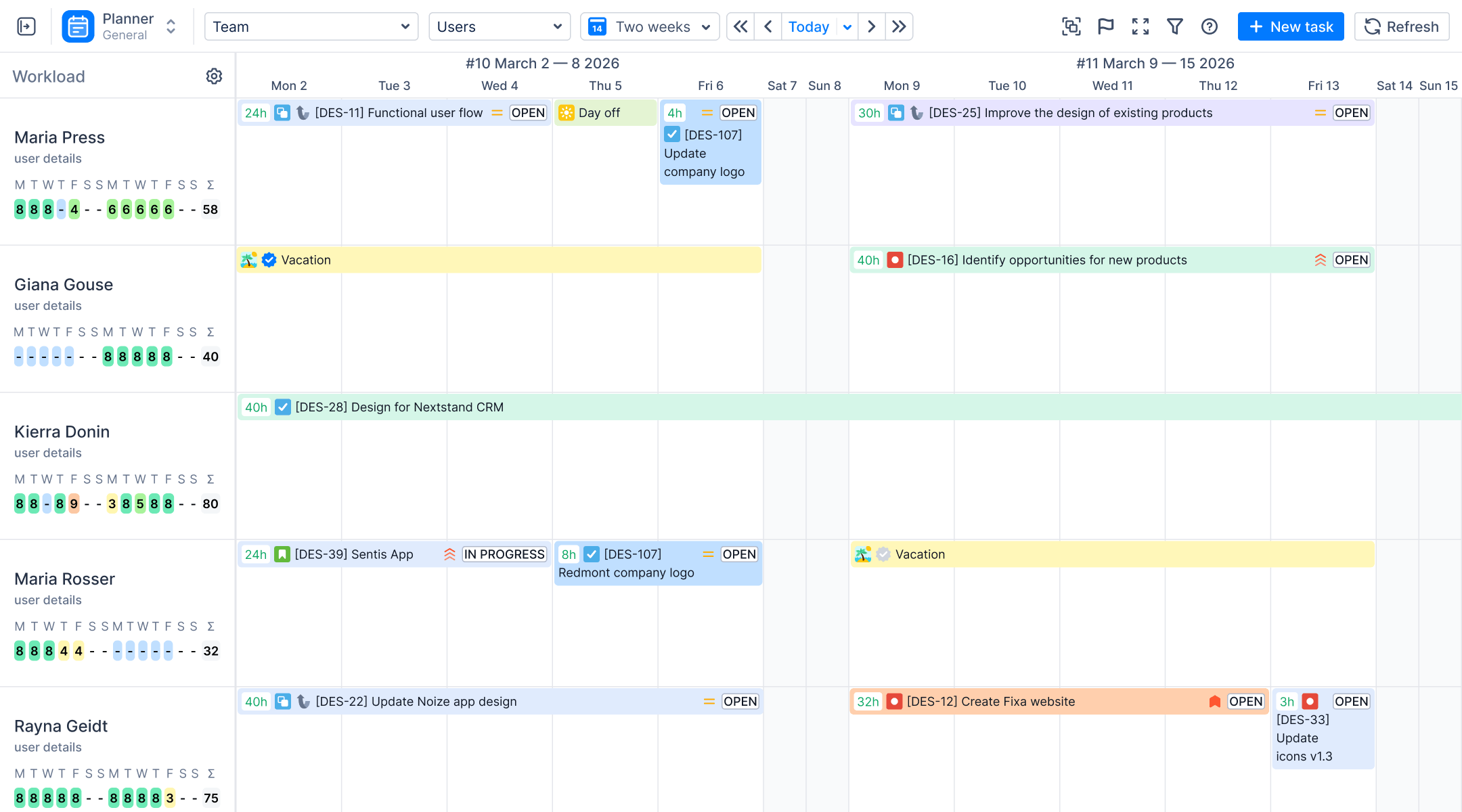
Controle a carga de trabalho individual

Revolucione a forma como você acompanha o progresso dos funcionários com nossos gráficos de registro de trabalho especializados, fornecendo uma visualização intuitiva do trabalho com base nas horas necessárias e registradas. Com o ActivityTimeline, os usuários aproveitam a vantagem de um painel de agendamento pessoal, garantindo que nenhuma tarefa passe despercebida. Eles também podem ver, editar e baixar todas as tarefas do Jira com detalhes do registro de trabalho.

Control personal workload
Step 3
Etapa

Fature os clientes pelo tempo trabalhado

Os usuários podem escolher quais horas são faturáveis e quais não são, bem como diferenciar entre diferentes categorias de trabalho, como CapEx e OpEx, etc., para atender às necessidades e projetos exclusivos de sua organização com precisão.

Bill clients for the time
Step 4
Etapa

Obtenha relatórios detalhados

Gere relatórios simples para revisar suas horas registradas e o progresso do projeto. Obtenha fluxos de trabalho de aprovação personalizados para planilhas de horas individuais e acompanhamento contínuo de tarefas que não são do JIRA. Agrupe relatórios por diversas categorias: campos de projeto, épicos e personalizados, para que você saiba onde o tempo está sendo gasto.

Get simple reports

Esqueça os relatórios manuais no Excel

Categorize o tempo com atributos personalizados para obter mais informações diretamente no aplicativo

Escolhendo as ferramentas de controle de tempo certas para o Jira

Com mais de 290 aplicativos de rastreamento de tempo disponíveis no Atlassian Marketplace, a escolha certa pode fazer a diferença. O ActivityTimeline pode ajudá-lo a:

Allocate resources
Alocar recursos
Track billable hours
Rastreie as horas faturáveis
Manage logged time
Gerenciar o tempo registrado
Analyze past entries
Analise entradas anteriores
Generate time reports
Gere relatórios de tempo
Compare actual vs. original estimate
Compare a estimativa real com a original
Oversee Project Management Tasks
Supervisionar as tarefas de gerenciamento de projetos
Get a lightweight and adaptable solution
Obtenha uma solução leve e adaptável

Frequently Asked Questions

What are all the ways employees can log time in ActivityTimeline?
Employees can log time via six different methods, including a quick "Log Work" dialog from the timeline, a real-time tracking stopwatch, or by dragging and resizing worklogs. They can also use daily bar chart shortcuts, input hours via an inline table, or log directly from native Jira issue pages.
Can managers log time on behalf of other team members?
Yes, privileged users can log time for managed individuals by using the User Selector in the Workspace module. This feature must be enabled in the configuration settings, and if Tempo is integrated, the corresponding Jira project permissions must also be granted.
Can I log time for activities that don't have a Jira ticket?
Yes, you can create non-Jira Booking events for internal work or meetings and configure the system to treat them as active worklogs in timesheets. You can also define custom booking types as billable or non-billable, or import external calendar events from Google or Outlook to serve as worklogs.
Is there a time limit on how far back employees can log work?
While unrestricted by default, admins can enforce a Past Worklog Limit to restrict historical backdating. Additionally, organizations can close weekly or monthly reporting periods to block any unauthorized retroactive additions or modifications once a grace period expires.
How does billable vs. non-billable tracking work?
Every worklog is assigned a category, such as Billable or Non-Billable, which users select from a dropdown when submitting hours. Admins can create up to 100 custom categories for finance workflows or set a default category per Jira project to automate the routing.
Can I add custom attributes to worklogs beyond just the category?
Yes, Worklog Attributes allow you to append extra metadata like Cost Center or Client Name to entries as required, optional, or hidden fields. These attributes act as grouping filters in Detailed Timesheets and can be imported directly from third-party tools like Tempo.
How do I mark time logged via Jira's native time tracking as non-billable?
When ActivityTimeline can be a time tracking provider in Jira, you only need to enable it and then select the category right within Jira’s UI.
What's the difference between the three timesheet views?
Progress Timesheets evaluate logged hours against a user's capacity to check completion percentages, while Timeline Timesheets offer a color-coded grid to spot team-wide logging trends. Detailed Timesheets itemize every worklog entry with comments and approval statuses, making them perfect for audits and client billing.
How does the timesheet approval workflow work?
This optional workflow assigns statuses to worklogs based on whether they are open, closed, or manager-approved. Admins and Team Leads can review entries individually or use Bulk Approve to process a team's entire period at once, locking approved items from further edits.
Can I enforce reporting periods and prevent employees from backdating entries?
Yes, the Time Tracking Period Closure feature lets you lock weekly or monthly intervals to prevent users from adding or editing worklogs. A flexible grace period can be established for late entries, working alongside a flat past worklog restriction for comprehensive control.
How do I stop employees from logging more hours than their daily capacity?
By enabling the maximum allowed worklog restriction, the system will block users from exceeding their defined daily capacity. Managers can bypass this cap when needed by creating an Overtime event type on a specific user's timeline.
How does the Planned vs. Actual report help with estimation accuracy?
This report measures initial task estimates against hours logged plus remaining work to label items as On Track, Underestimated, or Overestimated. It utilizes an acceptable deviation percentage to handle expected variations across issues, epics, or projects.
Can I group timesheet reports by custom Jira fields like client or cost center?
Yes, both Timeline and Detailed views allow you to group worklog metrics by any active Jira custom field, such as Client or Cost Center. These custom grouping views can be saved as shared dashboards for quick future access.
How does ActivityTimeline work with Tempo Timesheets?
On Jira Cloud, ActivityTimeline syncs with Tempo via an API token to automatically import worklogs, teams, attributes, and holiday schemes. On Jira Server or Data Center, all worklogs submitted via Tempo sync natively without additional configuration.
Can meeting time from Google Calendar or Outlook count as logged work?
Yes, connected external calendars will push events to the timeline, which can be configured to automatically count as logged worklogs. Alternatively, users can choose to manually map individual calendar events to specific Jira issues on a case-by-case basis.
Comece gratuitamente agora. É hora de colocar sua equipe no caminho certo.
Comece seu teste grátis de 30 dias. Não é necessário cartão de crédito.
Planer | ActivityTimeline