Schedule a free personal demo session
Disclaimer: Personal Demo Session for organizations with less than 50 people is subject to approval depending on the team's availability. A maximum of 10 participants is allowed for each demo session.
Rastreamento de custos no Jira que mostra o consumo enquanto ele acontece
Experimente o Jira como nunca antes. Diga adeus à sobrecarga de recursos e olá a processos mais fluidos.
Teste gratuito no Marketplace


Com a confiança de 10.000+ equipes ao redor do mundo


Veja na prática em uma demonstração gratuita
Seus custos já estão no Jira. Ninguém consegue vê-los.

O relatório de orçamento chega três semanas depois que o dinheiro saiu — novamente, em uma planilha.

As horas ficam no Jira, as taxas ficam no financeiro e a verdade não está em nenhum dos dois.

Trabalhos faturáveis, internos e não faturáveis são organizados manualmente na hora de faturar.

Quando um estouro de orçamento se torna visível, o trimestre já está precificado.

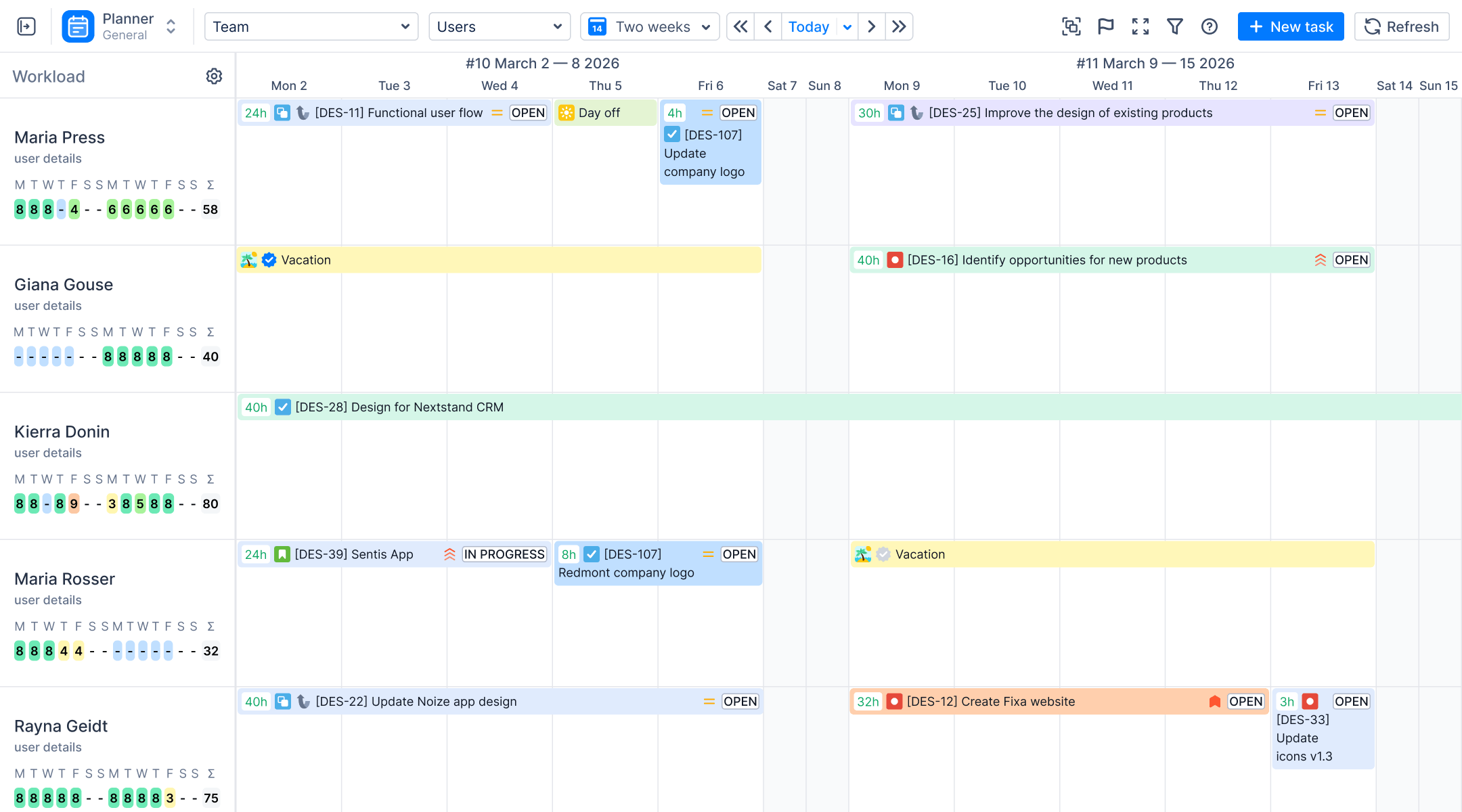
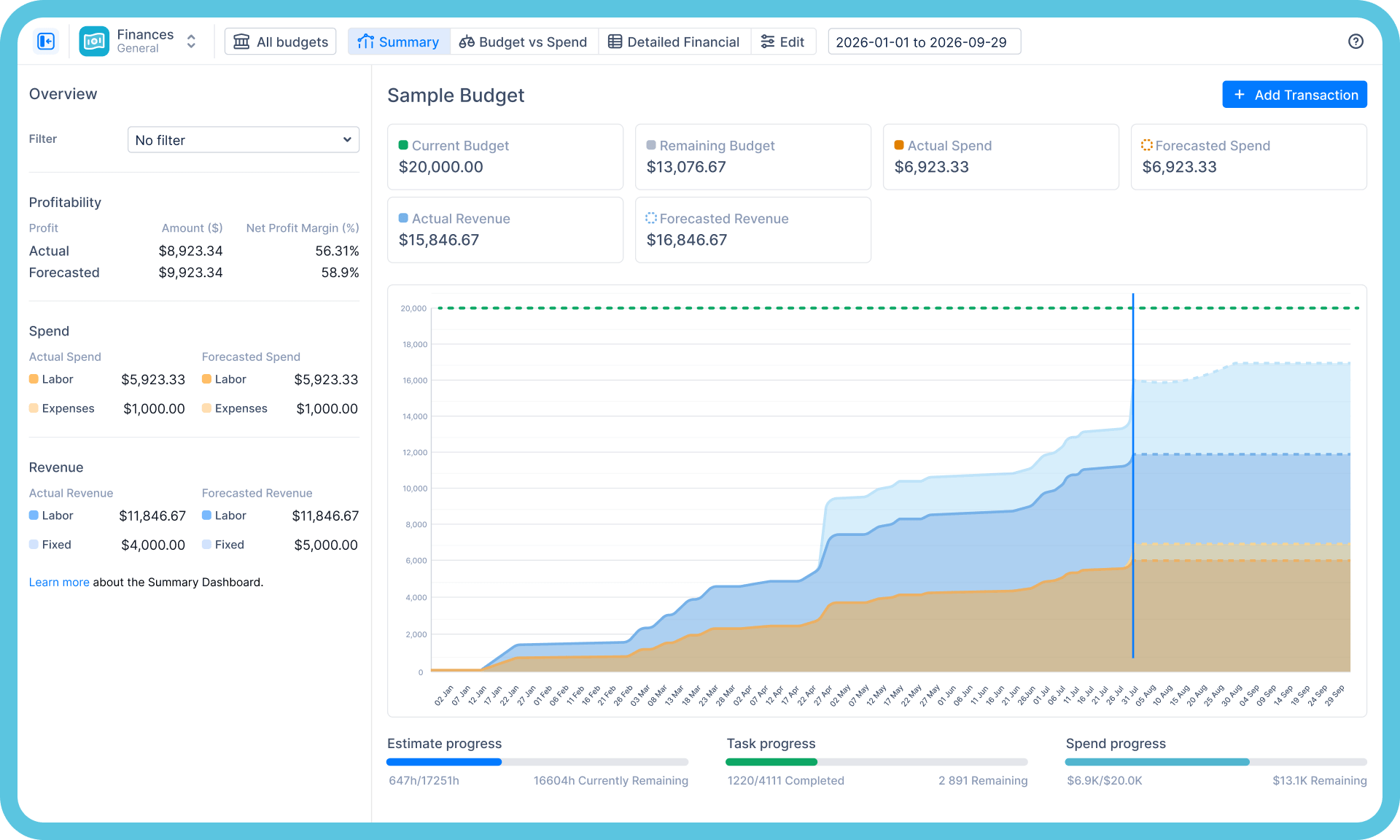
O módulo de Finanças precifica as horas que suas equipes já registram: planejamento de orçamento, rastreamento de custos e análise de impacto na receita — em tempo real, por projeto e por equipe, dentro do Jira.
Das horas registradas à realidade financeira
Taxas → Trabalho custeado
Gerencie a utilização de recursos
Defina funções e taxas uma única vez; cada hora registrada se torna automaticamente uma linha de custo. Sem redigitação, sem etapas de exportação para o Excel.

Orçamento
Consumo em relação ao planejado, em tempo real
Os limites orçamentários disparam alertas enquanto ainda há tempo de agir — não apenas no fechamento do mês.
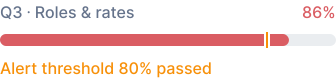
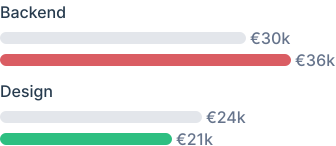
Planejado vs. Realizado
Qual equipe consumiu o orçamento
Divisão de Faturamento
Para onde o tempo da semana realmente foi
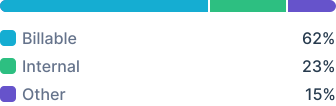
Divisão de Faturamento
Números que um CFO realmente vai ler
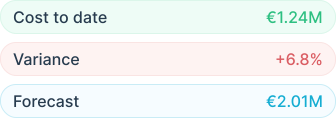
Uma única base de dados

Os mesmos dados do ActivityTimeline alimentam o planejamento de capacidade, as folhas de ponto e o financeiro — assim, os números batem entre si, porque são exatamente os mesmos.
O que exibiremos na tela — seus dados, não os nossos

A visualização acima, no seu Jira
Seus projetos com orçamentos, gastos realizados e previstos, e receita em relação ao planejado — a mesma tela, seus números.

Planejado vs. Realizado, por equipe e projeto
De onde vem a variação, rastreada até as horas por trás dela — não um trimestre depois em uma planilha.

O rastro do timesheet ao custo
Quem registrou o quê, a qual taxa, em qual linha orçamentária — o rastro de auditoria desde um registro de trabalho até o valor em euros.

Seu fechamento mensal, em tempo real
Os números que sua equipe atualmente reconstrói em planilhas, na tela em uma única visualização — e, honestamente, tudo o que ela não consegue fazer pela sua configuração.
O financeiro não deveria ser um app separado

App separado

Folhas de ponto
Controle de horas

App separado • Requer Folhas de ponto
Gerente Financeiro
Controle de custos de projetos

Um App • Edição Avançada

ActivityTimeline
Folhas de ponto e aprovações
Planejamento orçamentário e controle de custos
Análise de impacto na receita
Além do planejamento de capacidade, que outros cobram à parte.
Dados que você pode apresentar a um auditor

Implantação
Cloud e Data Center
Suporte completo para Jira Cloud e Jira Data Center — incluindo ambientes regulamentados que mantêm o Jira atrás do firewall.

Segurança
Pronto para auditoria
Certificado SOC 2, certificado ISO 27001:2022 e Cloud Fortified no Atlassian Marketplace.

Parceria
Muito mais que um plugin
Parceiro Platinum Marketplace com serviços profissionais para implementação, migração e configuração em escala.
Perguntas Frequentes
Algo mais? Navegue pela Central de Ajuda
O Jira consegue rastrear custos de projeto nativamente?
O Jira rastreia trabalho e tempo, não dinheiro. Ele não possui o conceito de taxas, orçamentos ou relatórios de custos — e é por isso que a realidade dos custos geralmente acaba em planilhas reconciliadas após o fato. O módulo de Finanças do ActivityTimeline precifica as horas já registradas no Jira e gera relatórios de orçamentos, custos e impacto na receita em tempo real.
O módulo de Finanças está incluído em todos os planos?
O módulo de Finanças vem com a Edição Avançada do ActivityTimeline. O planejamento, os quadros de horários e os relatórios fazem parte do aplicativo principal; a demonstração é a maneira mais rápida de ver qual edição atende ao seu caso de uso.
Como o rastreamento de custos funciona na prática?
Você define as taxas e o ActivityTimeline as aplica ao tempo que suas equipes já registram nas tarefas do Jira — gerando relatórios de consumo de orçamento, planejado vs. realizado e custos por pessoa, equipe e projeto, sem a necessidade de inserir dados separadamente.
Precisamos do Tempo Financial Manager para isso?
Não — essa é a diferença no empacotamento. O Tempo vende a gestão financeira como um aplicativo separado além do Tempo Timesheets; o ActivityTimeline cobre planejamento, registro de horas e finanças em um único aplicativo, com o módulo de Finanças na Edição Avançada. Se você está consolidando ferramentas, compare isso com seus requisitos durante a demonstração.
O que acontece na demonstração?
Vinte e cinco minutos com um especialista em produto, usando o seu próprio Jira: seus projetos, sua estrutura de taxas, suas necessidades de relatórios. Você sai sabendo se a ferramenta é ideal para você — sem apresentações de slides, sem compromisso. Prefere explorar por conta própria? Há um teste gratuito de 30 dias no Atlassian Marketplace, sem necessidade de cartão de crédito.
Comece a usar gratuitamente agora. Seus projetos vão agradecer.
Vinte e cinco minutos, analisando sua configuração do Jira, sua estrutura de projeto e a lógica de taxas. Vamos mostrar para onde o dinheiro está indo — e seremos honestos caso não sejamos a escolha certa para você.