Schedule a free personal demo session
Disclaimer: Personal Demo Session for organizations with less than 50 people is subject to approval depending on the team's availability. A maximum of 10 participants is allowed for each demo session.
Suivi des coûts dans Jira pour visualiser la consommation en temps réel
Découvrez Jira comme jamais auparavant. Dites adieu à la surcharge des ressources et bonjour à un processus fluide.
Essai gratuit sur la Marketplace


La confiance de 10 000+ équipes dans le monde entier


Découvrez-le en direct lors d'une démo gratuite
Vos coûts sont déjà dans Jira. Personne ne peut les voir.

Le rapport budgétaire arrive trois semaines après la dépense — encore une fois sous forme de feuille de calcul.

Les heures sont dans Jira, les tarifs sont dans le service financier, et la réalité n'est nulle part.

Le travail facturable, interne et non facturable doit être trié manuellement au moment de la facturation.

Lorsque le dépassement budgétaire devient visible, le trimestre est déjà bouclé.

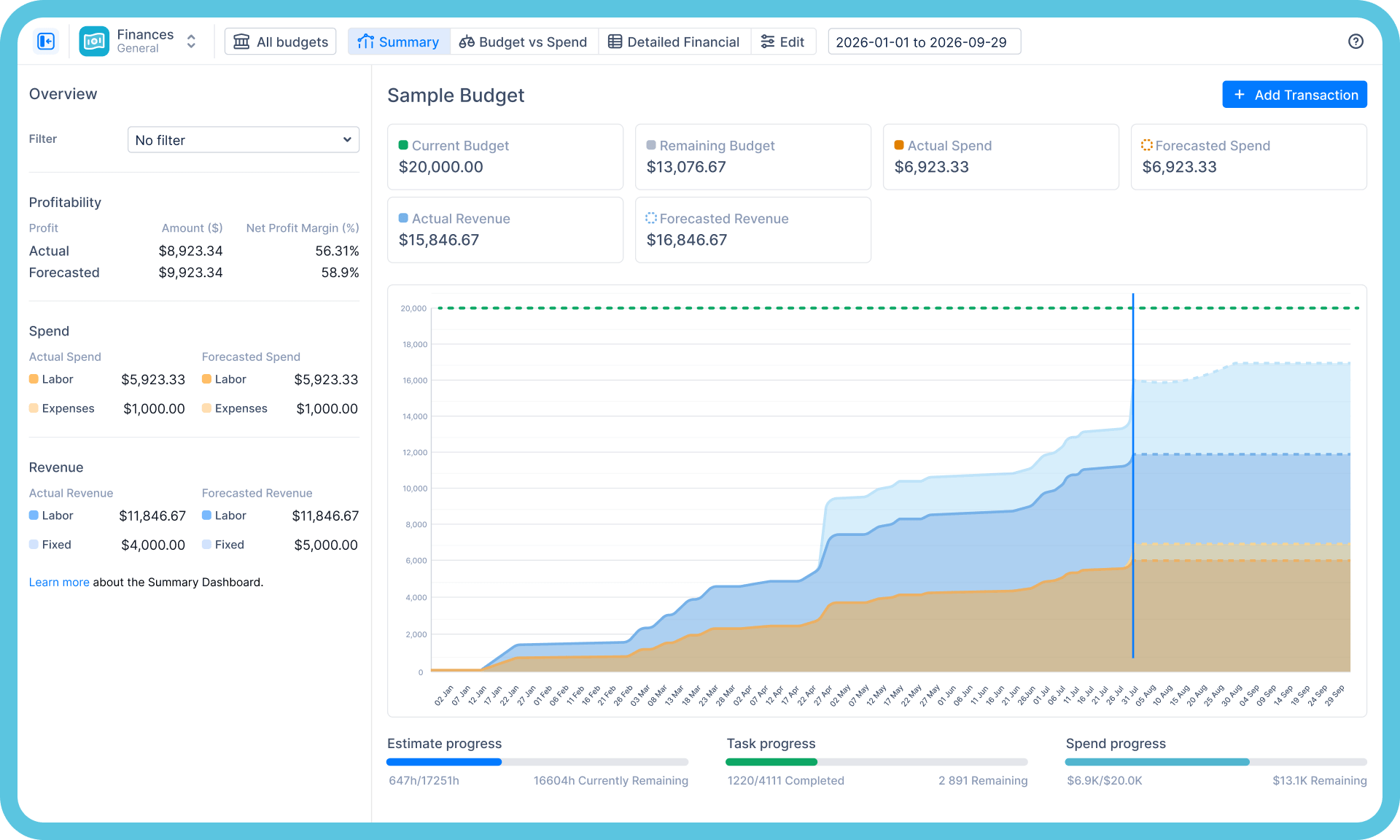
Le module Finances valorise les heures déjà saisies par vos équipes : planification budgétaire, suivi des coûts et analyse de l'impact sur le chiffre d'affaires — en temps réel, par projet et par équipe, directement dans Jira.
Des heures enregistrées à la réalité financière
Tarifs → Coûts réels
Gérez l'utilisation des ressources
Définissez les rôles et les tarifs une seule fois ; chaque heure enregistrée est automatiquement convertie en coût. Fini la saisie manuelle et les exports Excel.

Budget
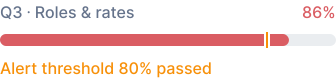
Suivi budgétaire en temps réel
Les alertes budgétaires se déclenchent lorsqu'il est encore temps d'agir, et non à la fin du mois.
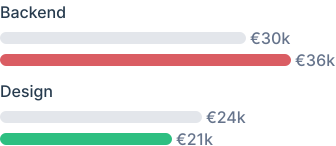
Planifié vs Réel
Quelle équipe a épuisé le budget
Répartition facturable
Où est passé le temps de travail réel
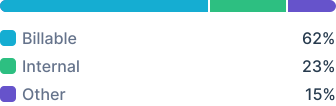
Répartition facturable
Des chiffres qu'un directeur financier prendra réellement le temps de lire
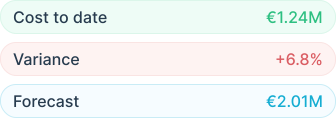
Une source de données unique

Les mêmes données ActivityTimeline alimentent la planification des capacités, les feuilles de temps et les rapports financiers. Les chiffres concordent donc systématiquement, puisqu'il s'agit des mêmes données.
Ce que nous afficherons à l'écran — vos données, pas les nôtres

La vue ci-dessus, sur votre Jira
Vos projets avec budgets, dépenses réelles et prévisionnelles, et revenus par rapport au plan — le même écran, vos chiffres.

Prévisionnel vs Réel, par équipe et par projet
L'origine des écarts, tracée jusqu'aux heures correspondantes — pas un trimestre plus tard dans un tableur.

Le suivi des feuilles de temps aux coûts
Qui a enregistré quoi, à quel taux, sur quelle ligne budgétaire — la piste d'audit, du journal de travail à l'euro près.

Votre clôture mensuelle, en temps réel
Les chiffres que votre équipe reconstruit actuellement dans des tableurs, affichés à l'écran en une seule vue — et honnêtement, tout ce qu'il ne peut pas faire pour votre configuration.
La gestion financière ne devrait pas être une application à part.

Application séparée

Feuilles de temps
Suivi du temps

Application séparée • Nécessite les feuilles de temps
Gestionnaire financier
Suivi des coûts de projet

Application unique • Édition Avancée

ActivityTimeline
Feuilles de temps et approbations
Planification budgétaire et suivi des coûts
Analyse de l'impact sur le chiffre d'affaires
Inclut la planification des capacités, une option facturée séparément par la concurrence.
Des chiffres à présenter en toute confiance à un auditeur

Déploiement
Cloud et Data Center
Prise en charge complète de Jira Cloud et Jira Data Center, y compris pour les environnements réglementés nécessitant de maintenir Jira derrière un pare-feu.

Sécurité
Prêt pour l'audit
Certifié SOC 2, certifié ISO 27001:2022 et Cloud Fortified sur l'Atlassian Marketplace.

Partenariat
Bien plus qu'un simple plugin
Partenaire Platinum Marketplace proposant des services professionnels pour le déploiement, la migration et la configuration à grande échelle.
Questions fréquentes
Autre chose ? Parcourir le centre d'aide
Jira peut-il suivre nativement les coûts de projet ?
Jira permet de suivre le travail et le temps, mais pas l'argent. L'outil n'intègre aucune notion de tarifs, de budgets ou de reporting financier, ce qui explique pourquoi les données de coûts finissent généralement dans des feuilles de calcul réconciliées a posteriori. Le module Finances d'ActivityTimeline valorise les heures déjà saisies dans Jira et génère des rapports en temps réel sur les budgets, les coûts et l'impact sur les revenus.
Le module Finances est-il inclus dans tous les plans ?
Le module Finances est intégré à l'édition Advanced d'ActivityTimeline. La planification, les feuilles de temps et les rapports font partie de l'application principale ; la démonstration est le moyen le plus rapide de déterminer quelle édition correspond à votre cas d'usage.
Comment fonctionne concrètement le suivi des coûts ?
Vous définissez vos tarifs et ActivityTimeline les applique au temps que vos équipes saisissent déjà dans les tickets Jira. Vous obtenez ainsi des rapports sur la consommation budgétaire, les écarts entre prévisionnel et réel, ainsi que les coûts par personne, par équipe et par projet, sans aucune saisie de données supplémentaire.
Avons-nous besoin de Tempo Financial Manager pour cela ?
Non, c'est là que réside la différence de packaging. Tempo vend la gestion financière comme une application distincte en complément de Tempo Timesheets ; ActivityTimeline couvre la planification, le suivi des temps et les aspects financiers dans une seule et même application, avec le module Finances inclus dans l'édition Advanced. Si vous cherchez à consolider vos outils, comparez ces options par rapport à vos besoins lors de la démonstration.
Que se passe-t-il lors de la démonstration ?
Vingt-cinq minutes avec un expert produit, directement sur votre instance Jira : vos projets, votre structure tarifaire, vos besoins en reporting. Vous saurez immédiatement si la solution vous convient, sans présentation commerciale ni engagement. Vous préférez explorer par vous-même ? Profitez d'un essai gratuit de 30 jours sur l'Atlassian Marketplace, aucune carte bancaire n'est requise.
Commencez gratuitement dès maintenant. Vos projets vous en remercieront.
Commencez votre essai gratuit de 30 jours. Aucune carte de crédit n'est requise.
and tell you honestly if we're not the fit.
and tell you honestly if we're not the fit.