


TL;DR
- Resource allocation is the discipline of allocating resources to ensure optimal performance and meet future demands.
- Core benefits include a transparent work process, prevention of team burnout, and higher team morale through balanced workloads.
- Inaccurate planning is a major risk, as 53% of burnt-out employees cite current workloads as the primary cause of their stress.
- Native Jira software features for advanced capacity planning are exclusively available to users on Cloud Premium and Enterprise tiers.
- ActivityTimeline acts as a specialized add-on that helps gather data and fills visualization gaps in Jira with a scalable dashboard.
- Advanced reporting enables managers to use a resource workload report to compare planned time against project progress and spot potential bottlenecks.
The ability to effectively manage your team’s capacity is one of the important areas for project managers to focus on. Capacity planning is an significant aspect of project management, especially under a fixed deadline. Jira is a powerful tool that helps you to effectively manage your team’s workload.
Jira capacity planning is one of the most commonly written topics in the Jira community. With thousands of users running projects in the cloud, it’s crucial to understand how to plan, configure, and run your deployments effectively. Business development is a difficult task for businesses, regardless of what size they are. If you spend a lot of your time on management processes without capacity planning tools, then things will go wrong. There are many things that you can do to streamline processes and increase productivity. Learning about Jira resource capacity planning is essential in this regard.
This blog post will cover some of the best practices for capacity planning in Jira, as well as a step-by-step approach for how to effectively plan and monitor the capacity of your teams.
Jira capacity planning is one of the most commonly written topics in the Jira community. With thousands of users running projects in the cloud, it’s crucial to understand how to plan, configure, and run your deployments effectively. Business development is a difficult task for businesses, regardless of what size they are. If you spend a lot of your time on management processes without capacity planning tools, then things will go wrong. There are many things that you can do to streamline processes and increase productivity. Learning about Jira resource capacity planning is essential in this regard.
This blog post will cover some of the best practices for capacity planning in Jira, as well as a step-by-step approach for how to effectively plan and monitor the capacity of your teams.
What is a Capacity Planning?
Capacity planning is the discipline of allocating resources for optimal performance. It focuses on anticipating future resource needs based on current and future business requirements. Capacity planning can be applied to both person-related resources, such as employees, and non-human resources, such as different goods, equipment, properties, etc.
Capacity planning offers a systematic framework for the professional management of the flow of materials, information, and other resources through a facility or company. A company’s capacity planning provides the information needed to determine whether it has sufficient resources to implement its strategic plan and deliver on expected objectives.
Capacity planning offers a systematic framework for the professional management of the flow of materials, information, and other resources through a facility or company. A company’s capacity planning provides the information needed to determine whether it has sufficient resources to implement its strategic plan and deliver on expected objectives.
The Advantages of Capacity Planning
The capacity planning process is a methodology used to ensure that the appropriate resources are available to ensure that projects can be completed effectively and efficiently. This process has many advantages for teams, project managers, companies, and employees.
Capacity planning is an extension of capacity management and production management processes. It aims to ensure maximum customer satisfaction. The process focuses on the optimal utilization of resources within the limits of the system and services' capabilities.
Capacity planning is a process that helps to plan the resources needed to meet capacity needs. It provides an outline of the resources required (for example, people, physical assets, and budgets) to enable organizations to achieve their objectives.
Capacity planning is an extension of capacity management and production management processes. It aims to ensure maximum customer satisfaction. The process focuses on the optimal utilization of resources within the limits of the system and services' capabilities.
Capacity planning is a process that helps to plan the resources needed to meet capacity needs. It provides an outline of the resources required (for example, people, physical assets, and budgets) to enable organizations to achieve their objectives.
Among other benefits
Here are more benefits of capacity planning tools:
- A clear vision of who is doing what and when it will be done
- A transparent picture of the work process
- The ability to prevent missing deadlines, resource overload or underload, and burnouts
- Higher team morale from balanced and manageable workloads
- Optimization of the planning process for both short and long-time periods
- The ability to make data-informed decisions
- It becomes easier to plan budget costs and allocate resources.
The Challenges of Capacity Planning
We have all been in this situation. We sit in meetings trying to figure out why a team failed to meet its expectations. We want to hold them accountable for their mistakes and identify exactly where things went wrong.
The most difficult challenge of capacity planning is always the same: we anticipate future growth/demand and then calculate numbers that are as accurate as possible without too much risk. But, as every business owner knows, accurate numbers are almost impossible to deliver.
Recent reports show that 53% of burnt-out employees cite a workload that is too high as the primary cause. This highlights how inaccurate planning directly impacts team health.
The most difficult challenge of capacity planning is always the same: we anticipate future growth/demand and then calculate numbers that are as accurate as possible without too much risk. But, as every business owner knows, accurate numbers are almost impossible to deliver.
Recent reports show that 53% of burnt-out employees cite a workload that is too high as the primary cause. This highlights how inaccurate planning directly impacts team health.
Top 5 common capacity planning problems
Among common challenges we can single out the following ones:
- Problems with Data collection and its quality. While collecting information you need to identify the most important indicators such as individual or team level of capacity, roles, position and skills. You should not also forget about the time frames.
- Accurate calculations. The ability to calculate the need for resources and their current capacity requires a lot of attention.
- Ignoring historical data. Teams frequently ignore past project performance when they plan future capacity. This usually results in repeating the same planning errors.
- Capacity planning levels. You must be accurate when developing both short-term and long-term planning strategies.
- Communication within the organization. Project managers and teams should always stay on the same page to achieve their desired goals.
- Ability to adapt quickly. The working environment is very unstable, even if you planned everything scrupulously, something can always go wrong.
Many organizations choose different project management and scheduling software to avoid these and other challenges. For example, companies frequently utilize resource capacity planning in Jira.
Capacity Planning in Jira
Resource capacity planning in Jira is a never-ending job. Jira capacity planning varies from one organization to another and every time, it's going to be different because of the different features considered for your required Jira configuration.
Jira capacity planning is crucial for project management as it ensures that projects receive the resources they require to achieve goals. Many agile teams use Jira Plan features during the product development process and for sprint planning, but Jira is also suitable for non-technical teams, as it fits the needs of teams of different types and sizes.
Jira capacity planning is crucial for project management as it ensures that projects receive the resources they require to achieve goals. Many agile teams use Jira Plan features during the product development process and for sprint planning, but Jira is also suitable for non-technical teams, as it fits the needs of teams of different types and sizes.


Introduction to Plans
A successful manager is willing to engage their team and ask them what changes are needed for the next forecast or planning period. Jira capacity planning is a critical success factor for increasing team productivity and meeting project targets.
Project managers require a clear understanding of who is doing what and when, so capacity planning Jira activities should be organized accurately. There is no one size fits all approach to it, and Jira is no exception to that rule.
Jira can serve as a ticketing system for managing your tasks or as a project management tool, but there are specific things you need to remember before embarking on the journey of Jira capacity planning. These advanced planning features are exclusively available to Jira Cloud Premium and Enterprise users.
Project managers require a clear understanding of who is doing what and when, so capacity planning Jira activities should be organized accurately. There is no one size fits all approach to it, and Jira is no exception to that rule.
Jira can serve as a ticketing system for managing your tasks or as a project management tool, but there are specific things you need to remember before embarking on the journey of Jira capacity planning. These advanced planning features are exclusively available to Jira Cloud Premium and Enterprise users.
Set up your projects and organize teams
Jira offers great project boards with all the tasks. First, you need to create and prioritize your projects, as well as create tasks with and assign them to employees. Create teams and set up deadlines to make sure everything will be delivered on time and your capacity planning Jira activities run smoothly. To activate these features, your plan must use boards as work sources, associate teams with a board, and use story points or hours for estimation.
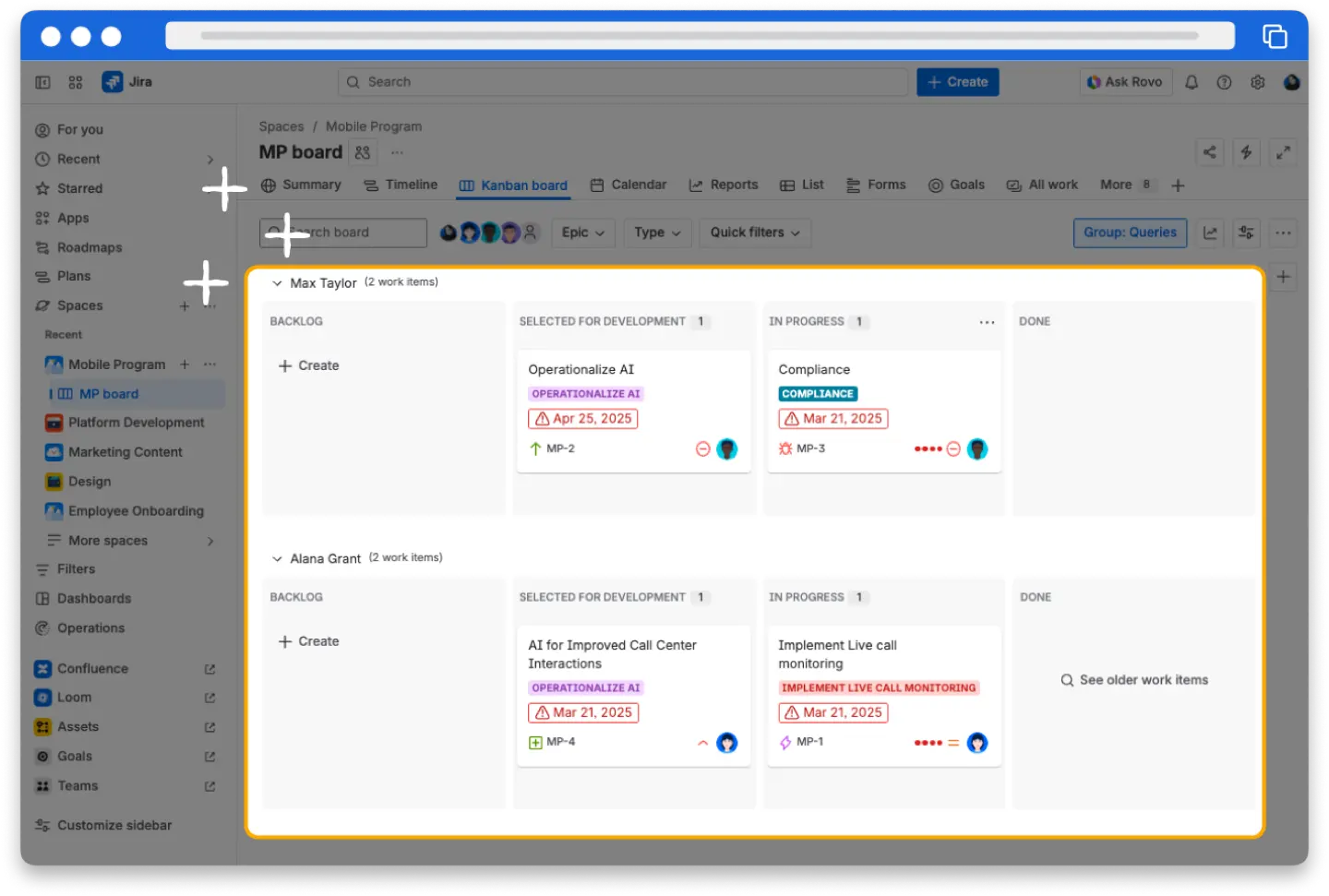
Make sure that the project manager stays on the same page with their team
A good PM always knows how much time is needed for different tasks. This depends on the task complexity and the PM’s previous experience. More importantly, a good PM prioritizes project milestones while actively supporting the well-being of their team. They take proactive steps to prevent burnout and ensure they stay aligned through clear, consistent communication. This approach eliminates small misunderstandings and builds a foundation for long-term, effective cooperation. So, structured Jira capacity planning mechanisms always are useful for PMs.
Get a clear visualization
Comprehensive visualization is a key factor in project success, as it helps to balance workload, get an accurate availability of your resources, and as a result meet deadlines. Jira has many features for project management, but it doesn’t visualize resource utilization clearly. We’ve already mentioned Jira Plans (formerly Advanced Roadmaps) that some teams use for an in-depth visualization, as usually it’s difficult to understand the capacity of teams&individuals, whether resources are over- or underloaded.
That naturally leads to another common question: What is the best tool for capacity planning in Jira? The answer often lies in whether you need native Jira Plans functionality for high-level roadmaps or a specialized add-on for granular resource tracking.
Obviously, most users need a capacity planner to fill those gaps and enhance capacity planning in Jira, so Jira provides a great variety of capacity planning software. ActivityTimeline is a resource capacity planning. It is one of the most popular add-ons in the resource planning area that facilitates Jira capacity planning.
That naturally leads to another common question: What is the best tool for capacity planning in Jira? The answer often lies in whether you need native Jira Plans functionality for high-level roadmaps or a specialized add-on for granular resource tracking.
Obviously, most users need a capacity planner to fill those gaps and enhance capacity planning in Jira, so Jira provides a great variety of capacity planning software. ActivityTimeline is a resource capacity planning. It is one of the most popular add-ons in the resource planning area that facilitates Jira capacity planning.
Resource Capacity Planning with ActivityTimeline
Capacity evaluation and project management go hand in hand. Sometimes we need to observe the whole picture of resource workloads, and sometimes we need to take a closer look at individual resource availability. An advanced Jira resource capacity planning app will save your time and effort.
ActivityTimeline provides many useful features to help you manage capacity that is why it’s one of the best Jira capacity planning plugins. You want to assign project tasks and track your employees, but you don't want the headache of an inconvenient dashboard? You're in luck. With a scalable dashboard, you can automatically assign and track tasks. The system also features Advanced Auto Issue Scheduling to distribute unassigned tickets based on real-time availability.
The app is fully synchronized with Jira, so Jira workflows are reflected on timelines and vice versa. Click the Refresh button for immediate Jira updates. Otherwise, changes sync every 10 minutes.
ActivityTimeline provides many useful features to help you manage capacity that is why it’s one of the best Jira capacity planning plugins. You want to assign project tasks and track your employees, but you don't want the headache of an inconvenient dashboard? You're in luck. With a scalable dashboard, you can automatically assign and track tasks. The system also features Advanced Auto Issue Scheduling to distribute unassigned tickets based on real-time availability.
The app is fully synchronized with Jira, so Jira workflows are reflected on timelines and vice versa. Click the Refresh button for immediate Jira updates. Otherwise, changes sync every 10 minutes.

Jira data refresh on a timeline
Assign existing Jira tasks or create new ones directly from the main dashboard. Create different events, assign specific skillsets, and assign positions to your users while tracking their work:
How to do Jira Capacity Planning with Activity Timeline?
It's easy to get a comprehensive understanding of all workflows in one window when you have access to the cross-project view for shared resources. ActivityTimeline, as a leading Jira capacity planning plugin, helps you stay on top of everything that's going on at different times. Its planning dashboard shows what tasks are related to a project and which team members are involved:
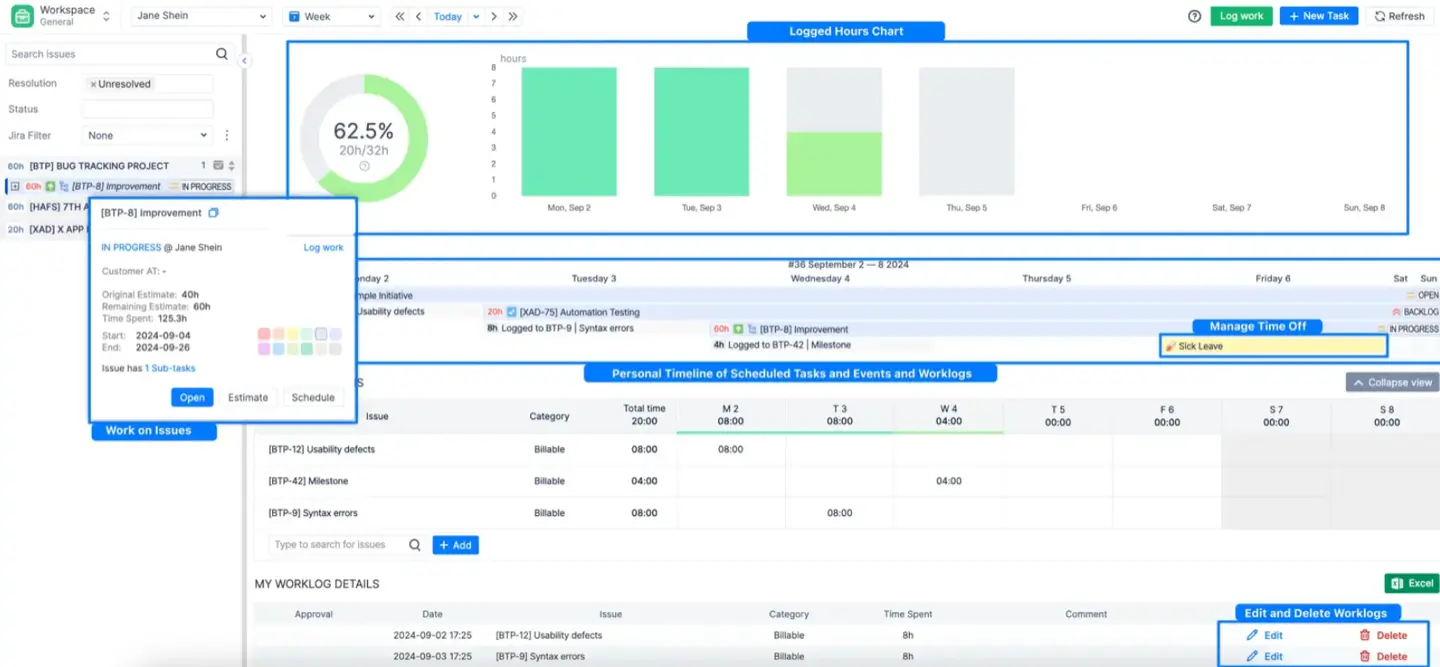
Workload/availability monitoring is also easy with ActivityTimeline. Commonly people are bad at predicting how much capacity they have left, so the app provides a visualization of the teams & resource capacity with the help of the workload indicators. These indicators provide metric flexibility because you can view data in hours, days, or percentages.

Special workload indicators display the workload of team members, so you can easily understand how many resources are utilized at a given time. You can manage individual involvement for each resource in their profiles:
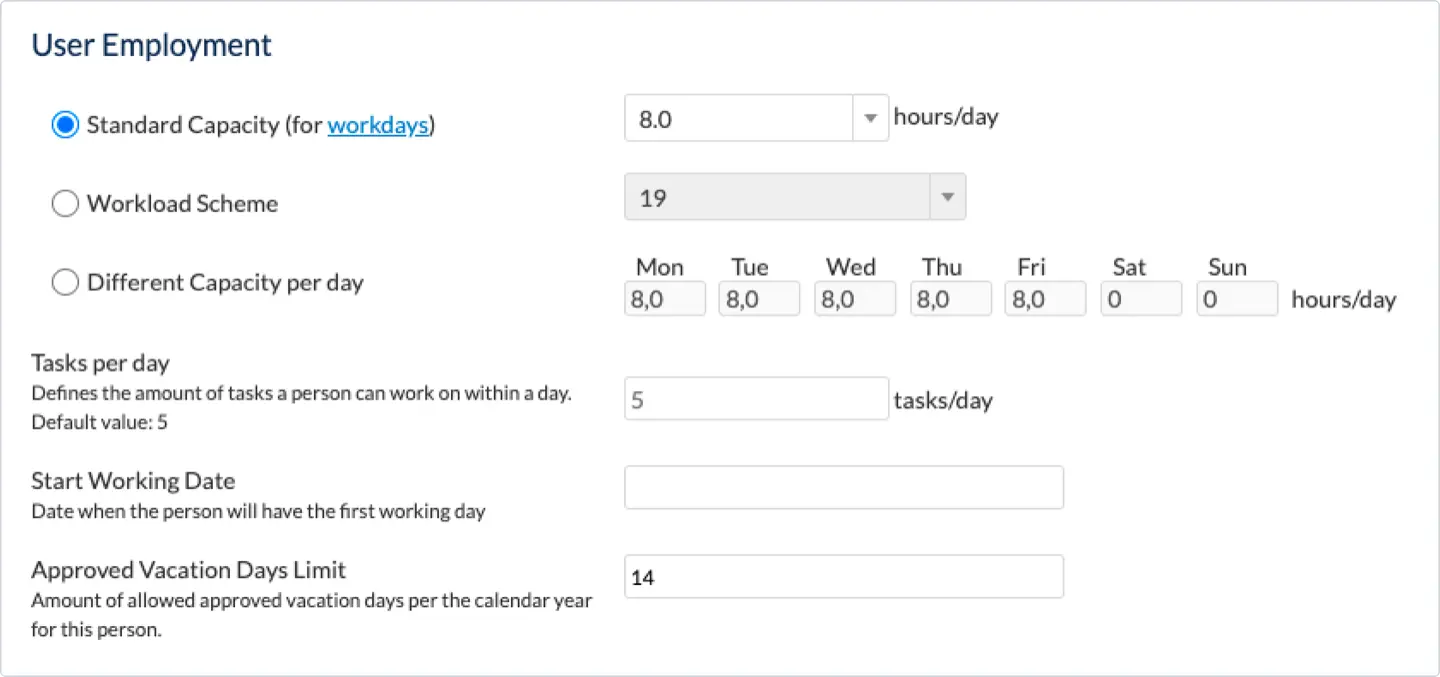
You can switch between various workload modes to understand the data from different perspectives:
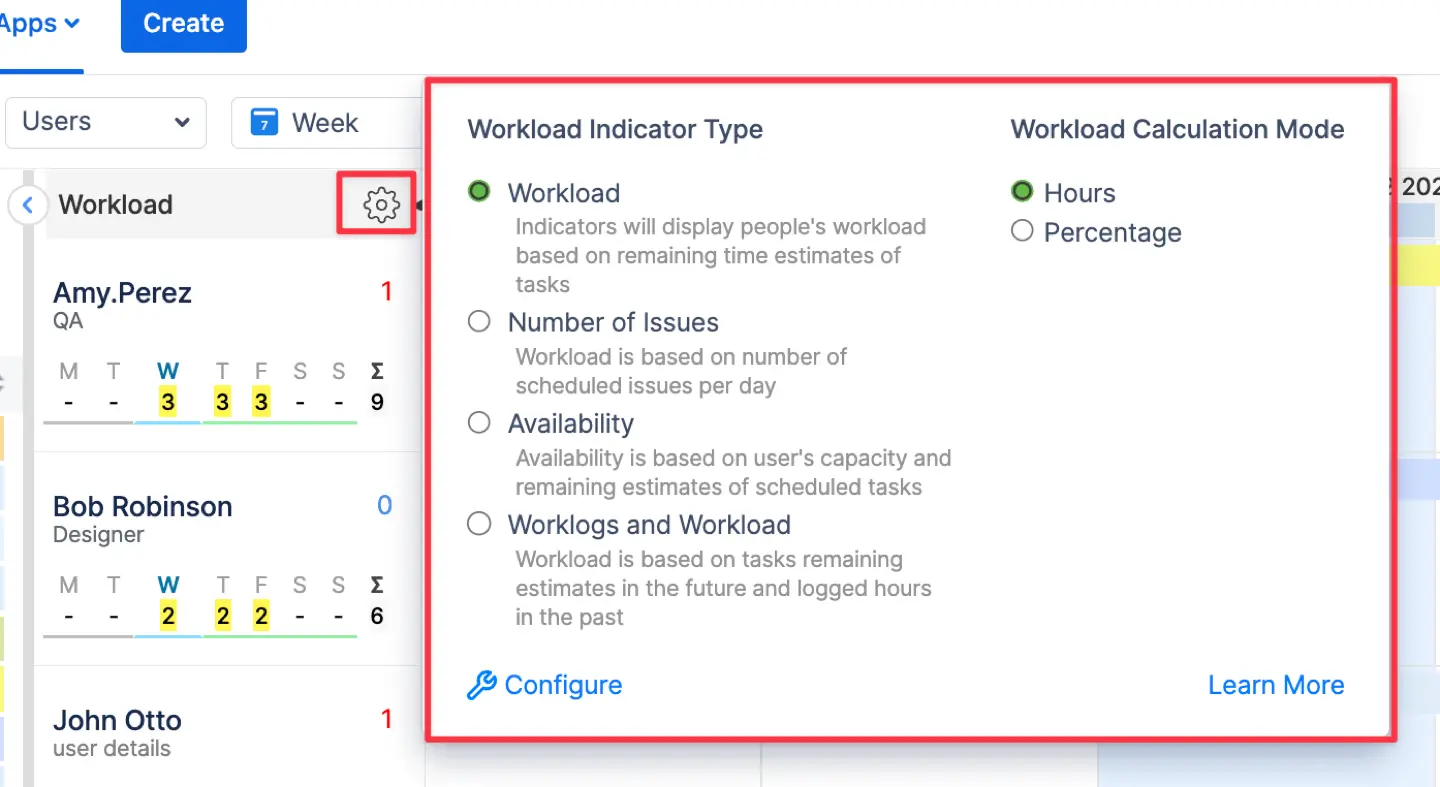
If you’ve ever thought, “I need to see which team members are overcommitted during a specific Sprint. Does Jira show this?” you’re not alone. ActivityTimeline highlights overcommitment through red color-coded workload indicators and specialized utilization reports that can be grouped by specific Sprints.
Observe resource capacity at both individual and team levels with the help of a team panel, as every team has a separate workload indicator:
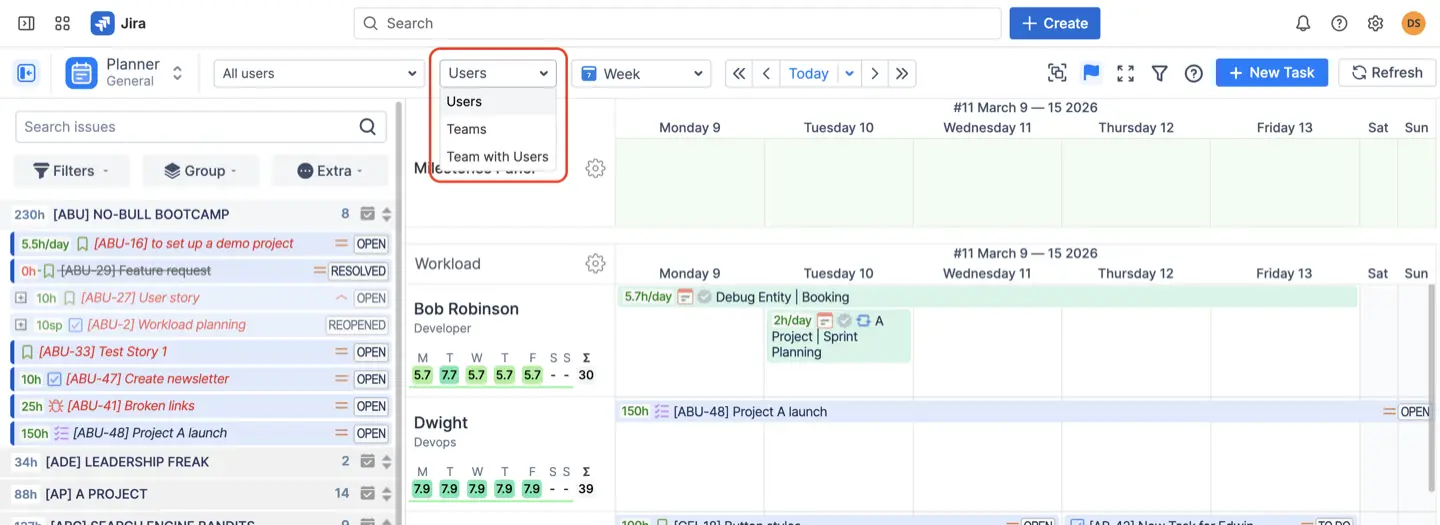
All the previously described modes help to understand Jira resource utilization from different sides. Teams' workload indicator also has different workload indicator types:
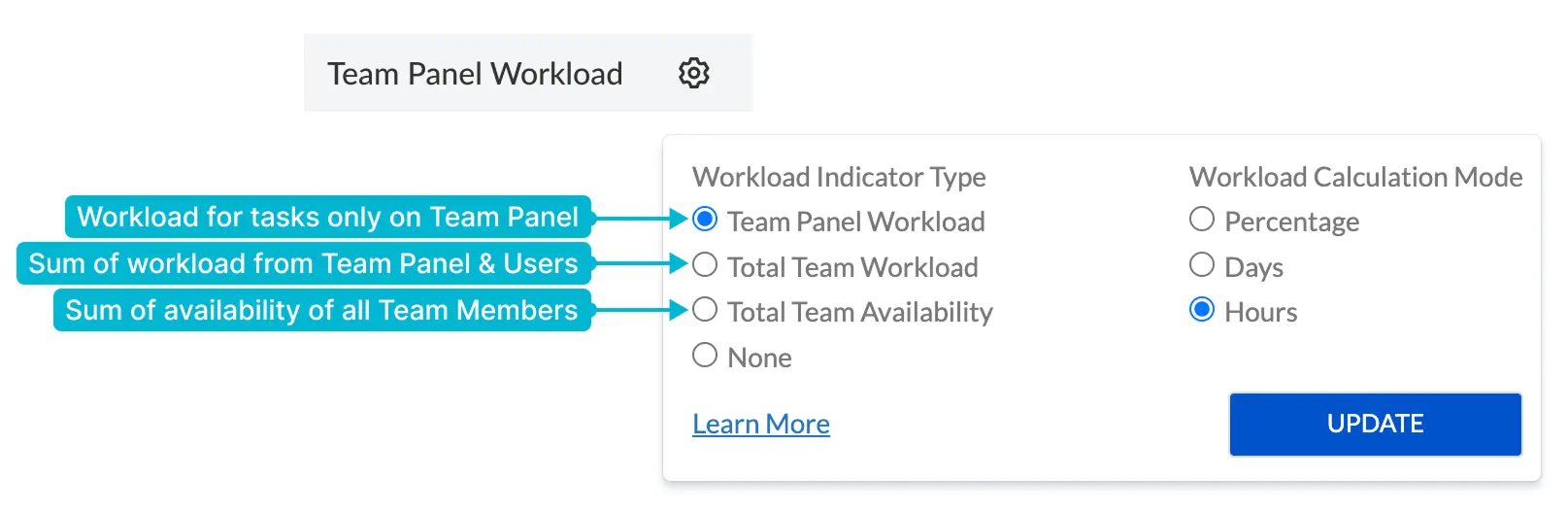
You can select Total Team Availability to track remaining capacity across the whole group or Total Team Workload to see all combined assignments. The Team Panel Workload mode is specifically designed for pre-planning, as it focuses only on tasks assigned to the team as a whole before they are distributed to individual members.
When you assign tasks to separate users or the whole teams, the workload indicators are updated automatically by the system:
When you assign tasks to separate users or the whole teams, the workload indicators are updated automatically by the system:

Capacity Reporting with ActivityTimeline
Resource capacity planning in Jira can’t be imagined without accurate reporting. App provides numerous reports for comfortable data tracking. The system organizes these into four main categories: Planning reports for future workloads, Timesheets for logged hours, Project reports for tracking progress, and Leave reports for absences.
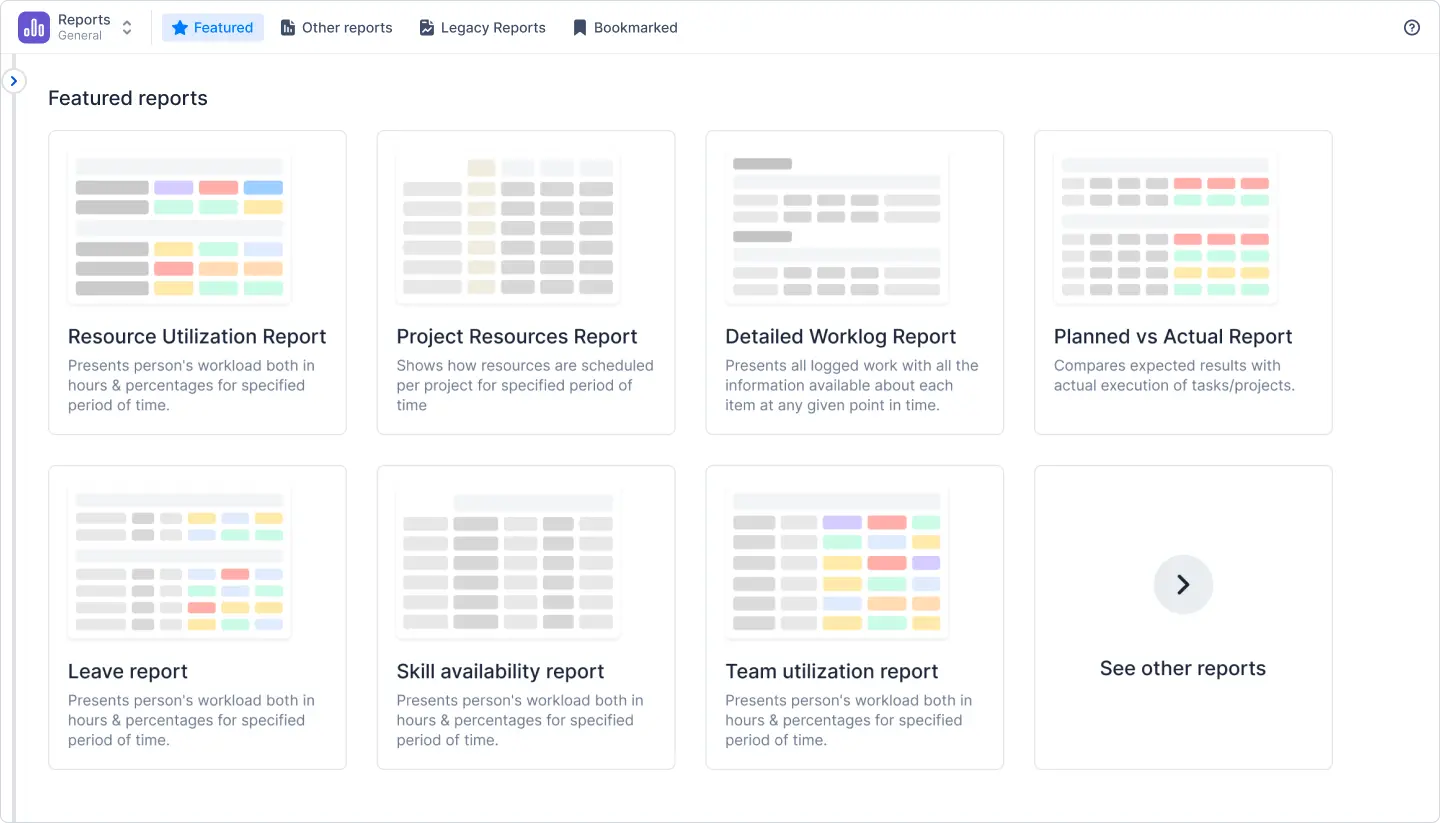
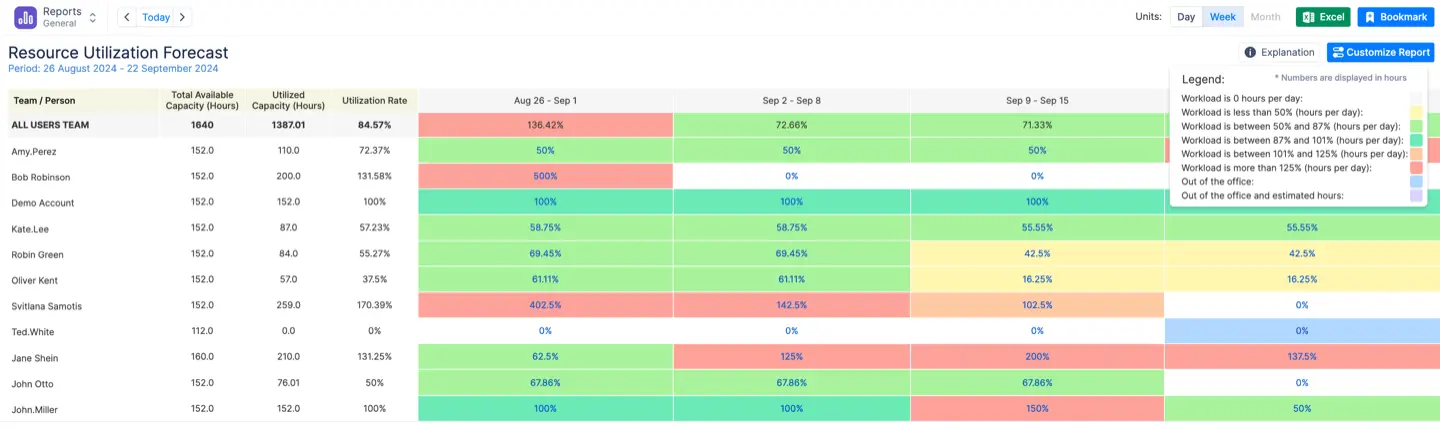
Many managers rely on the Resource Utilization Forecast as their primary resource report. It’s simple to use and helps to observe a clear picture of current workloads for different periods. If you’ve ever wondered, "I need to export a resource utilization report from Jira to Excel. How do I do that?" you are in luck. The answer lies in the quick export button available on almost every report page, which allows you to download data for other departments like accounting. Generate Resource Utilization Forecast to observe the actual/future workload and to prevent people from work over- or underload:
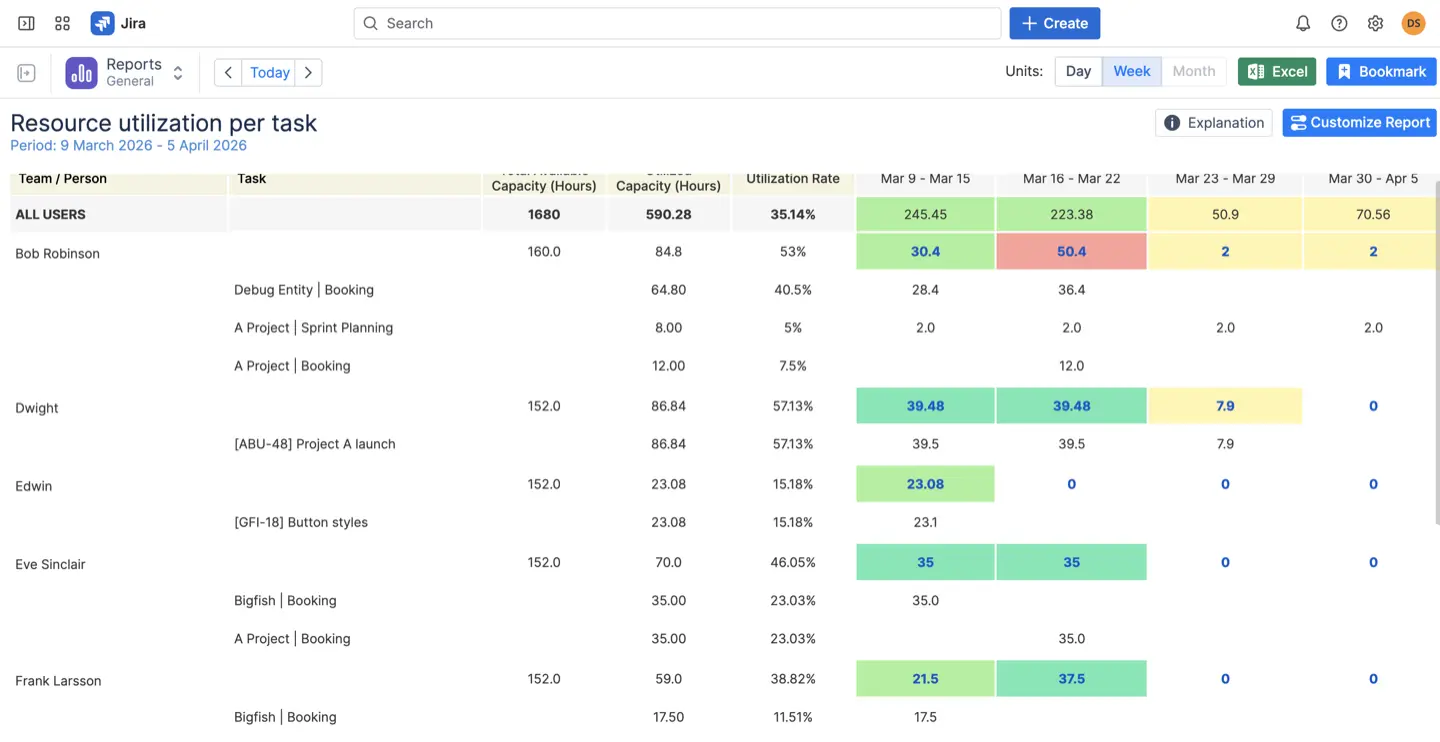
The default indicator does not show the details of each task. Our team developed a detailed Person per task workload report to help manage users' workloads on a day-to-day basis. It also helps with prioritizing long-lasting tasks:
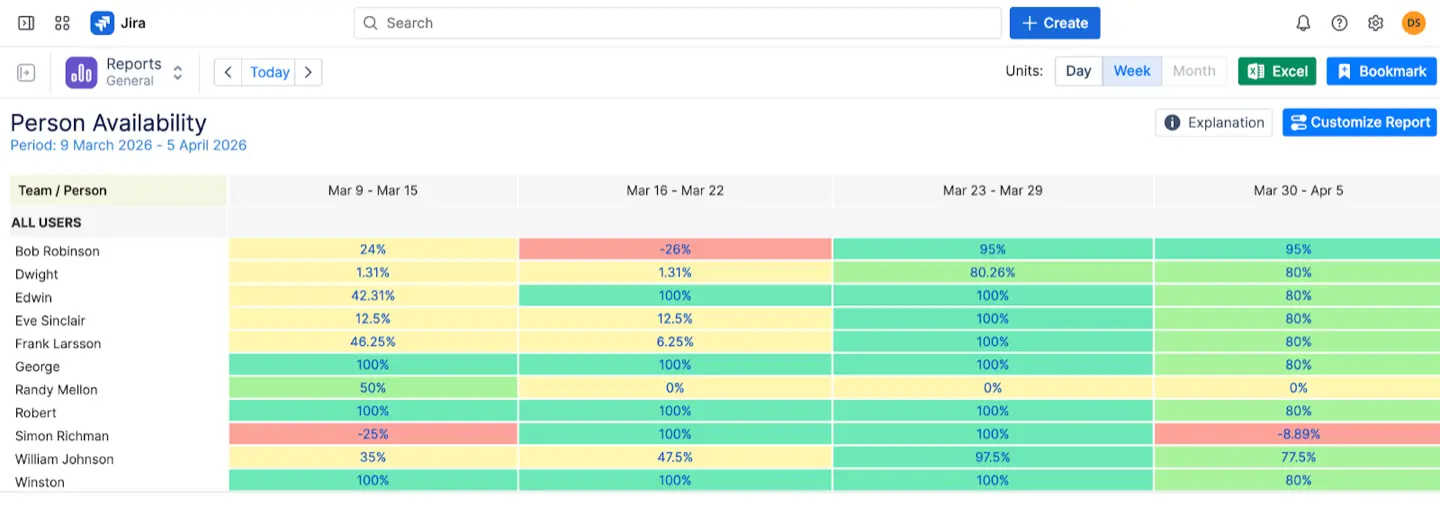
Users can also use an Availability Report to see what resources have available working hours and assign new tasks to them:
The Planned vs Actual Report allows you to compare the original estimate with the actual execution of tasks to spot bottlenecks. At this point, many managers wonder, "How can I generate a 'Planned vs. Actual' report for my Jira projects?" To generate this report, navigate to the Reports module and select Planned vs Actual under the Project Reports section.
Configure your parameters by selecting the timeframe, teams, and specific Jira projects you want to analyze. Click Create to view a comparison between the original estimate and the actual logged work plus any remaining time.
Configure your parameters by selecting the timeframe, teams, and specific Jira projects you want to analyze. Click Create to view a comparison between the original estimate and the actual logged work plus any remaining time.

Unlocking Planned vs Actual Reports in Jira with Activity Timeline
You can also use different Timesheet variations, such as Progress, Timeline, and Detailed views, to monitor exactly how team members log their hours.
Using ActivityTimeline plugin for Jira Capacity Planning
With the help of this capacity planning Jira plugin, its resource management, and tracking features, managers can see everything about resources and their availability. A scalable dashboard, advanced timesheets, project time tracking software with detailed reporting, and various planning levels will help to bring your Jira resource capacity planning to the next level.
A real-world example is Medtronic, which replaced manual Excel tracking with ActivityTimeline to manage thousands of tasks across hundreds of users. This transition provided their leadership with a high-level view of resource allocation and significantly reduced the number of overloaded employees.
With this data at their fingertips, they can create plans without worrying that resources will be overloaded with work. Enjoy effortless advanced resource management and have no more worries about Jira capacity planning activities.
A real-world example is Medtronic, which replaced manual Excel tracking with ActivityTimeline to manage thousands of tasks across hundreds of users. This transition provided their leadership with a high-level view of resource allocation and significantly reduced the number of overloaded employees.
With this data at their fingertips, they can create plans without worrying that resources will be overloaded with work. Enjoy effortless advanced resource management and have no more worries about Jira capacity planning activities.


