
Clockify was the obvious pick. Free, a start button next to every Jira ticket, and everyone had it running in five minutes. A year later there are two sources of truth: Jira says one number, Clockify says another, and the person doing the invoices trusts neither.
Clockify is CAKE.com's standalone time tracker: a web app, desktop and mobile apps, a browser extension that adds a timer button to Jira issues (and to Trello, Asana, GitHub and a few dozen other tools), and a free Marketplace app, "Clockify: Time Tracking & Timesheet 2-Way Sync," that puts a Timer and a Manual tab inside the Jira issue view. The free tier is what made it popular, offering basic tracking for up to five users. Anyone can also test all Pro features with a separate 7-day free trial.
The paid tiers add what a business eventually asks for, with rates based on annual billing. Basic starts at $3.99 per user a month for hourly and billable rates. Standard costs $5.49 and adds timesheet approvals, invoicing, and locked timesheets. Pro costs $7.99 for project budgets, scheduling, and forced timer controls. Enterprise runs at $11.99 per seat for single sign-on, audit logs, and custom security controls. You can also pick the Cake Bundle for $12.99 to get Enterprise features alongside Pumble and Plaky.
For freelancers, small agencies and mixed teams where half the work is not in Jira, it is the right tool, and we would rather say that than pretend everyone needs a Jira app. The teams that start looking for alternatives are the ones where Jira became the place work is planned, estimated and reported, and the wall between Clockify and Jira started costing hours every month. In the conversations we have with them, the reasons are usually some of these:
- Hours tracked through the extension, desktop or mobile app never reach Jira's worklog, so sprint reports, remaining estimates and burndowns stay empty
- Two systems means two admins: every new hire, project or renamed epic gets updated twice, or the Clockify project list drifts from Jira
- Custom fields do not sync, so anything finance tagged in Jira gets tagged again in Clockify
- Clockify knows the issue key, title and labels but nothing about the estimate, so planned vs actual per ticket means matching two exports in a spreadsheet
- Scheduling (Pro tier) is a separate calendar with no idea of assignees, remaining estimates or sprints
- Approvals, rates, budgets and locked timesheets are all paid, so the free tool becomes a per-user bill next to Jira exactly when the team grows
- The sync between the two databases needs babysitting: Clockify's own changelog carries a steady trickle of fixes like "Timers continue running in Jira V2 after being stopped in Clockify" and "Time entries incorrectly flagged as manual in Jira sync"
Who this article is for: Jira teams that started on Clockify, now plan and report in Jira, and want the timesheet, the sprint report and the invoice to read the same rows.
Which Jira apps work better, and when
Not every team has the same problem. Some just want the same easy day view they had in Clockify, but writing to Jira worklogs. Some need stronger project management around timelines and planning. The teams that start looking for an alternative to Clockify often want a different time tracking solution for Jira teams. Some want automatic time tracking so time appears without anyone pressing a button. And some really do work in three or four tools and want the tracker, not Jira, to be the system of record. The table compares Clockify with ActivityTimeline's Advanced Edition capability by capability; the entries below cover the other options and who each one suits.
Comparison table: Clockify vs ActivityTimeline
Not every team has the same problem. Some want a time tracking solution tied closely to Jira for tracking hours in native worklogs, while others need stronger project management context around logged time, including project management features like project progress, budget tracking, client billing, and reporting.
Some want automatic time tracking. Others need accurate time tracking, detailed reports, and customizable reports once work hours are already in Jira.
Clockify prices are per user per month multiplied out for a year, because Clockify bills every user on the workspace. Fewer people may need paid seats in practice, but the moment approvals or budgets matter, everyone who logs time needs them.
#1. ActivityTimeline Advanced Edition: Finances module
Best for: Agencies, consultancies, internal IT and PMO teams whose work is already in Jira and who need logged hours to become cost and revenue without leaving Jira. It is also one of the best clockify alternatives for Jira-first organizations focused on managing teams without splitting work across separate systems.
Take a 40-person consultancy that tracked time in Clockify, planned in Jira and invoiced from Excel. Every month end, the ops lead spent three days matching Clockify rows to Jira tickets, chasing entries that never made it into a worklog, and explaining to a client why the sprint report and the invoice disagreed. When logging moved into Jira, month end shrank to an afternoon. Nothing got faster. There was simply nothing left to reconcile, because the timesheet, the sprint report and the invoice were reading the same rows.
That is the whole idea. ActivityTimeline is a resource planner that writes and reads native Jira worklogs, so time tracking, planning and, on the Advanced Edition, money all sit on one set of data in one app. For teams already using Jira as one of their core project management tools, that means seamless integration instead of another layer to maintain. The simple version comes first: log time where the work is. If you need more, the reports are two or three clicks further.
Key features
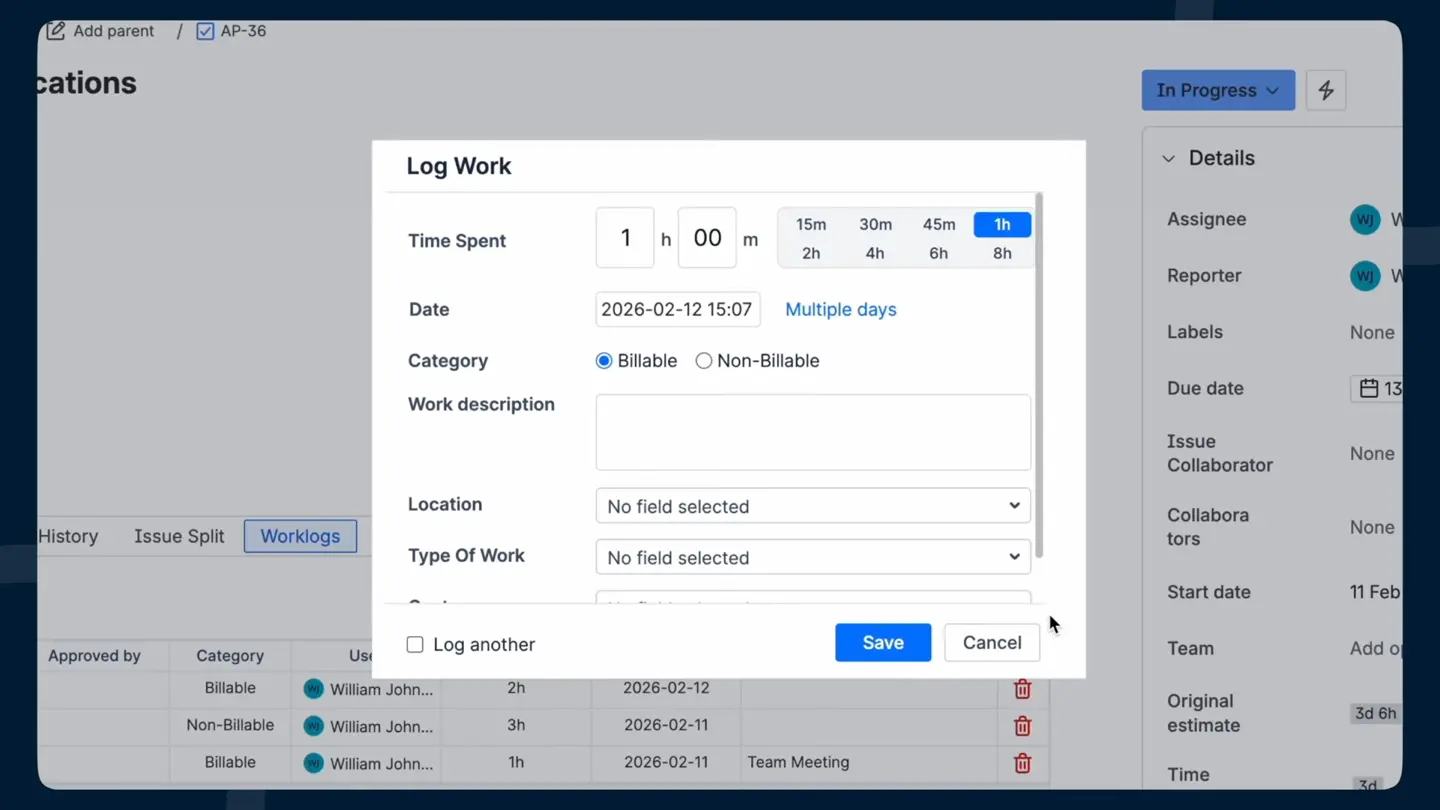
Log time where the work is. In Jira Cloud you can set ActivityTimeline as the time tracking provider, so the Log Work action on any issue opens ActivityTimeline's dialog, with a worklog category dropdown and the option to log one entry across several days. The same dialog is available from the Workspace page (one person's issues and week on one screen) and from Track, there is a built-in timer if you prefer pressing a button instead of relying on manual input, and whatever gets logged in Jira shows up in ActivityTimeline and the other way around. Every path produces a native Jira worklog, so sprint reports, remaining estimates and burndowns finally agree with the timesheet.
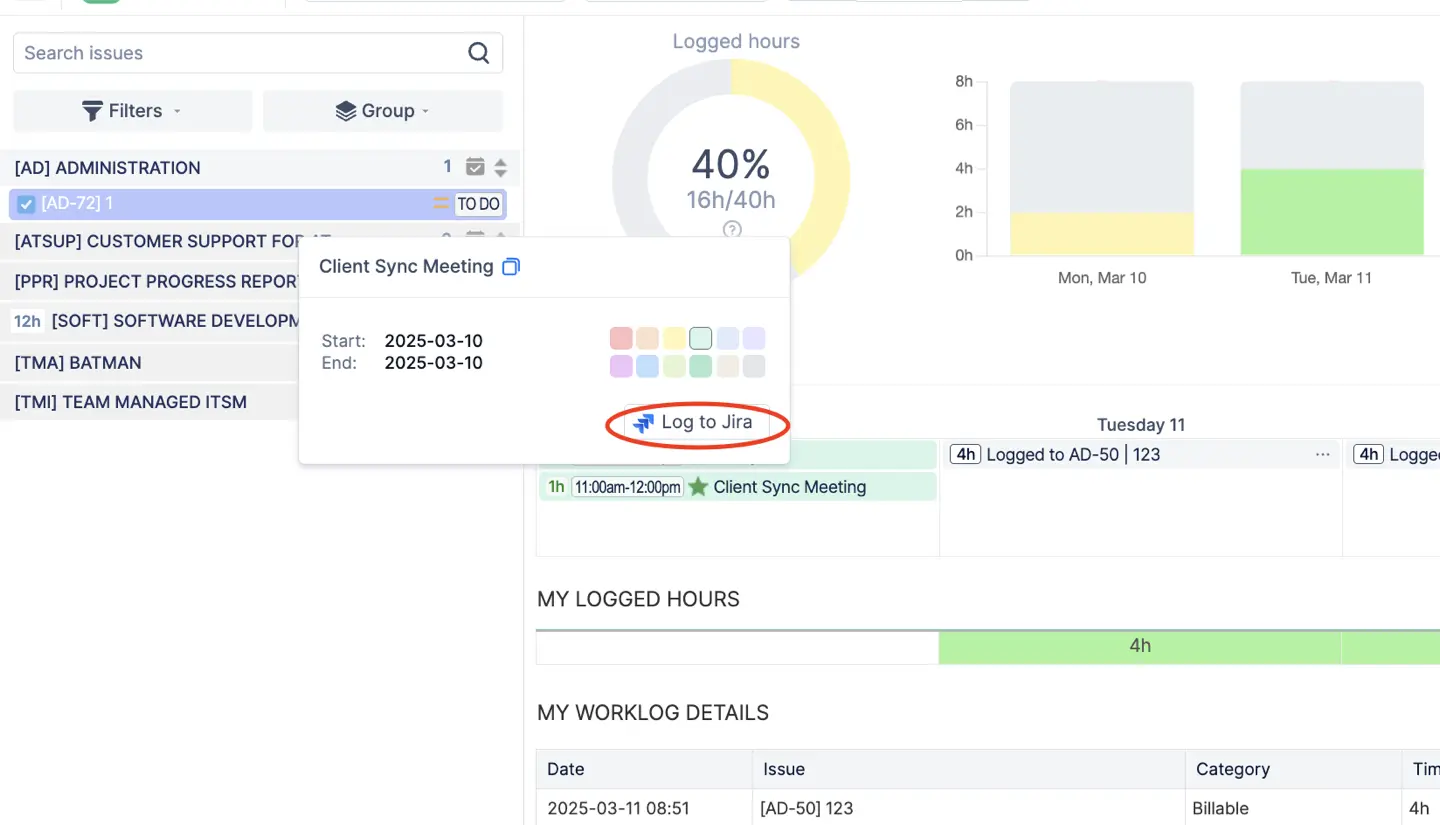
Non-ticket time, the thing Clockify users mention first. Meetings and calls never get a ticket, and in our experience that is 20 to 30 percent of the week. ActivityTimeline imports events from Google Calendar, Outlook or any iCal feed, and the default setting treats them as worklogs once the event has passed; the documentation puts it as "all imported events are instantly saved as Jira worklogs." If you want people to choose, switch to "Treat none as Worklogs" and they click the event, pick a Jira issue and log it. Internal bookings, say a placeholder for a support rotation with no Jira issue behind it, can be counted as worklogs too, so the timesheet stops having a hole every Tuesday afternoon and gives a fuller picture of time spent.
Every hour tagged the way finance needs it. Worklog categories mark time as billable, non-billable, or whatever kinds of work your organization distinguishes, and a project can have a default category so the right one is pre-filled. Worklog attributes carry the rest: cost center, client name, a checkbox, a free-text field, a dropdown, each set to required, optional or hidden. If you are coming from Tempo, your existing worklog attributes and Tempo Accounts can be imported with a token so people keep picking from the same lists. That also makes client billing cleaner when the same category and attribute rules carry through to exports.
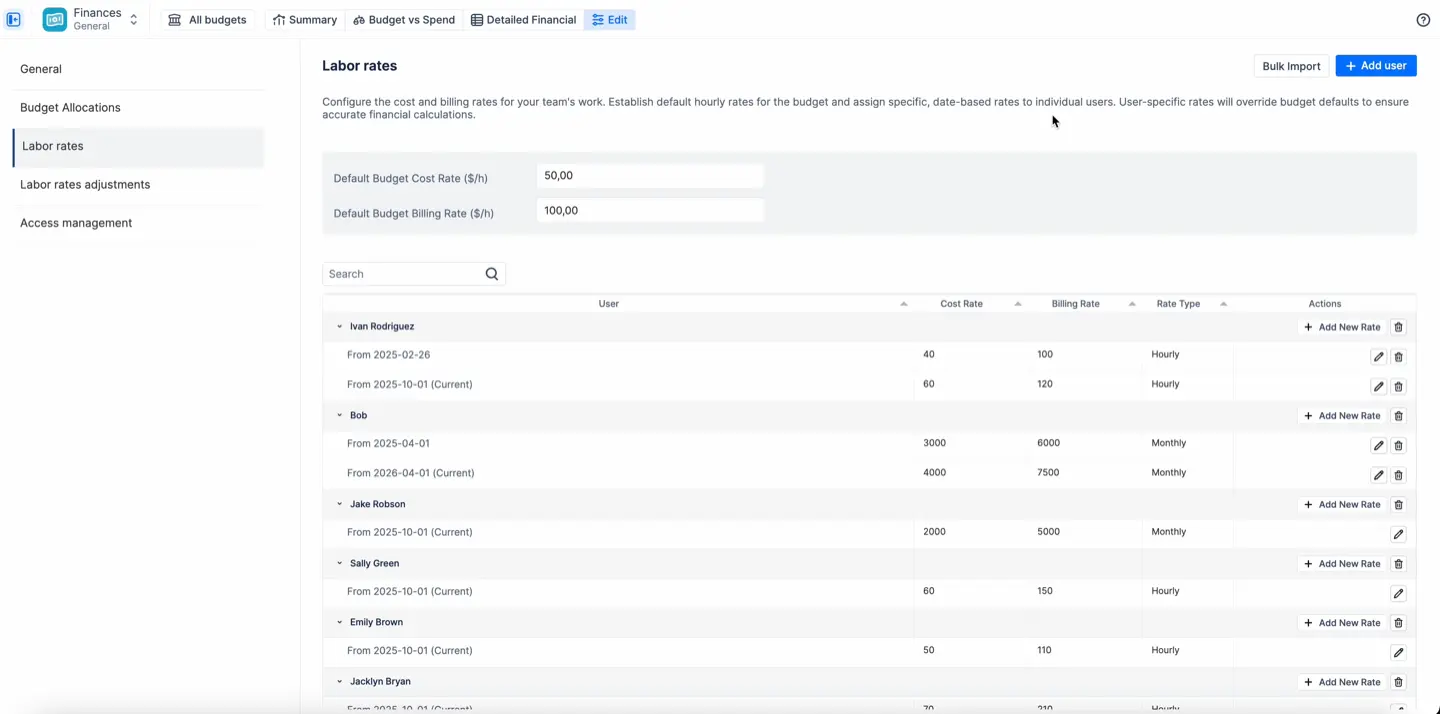
Rates that match how you actually pay people. Each person gets a cost rate (what they cost you) and a billing rate (what you charge for them), hourly or monthly. Monthly rates suit salaried staff and retainers and are prorated across the month, which also helps with payroll processing when compensation is not tied to a single issue. A category rate on top handles the cases where the same hour costs or bills differently: urgent support at 1.5 times the base rate, non-billable at zero. Rates are effective-dated, so a raise in March applies from March and February's numbers stay as they were. Rates for a whole team can be imported from a Jira group instead of typed one by one.
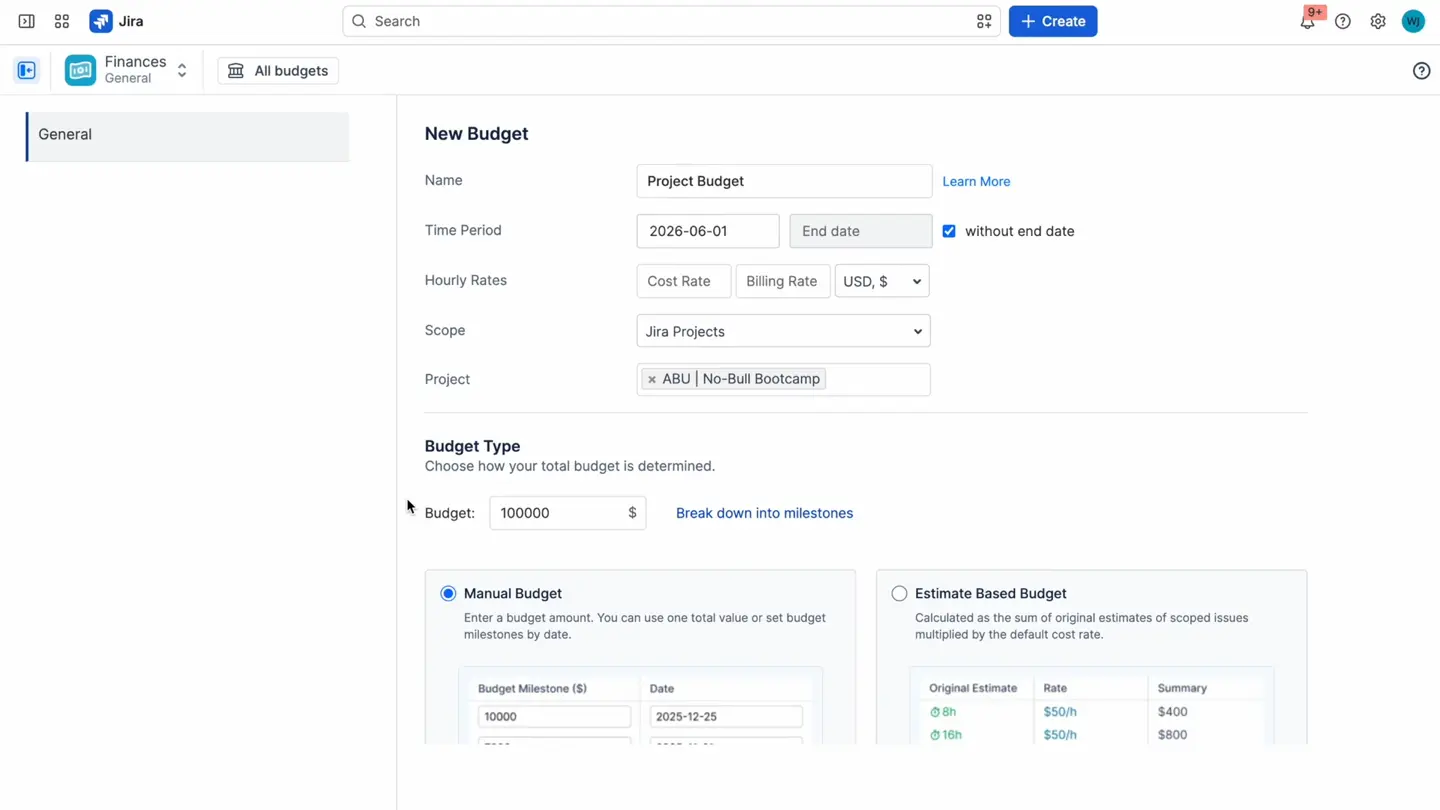
A budget is a scope plus a cap. Point a budget at a Jira project, a set of epics or a saved JQL filter, give it a period (or none, for maintenance work that never ends), and set the cap as a fixed amount, optionally split into milestones, or let the app calculate it from the original estimates in scope times your cost rates. Cost tracking and revenue tracking switch on independently, so an internal department tracks cost only and an agency tracks both. That makes budget tracking practical at team or portfolio level. Costs that are not hours (licenses, contractor invoices, hosting) go in as transactions, linked to an issue or a person if you want, with a recurrence if they repeat, which covers expense tracking without pushing it into another system.
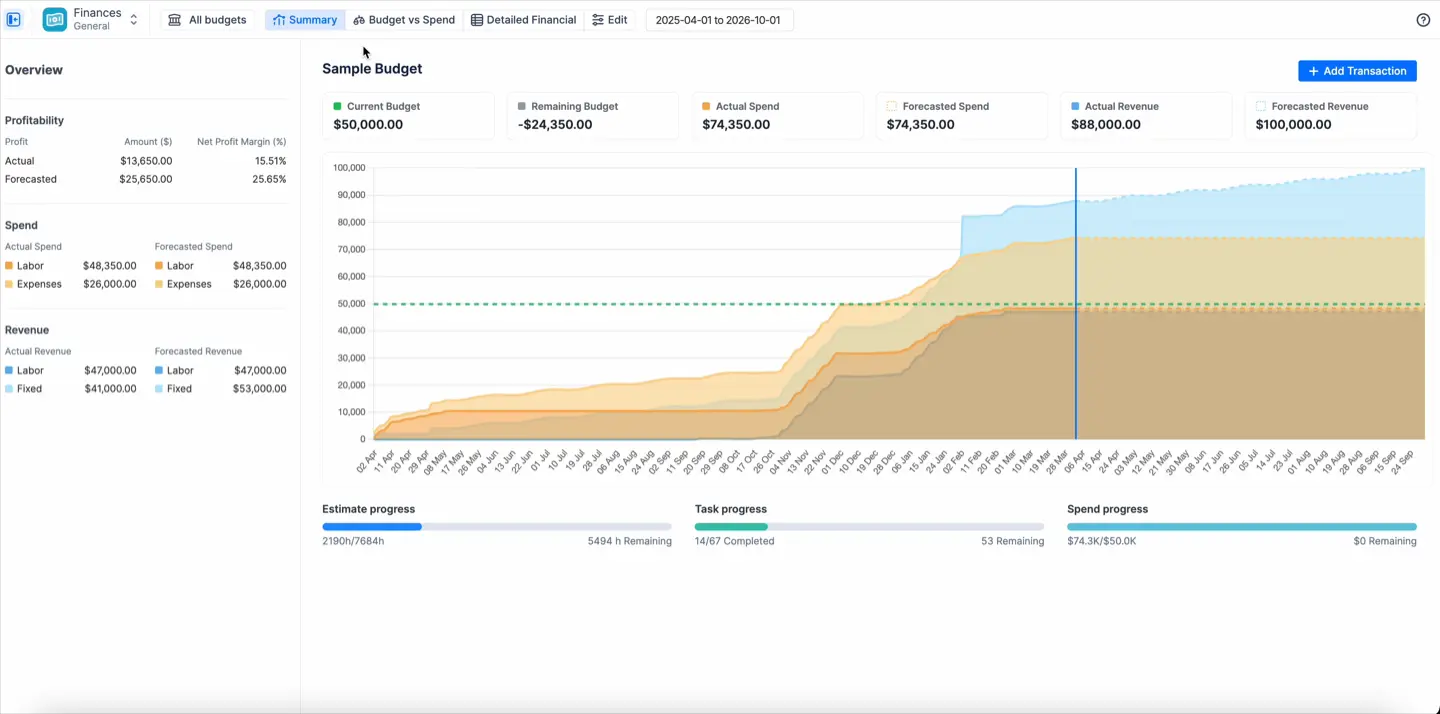
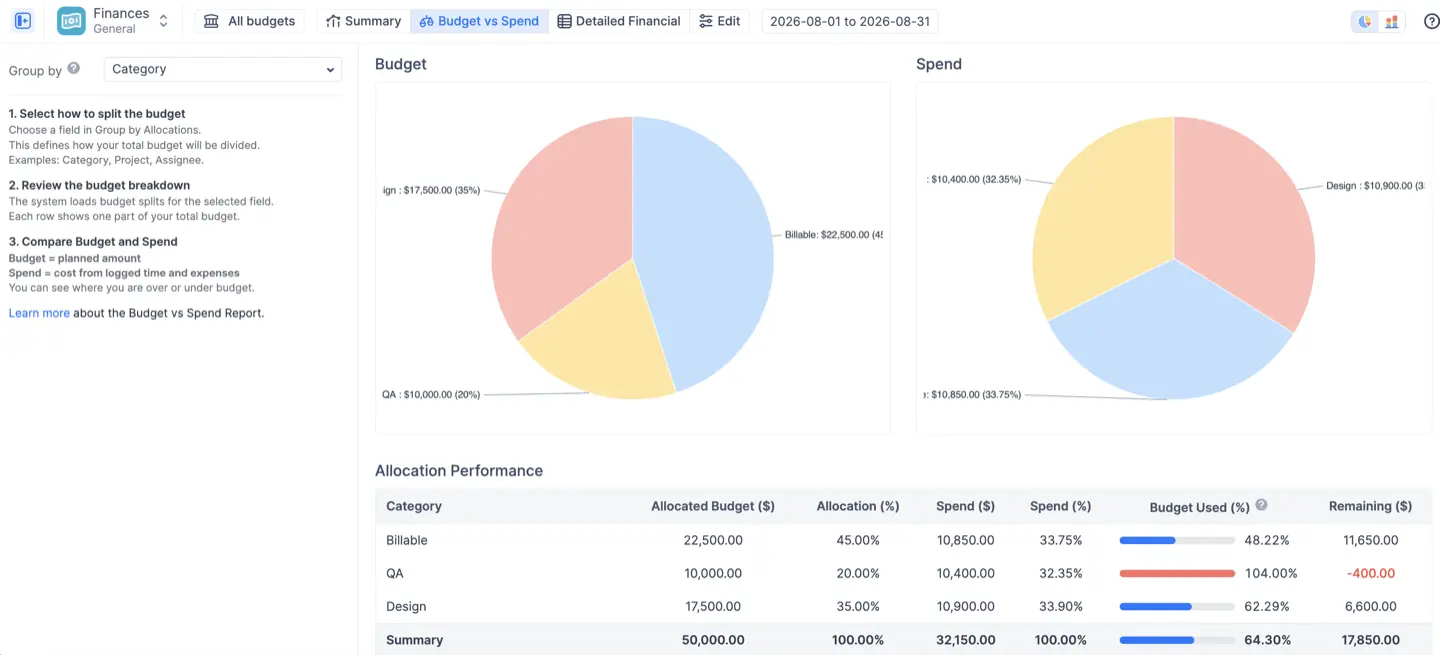
Three live financial reports. The Summary dashboard is the one-screen answer: current budget, remaining, actual and forecasted spend, actual and forecasted revenue, and the margin, with a trend chart where you see the burn heading over before the month closes. The forecast is actual spend to date plus what is already scheduled, including recurring transactions and monthly rates. Budget vs Spend compares what you allocated to each category, project, epic or person against what was actually spent, as a pie chart for proportions or bars for amounts, with a table underneath colored on track, fully spent, over budget or unallocated. The Detailed Financial Report is the ledger: every logged hour and every transaction as a line with the rate applied and the resulting cost and revenue, filterable by date and exportable to Excel for invoicing or an audit. If reporting depth is your priority, this is where ActivityTimeline earns its place among the best Clockify alternatives for teams that need Jira-based planning and reporting.
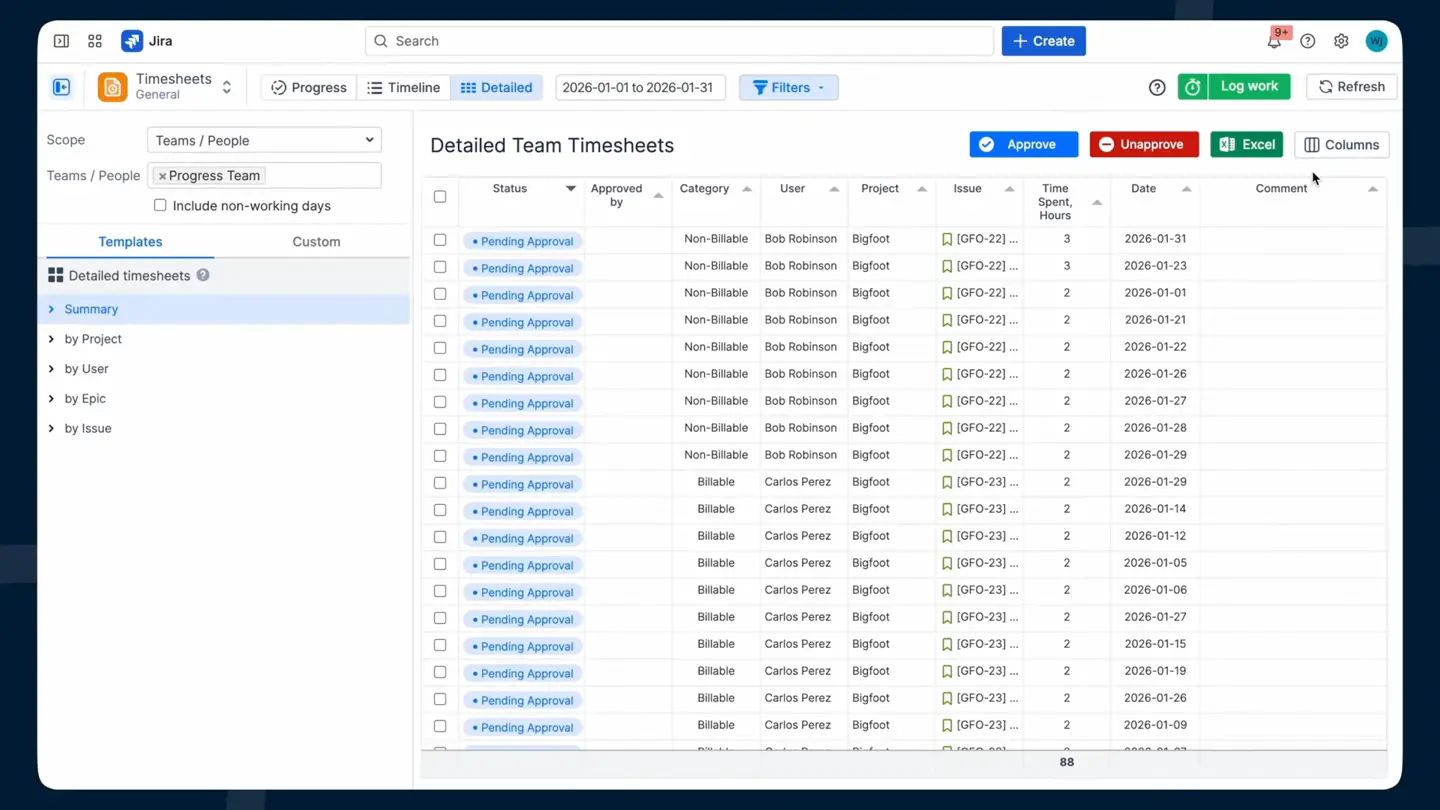
Approvals that close the loop. Managers, team leads and admins approve timesheets one at a time or in bulk, approved worklogs lock on both the Track and Work pages, the app records who approved what, and admins can limit how far back anyone may log so the books actually close. Then everything exports to Excel for the accountant who will never open Jira, and should not have to.
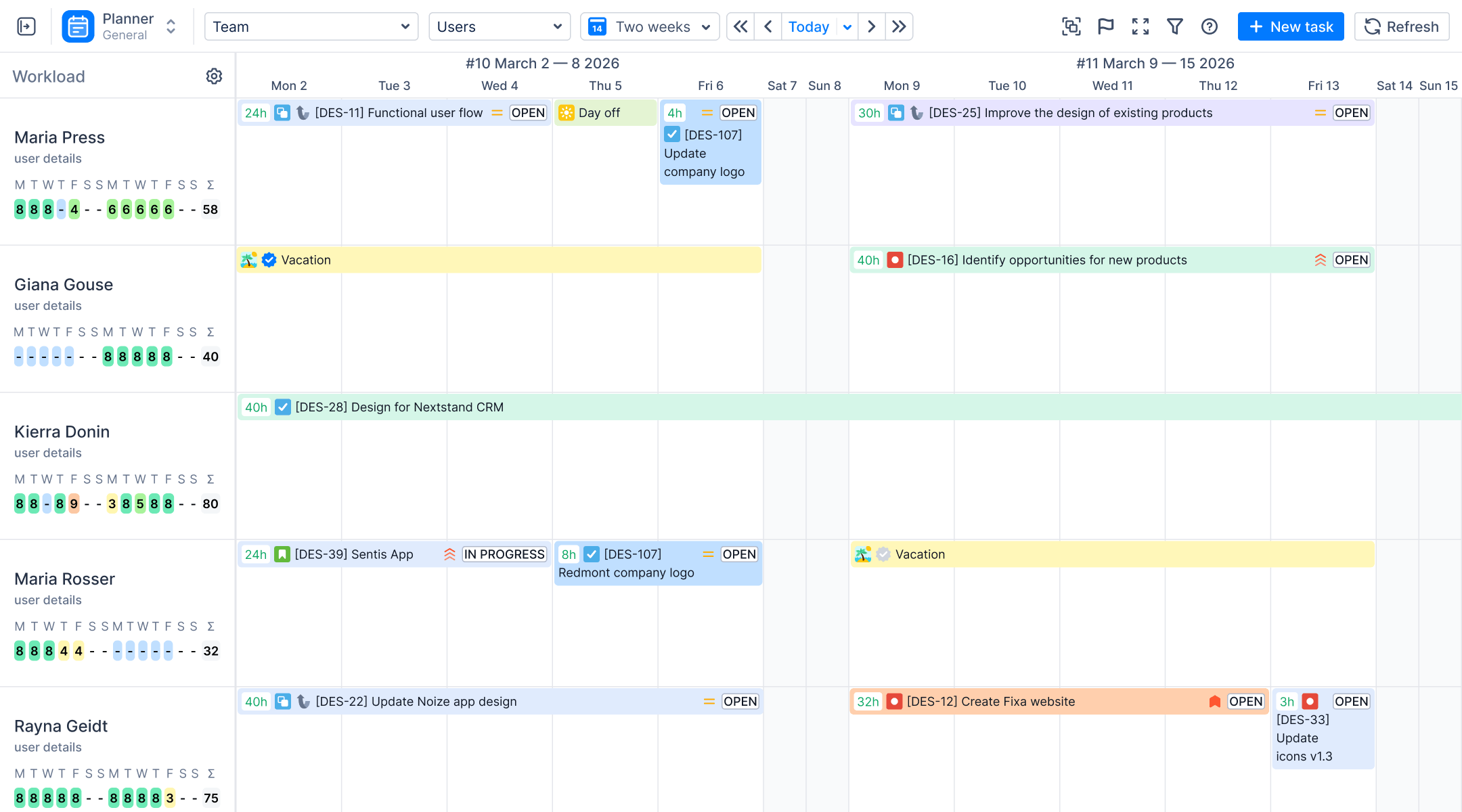
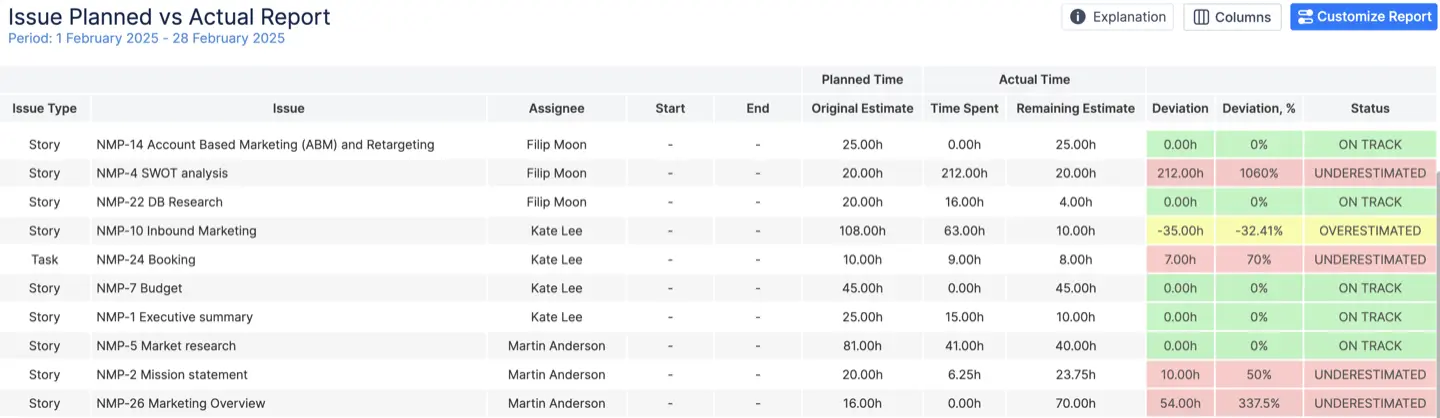
Planning and tracking in the same place. This is the part Clockify structurally cannot do, because the hours live in another database. ActivityTimeline is not just a time tracking tool; it combines tracking time with Jira project management tools through seamless integration. In ActivityTimeline the Jira estimate and the logged hours are already side by side. The Planned vs Actual report puts original estimate against logged time per project and team with a deviation threshold you set, so you see which projects are running over before it becomes a delay. The Resource Utilization Forecast breaks utilization down week by week from remaining estimates and scheduled bookings, so you find out that Anna is at 130 percent next week before the sprint starts, not in the retro. On the Advanced Edition, the Alignment timesheet shows planned hours against logged hours per person as a delta or a match percentage, so the best choice still depends on whether your team prioritizes invoicing or project management.
Who sees the money. Three roles per budget. The owner runs the budget and its users, an administrator edits configuration and transactions, and a read-only role sees every report and can export but never sees the rate cards, which is what lets a project manager see margins without seeing salaries. Budgets respect your existing Jira permissions for the issues in scope.
What it doesn't do
ActivityTimeline has no free tier and no standalone desktop timer app; the timer lives in Jira and in the app, so if most of your work happens outside Jira, one of the outside tools below will serve you better and we would rather say so. That also means it is not built around the kind of employee monitoring or employee surveillance features some standalone trackers push, such as activity tracking, app usage, screen captures, or idle time detection. There is no attendance tracking layer either, and no separate iOS and Android apps if your team needs fully mobile logging. On the other hand, if you prefer a Jira-centered setup over tools that analyze idle time or rely on heavier oversight, that trade-off may be exactly the point. Finances is about internal cost and revenue tracking, not external billing: there is no invoice generator and no QuickBooks or Xero connector, so the Detailed Financial Report's Excel export is what goes to whoever raises the invoice. That export can still help with payroll processing. Finances is Cloud only for now; if you are on Data Center and need it, tell us, because that is how we decide what to build next. And there is no Clockify importer , though it matters less than it sounds: every Clockify entry that was stopped inside the Jira plugin already created a Jira worklog, and ActivityTimeline reads those the moment it is installed. What lived only in Clockify stays in Clockify's export, and from the switch date forward there is nothing to double-enter.
Compared with more standalone time trackers, it also skips some of the advanced features teams may expect from dedicated tools or broader paid plans. A short comparison point is Everhour, which integrates time tracking directly within project management tools. If your shortlist depends on deeper employee monitoring workflows, this one is intentionally a lighter fit.
Ideal customer profile and pricing
ActivityTimeline fits project and resource managers who need capacity planning connected to time and cost; agencies, consultancies and professional-services teams billing by the hour; and internal IT and PMO teams with a cost cap and no revenue at all. The Standard Edition already covers timesheets, categories, attributes, approvals and the planning reports, and to be fair that is what most customers actually use: our own senior PM's rule of thumb is that 80 to 90 percent of customers need the simple report and never more, and the ones who do can click two or three more buttons. Start there, and move to Advanced when someone asks "what did this cost us" and the answer is a spreadsheet. On Atlassian Marketplace, the actual tiered annual cost for ActivityTimeline is same as for Jira: $12,450/year (500 users), $21,950/year (1,000 users), and $28,950/year (2,000 users). Against Clockify's Standard tier for the same 500 people that is a rounding error, and unlike Clockify the price includes approvals, budgets and planning rather than gating them behind a tier. That matters if you are comparing a free plan with paid plans, especially where competitors reserve advanced features for higher tiers. There is no separate enterprise plan, no priority support SLA, and no pitch around unlimited users, unlimited projects, or broader employee management for remote and hybrid teams. The trial is 30 days with no credit card, and you can trial either edition and switch between them during or after the trial.
Two systems of record is one too many. That is the argument for this entry, and it holds for the next three apps as well. ActivityTimeline also is not built around employee monitoring, activity tracking, app usage, or idle time detection for remote teams. Some teams prefer that because employee surveillance features like screenshots can erode trust and decrease productivity.
#2. Tempo Timesheets
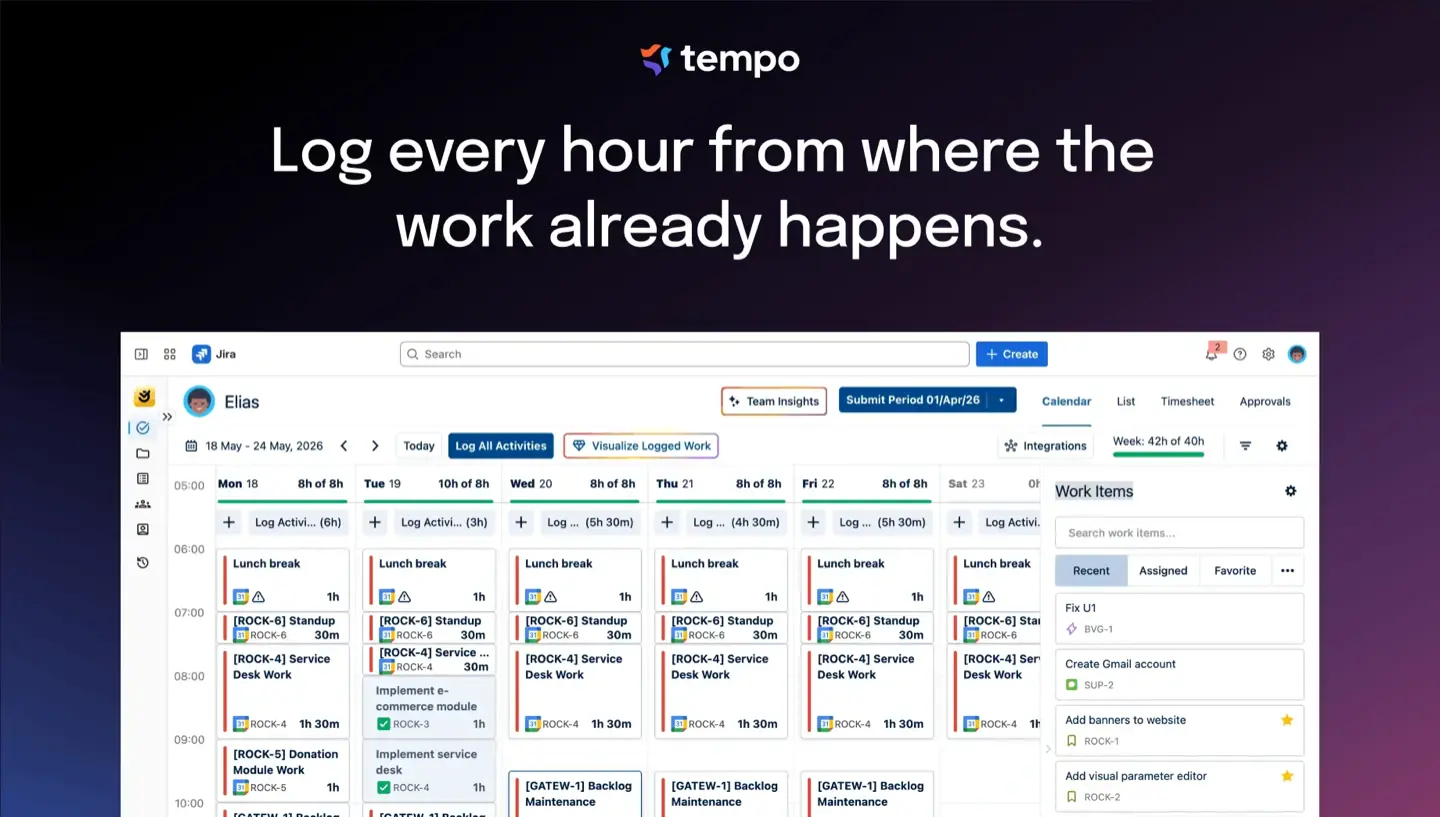
Best for: Large enterprises that want the biggest ecosystem on the Marketplace and do not mind buying it in pieces, especially organizations focused on Jira-based employee management for in-office, remote teams, or remote and hybrid teams.
Tempo's strengths are real: mature approvals at the timesheet or project level, Tempo Accounts and customers on worklogs, deep reporting, Cloud and Data Center, and native Jira worklogs. If you have 500 or more users and a one-vendor policy, it is the safe answer and nobody gets in trouble for choosing it. It also fits buyers who want time tracking tied closely to Jira-centric project management and adjacent project management tools, with some advanced features available across the broader Tempo stack.
The weak spot is that the pieces are sold separately. Cost and revenue live in Financial Manager (formerly Cost Tracker), a second licence and Cloud only; planning lives in Capacity Planner, a third. Setup is heavy, and per-user pricing that starts around $5 per user per month at a hundred Cloud users adds up fast past a few hundred people, especially after the 10 to 25 percent price increases Tempo applied in September 2025. On annual billing, smaller teams pay a flat $100 per year for up to 10 users, but larger tiers scale quickly: 500 users cost $17,280 per year, and 1,000 users run $27,230 per year. Many buyers start with a free plan, but Clockify's free plan now caps users at five, Toggl's free plan is limited to five users, and Harvest's free plan is limited to one user and two projects; by contrast, Jibble provides unlimited users on its free plan, TimeCamp's free plan supports unlimited users, and My Hours offers unlimited projects in its free plan. Larger buyers may also care about enterprise plan options or priority support in the broader market. One detail to know before you build reporting on it: time logged through Tempo appears in Jira as logged by "Tempo User," so any other tool reading Jira worklogs sees the wrong author unless it also talks to Tempo's API.
Pick it if you are 500-plus users, one vendor policy, and budget is not the constraint.
#3. Timetracker by Everit
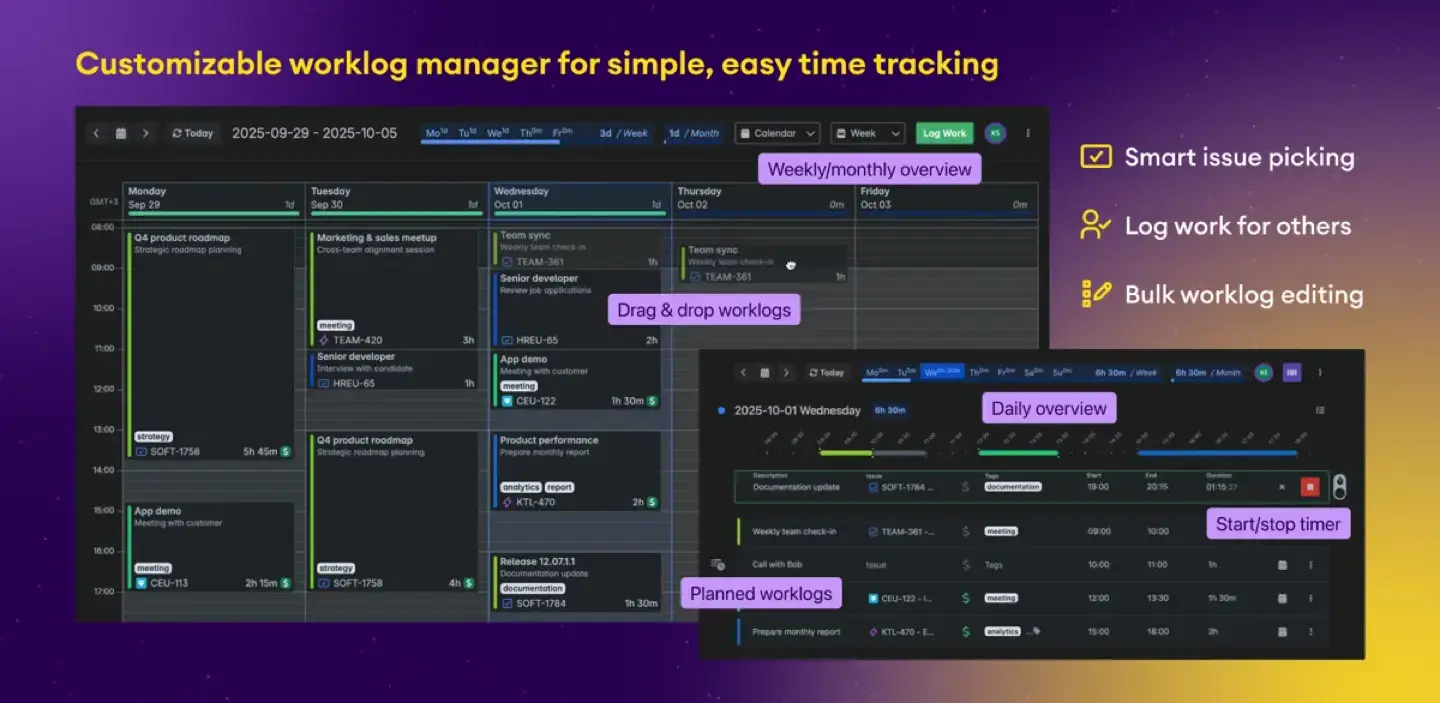
Best for: The Clockify user who mostly wants the same easy day view, but inside Jira and writing to Jira worklogs, especially if Tempo feels more like an enterprise plan ecosystem around Jira project management tools than you need.
Timetracker gives you calendar, timeline and issue views for entering time, a timer, reports with pivot tables and grouping by custom field, worklog tags for billing categorization, custom reports via Excel export, and a straightforward fit for teams focused on basic time tracking. It runs on Cloud and Data Center, and the price is fair; a 2024 comparison put it at about $40 per month for 100 users. It has 110 Marketplace reviews at 4.1 out of 5, which for a Jira app is a good sign that it does what it says.
What it does not do: rates or budgets to speak of, approvals (the same 2024 comparison listed the lack of timesheet approval as its main gap, and the listing still does not mention them), and no planning against estimates. Those advanced features also tend to come with enterprise-style pricing and expectations around priority support.
Pick it if you want tracking hours only, you liked Clockify's simplicity, and you just want it in Jira.
#4. Clockwork by HeroCoders
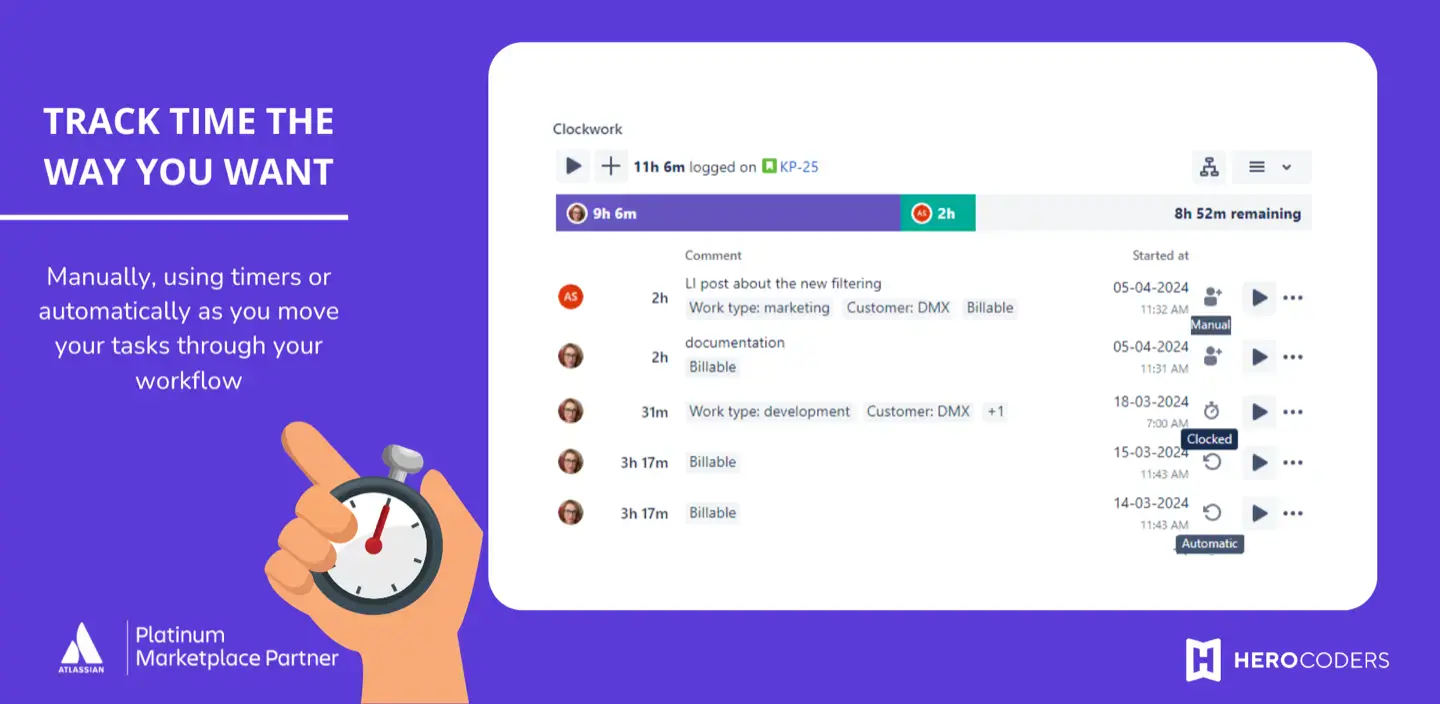
Best for: Dev teams that want time to appear without anyone pressing a button.
Clockwork's automatic timers start when an issue has an assignee and moves into an In Progress status, and stop when it is unassigned or moved out. That makes it a strong fit for automatic time tracking, basic time tracking, and straightforward tracking hours inside Jira. Both editions write native Jira worklogs and offer a free plan for up to 10 users. On annual billing, Clockwork Lite runs $1,350 per year for 500 users and $2,350 per year for 1,000 users, and as of May 2026 the old cap of 300 automatic timers per month is gone. Clockwork Pro adds worklog attributes, timesheet approvals, billing periods that lock past time, calendar sync, and an hourly cost and billing rate per user, pricing at $2,900 per year for 500 users and $4,900 per year for 1,000 users.
The weak spot is what automatic tracking actually measures. A status-based timer counts the time a ticket sat In Progress, not the time someone worked on it, so a ticket left open over lunch or over a weekend produces a worklog someone has to clean. That can distort recorded work hours, even if the app covers the core time tracking features many teams want. HeroCoders' own docs say that locking is enforced inside Clockwork and that the Jira REST API or the mobile app can bypass it. The cost and rate feature is one number per user with no date ranges and no per-project rates, there are no budgets, and there is no planning against estimates. It is Cloud only.
Pick it if your team refuses to log time and you would rather clean noisy data than have none.
#5. Toggl Track
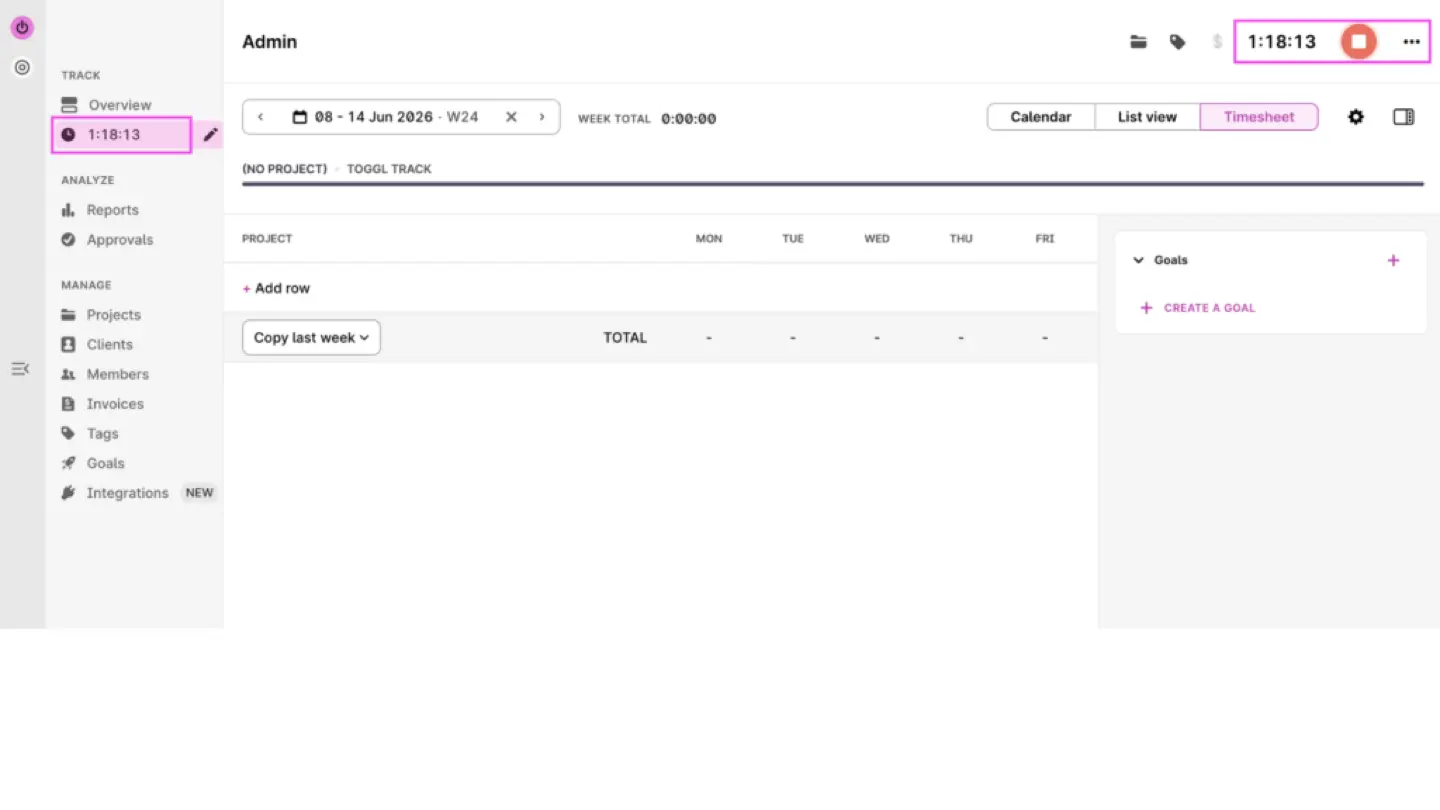
Best for: The closest like-for-like Clockify swap, for teams that work in several tools and are switching for the experience rather than to fix the two-databases problem.
Toggl has the nicest timer in the category, with automatic time tracking in its browser extension that puts a timer in the Jira issue and helps eliminate the need for manual timers, plus detailed reports, customizable reports, and billable rates, project time estimates, and other time tracking features from the Starter plan ($9 per user per month on annual billing, or $12 monthly; fixed-fee projects and project dashboards are on Premium at $16 annually, or $24 monthly). Its free plan is easy to start with, but it is not built around unlimited users, and it avoids the more intrusive side of employee monitoring.
The weak spot is exactly the wall you already have. Data lives in Toggl and Jira worklogs stay empty. Toggl's Jira Sync, a Premium feature, is one-way; Toggl's support docs say "it's currently not possible to export data from Track to Jira." There are third-party Marketplace apps that push Toggl entries into Jira worklogs, which is a third tool to keep the second tool in sync with the first. Two admin surfaces, paid tiers for the finance features, same as before.
Pick it if Jira is one of four tools and the timer UX is what you are buying.
#6. Everhour
Best for: Agencies that need tighter Jira connectivity, broader project management tools support, and built-in ways to bill clients.
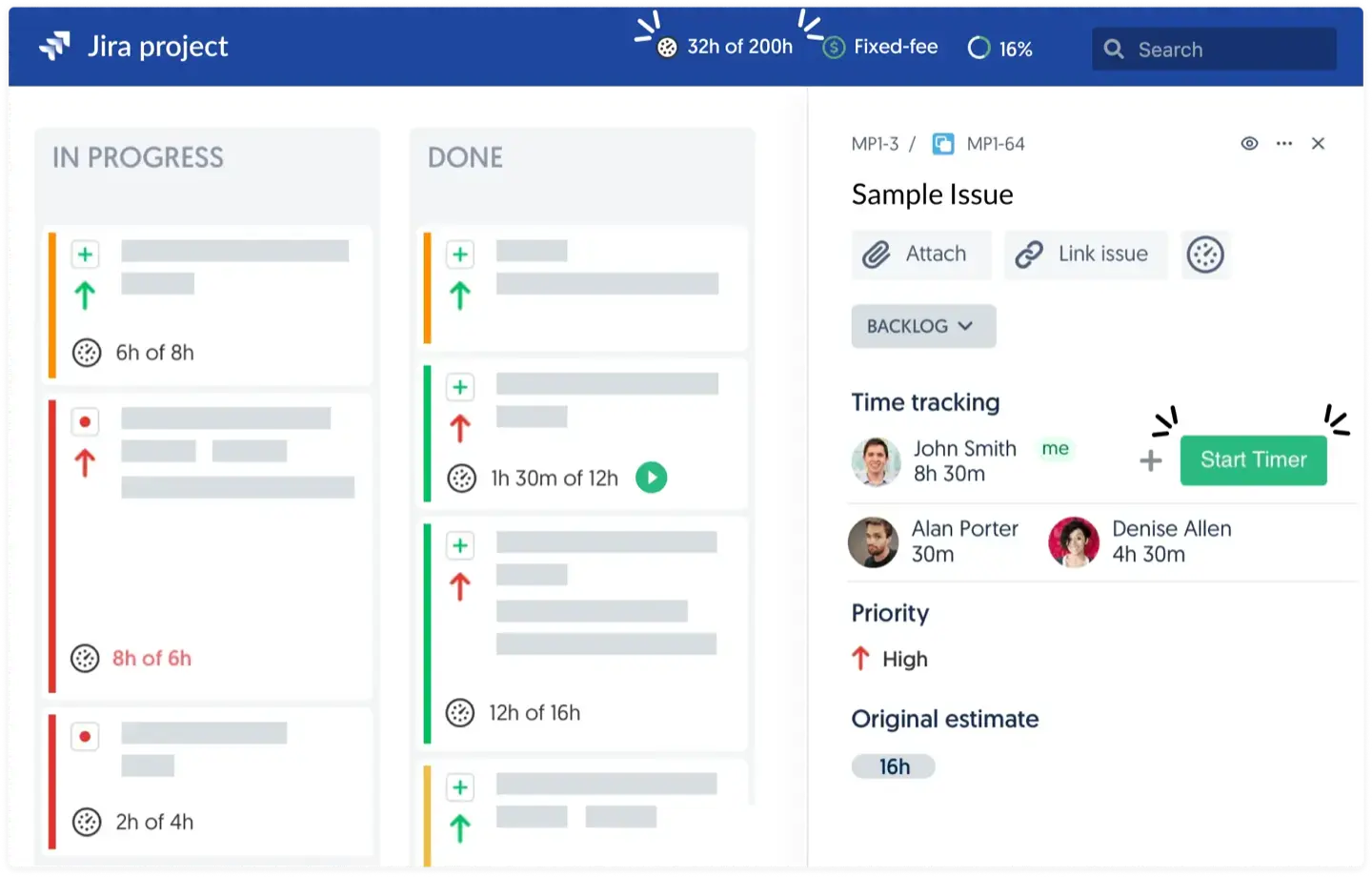
Everhour's timer and controls sit inside the Jira issue view (it replaces Jira's standard time tracking panel), projects and issue names sync automatically, and budgets, rates, threshold alerts, billable hours, client billing, and invoicing are built in on the Team plan ($8.50 per seat per month billed yearly, $10 monthly, five-seat minimum). That gives teams more seamless integration around worklog sync than Clockify offers.
The limits are the direction and the seams. The sync is one-way: Everhour's documentation says it does not sync time entered directly in Jira, historical records are not carried over, and worklog comments are capped at 1,000 characters. So it is still a second system with its own admin, and Jira only ever sees what Everhour decided to send. There is no planning against estimates, and it is per-seat pricing on top of Jira.
Pick it if the invoice is the main output and Jira reporting does not matter much to you.
Conclusion
Clockify does its job. It just does it next to Jira instead of in it, and that gap, not any missing feature, is where the extra work comes from. Toggl and Everhour keep the same gap and paper over it with a better timer or a better invoice; Everhour also integrates time tracking directly within Jira project management tools, which is a fair trade for teams that work in many tools and want the tracker to be the system of record. If invoicing is the priority, that also helps with billable hours and client billing.
If you mostly need hours inside Jira, Timetracker or Clockwork will do it for a few dollars. If you are an enterprise with a budget that is not the constraint, Tempo is the safe choice and you buy the planning and cost pieces as you go. If you really do work across many tools and invoice from the tracker, Toggl or Everhour. And if what you want is hours, planning and money on one set of Jira data, in one app, that is ActivityTimeline Advanced Edition, with the caveats above: no free tier, no desktop timer app, and Finances on Cloud only for now. In that sense, the list above covers both the best Clockify alternatives and the best free Clockify alternatives depending on whether you need Jira-native workflows or broader time tracking software. It also includes free Clockify alternatives worth testing if budget matters before you commit. If most of your work is outside Jira, we are not the answer, and any of the outside tools will serve you better than an app that lives in a Jira tab.
This data was taken from CAKE.com and other alternatives official English-language sites on Sep 22, 2026.
{{rich-cta-4}}