
If you're searching for Tempo Timesheets alternatives, you're probably running into one of two problems: the cost is climbing as your team grows, or you've realized that time tracking alone isn't solving your resource planning headaches.
Alternatives to Tempo Timesheets range from lightweight Jira add-ons built purely for logging hours to full work management platforms, and the right pick depends almost entirely on what you actually need Tempo to do for you.
In this post, we'll break down why teams look for a Tempo alternative in the first place, compare the top options side by side, and walk through what each tool actually offers so you can pick the one that fits your workflow instead of fighting it.
Why migrate from Tempo Timesheets
Tempo Timesheets is an app on the Atlassian Marketplace that has built a solid reputation for time tracking, work logs, and invoicing. It lets teams track time, log hours against work items, and generate reports for compliance, billing, and project visibility. For straightforward time tracking on Jira Cloud or Data Center, it's a capable tool, and plenty of teams use it successfully.
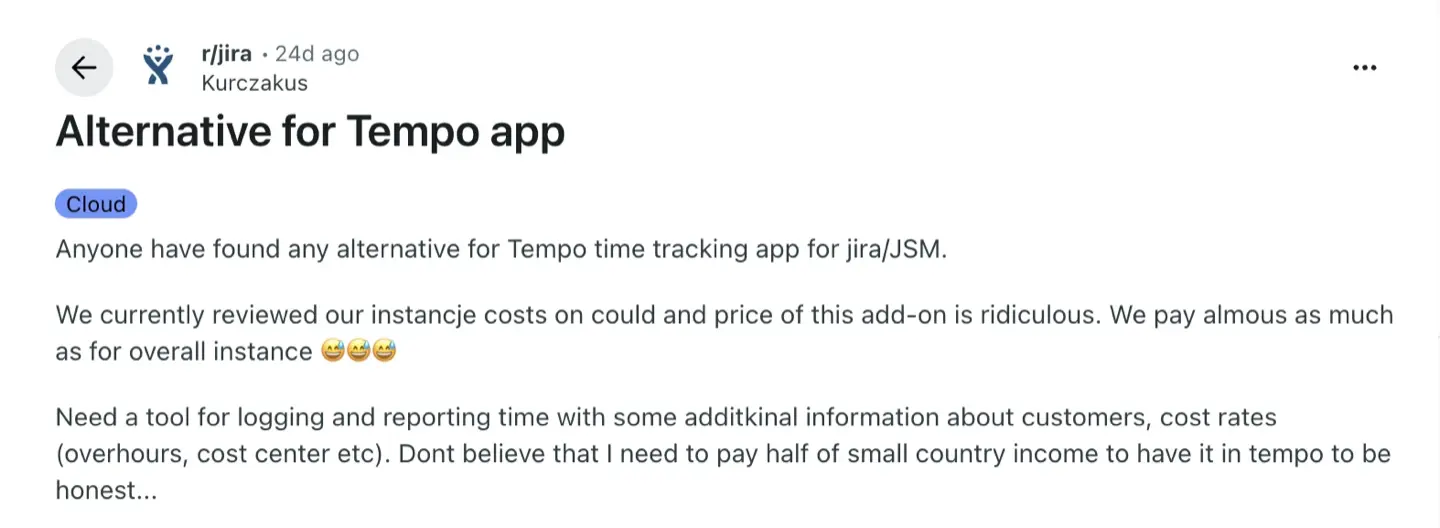
That said, Tempo Timesheets requires multiple plugins for full functionality. The core Timesheets app handles logged time and basic reports, but resource planning lives in a separate product (Tempo Capacity Planner), cost tracking lives in another, and budgeting tools live in yet another, each billed separately. Tempo users often seek alternatives due to high costs of add-ons (only Timesheets costs $1,522.50/mo for a team of 500 users) once they start stacking these plugins to get the functionality they actually need.
Beyond pricing, a few other patterns show up consistently across user feedback on Atlassian Marketplace, Reddit, and review sites:
- Worklog portability. Tempo stores its own worklog metadata — author, description, custom attributes — separately from Jira's native work logs. If you ever want to switch tools or use another reporting app on that data, migrating it out cleanly is harder than it should be.
- Interface complexity. Tempo's interface can feel confusing for new users, and several reviews mention a steep learning curve, sluggish performance on large datasets, and clunky navigation when approving timesheets across many team members.
- No native resource planning. Time tracking and capacity planning are two different problems, and Tempo Timesheets only solves one of them. If you want to see who's overbooked next sprint, you're paying for a second product.
- Overkill for smaller teams. For small and mid-sized agile teams, the full Tempo ecosystem can be more complexity (and cost) than the team actually needs.
- Less personalized support. As part of a larger vendor, some users report slower or less hands-on support compared to smaller, more responsive teams.
None of this means Tempo is a bad product. It's an enterprise-grade tool used by thousands of teams. But for many businesses, especially those that need time tracking and capacity/resource planning in one place rather than logging hours in isolation, a more focused or more bundled alternative ends up being the better fit.
Which Jira apps and add-ons will work better and in what cases
Effective tools serve as alternatives to Tempo Timesheets in two broad categories, and figuring out which camp you're in will narrow your search fast:
- Resource planning + timesheets combined — apps like ActivityTimeline that handle capacity planning, team workload, and time tracking under one roof. Best if you need visibility into who's available, not just who logged what.
- Pure time tracking / automated worklogs — apps like Toggl Track, Clockify, RVS Worklog, and similar tools that focus on logging time entries, work logs, and billing without a planning layer. Best if reporting and invoicing are your only goals.
The quick decision rule: if you need to plan and track time, look at ActivityTimeline. If all you need is to log, approve, and bill hours, Toggl Track, Clockify, RVS Worklog, or Clockwork Pro will cover it without paying for planning features you won't use.
#1. ActivityTimeline
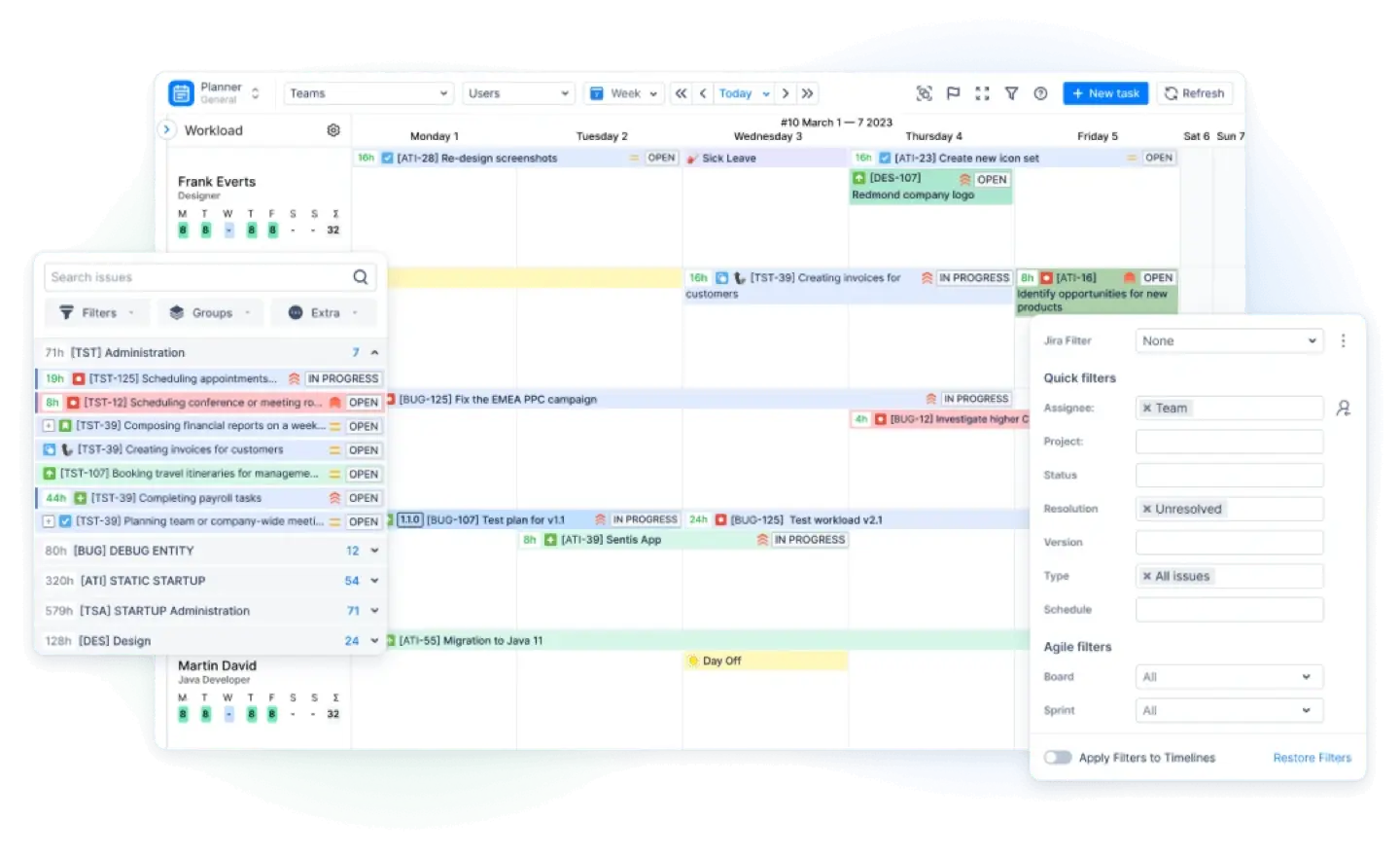
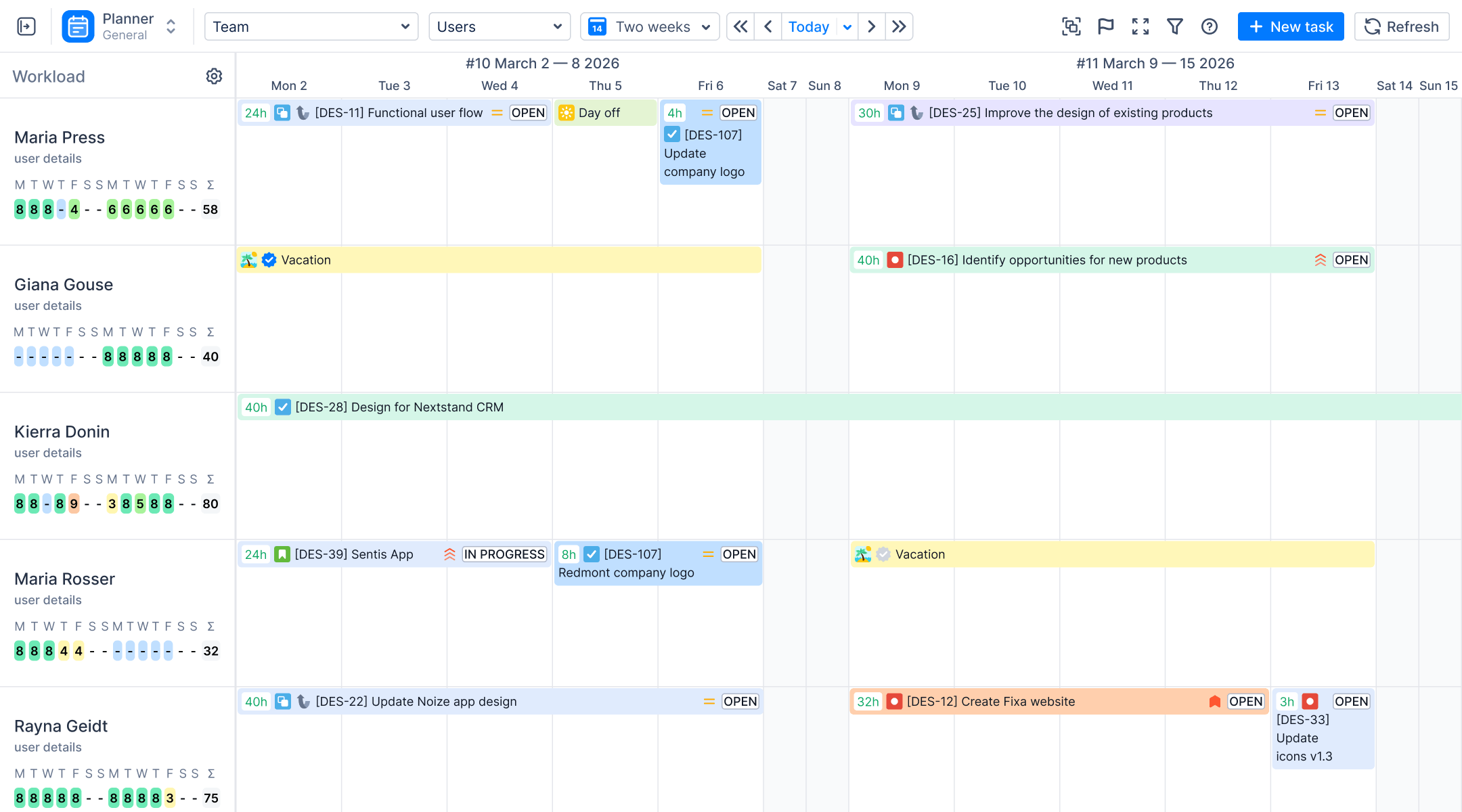
ActivityTimeline is built around a simple idea: time tracking and resource planning shouldn't be two separate purchases. Where Tempo Timesheets requires multiple plugins for comprehensive reporting capabilities — and Tempo Capacity Planner focuses on matching resources to tasks as its own add-on — ActivityTimeline gives you capacity planning, a personal workspace, timesheets, and reports all inside one Jira Cloud and Data Center app.
- Migrate everything from Tempo — worklogs, teams, and holiday schemes. Switching time tracking tools is only painless if your historical data comes with you. ActivityTimeline connects directly to Tempo via API token and imports your existing worklogs, teams, and holiday schemes in full. Your logged time entries surface in ActivityTimeline with the right attribution, so reports and timesheets pick up from where Tempo left off rather than showing a gap at the point of migration.
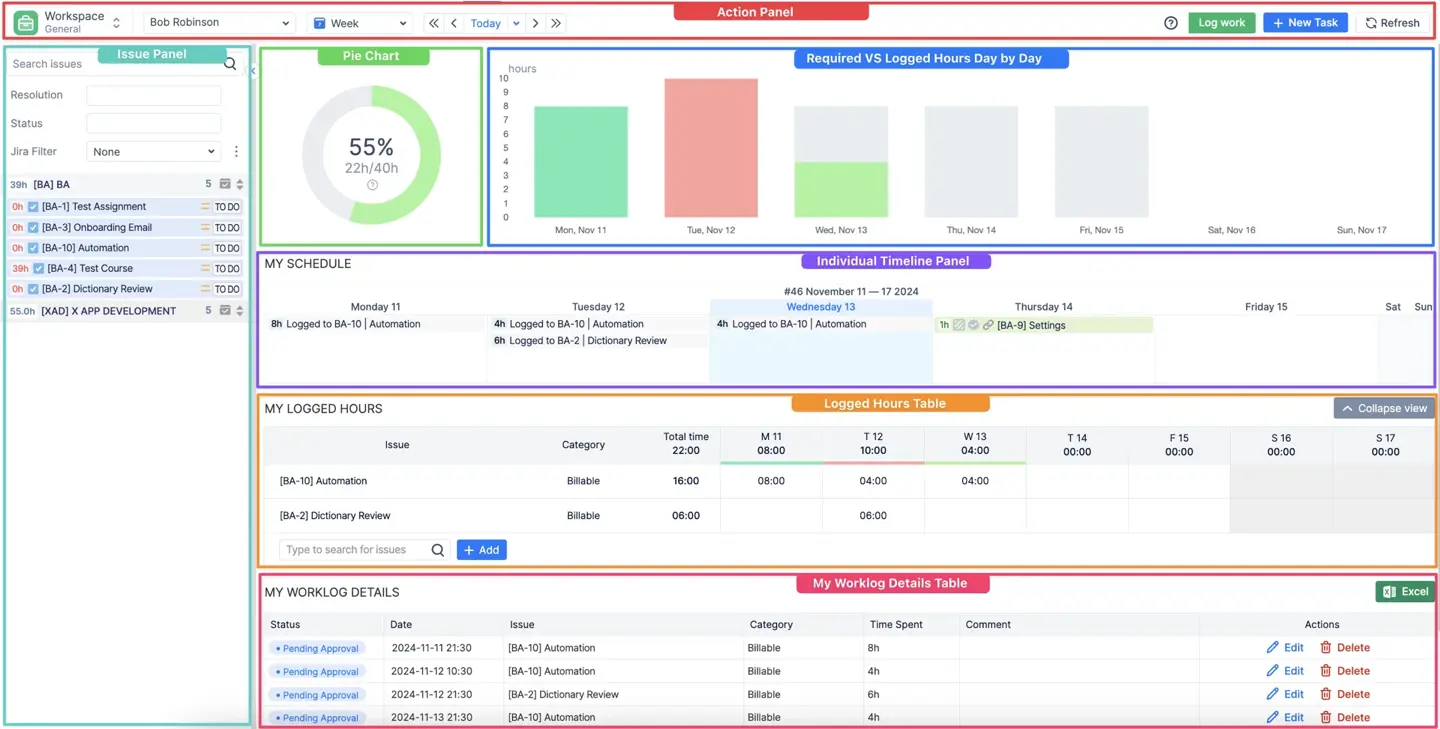
- Seamless time tracking, built the way your team actually works. ActivityTimeline gives team members multiple ways to log time without friction. They can start and stop a built-in timer directly inside ActivityTimeline's Workspace, or trigger it straight from the Jira issue screen without switching tools — whichever fits how a person actually works during their day. Time can also be logged manually, through drag-and-drop on the schedule, or by resizing existing worklogs to cover additional days. Every worklog syncs directly with Jira's native time tracking, meaning your data lives in Jira itself — not inside a third-party silo you'll have to negotiate with later.
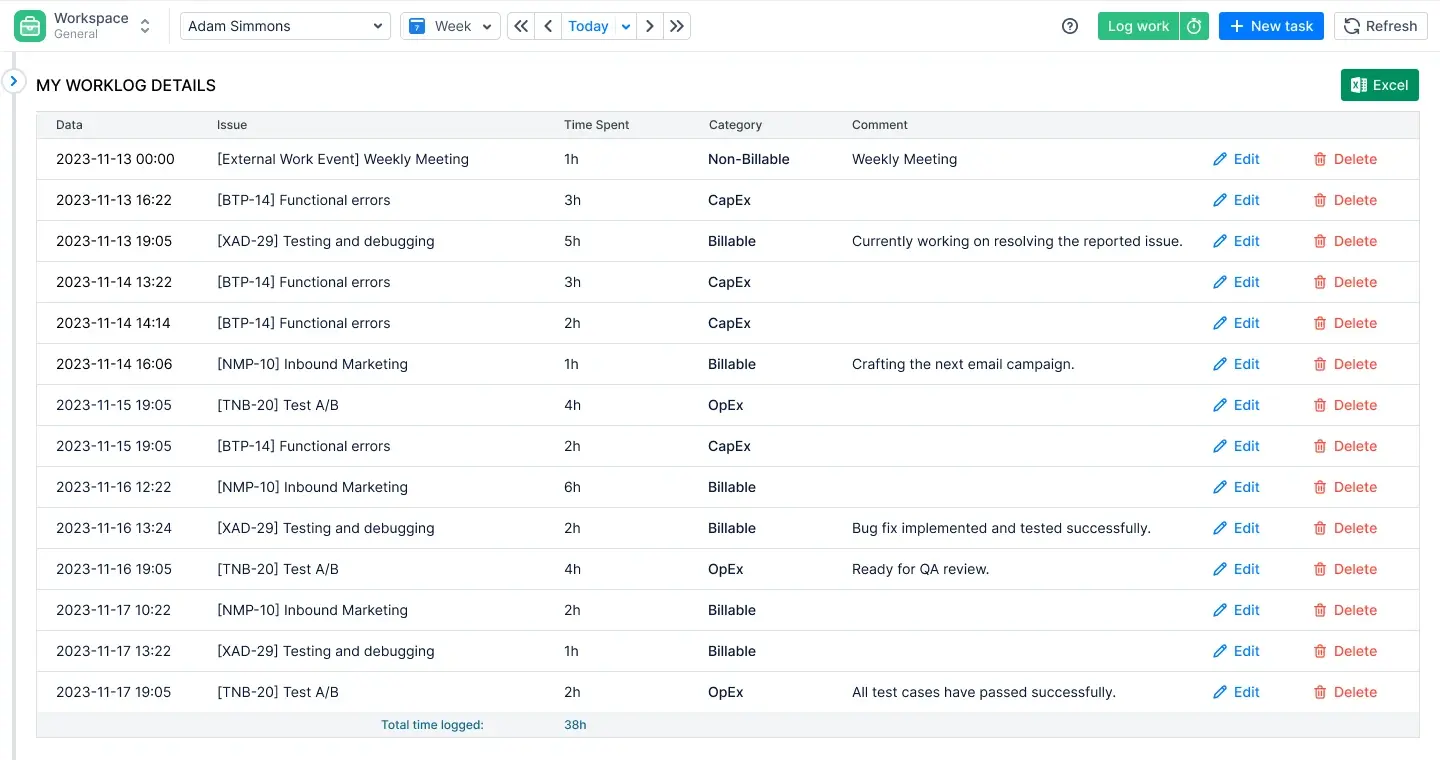
- Worklog categories and attributes for precise billing and compliance. Every logged entry can be assigned a worklog category — billable or non-billable out of the box, with the ability to create as many custom categories as your billing model requires. Beyond categories, worklog attributes let you attach custom fields to individual time entries: cost center, client name, account, work type, or anything else your reporting or compliance process demands. If your team uses Tempo Accounts, those can be imported directly into ActivityTimeline as Static List attributes, so your billing structure carries over rather than being rebuilt from scratch.
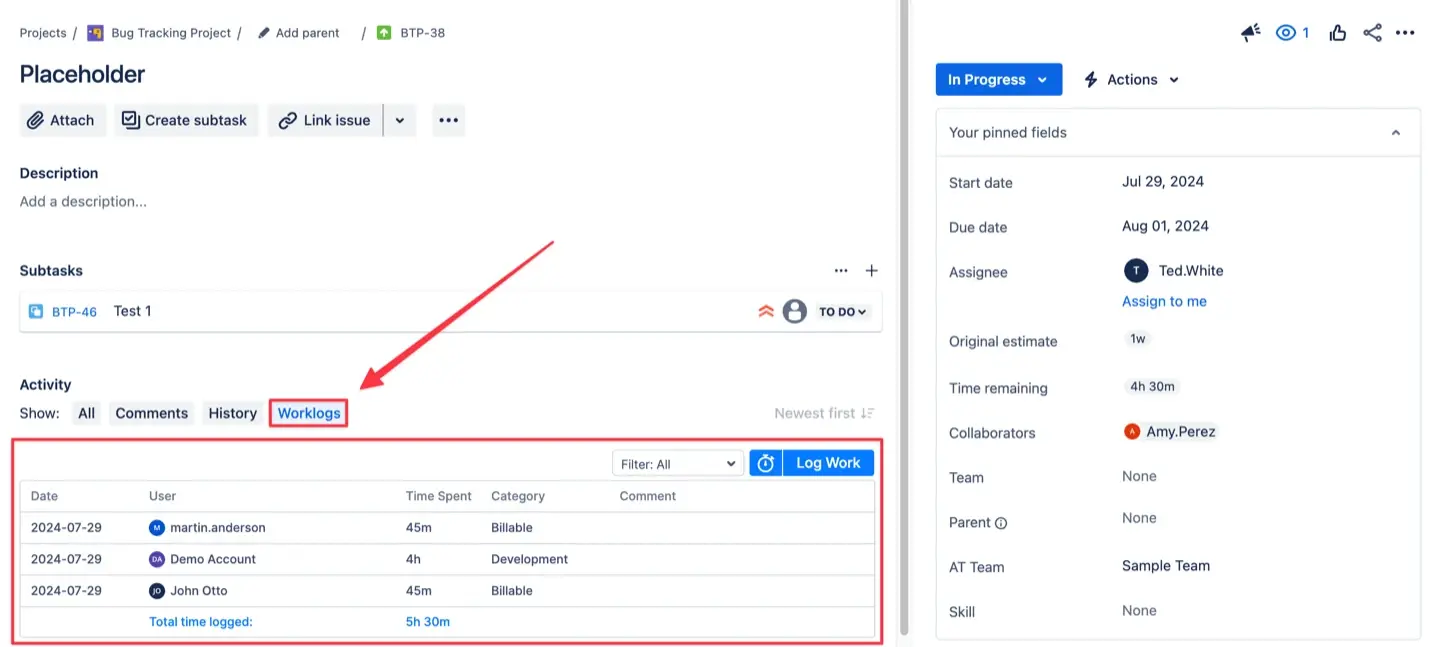
- Timesheets and approvals built in. The Track module covers Progress, Timeline, and Detailed timesheet views, with a full approval workflow so managers can review and lock logged hours. Worklog categories separate billable from non-billable hours out of the box, and worklog attributes let you add custom fields — cost center, client name, work type — directly to each entry for more precise billing and compliance reporting.
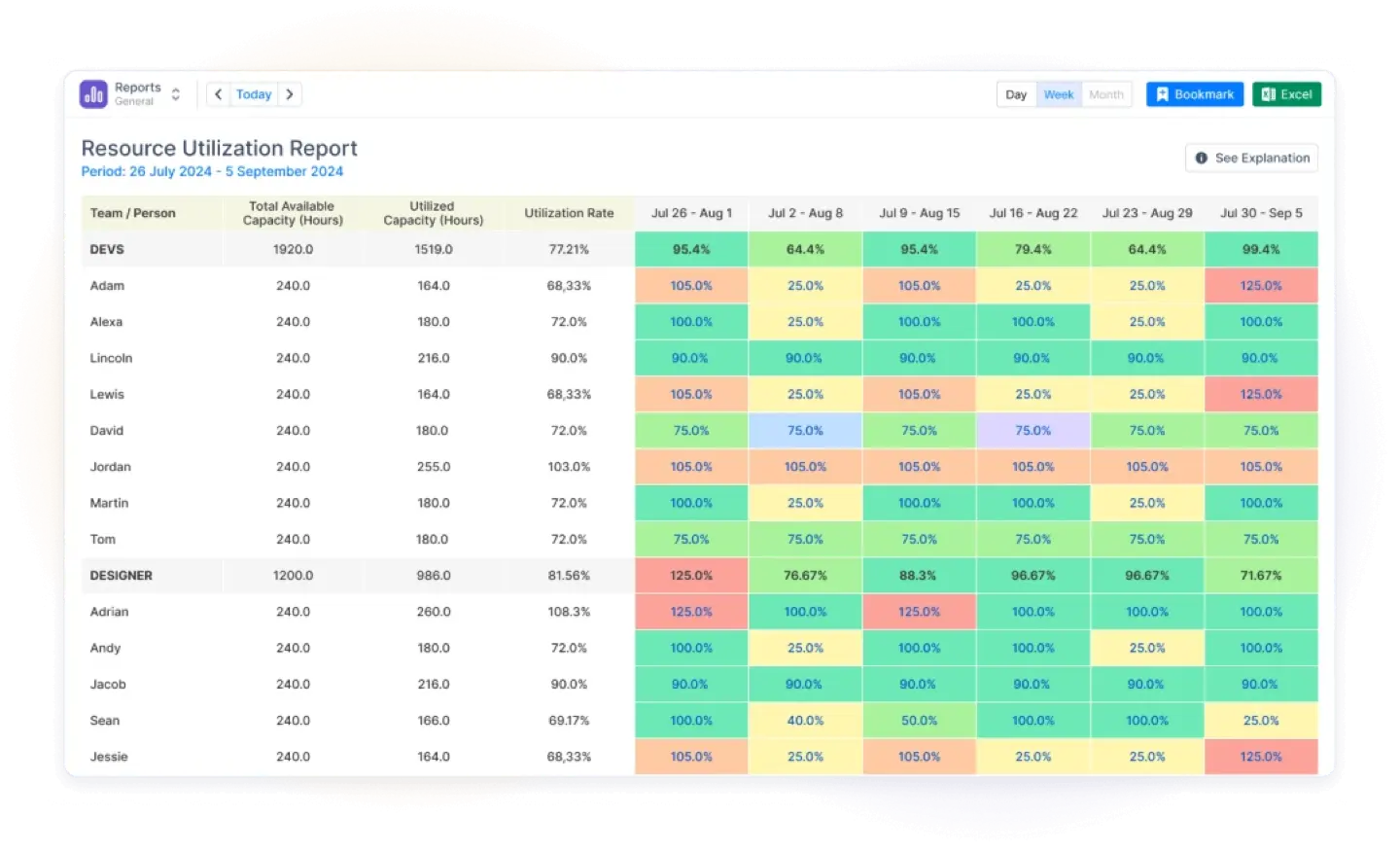
- Reporting that goes past hours logged. Where Tempo's reports are largely time-and-cost focused, ActivityTimeline adds Resource Utilization Forecast, Planned vs. Actual, Team Utilization Forecast, and Skill/Position Availability reports, plus visual charts like the Team Capacity Chart and Team Utilization Pie Chart. The Project Progress Report can track completion by Story Points as well as hours, and you can toggle reports to display time in days instead of hours, or apply Exclude filters to hide irrelevant data — small touches that add up when you're building a report for stakeholders, not just yourself.
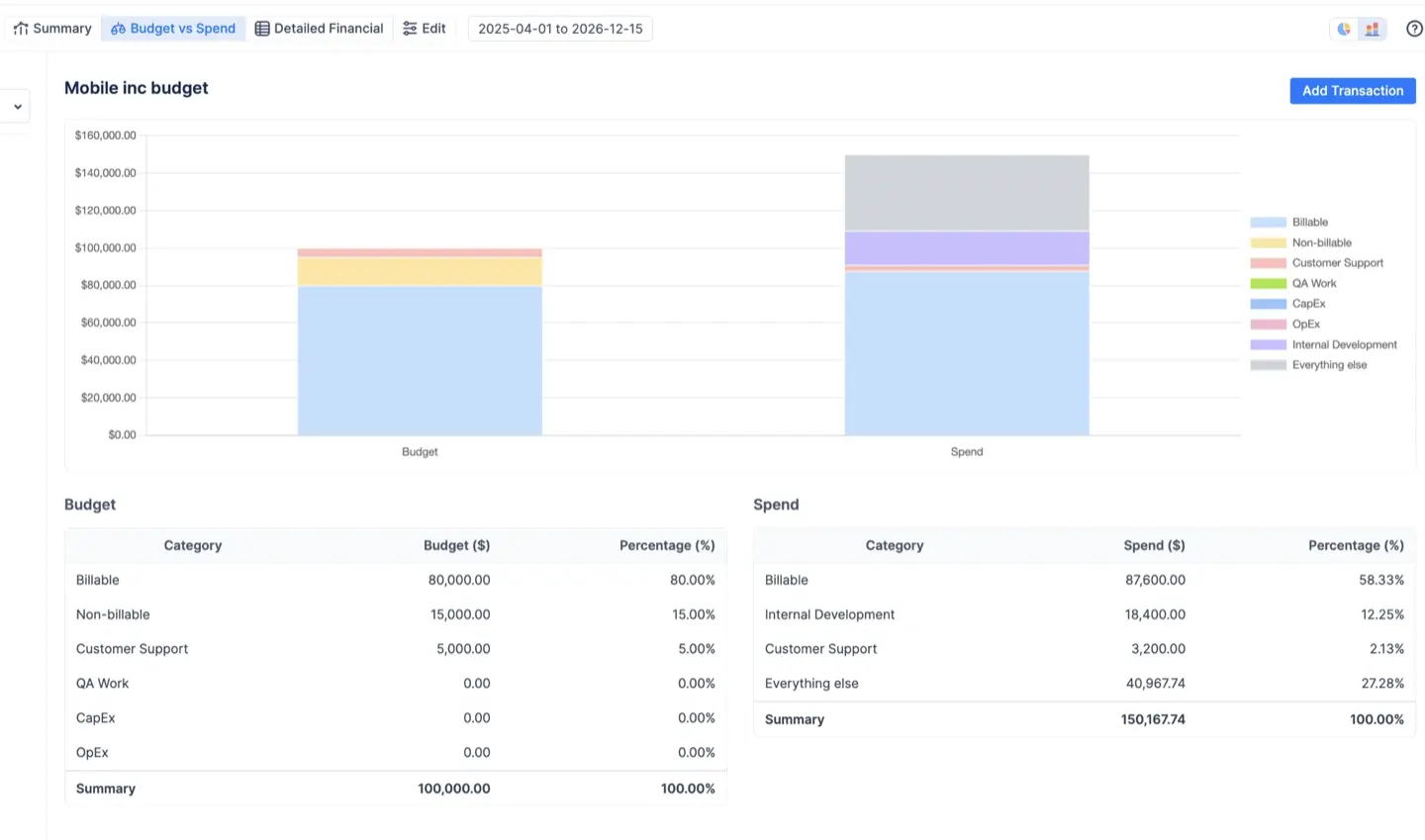
- Time tracking data is your cost and billing intelligence. Logged hours don't have to stay as hours. With billable/non-billable categories, custom worklog attributes, and cost/rate data layered on top of tracked time, ActivityTimeline gives finance and project leads the raw material to build accurate billing reports without exporting to a spreadsheet and reconciling manually. Reports like Planned vs. Actual and Detailed Worklog can be filtered, grouped by category or custom attribute, and exported to Excel — giving you an audit-ready breakdown of where time and money actually went across any project, team, or billing period.
- Integrations that respect your existing setup. Beyond Tempo migration, ActivityTimeline connects with Google Calendar, Outlook, and Apple iCal for two-way calendar sync, integrates with Advanced Roadmaps/Plans for Jira, and exposes a full REST API for teams that want to build their own dashboards or automations on top of the data.
Pricing. ActivityTimeline has a free 30-day trial, then there’s a per-user pricing scaling down as your team grows, from $2.50/user to $0.13/user. This starts lower than Tempo's base tier before you've added a single extra module. Since planning, tracking, and reporting are bundled rather than sold separately, most teams end up paying for one app instead of two or three.
Where it's not trying to compete. The day-to-day act of logging time — clicking a button, picking an issue, entering hours — is intentionally close to native Jira. ActivityTimeline's real differentiator is the planning and reporting layer wrapped around that logging, not a reinvented time-entry interface. If your only requirement is "log hours, generate an invoice," a narrower tool might feel simpler on day one, though most teams find they outgrow that limitation quickly.
Best for: teams that want resource planning and timesheets in the same app instead of stitching together multiple Tempo products, agencies tracking utilization across many projects, and any team migrating off Tempo that wants a low-friction path to bring existing worklogs, teams, and holiday data with them.
Because ActivityTimeline is not just a timesheet tool, all of this time tracking data feeds directly into resource planning, forecasting, and capacity reports without any additional plugins. The Planner shows workload alongside logged time. The Track module handles approvals and timesheet reviews. Reports surface utilization, availability by skill or position, and project progress. It is the planning and reporting layer that most Tempo users end up paying for separately, included here by default.
#2. Toggl Track
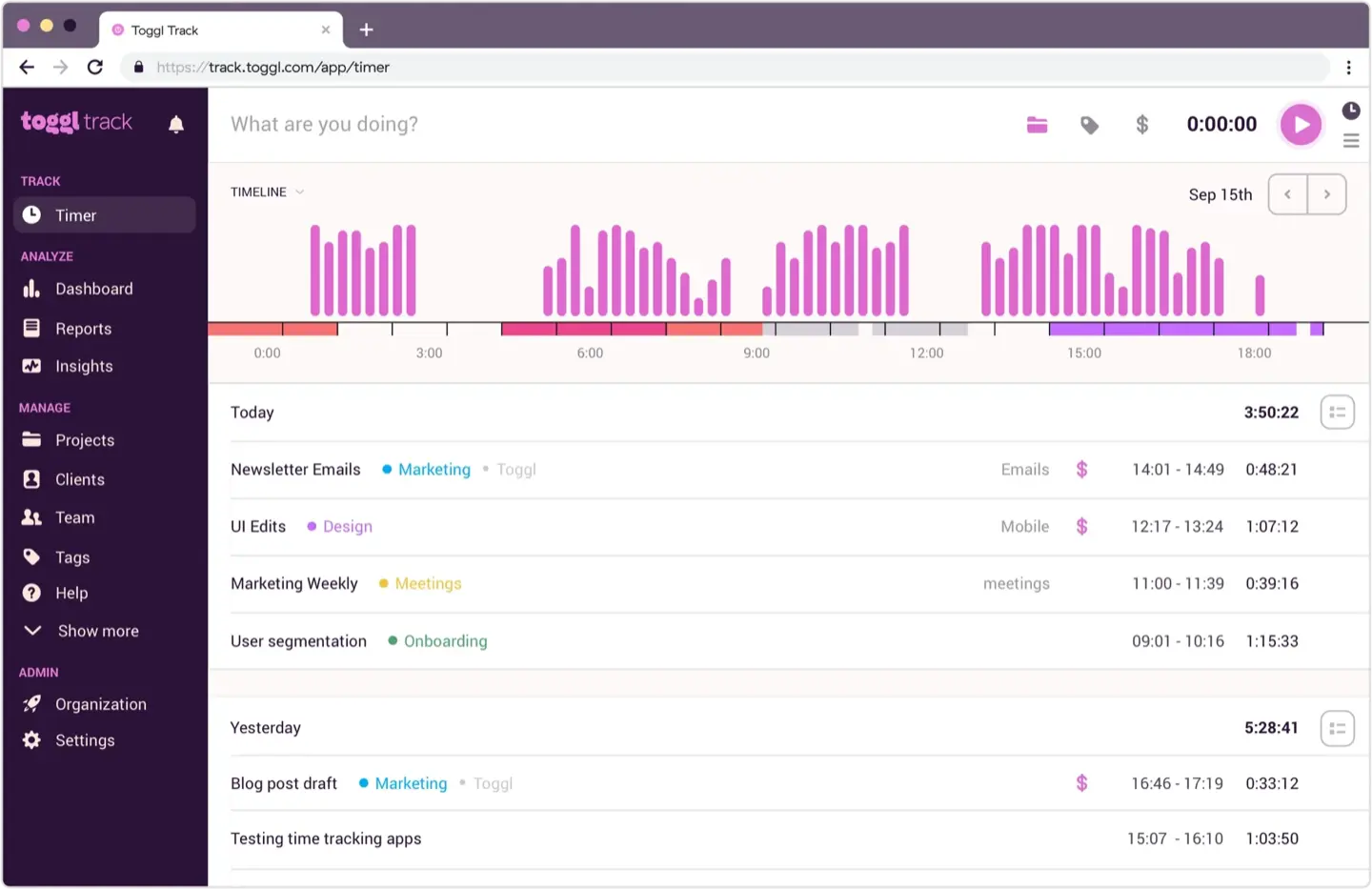
Toggl Track is one of the more recognizable time tracking names outside the Jira ecosystem, but that's also the core limitation for Jira teams. It runs as a standalone platform that connects to Jira rather than living inside it, which means worklogs, work items, and Jira-side reporting don't sync natively. They require an extra integration layer that adds friction and a potential point of failure. Teams used to logging time directly against Jira issues will find the context switch to a separate app disruptive, and any reporting that needs to combine Jira project data with time entries requires manual effort or third-party connectors to stay in sync.
Where Toggl Track does have genuine strength is in billing-focused workflows for teams that already operate across multiple platforms beyond Jira — freelancers and agencies in particular, where invoicing and client reporting matter more than deep Jira data fidelity. Its timer-based tracking and reporting are purpose-built for that audience.
Best for: teams (especially agencies and freelancers) that need time tracking tied closely to client billing and don't mind running a separate platform alongside Jira.
#3. Clockify for Jira
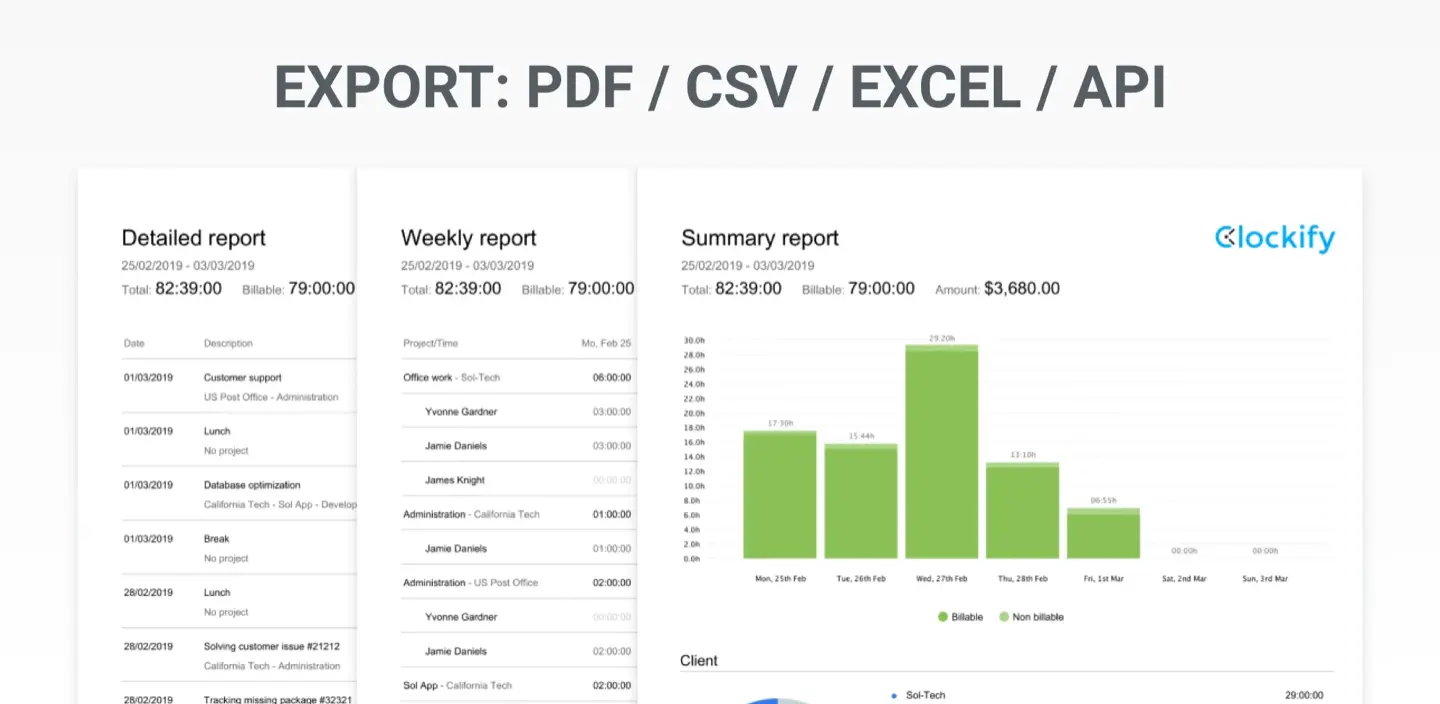
Clockify is a popular project tracker with straightforward reporting and a free plan, which makes it a frequent first stop for teams testing the waters before committing budget to a paid Tempo alternative. The Jira plugin connects Jira issues directly to Clockify's time tracking platform, supports unlimited users on its free tier, and is available across web, mobile, and desktop.
For logging time entries, filtering by project, and exporting basic reports, Clockify covers the fundamentals well. It lacks resource planning, deeper worklog attributes, and the kind of forecasting reports that matter once a team scales past simple logging — but as a free, no-friction starting point, it's hard to beat.
Pricing: free app.
Best for: small teams or anyone just starting to formalize time tracking who isn't ready to pay for enterprise reporting yet.
#4. RVS Worklog Time Tracking
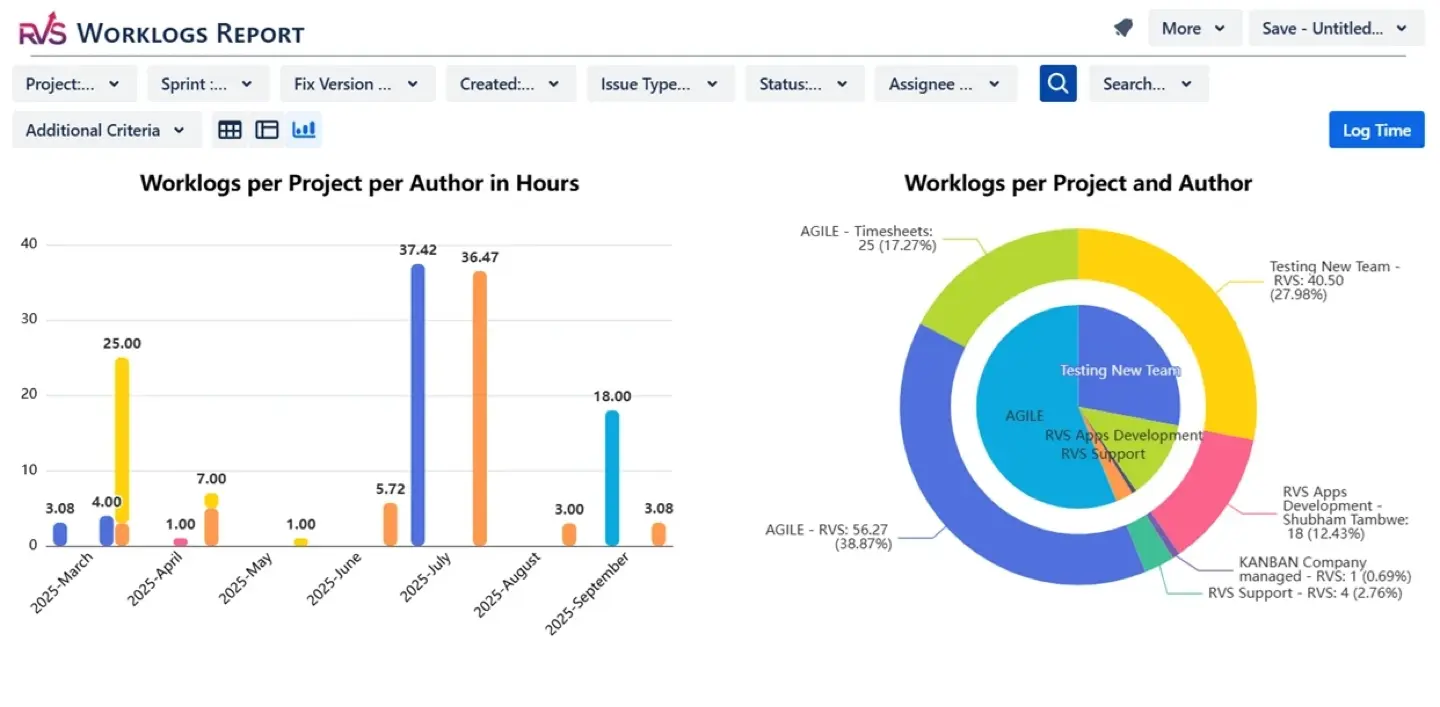
RVS Worklog Time Tracking is a direct alternative for teams that find Tempo too complex. It's built specifically as a lightweight, in-Jira time tracking and timesheets app — no external platform, no separate login, just work logs, filtering, and reports inside the Jira interface you already use.
It supports CSV and Excel export, customizable worklog options, and real-time reporting across projects and team members. Compared to Tempo, the setup is faster and the interface is simpler, though the reporting and filtering options are correspondingly narrower — there's no automated time tracking or resource capacity planning layer.
Pricing: free for less than 10 users; starts from $0.35/user to $0.05/user as your team grows.
Best for: teams that want simple, in-Jira time tracking without the overhead (or cost) of Tempo's broader ecosystem.
#5. Clockwork Pro
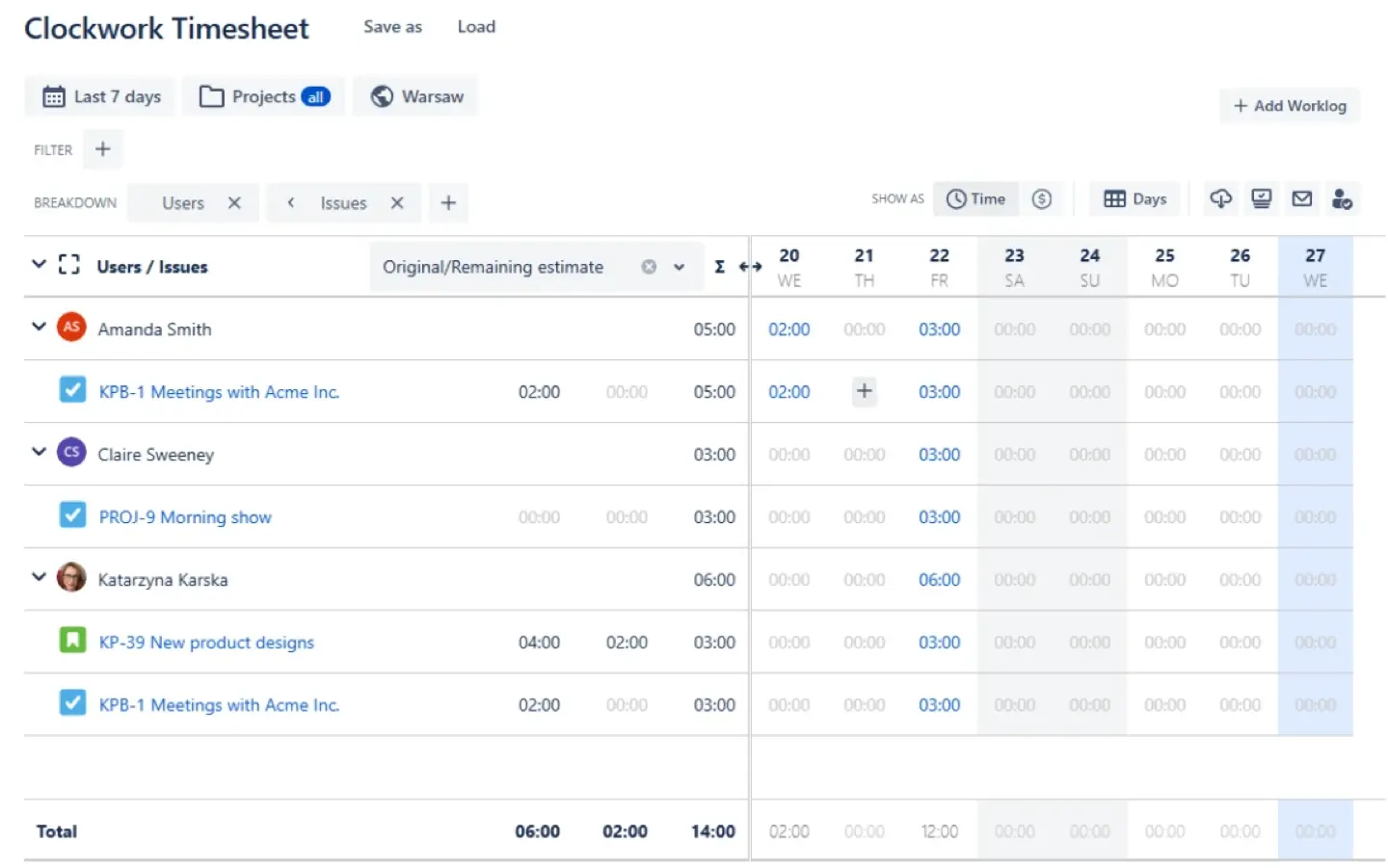
Clockwork Pro takes a different angle on the time-tracking problem: instead of relying on team members to remember to log hours, it can generate work logs automatically based on Jira issue status changes, in addition to supporting manual entries and timers. It fully syncs with Jira's native worklogs (avoiding the data-silo issue some Tempo users run into), and adds cost/rate tracking, lockable billing periods, and reminders for team members who haven't logged enough hours.
It's priced well below Tempo and focuses entirely on time tracking and billing — there's no resource or capacity planning module, so teams that need workload visibility will still need to pair it with a planning tool or look elsewhere.
Pricing: free for less than 10 users; starts from $1.30/user to $0.04/user as your team grows.
Best for: teams that want minimal manual time entry and tight Jira worklog integration, particularly for client billing and invoicing.
Conclusion
Tempo Timesheets excels at turning time logs into actionable insights for teams that are willing to pay for its full ecosystem, plugin by plugin. But for most businesses, the real friction isn't the core tracking — it's the cost of stacking add-ons, the limits on worklog portability, and the lack of native resource planning that comes standard.
The decision really comes down to two camps. If you need planning and tracking together, ActivityTimeline and Planyway are your strongest options, with ActivityTimeline offering the deeper feature set across teams, skills, holiday management, and reporting. If all you need is to log hours and generate an invoice, Toggl Track, Clockify, RVS Worklog, or Clockwork Pro will get the job done without paying for planning features you'll never open.
For teams that want both — visibility into who's working on what next week and a clean, exportable record of what was actually logged — ActivityTimeline remains the strongest all-in-one pick. It bundles planning, tracking, and reporting into a single Atlassian Marketplace app, and because it supports direct import of Tempo worklogs, teams, and holiday schemes, switching over doesn't mean losing your historical data or starting your reports from scratch.
Ready to make the switch?
See exactly what you'd be working with before committing to anything.
Start your free ActivityTimeline trial → — free for up to 10 users on Jira Cloud, no credit card required.
Learn how to migrate from Tempo to ActivityTimeline → — import your existing worklogs, teams, and holiday schemes in a few clicks.
Book a demo → — talk to our team about your specific setup, permissions, and reporting needs before you migrate.