
Tempo Financial Manager (formerly Cost Tracker) is a Jira Cloud app that turns Tempo Timesheets data — or native Jira worklogs — into project cost, revenue, and budget tracking inside Jira. It is designed for project-based financial tracking: a project owner defines a project scope, sets cost and billing rates, adds a budget, and the app transforms daily time logs into real-time financial metrics. You get a visual overview of project health, spend against budget, billable vs. non-billable hours, and CAPEX/OPEX accounts, plus the ability to group multiple projects into strategic portfolios to measure performance across the board.
For small to medium-sized teams already invested in the Tempo ecosystem, that's genuinely useful functionality: it helps identify financial risks early, avoid budget creep through standardized processes, and take corrective action before overrunning costs become a problem.
So why do so many teams end up searching for Tempo Financial Manager alternatives? Because of how the app is packaged and what it leaves out:
- It rarely works alone. Financial Manager needs a time source to be useful — Tempo Timesheets or native Jira worklogs — and forecasting and planned-vs-actual reporting only unlock once you also buy Tempo Capacity Planner. A full plan–track–forecast workflow means licensing three to four separate Tempo apps (Core + Financial Manager + Timesheets + Capacity Planner), and the fees stack up fast.
- Backward-looking budgets. It tracks spend against a single manual budget total after the fact. There's no way to pre-allocate budget across roles, teams, or work categories before the work begins.
- Forecasting is gated. Projected cost, revenue, and profit — the numbers your financial goals depend on — appear only after Capacity Planner is added.
- Rigid rates. Rates are hourly and role-based; you can't assign a monthly rate to a salaried user.
- Transactions aren't people-aware. Expenses and revenue attach to accounts and projects, not to individual users.
- Money without capacity context. It shows the financials, but resource allocation and capacity planning live in a different Tempo app — so you can't see cost and who's actually available in one place.
- Cloud / Forge-only. Financial Manager runs on Atlassian Cloud's Forge platform; teams with on-prem requirements have limited options.
Who this article is for: Jira teams reviewing alternatives before committing to Tempo Financial Manager, or teams already using it who feel locked into the wider Tempo stack and want to pay for one app instead of four.
Which Jira Apps Work Better — and When
The right alternative depends on what financial management means for your team. Some organizations need full accounting and invoicing. Others just want lightweight budget caps per project. Analytics-heavy teams want BI-style reporting on top of their timesheets data. But the most common request we hear is simpler: resource planning and financial visibility together, in one Jira-native tool, without juggling separate apps and separate fees.
That's the head-to-head that matters most, so let's start there.
Comparison Table: Tempo Financial Manager vs. ActivityTimeline
Per-tool detail for the other alternatives follows below.
#1 ActivityTimeline Advanced Edition — Finances Module
Best for: Teams that want financial visibility and resource planning together in a single, Jira-native tool.
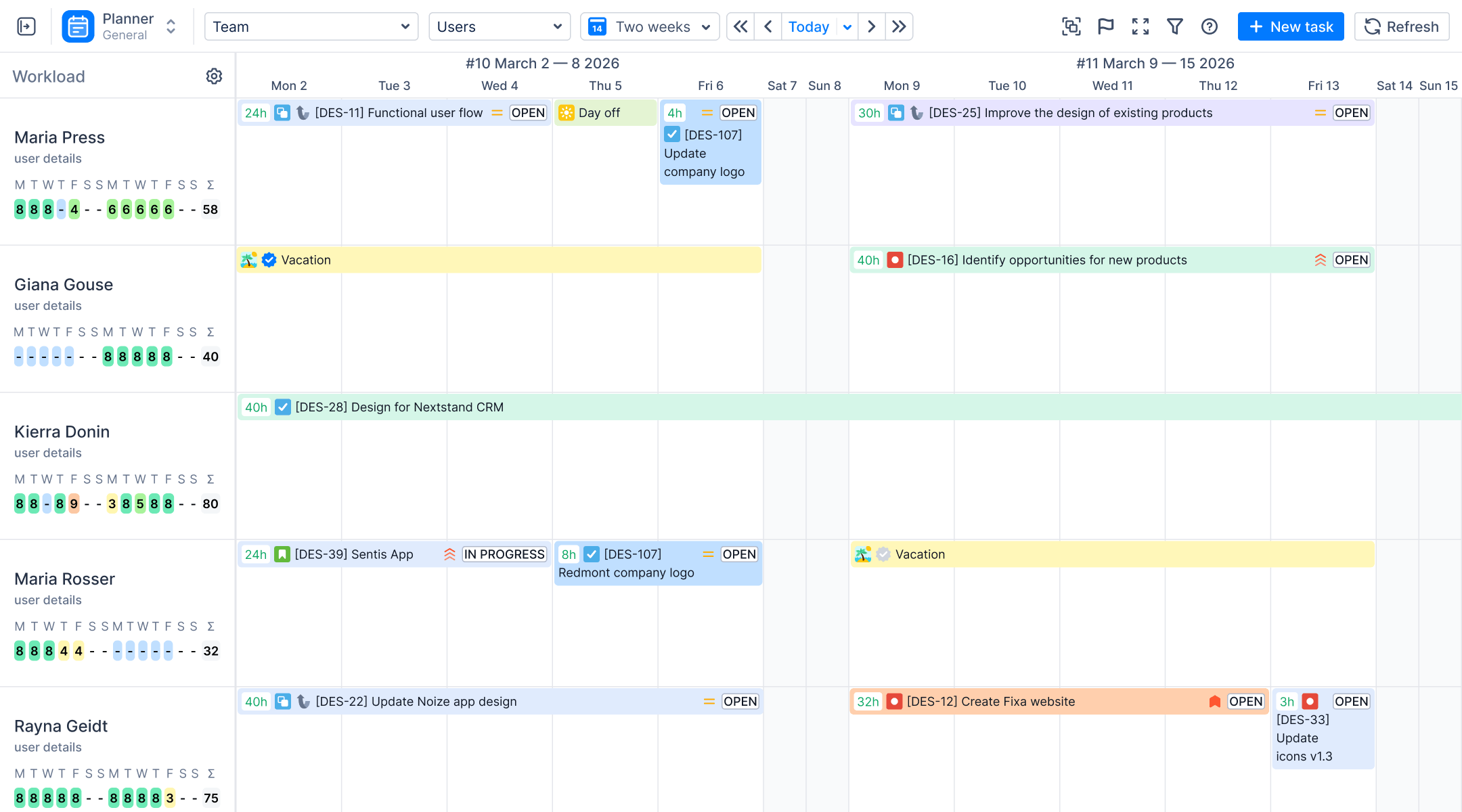
ActivityTimeline is a resource planning and time tracking app for Jira, and its Advanced Edition adds a full Finances module. That combination is the core differentiator: Planner, Workspace, Timesheets, Reports, and Finances live in one app, whereas Tempo splits the same outcome across separately licensed products. Instead of asking "what did we spend?" after the fact, you plan capacity, track hours, and monitor the financial layer behind that work in one workflow.
Key features
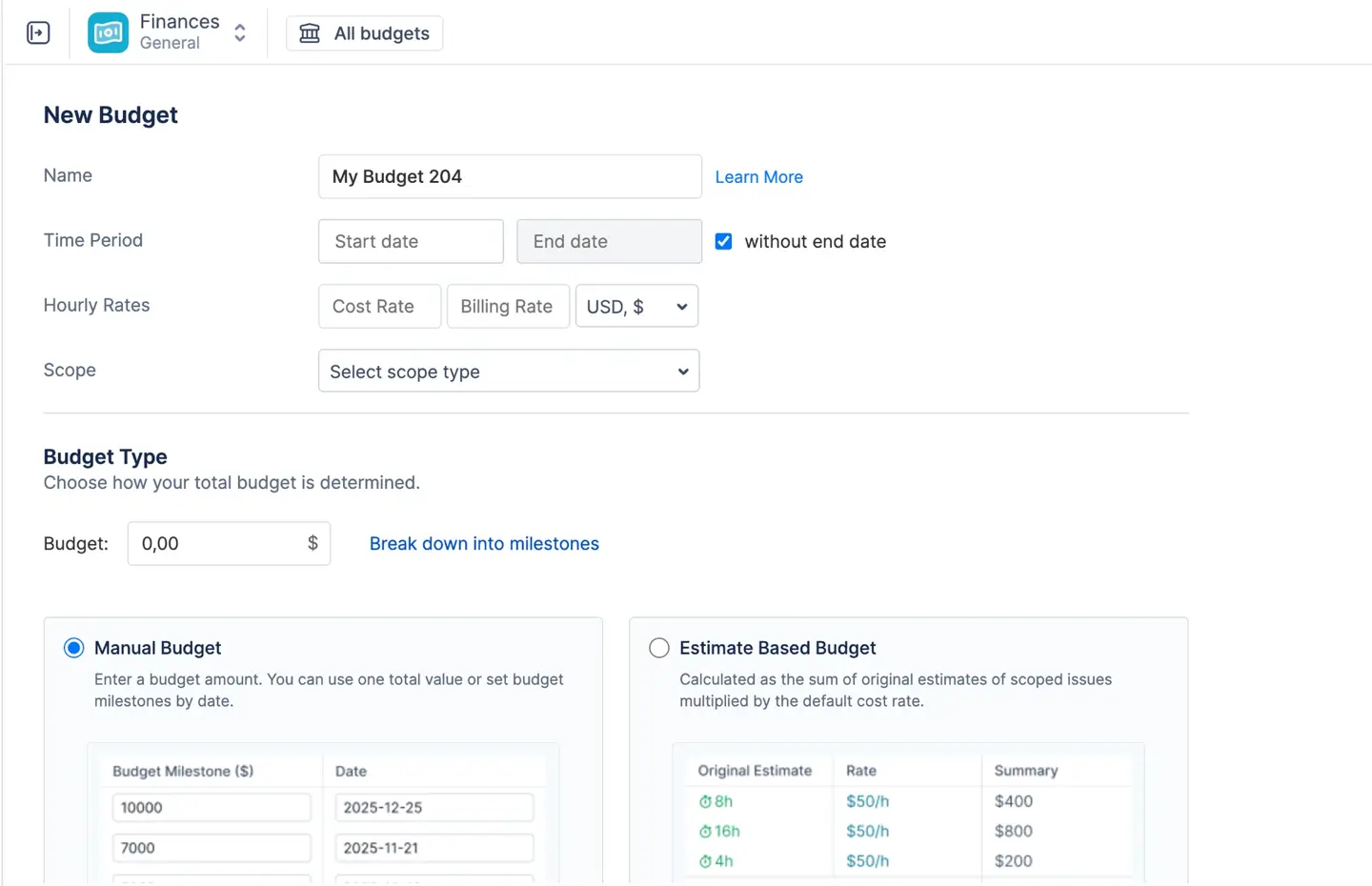
Flexible budget containers. A budget in ActivityTimeline is a financial container scoped to whatever you're delivering: entire Jira projects, specific epics, or a saved JQL filter for highly customized tracking (say, all high-priority bugs assigned to one team across multiple projects). You choose how the total is determined — a Manual Budget (a fixed cap approved by management, optionally broken into date-specific milestones like "$10,000 by Q1, $20,000 by Q2") or an Estimate-Based Budget that the system calculates automatically from the original estimates of every task in scope multiplied by cost rates. Tempo Financial Manager supports the manual approach only.
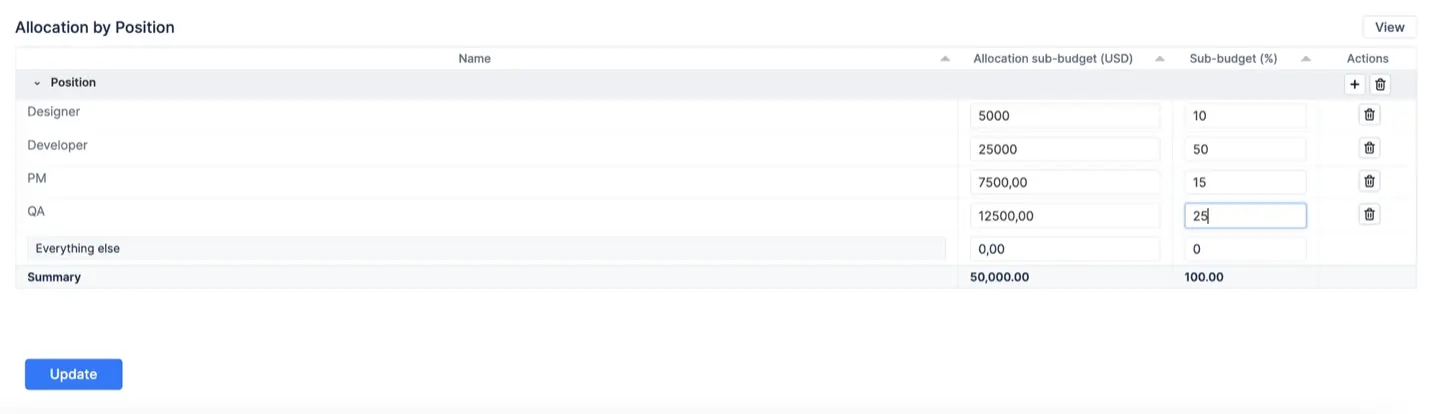
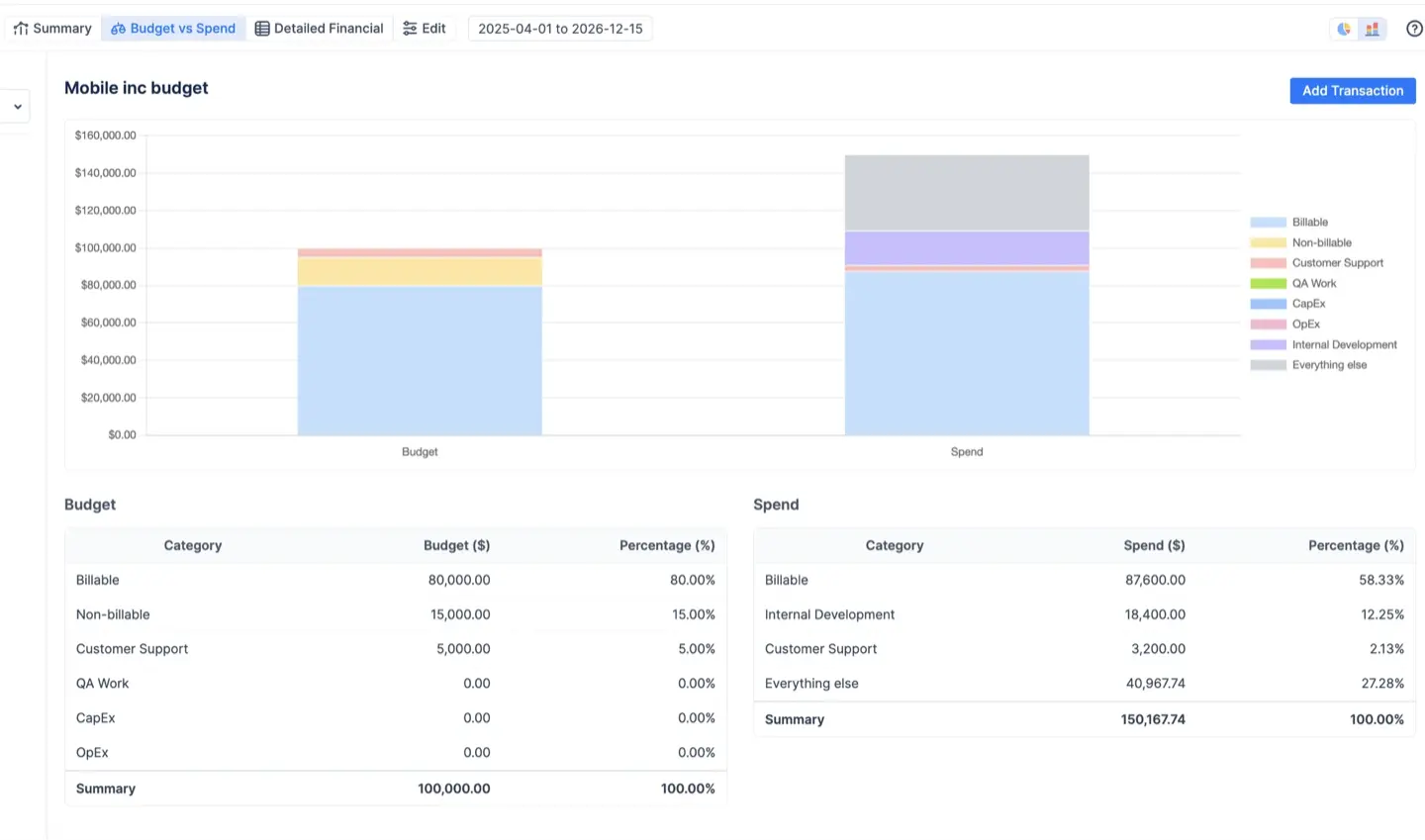
Forward-looking budget allocations. This is where ActivityTimeline stops being a rear-view cost tracker. Budget Allocations let you pre-allocate your total budget across categories, positions, components, or assignees — for example, 70% billable work, 20% internal, 10% urgent — creating a baseline before a single hour is logged. The Budget vs Spend report then compares your plan against actual spend in real time, so if "non-billable" was planned at 20% but is consuming 48% of actual costs, the discrepancy is visible immediately and you can take corrective action before the budget is exhausted.
Labor rates that match how you actually pay people. Rates convert your team's time logs into cost and revenue data, and ActivityTimeline supports both hourly rates (worklog hours × rate) and monthly rates for salaried employees — a fixed monthly amount that the system prorates into a daily cost regardless of logged hours. A strict rate hierarchy applies the most specific rate available: category-adjusted rates (e.g., "Urgent work" billed at a 3× multiplier, or "Non-billable" set to $0) override user-specific rates, which override the default budget rate. All rates are effective-dated, so a raise on July 1st applies from July 1st forward without rewriting the cost of June's work — historical accuracy your finance team will appreciate.
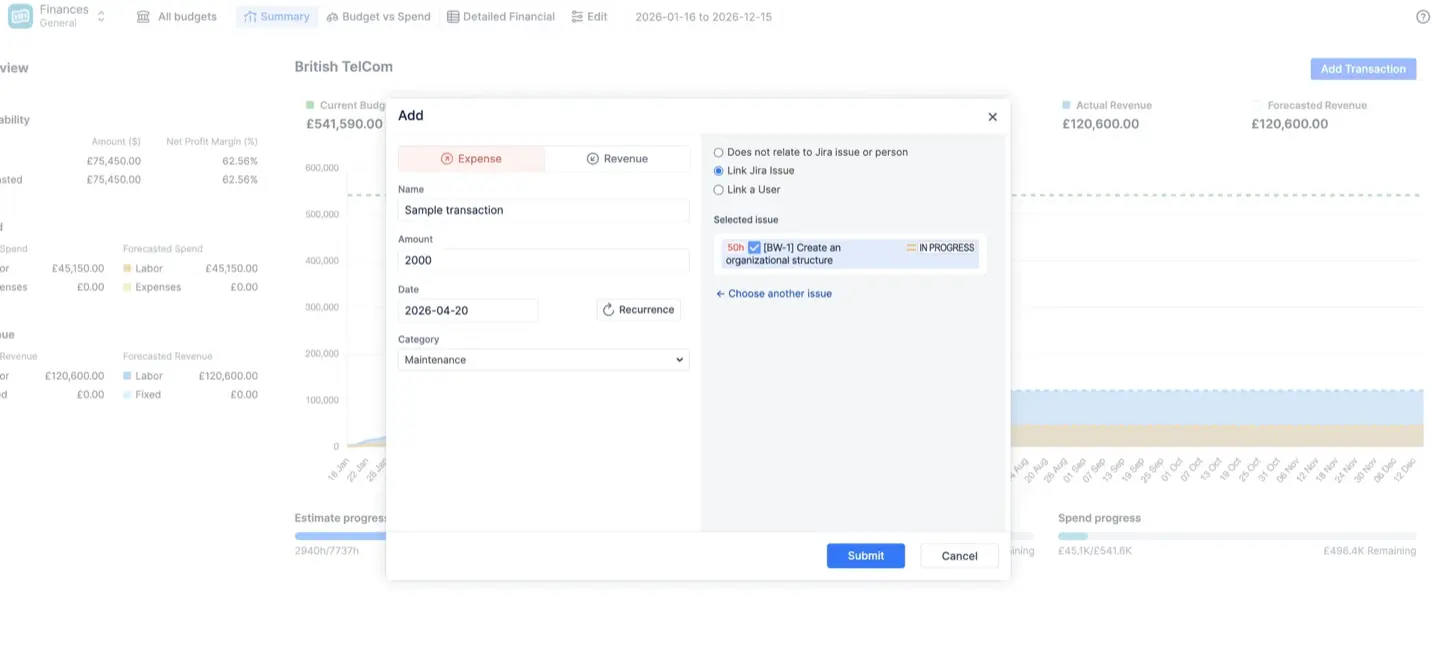
Person-aware manual transactions. Fixed expenses (software licenses, travel, contractor fees, hardware) and fixed revenue (milestone payments, down payments, subscription renewals) are logged as manual transactions with recurrence support — and they can be linked to specific Jira issues and individual users. Link a one-time bonus to a team member and it's counted in their true labor cost; link a contractor's fixed fee to their profile and the ledger stays consistent. Tempo ties transactions to accounts and projects only.
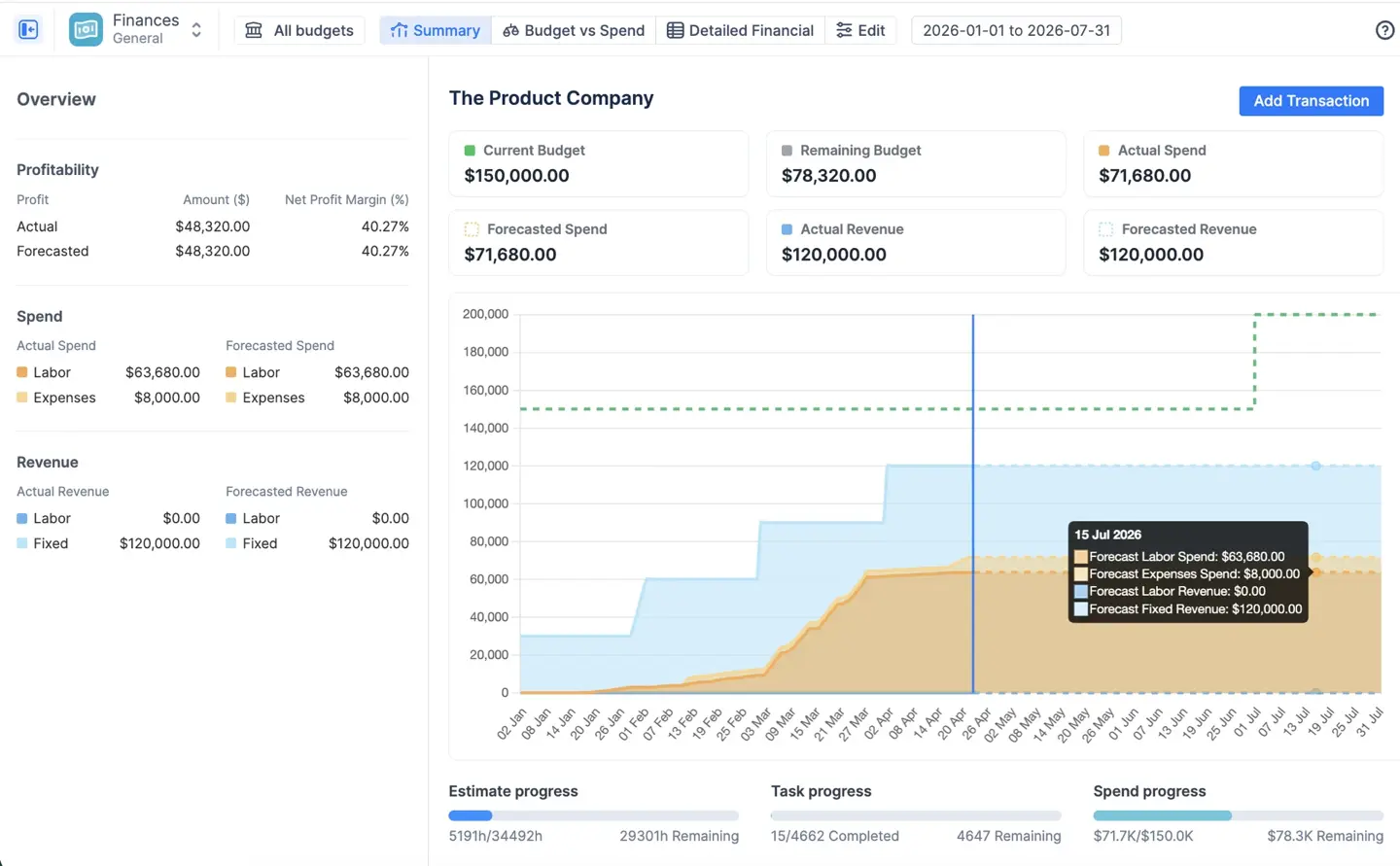
Built-in forecasting. Forecasted spend and revenue are calculated from concrete scheduled data — future worklogs, recurring transactions, and monthly rates projected through the budget period — not abstract estimates, and no separate capacity planner app is required. If the forecasted spend line crosses your budget line on the cumulative trend chart, the dashboard warns you the project is on track to lose money.
Three live financial reports. The Summary Dashboard is the executive view: current and remaining budget, actual and forecasted spend and revenue, profit and net margin, and a cumulative burn-rate chart, plus progress indicators that compare spend progress against actual task progress (80% of money spent with 40% of tasks done is a red flag you'll see instantly). The Budget vs Spend report compares planned allocations against reality, grouped by category, project, epic, or assignee, in proportional (pie) or absolute (bar) views.
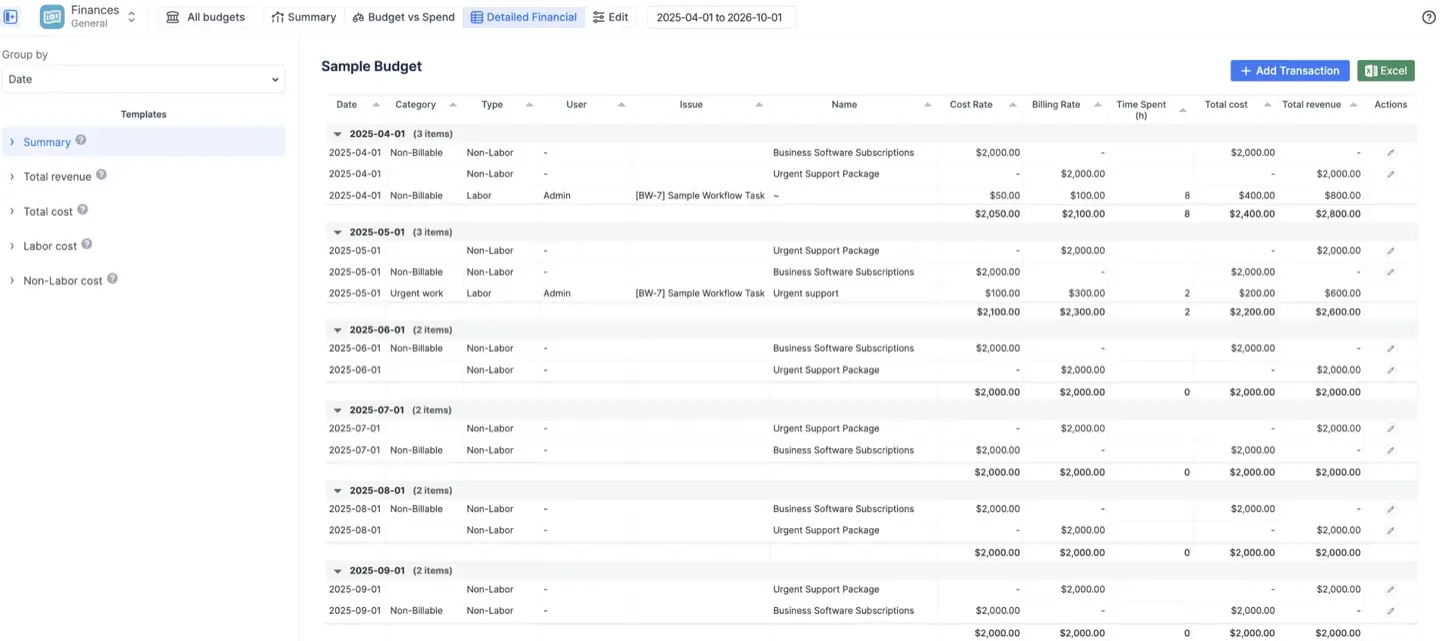
The Detailed Financial report is the auditable ledger — every worklog cost and every transaction line by line, with templates like "Total revenue" that produce an invoice-ready list of billable hours for export. All three support date-range filtering and one-click Excel export.
Governance and access control. Budget-level roles (Owner, Administration, Read-Only) keep sensitive labor rates hidden from stakeholders who only need to see project health, and Jira permission mirroring ensures financial visibility never bypasses your existing Jira security.
Real-world scenarios out of the box. The module is documented for fixed-price contracts, time & materials agencies maximizing billable margins, internal departments with strict cost ceilings, and product companies weighing continuous development burn against sales revenue — each with a recommended tracking configuration.
What it doesn't do
Like Tempo Financial Manager, ActivityTimeline’s Financial Module focuses on internal cost and revenue tracking rather than external billing — there's no dedicated invoicing or accounts-payable module, and no native QuickBooks or Xero connector.
Ideal customer profile and pricing
ActivityTimeline fits project and resource managers who need capacity planning connected to financial reporting; agencies, consultancies, and professional-services teams billing by the hour; and teams already using ActivityTimeline for project planning who don't want to pay for a second tool just to see financials. A single subscription on the Atlassian Marketplace covers planning, timesheets, reporting, and finances. Because Tempo licenses Financial Manager, Timesheets, and Capacity Planner separately, a comparable Tempo setup typically costs roughly 40–50% more for the same capability — and the full Tempo Suite can run up to ~2–4.7× the per-user price.
#2 Budgety for Jira (by DEISER)
Best for: Teams that need simple project budget tracking without resource-planning complexity.
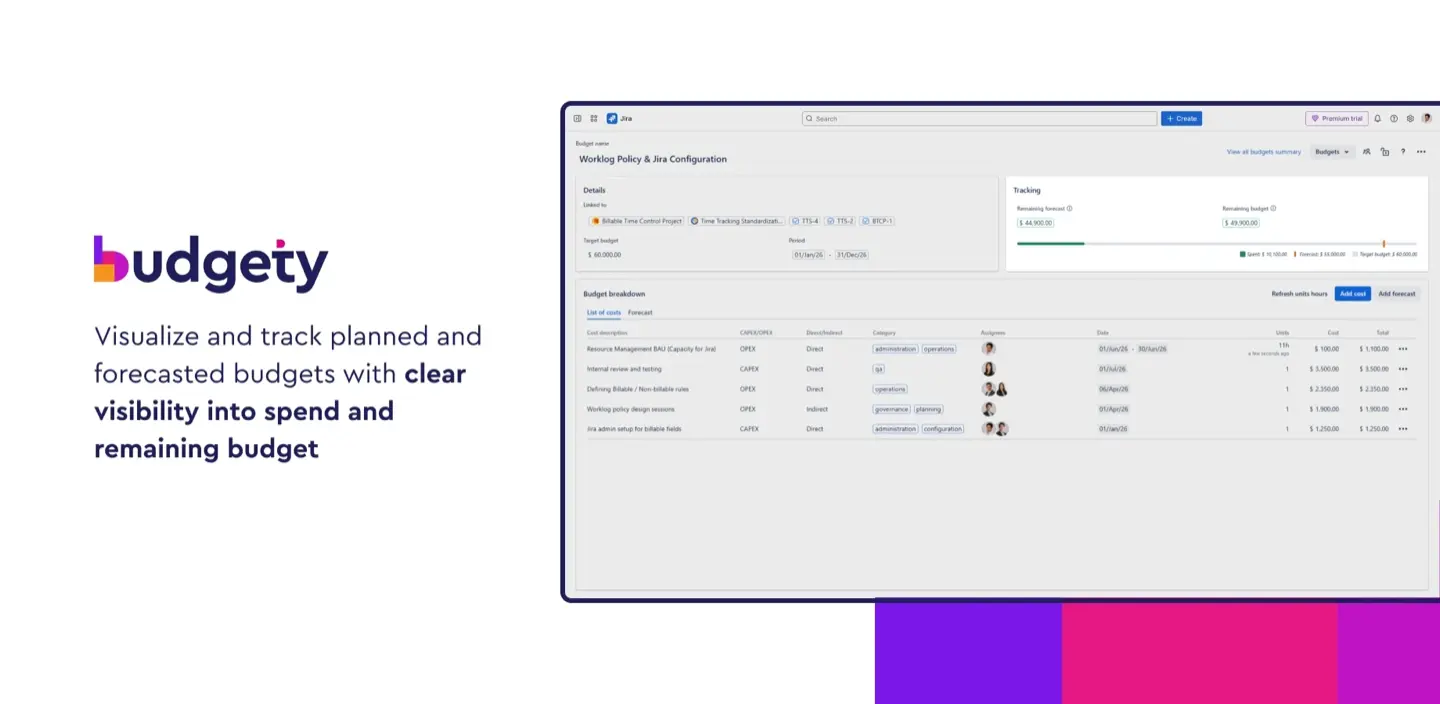
Budgety, developed by DEISER, takes a deliberately hands-on, lightweight approach to project finances in Jira Cloud. You create budgets, assign costs and expenses at different project levels, and monitor expenditures against planned budgets in real time — including CAPEX and OPEX classification and their impact on portfolio-level budgets. Setup is quick and the learning curve is minimal, which makes it a reasonable choice for teams whose main requirement is "tell me when we're approaching the cap."
What it lacks is everything around that: no capacity planning, workload management, or team-availability reporting; no timesheet approval workflow; and limited reporting depth compared with a full financial manager — no utilization forecasts or labor-rate hierarchies. If your financial process ends at tracking spend against a per-project budget, it works; if you need to manage resources and budgets together, you'll outgrow it.
#3 eazyBI for Jira
Best for: Analytics-heavy teams that need custom financial reporting on top of Jira and Tempo data.
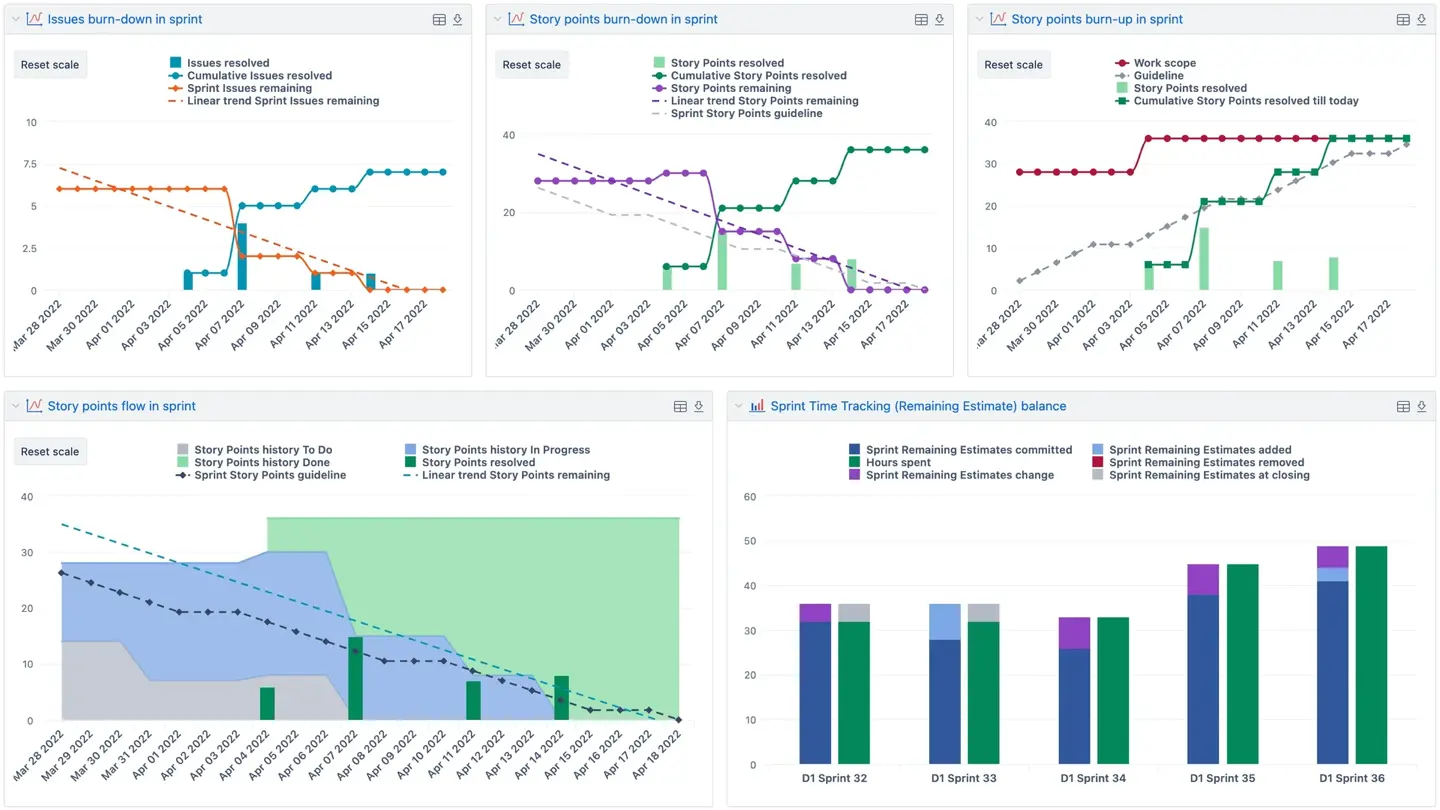
eazyBI is a business-intelligence app rather than a financial manager. It builds BI-style reports and dashboards on top of Jira and Tempo Timesheets data, and with custom MDX queries you can calculate virtually any metric — cost per issue, budget variance by team, revenue per sprint — then roll numbers up across multiple projects and embed the results in Jira and Confluence. It's available for both Cloud and Data Center, which is a genuine advantage for large enterprises with on-prem requirements.
The trade-offs: eazyBI is not a planning tool — there's no scheduling, capacity management, or workload balancing — and it needs MDX knowledge plus meaningful setup time. It also depends on a separate time-tracking tool to feed it data and has no timesheet approval of its own. Think of it as the reporting layer you add after your tracking process is settled, not a replacement for it.
#4 Toggl Track (with Jira Integration)
Best for: Small teams or freelancers who want dead-simple time tracking with billable-hour management.
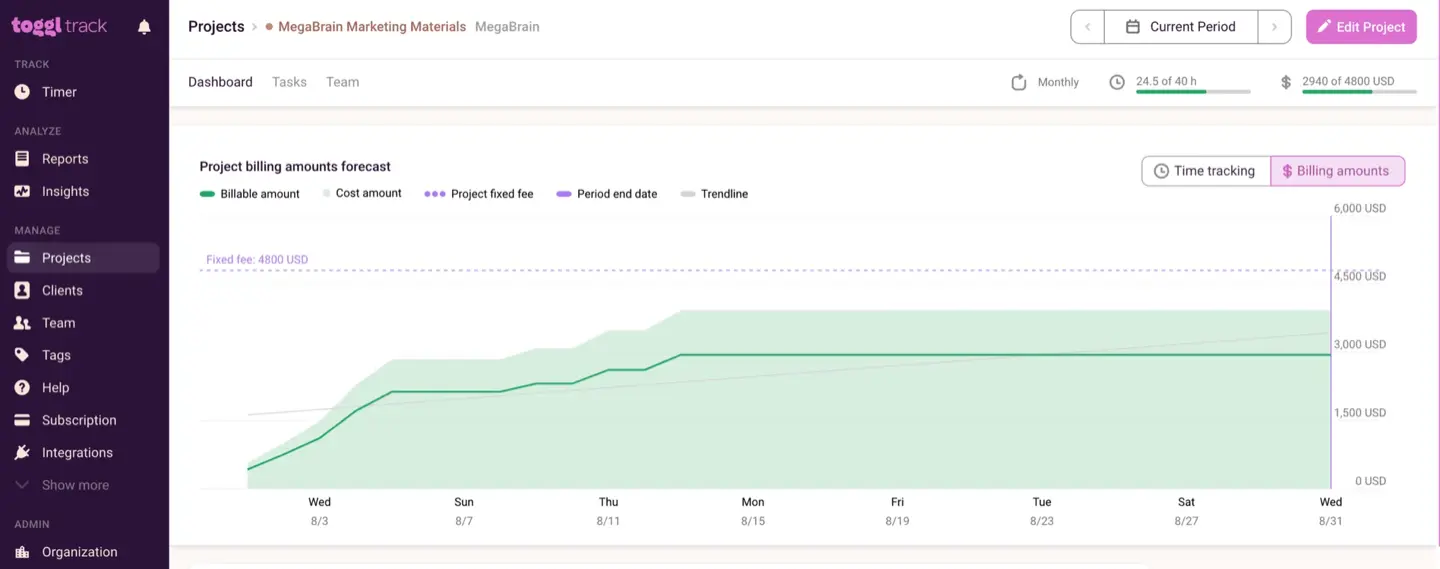
Toggl Track is the friendliest time tracking tool on this list: intuitive timer-based tracking with project tagging and billable rates, connected to Jira via a browser connector or Zapier integration. You can separate billable and non-billable hours per project or client, pull simple invoice-ready CSV reports, and review a team dashboard of logged hours and amounts — enough to support basic billing and client payments for a small operation.
But Toggl is not a native Jira add-on; it's a separate external tool that breaks the Jira-centric workflow, with no capacity planning, no approval workflow, and only basic financial reporting. It isn't built for complex multi-team organizations, and budget tracking beyond hours-and-rates isn't really its job.
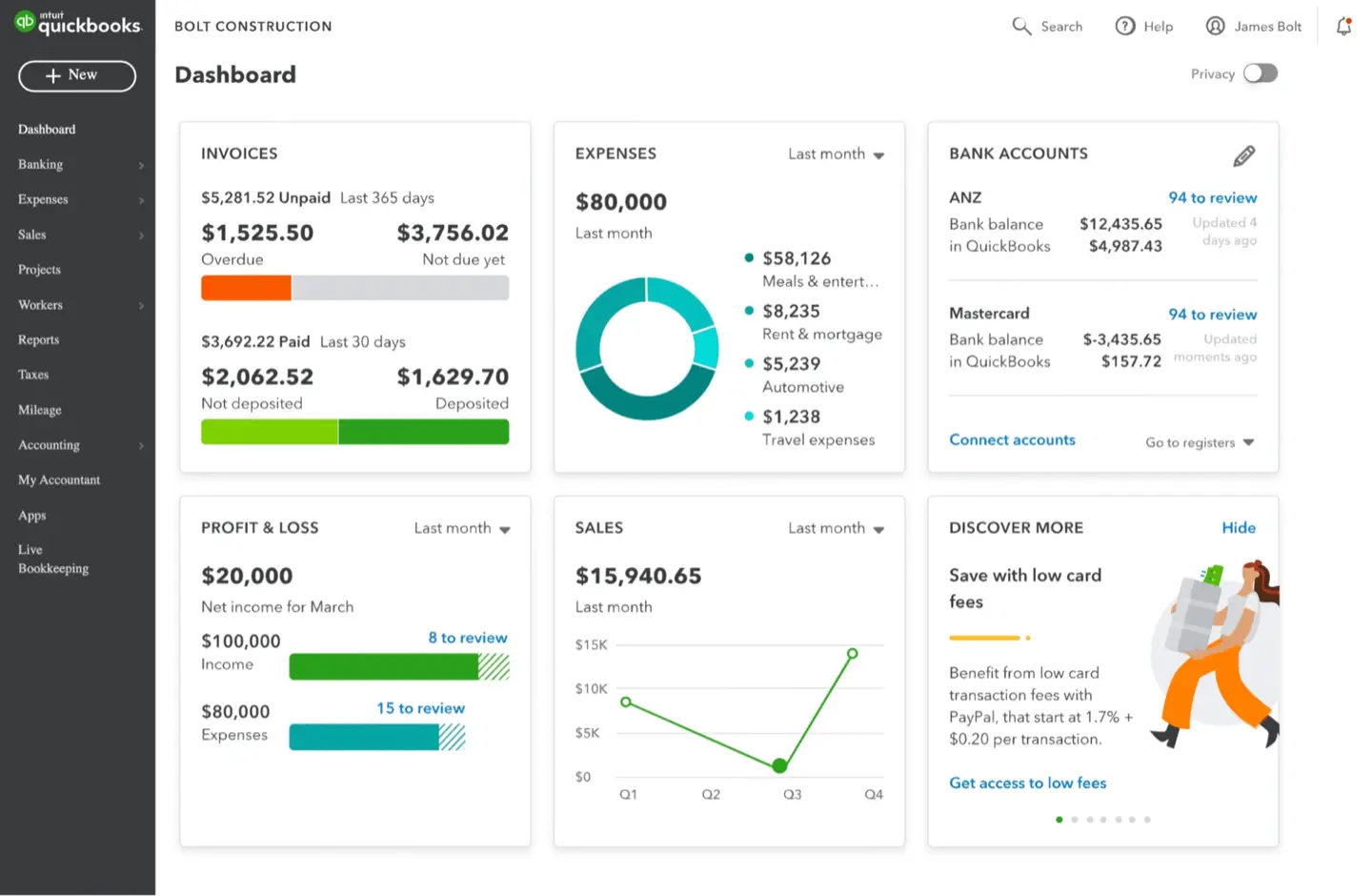
#5 Xero or QuickBooks via Jira Integration (Exalate / Zapier)
Best for: Organizations that need true accounting and invoicing fed by Jira project data.
If your requirement is actual accounting — client invoices, accounts receivable and payable, tax, payroll, multi-currency, bank reconciliation — no Jira app will replace a real accounting platform. Xero and QuickBooks can pull Jira time and cost data into financial records through integration tools like Exalate or Zapier, generate accurate invoices from verified logged hours, and close the loop from delivery to payment.
The cost is complexity: these are separate systems that need integration upkeep, they offer no project management, resource planning, or workload visibility, and they're overkill if all you need is internal cost tracking. Many teams pair an accounting platform with a Jira-native tool like ActivityTimeline — one manages the project financials in real time, the other handles the books.
Conclusion
Tempo Financial Manager is a capable financial manager for Jira, but it assumes you've bought into the wider Tempo stack — and on its own, it mostly tells you what you've already spent. For Jira teams that want to plan capacity and budgets, track billable work, and forecast financial outcomes in one tool at a lower total cost, ActivityTimeline's Advanced Edition Finances module is the most complete single-app alternative. The other options each solve a slice of the problem — budget caps, BI reporting, simple time tracking, or full accounting — but only ActivityTimeline brings resource planning and project financials together natively in Jira.
Ready to see it in practice?
Try ActivityTimeline free for 30 days on the Atlassian Marketplace.
See how Planned vs. Actual reporting, billable-hour tracking, and resource utilization forecasting work together — without switching tools.