
Resource planning is one of the most common reasons Jira admins go shopping on the Atlassian Marketplace. Teams need to see who's available, who's overbooked, and whether the entire team can realistically deliver what's on the board — and native Jira doesn't fully answer that on its own. That's where Tempo Planner comes in for a lot of organizations.
But as projects grow more complex and team plans stretch across multiple teams and multiple projects, many Jira admins and project managers start looking for tempo planner alternatives that offer more flexibility without the layered pricing.
This roundup walks through what Tempo Planner actually does, why teams outgrow it, and which apps are worth evaluating instead.
What Is Capacity Planner, and Why It Might Not Be the Right Choice for Your Business
Tempo Planner (now named Capacity Planner) is a resource capacity planning and management tool tailored for Jira. It lets project managers assign work items to team members, schedule tasks against availability, and get a visual read on team capacity across a project or a group of projects. For organizations already inside the Tempo ecosystem — using Tempo Timesheets for time tracking, or Structure PPM for portfolio-level reporting — Tempo Planner can slot in as the resource allocation layer.
It's built primarily for enterprise PMOs that need a capacity planner connected to a broader project portfolio management (PPM) stack. If your organization already has a Jira admin managing multiple integrated Tempo apps, the seamless integration between Planner, Timesheets, and Financial Manager can work well.
The core limitation, though, is structural: Tempo Planner is one module in a modular suite. To get full functionality like actual time tracking, planned-vs-actual comparisons, billing and budget data, you need to separately purchase Tempo Timesheets, and in some cases Financial Manager on top of that. This is, by a wide margin, the single biggest driver behind Tempo planner alternatives searches.
A few other pain points come up repeatedly in reviews and community discussion:
- Rigid, manual task distribution. Tempo Planner allocates Jira issues to team members based on availability, but there's no smart automation — distributing or rebalancing work across an entire team still requires manual adjustment.
- Pricing stacks up fast across modules. Tempo's per-user pricing for Planner alone for a team of 500 users will cost $1144/mo, but once you add Timesheets, real-world combined costs can land $2666/mo. Reported market pricing for Tempo Financial Manager spans at another $866/mo, with no free tier for small teams.
- Limited customization of capacity constraints. Workload balancing options are fairly basic; fine-tuning how capacity is calculated per person or per workload scheme isn't as flexible as in dedicated planning tools.
- Limited reporting capabilities. Reporting is primarily focused on planned time. Teams that need insights into time spent, planned vs. actual performance, financial metrics, or project progress often have to rely on additional apps or external reporting tools.
These gaps are why many Jira teams start comparing Tempo Planner against dedicated alternatives. Here's how six of the most common choices stack up.
Which Jira Apps and Add-Ons Work Better — and in What Case
There's no single best replacement for Tempo Planner — the right pick depends on whether you need an all-in-one planning-plus-timesheets app, enterprise-grade Project Portfolio Management, a lightweight visual scheduler, or native Jira capabilities you already have access to.
ActivityTimeline is the most direct, like-for-like replacement for Tempo Planner, since both unify planning and time tracking in a single app. The rest serve more specialized needs: native Jira Premium users, large-scale PPM, or teams managing resources across multiple tools beyond just Jira.
#1. ActivityTimeline
ActivityTimeline is designed for team capacity and holiday management within Jira, and it's built specifically to remove the "buy two apps to get one workflow" problem that defines Tempo Planner. Where Tempo splits planning and time tracking into separate purchases, ActivityTimeline covers the full flow for planning, working, tracking, reporting and budgeting in a single license — recommended specifically for teams that need detailed resource planning without juggling multiple apps.
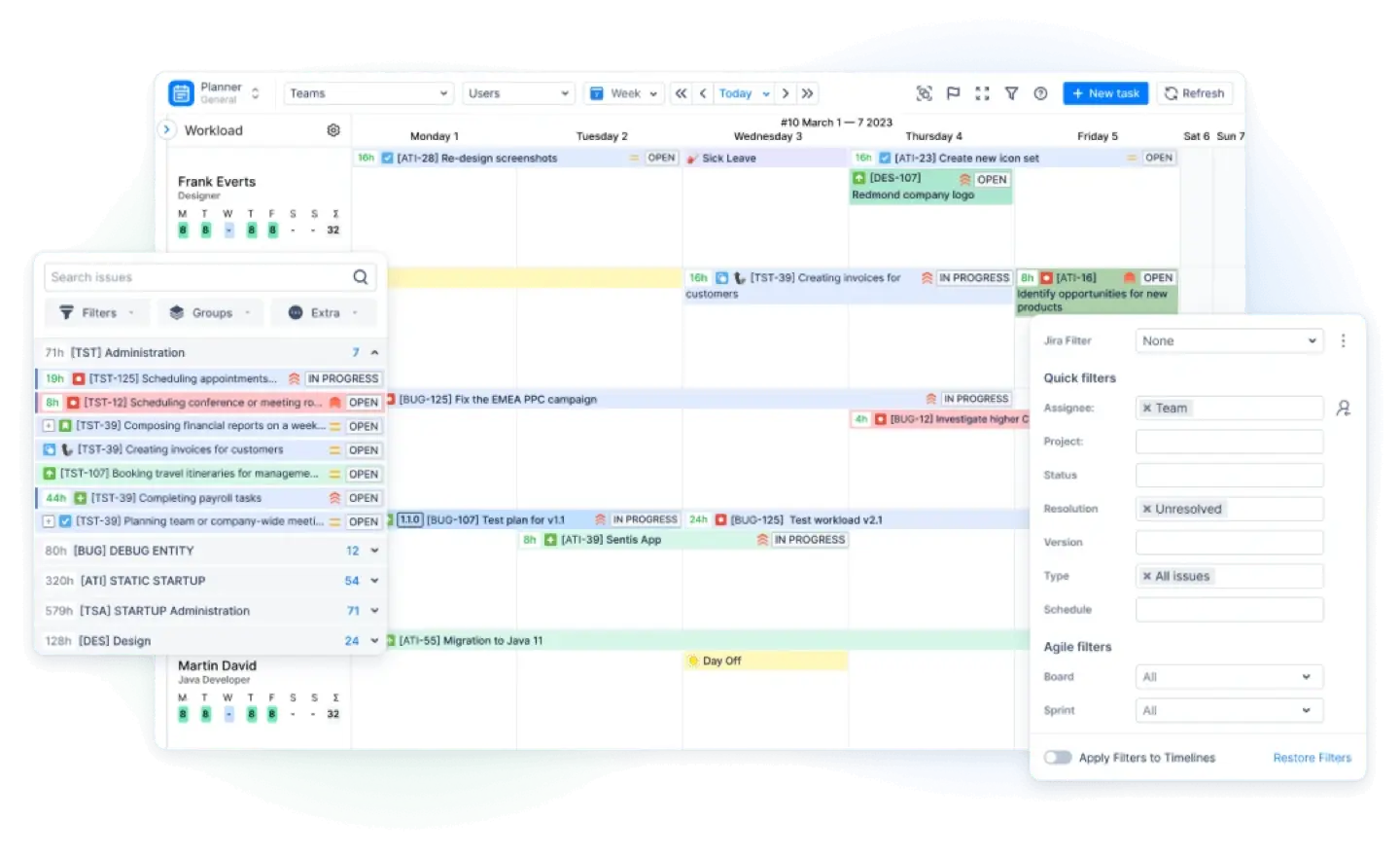
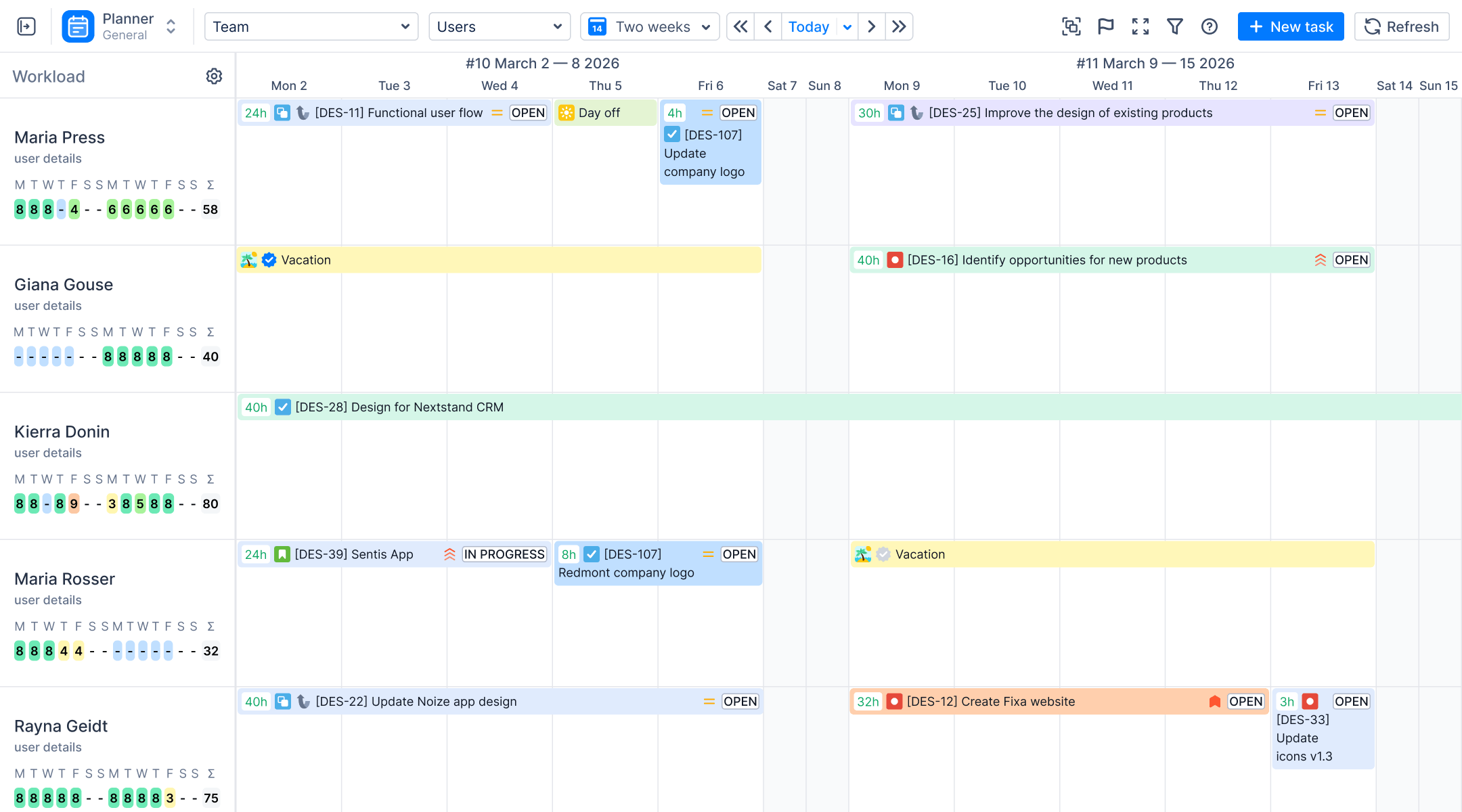
- Capacity and workload planning. Every resource gets a color-coded Workload Indicator that updates as Jira issues, custom events, and worklogs are scheduled, so a project manager can see at a glance who's underloaded, balanced, or overbooked. Workload can be calculated in two modes: Balance, which spreads estimated hours evenly across the days a task is scheduled, or Liquid, which front-loads work according to each team member's actual involvement — useful for continuous flow work versus time boxed iterations. Story points convert into hours through a configurable conversion factor (global or per-project), so teams using story points still get accurate workload data without manual math. A Daily Estimate option lets managers set exact hours-per-day for any task, independent of the Jira estimate fields.
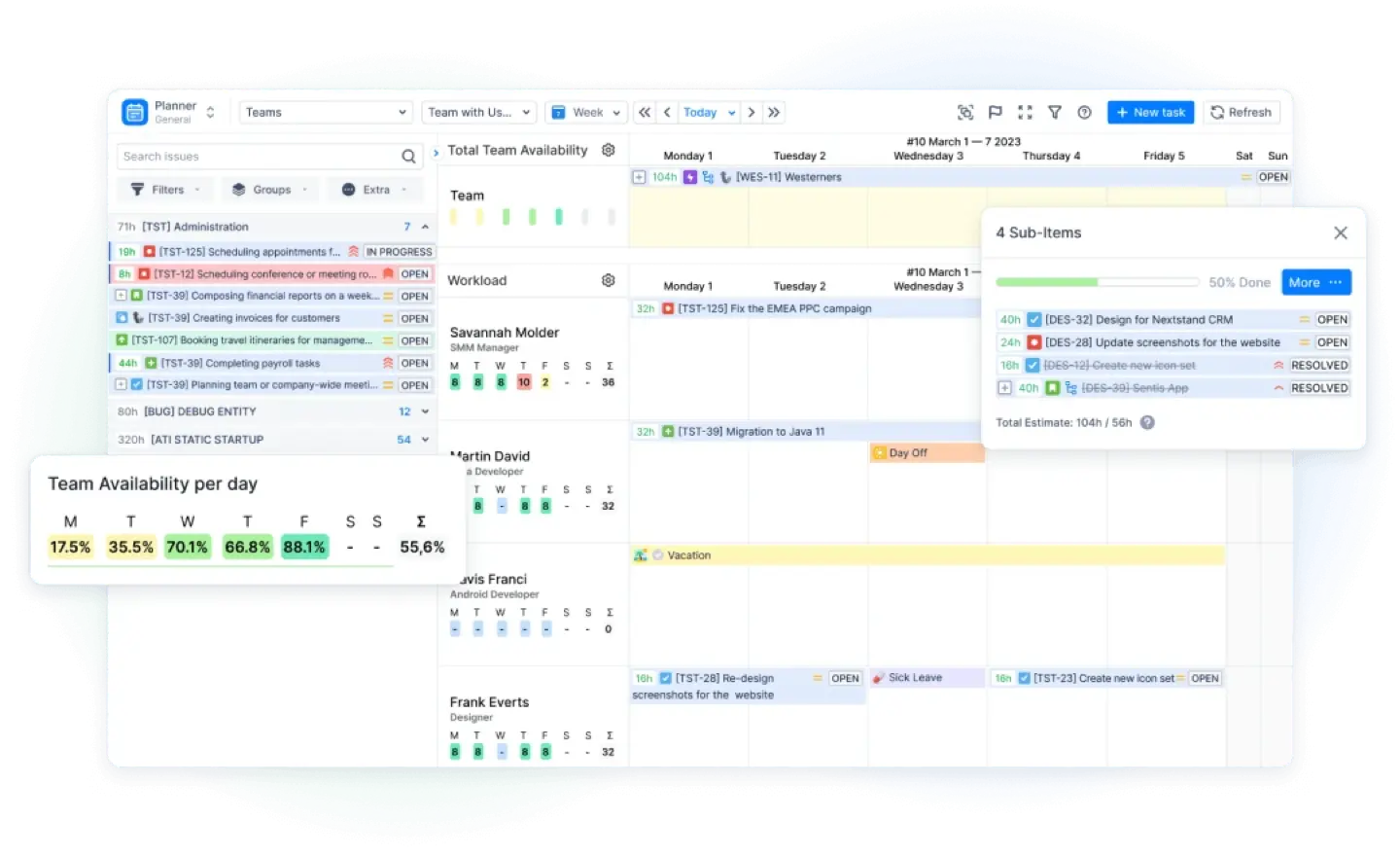
- Resources and teams. ActivityTimeline supports Classic teams (manually assembled), Functional teams (automatically built from skills or positions — so membership updates dynamically as people gain or lose a skill), teams imported from Jira groups, and native Jira Teams. It also supports non-Jira "Resources" — rooms, equipment, or placeholder rows for potential hires — which is something Tempo Planner doesn't offer at all. A Workload Scheme can be applied to a group of users at once, which is especially useful for teams spread across countries with different working hours.
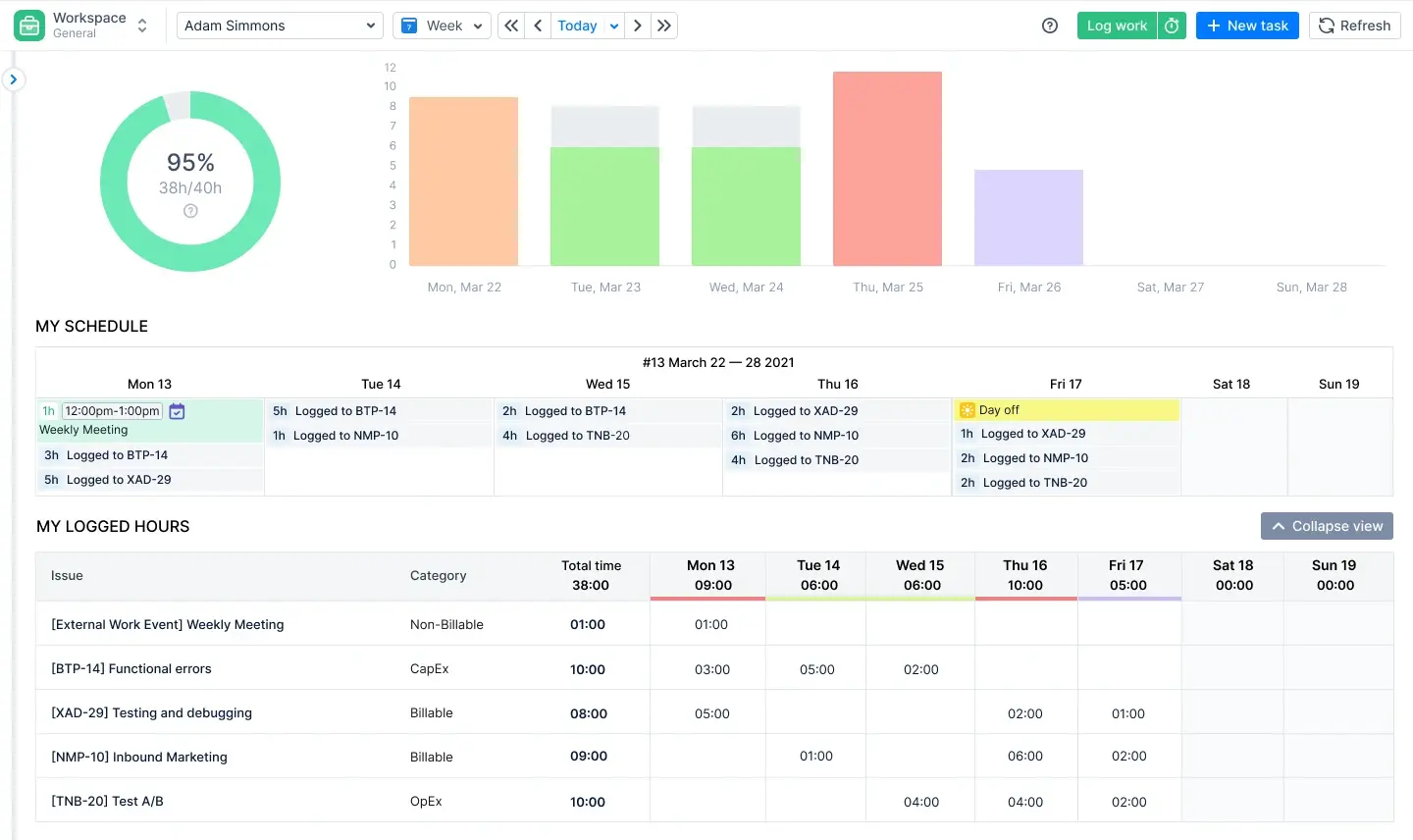
- Built-in time tracking. This is the headline difference versus Tempo. The Workspace module lets every team member view assigned issues, log hours directly against a task, and see required-vs-logged progress in one place — no Tempo Timesheets purchase required. The Track module then gives managers Progress, Timeline, and Detailed timesheet views, plus optional approval workflows so logged time can be locked once verified. Planned-vs-actual comparison is native, not bolted on through a second integration.
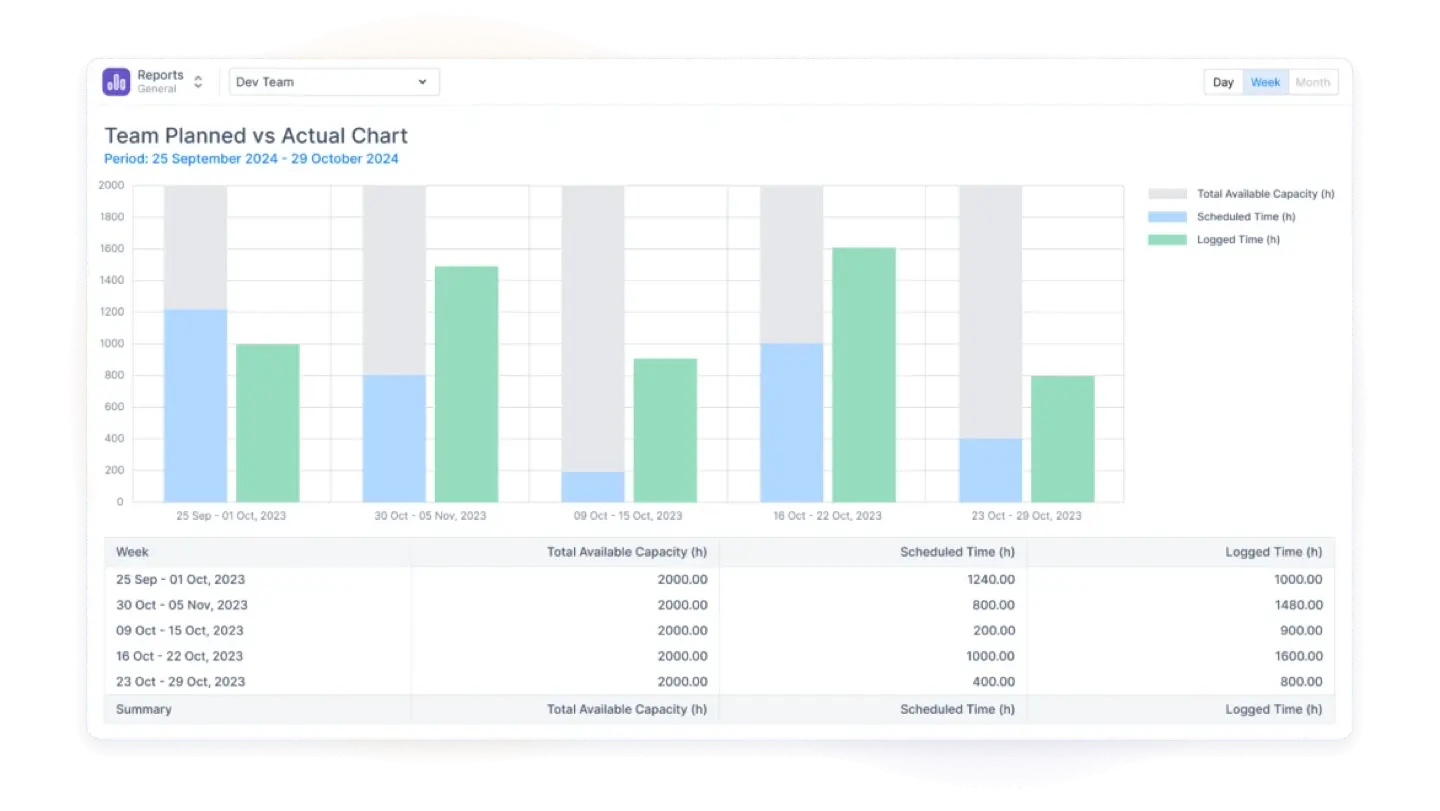
- Reporting depth. ActivityTimeline ships with a genuinely deep reporting suite: Resource Utilization Forecast, Project Resources Forecast, Team Utilization Forecast, Planned vs. Actual Report and Chart, Team Capacity Chart, Team Utilization Pie Chart, plus Position, Person, Team, and Skill Availability reports. Reports can be bookmarked and shared as saved dashboards, exported to Excel, or even embedded as Jira gadgets — giving project managers and stakeholders visibility without needing to log into the app directly.

- Leave and event management. This is one of the areas where ActivityTimeline pulls clearly ahead of Tempo Planner's basic holiday/workload configuration. Vacations, sick leave, day off, holidays (with country-based auto-population of public holidays), bookings, placeholders, and overtime are all native custom event types, each with configurable approval workflows. Holiday Schemes can be applied to a team, a Jira group, or an individual, which makes managing distributed, cross-border organizations far simpler than in Tempo.
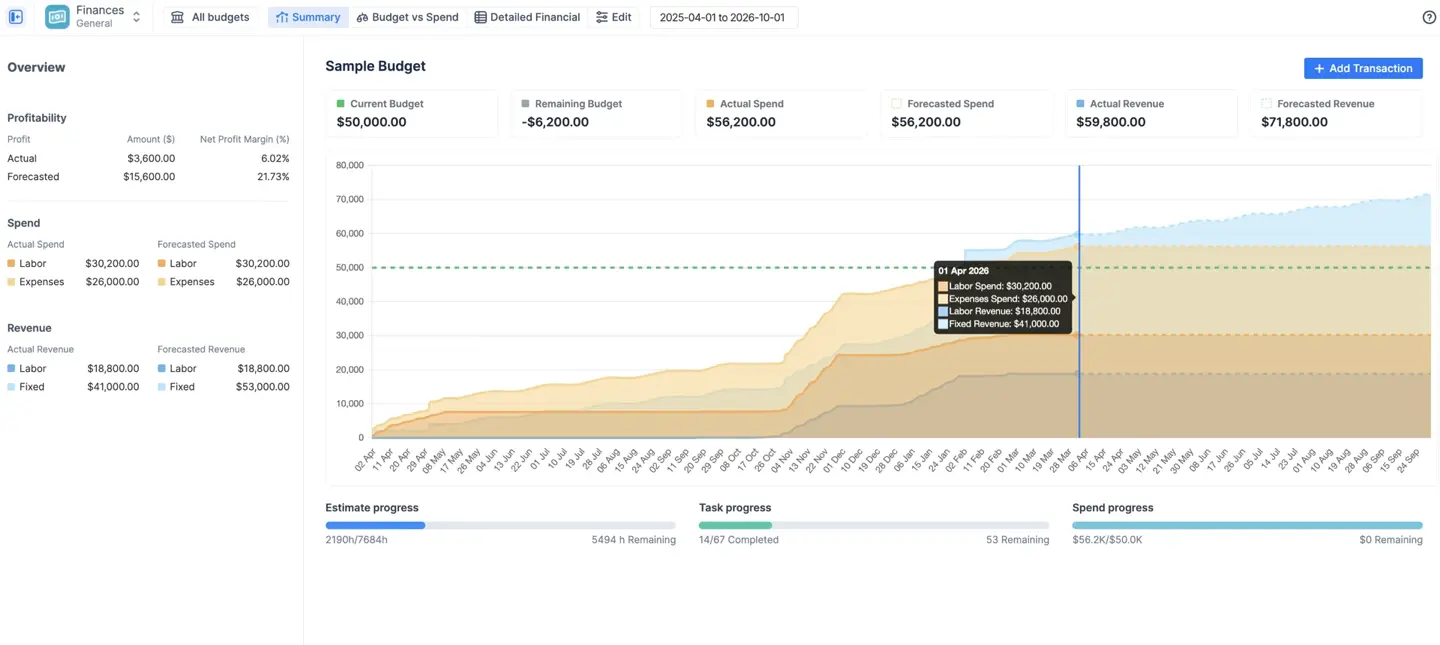
- Financial module. The Finances module (part of the Advanced Edition) adds a full cost and revenue layer directly inside Jira, converting Jira worklogs into financial data through configurable labor rates and combining them with fixed expenses and manual revenue entries in one budget container. Labor rates support both hourly and monthly (salary-based) models, follow a strict priority hierarchy — category-specific rates override user rates, which override the project default — and are effective-dated so historical reports stay accurate when rates change. Manual transactions cover anything outside logged hours: contractor invoices, software licenses, milestone payments, or recurring expenses. Three report views surface the results: a Summary Dashboard with burn rate trend lines and profit margin KPIs, a Budget vs Spend comparison of planned allocations against real-time actuals, and a Detailed Financial ledger exportable to Excel for invoicing or audits. The module supports four contract models out of the box — Time & Materials, Fixed-Price, SaaS/product, and internal cost-center — each with its own configuration path for revenue and cost tracking.
- Integrations. ActivityTimeline doesn't try to lock teams out of their existing stack — it works alongside Tempo Timesheets (for organizations that already use it), BigPicture, BigGantt, and Jira Advanced Roadmaps, and it syncs with Google Calendar, Outlook, and Apple iCal.
Why it solves Tempo Planner's specific gaps:
- One license instead of multiple paid modules — clearer cost predictability as the organization scales.
- An Auto Issue Scheduler that automates task distribution based on availability, instead of Tempo's fully manual allocation.
- Native planned-vs-actual reporting without needing to purchase Tempo Timesheets separately.
Pricing: a single per-user price (averaging around $2.50/user and below till $0.13/user as your instance grows versus a combined Tempo Planner + Timesheets cost that can land near $8/user), with a free trial and Cloud, Server, and Data Center deployment options.
Best for: teams that want everything Tempo Planner's capacity planner does, plus timesheets, leave management, and deep reporting, under one bill without needing a Jira admin to manage three separate apps.
#2. Jira Plans (Advanced Roadmaps)
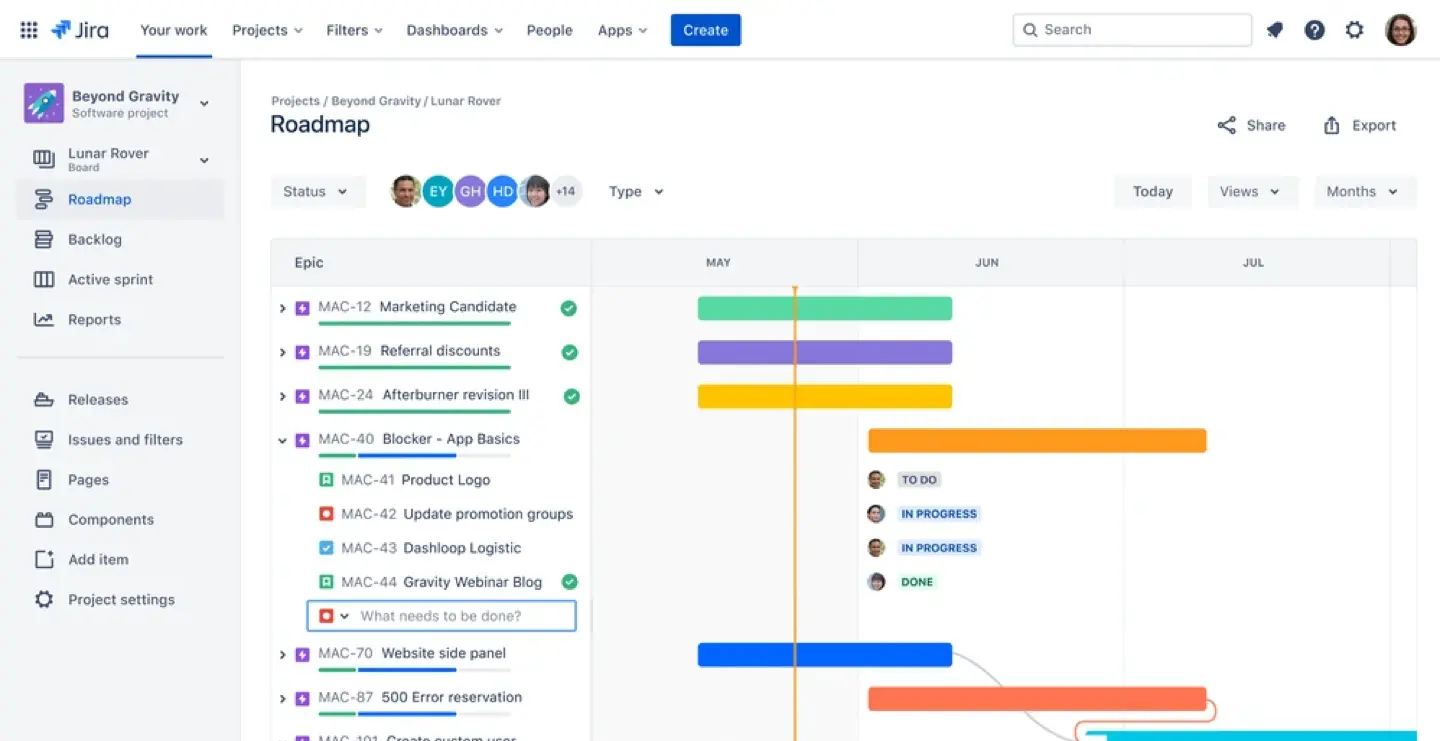
For organizations already on a Jira Premium or Enterprise subscription, Jira Plans is the most obvious first stop before buying any add-on at all. Advanced Roadmaps in Jira supports high-level planning and timeline visualization natively — letting teams build cross-project plans, model dependencies, and get a basic read on team capacity directly inside Jira, no installation required.
Strengths: zero setup cost beyond the existing Jira Premium subscription, native data (no sync delays or separate user management), and solid support for Scrum board and Kanban board-based teams managing future sprints.
Gaps: capacity views are mostly team-level rather than individual, and it lacks the deep timesheet, leave management, and skill-based resourcing features found in dedicated tools.
Best for: Jira Premium organizations that want roadmap-level capacity visibility before investing in a dedicated planning app.
#3. BigPicture
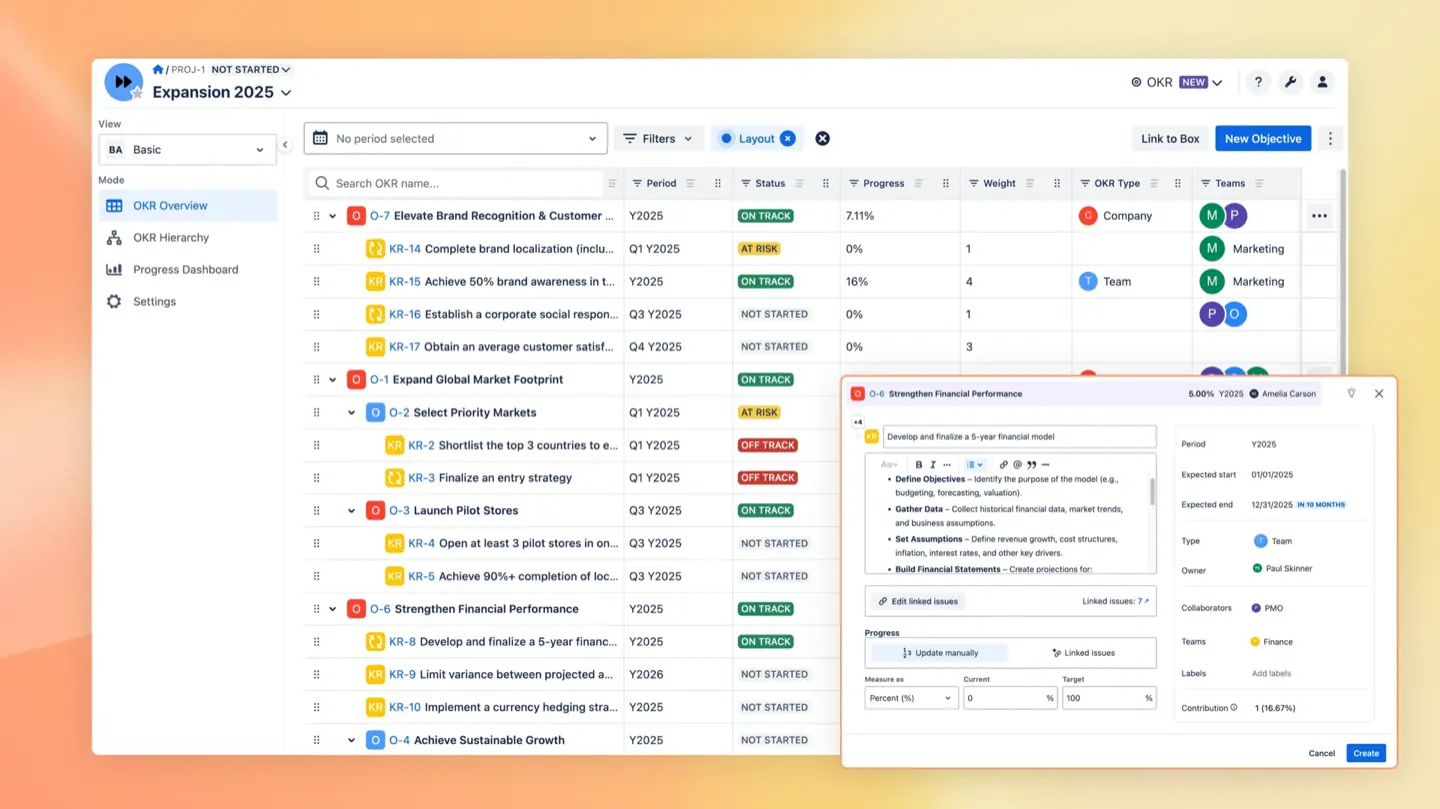
BigPicture is recommended for complex projects requiring global planning across many teams and many projects at once. It's a full Project Portfolio Management suite — Gantt charts, portfolio "Boxes" for aggregating data across levels, dependency tracking, and a risk matrix — built for organizations running SAFe, hybrid, or large-scale Agile programs.
Pricing: free for less than 10 users; pricing starts from $3.97 (11 users) and decreases to $0.17 for 100000 users max.
Strengths: strong cross-project and cross-team visibility, customizable Gantt charts for visualizing project timelines and dependencies, Excel and MS Project import/export.
Gaps: resource and capacity planning is just one module inside a broader (and pricier) tool, the learning curve is steeper than most dedicated planners, and time tracking still needs to be handled through Tempo or a similar third-party integration.
Best for: large organizations already managing multi-project portfolios that need structure well beyond simple capacity planning.
#4. Big Gantt
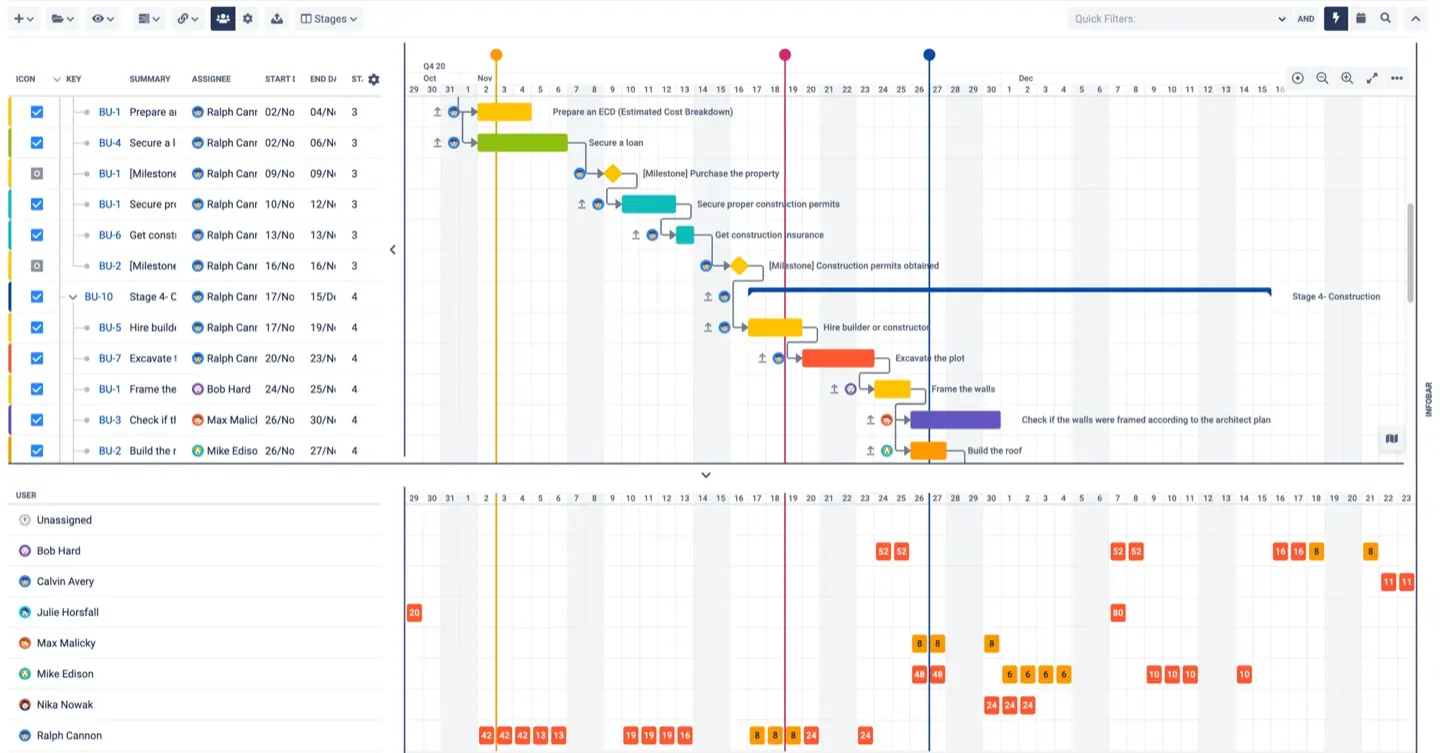
BigGantt is the simplified, Gantt-focused sibling to BigPicture, built by the same vendor for teams whose primary need is timeline visualization rather than full portfolio management.
Pricing: from $1.82/user to $0.09/user with a free tier below 10 users.
Strengths: critical path markers, adjustable scope, "what-if" scenario planning, and native integration with Jira Agile data — sprints, epics, and releases all map cleanly onto the Gantt structure.
Gaps: the resource and capacity view is lighter than dedicated planners like ActivityTimeline, and there's no built-in time tracking.
Best for: teams whose core workflow centers on Gantt charts and deadline visualization, with capacity planning as a secondary need.
#5. Resource Guru
Resource Guru is a standalone capacity planning tool widely used outside of Jira — a simple, booking-style scheduler focused purely on resource allocation rather than broader project management.
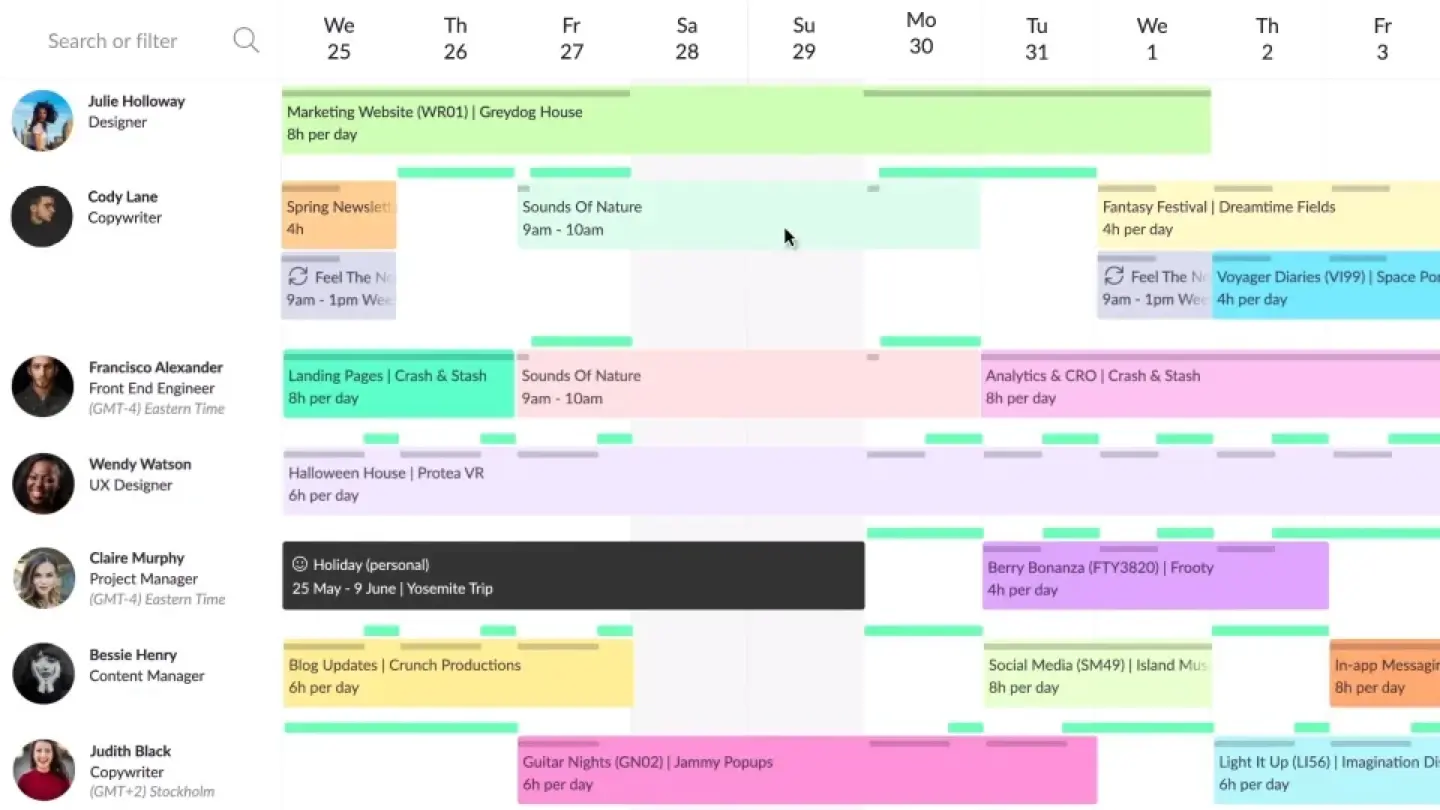
Pricing: starts at $4.16 per person, free 30-day trial is available.
Strengths: Resource Guru offers a fast, no-frills way to book people, rooms, or equipment against a calendar.
Gaps: requires manual or integrated data sync to stay aligned with Jira projects and work items.
Best for: organizations evaluating whether a Jira-native app or a standalone platform better fits their broader tool structure — particularly useful if resource planning needs to span teams that don't use Jira at all.
Conclusion
Tempo Planner is a capable tool for basic resource allocation, and for organizations fully committed to the Tempo ecosystem — Timesheets, Financial Manager, Structure PPM — it can still make sense. But its modular structure, manual task distribution, and stacked per-module pricing are exactly why so many Jira admins and project managers go looking for alternatives once their organization, team plans, or project complexity start to grow.
The right replacement depends on what you actually need:
- Want everything Tempo Planner and Tempo Timesheets do, combined, for one price? ActivityTimeline is the most direct, feature-complete swap — built specifically for Jira, with native time tracking, deep reporting, and advanced leave management included.
- Already on Jira Premium and just need high-level visibility? Start with Jira Plans (Advanced Roadmaps) before paying for anything extra.
- Managing complex, multi-team portfolios at scale? BigPicture or BigGantt offer the Gantt-chart depth and dependency tracking that enterprise PPM requires.
- Want a modern, visual alternative without enterprise overhead? ActivityTimeline is worth a close look.
- Resource planning spans more than Jira? Resource Guru can manage shared resources across tools and teams.
Whichever direction you take, evaluate each option against the same criteria: total cost per user (not just the headline price), how much automation it brings to resource allocation, how deep its leave and event management goes, the quality of its reporting, and how easy it is for a new user to navigate without extensive training.
Try ActivityTimeline Free
If reading through this list confirmed that you need planning, time tracking, and reporting in one place — without the layered Tempo pricing — give ActivityTimeline a try. It's available on the Atlassian Marketplace for Cloud, Server, and Data Center, with a free trial and no requirement to purchase a separate timesheets add-on to get full functionality.
Start your free ActivityTimeline trial →
Want a closer, feature-by-feature look first? Read our detailed Tempo Planner vs. ActivityTimeline comparison to see exactly how the two tools stack up on pricing, automation, and reporting.