
Planning work in Jira is one thing. Actually understanding whether your team has the capacity to do that work on time, without burning out is another challenge.
This guide covers how to move from basic Jira planning to a full-featured capacity and resource management system, and where ActivityTimeline fits in to fill the gaps that Jira leaves open.
{{key-takeaways}}
Jira Planning Basics
What Features Does Jira Natively Have?
Jira is built around the concept of structured work items: issues, epics, stories, subtasks, and custom fields that let teams track progress across projects. Teams can enable features like story points or custom fields to enhance planning and tailor Jira to their workflow. For teams that need to plan and track work across a project, Jira’s native tools cover the essentials: creating tasks, assigning owners, setting due dates, and querying status through filters and JQL.
- At the board level, one can open a Jira board to view tasks by status, filter by assignee or label, and monitor a backlog for prioritization.
- Sprint planning is baked in, allowing teams to group work into time-boxed iterations and track velocity over time.
- The sidebar, board views, and backlog panel make it easy to add tasks, comment on progress, and refine priorities continuously.
- In board views, issues can be organized into rows or swimlanes based on selected Jira fields, allowing for better visualization and management alongside columns.
- Cloud and Data Center deployments both support real-time sync of issue data, so teams stay aligned without manual work to reconcile updates.
Benefits of Advanced Roadmaps (Jira Plans)
Advanced Roadmaps, now called Jira Plans, takes the foundation of a Jira board and extends it into a high-level project map. It gives leads and executives a macroscopic view of project trajectories, enabling strategic alignment across a business or program.
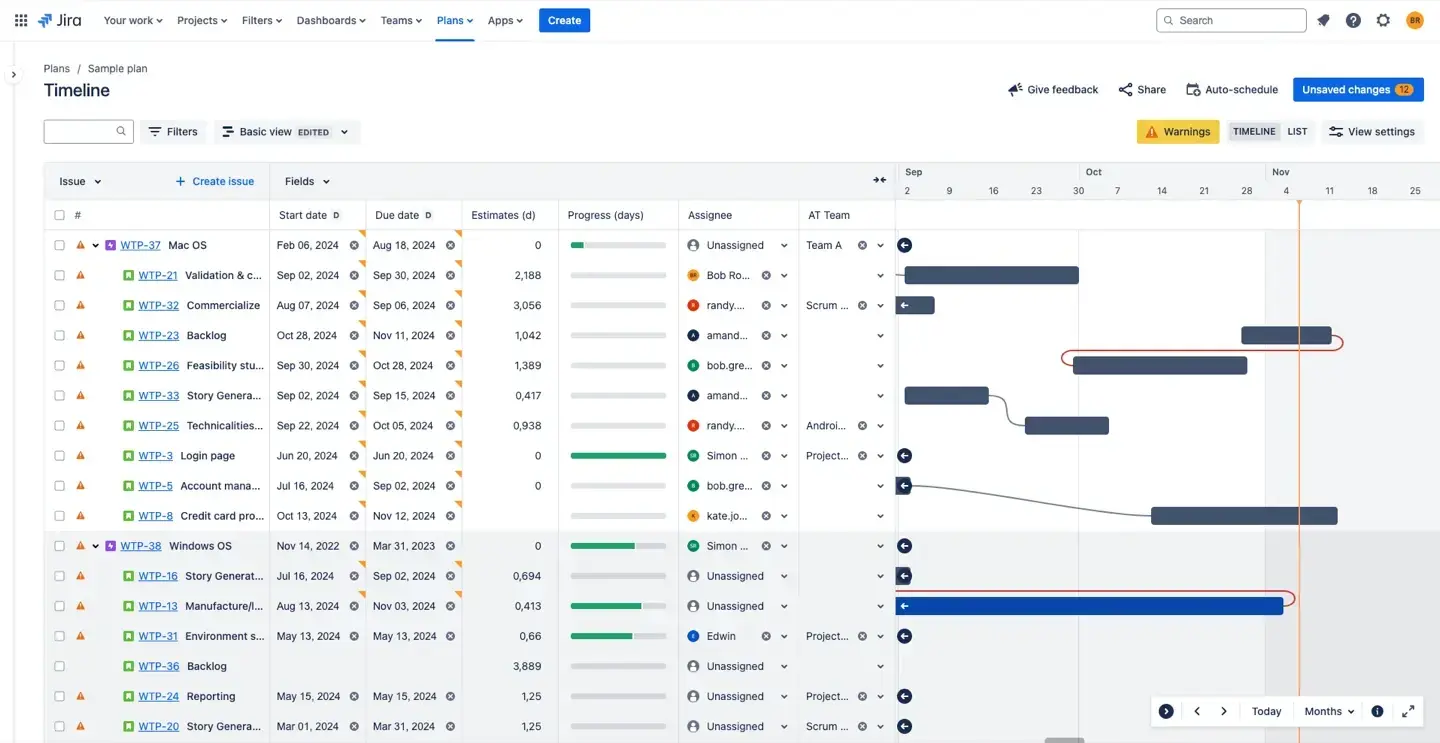
With Jira Plans, teams can visualize and manage dependencies between tasks, with lines displayed on the timeline to clearly show relationships, critical paths, and potential blockers. The summary screen in Jira's advanced planning provides a snapshot of work item progress, key dependencies, team progress, and team capacity within a chosen date range.
Blocked work items are specifically highlighted, helping teams quickly identify and address obstacles that may hinder progress in the project timeline. Advanced Dependency Management helps teams manage dependencies by visualizing and tracking connections between teams and work items, highlighting scheduling conflicts and blockers. Hierarchies of work items, from epics down to individual tasks, and even expanded levels above epics such as Initiatives, can be represented in a single timeline view, making it easy to understand how short-term sprints connect to long-term roadmap goals.
Jira Plans supports scenario modeling, allowing teams to create multiple versions of a plan and test different resource or timeline adjustments in a sandbox environment without affecting live project data. Seamless integration with other Atlassian tools, including Jira Software, Confluence, and Jira Service Management, creates a comprehensive workflow. The summary screen provides a snapshot of work item progress, key dependencies, team progress, and team capacity within a chosen date range, giving stakeholders a clear overview of project health and status.
Limitations of Jira and Jira Plans
Despite these strengths, Jira and Jira Plans leave meaningful gaps when it comes to capacity planning and resource management:
- No individual capacity view. Jira doesn’t show you how many hours a person has available or how much work they’re already carrying. Overloading a team member isn’t visible until a deadline slips.
- No cross-project resource visibility. When a developer supports multiple projects simultaneously, Jira’s board-by-board structure makes it difficult to see total workload in one place. Each board is its own lens, not a unified view.
- Limited workload balancing. Reassigning tasks based on team capacity requires manually checking multiple boards, filters, and columns. There’s no drag-and-drop workload rebalancing built into native Jira. In some cases, dragging cards into the Planner view may not update fields correctly, leading to confusion about actual assignments.
- No time-off or availability tracking. Vacations, sick leave, and company holidays aren’t surfaced in sprint planning. A sprint that looks achievable on a Jira board may be based on capacity that doesn’t exist.
- Manual scheduling. Linking work items to specific calendar dates requires manual work. The relationship between a task and when it will actually be executed is often invisible. Additionally, duplicating plans in certain cases can lead to data inconsistencies if not handled carefully.
Sharing plans or progress updates with stakeholders is also not as seamless in native Jira, as there is no easy way to share a direct link or embed a plan page for quick access and collaboration.
For fixing these gaps, there’s a thriving marketplace of Jira apps — and ActivityTimeline is one of the most comprehensive options for capacity planning and resource management.
How ActivityTimeline Enhances Your Jira Planning
ActivityTimeline is an app that connects directly to your Jira account, extending its data into a full-featured planning environment. It’s built around two core ideas: every person and team has a specific capacity, and work should be planned against that capacity, not assumed. Users can set up their planning environment by configuring teams, capacity, and timelines according to their needs.
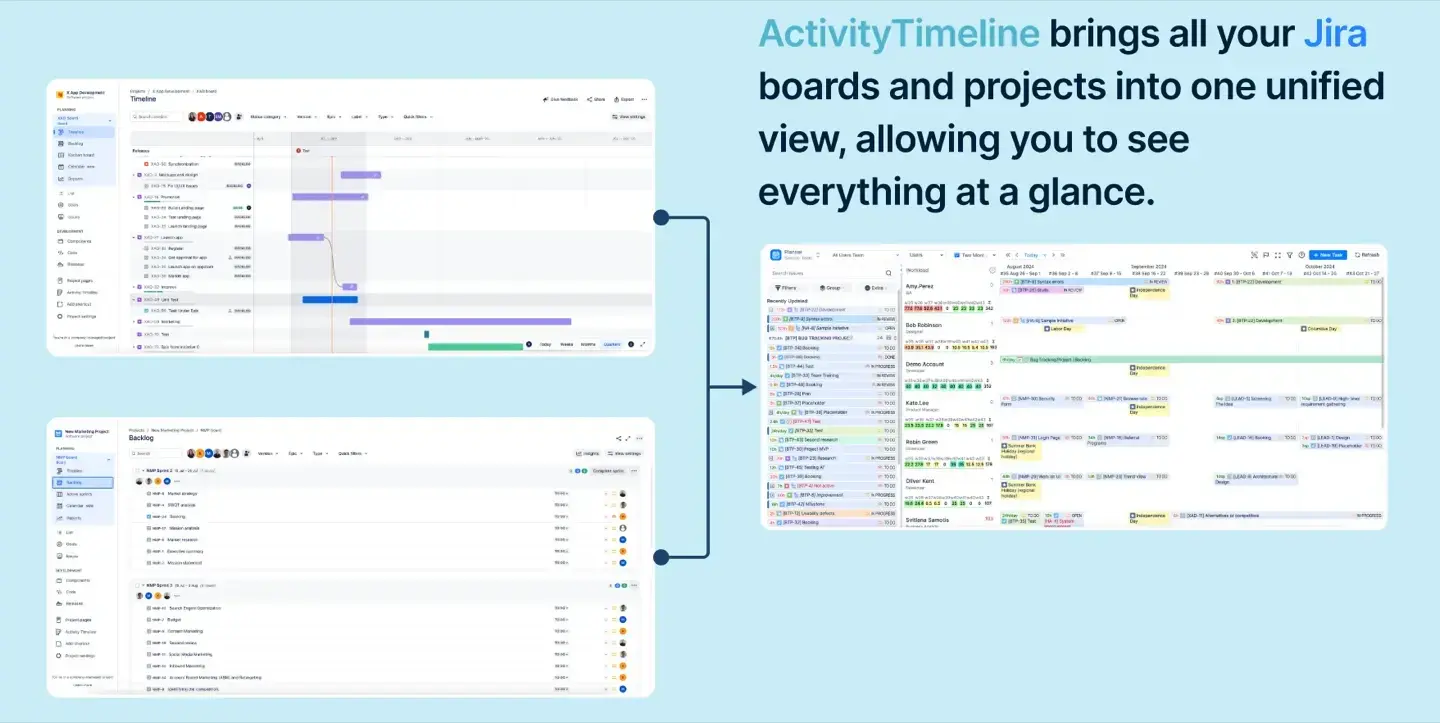
The app addresses various aspects of planning and resource management, including capacity planning, resource management, skill management, resource and team timelines, time-off tracking, milestone visualization, and scenario planning with placeholders. All of it stays in sync with Jira in real time, so there’s no duplicate data entry or manual work to keep the two systems aligned.
Advanced Resource Capacity and Workload Planning
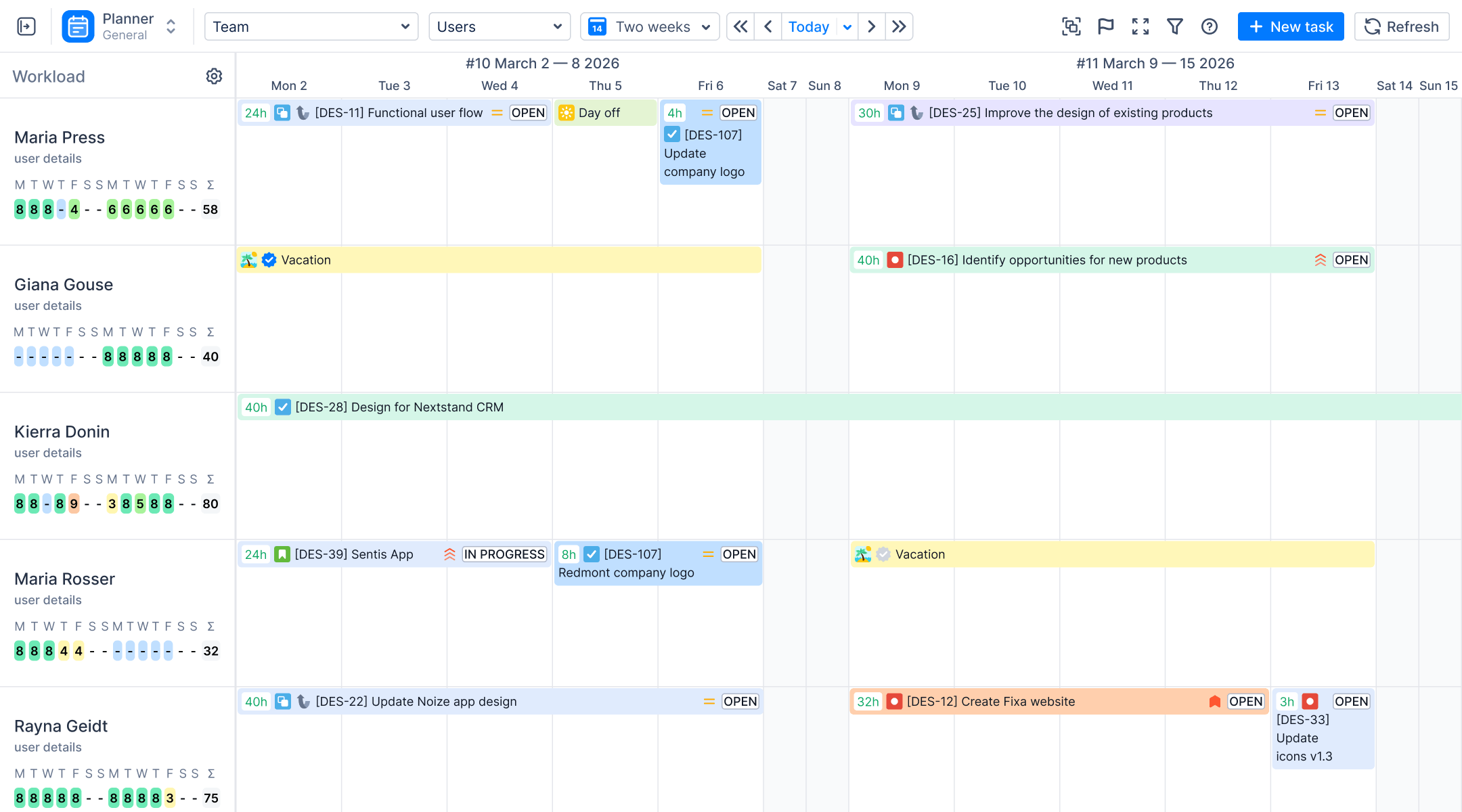
ActivityTimeline allows managers to calculate and visualize the workload of individuals and teams based on their specific capacity, known as involvement.
Managers can focus on specific team members or workload aspects, filtering the planner to concentrate on active sprints or particular issue types for improved clarity and productivity. Rather than guessing whether someone has bandwidth, visual cues directly under resource names indicate workload status at a glance showing whether a person is under-allocated, fully booked, or overloaded.
These visual cues help monitor the team's capacity and prevent overload, ensuring balanced workloads across the team. This turns capacity planning from a manual estimation exercise into a data-driven decision.
Visual Calendar Interface
The Planner module serves as a visual calendar for monitoring teams, projects, and tasks in a single view, with tasks and timelines clearly displayed for clarity and ease of planning. Managers can schedule work by dragging Jira issues from the Issue Panel directly onto a user’s timeline, no need to open each issue and manually update fields.

This drag-and-drop interface makes it easy to plan in context: you can see a person’s full week or month, understand what they’re already committed to, and place new work where capacity actually exists. The result is a planning process that takes a few seconds instead of several minutes of manual navigation.
Expanded Issue Hierarchy enables the creation of levels above Epics, such as Initiatives, to track high-level business goals across the organization.
Unified Multi-Project View
Unlike standard Jira boards, ActivityTimeline provides a cross-project view of shared resources and tasks in one interface. A developer working across three projects appears once on the timeline, with all their assigned work items visible in a single row, regardless of which Jira project or board each task belongs to.

This unified view is essential for teams and companies where people frequently work across multiple business units or program areas. It surfaces conflicts and overallocation that would otherwise remain hidden behind project-level silos.
Splitting Complex Tasks
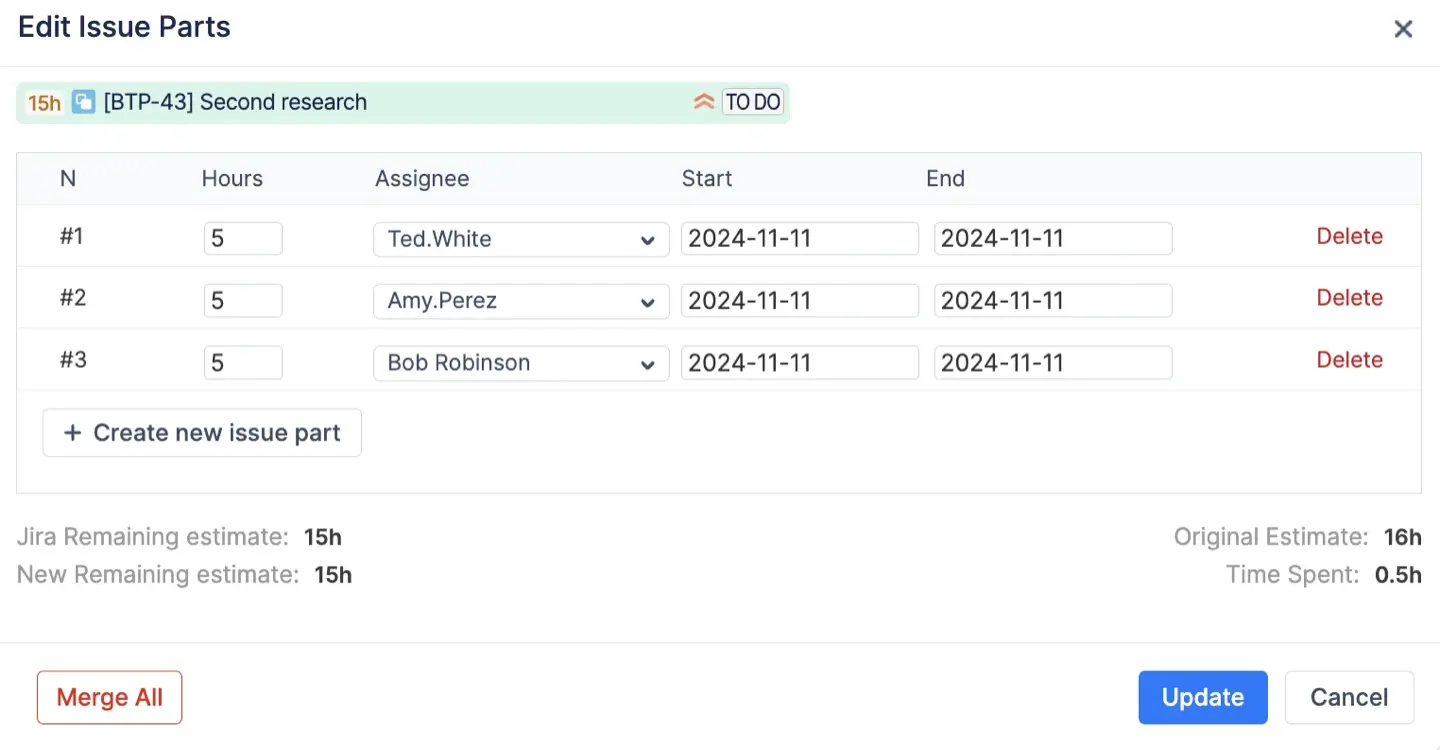
One of the more powerful features is the ability to split a single Jira issue across multiple days or between different assignees without creating sub-tasks in Jira. When a large task needs to be shared across team members or distributed across a week, ActivityTimeline handles the scheduling logic while keeping the original issue intact. This reduces the noise of unnecessary sub-task creation while enabling more flexible work allocation.
Automatic Jira Synchronization
Every drag-and-drop action in ActivityTimeline automatically updates the Start and End date fields within the corresponding Jira issues. There's no separate step to sync data or push changes back to Jira — the connection is live. This keeps your Jira board accurate as a source of truth while letting ActivityTimeline serve as the planning workspace.
Agile and Sprint Planning
Milestones Panel
A dedicated Milestones Panel visualizes sprint durations as horizontal timelines and displays important deadlines or release dates. Teams can see at a glance how much runway remains in a sprint, when key releases are coming, and whether current capacity is aligned with upcoming commitments.

This panel connects the tactical view (daily task progress) with the strategic view (launch dates, milestones), making it easy for leads to communicate status without building separate reports.
Automated Sprint Display
Measuring capacity differs between Scrum and Kanban teams; Scrum teams can use story points while both types can measure capacity with time (days or hours).
ActivityTimeline can automatically display tasks on timelines based on Jira Sprint Start and End dates, removing the need for manual scheduling. When a sprint is active in Jira, its tasks appear in the correct timeline positions in ActivityTimeline giving teams an instant visual representation of sprint workload without any additional setup.

Capacity planning is available to both Scrum and Kanban teams, but sprint planning is exclusive to teams that use Scrum boards as a work item source. ActivityTimeline is particularly useful for Scrum teams who plan and track work in sprints but need a clearer view of who is doing what and when, beyond what a Jira board status column can show.
Skill Management
ActivityTimeline includes a skill management layer that allows managers to tag team members with specific competencies and filter resource views by skill. When planning work that requires particular expertise, managers can query the team and see who has the right skills and the available capacity enabling smarter assignment decisions and helping companies build balanced teams over time.

Long-Term Roadmapping
Aggregated Team Planning
The Team Panel allows managers to assign high-level work items — such as Epics or Initiatives — to an entire team rather than individual contributors. This is ideal for early-stage roadmapping where the specific assignees haven't been determined yet, but capacity needs to be reserved at the team level.
Teams can plan and track work at this aggregate level, then drill down to individual assignments as the plan matures. This supports both long-horizon strategic planning and the kind of iterative refinement that agile programs depend on.
Scenario Planning with Placeholders
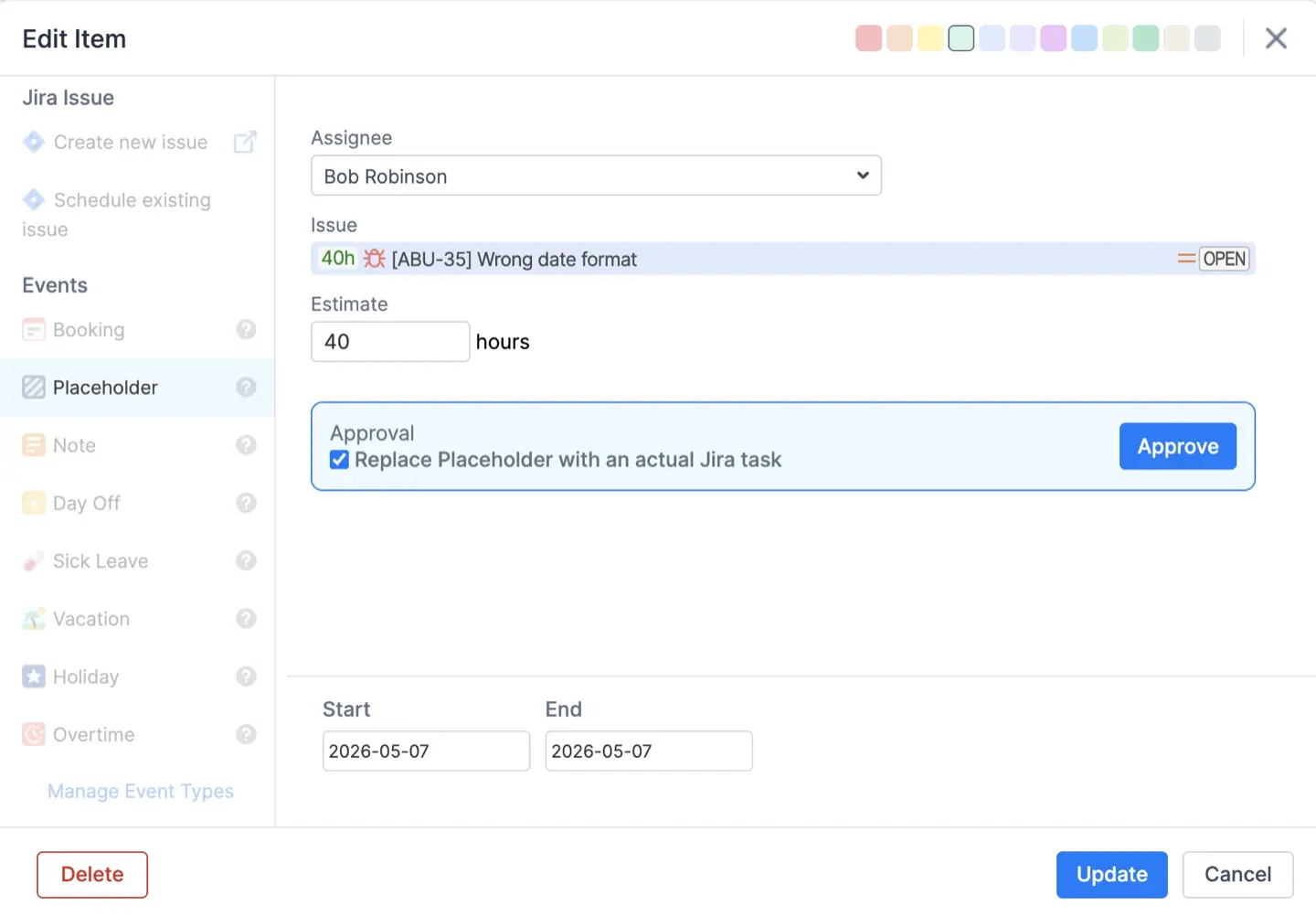
Before a project is formally approved or even exists in Jira, ActivityTimeline's Placeholder feature lets managers reserve capacity for future or hypothetical work. A placeholder behaves like a real task on the timeline — it occupies time, affects workload calculations, and appears in capacity views — but it exists independently of any Jira issue.
This enables teams to model different scenarios, understand the resource implications of potential projects, and make better decisions about what to start, delay, or decline. It's a lightweight way to connect business decisions to team capacity before the formal work begins.
Placeholder Conversion
When a plan is approved and the work becomes real, placeholders can be converted directly into active Jira tasks with a few clicks. The scheduled time, assignees, and dates carry over automatically, eliminating the manual work of recreating the plan in Jira from scratch. This bridges the gap between planning mode and execution mode without losing any of the strategic context.
Custom Event Management
Time-Off Management System
ActivityTimeline includes a dedicated system for tracking non-working events to ensure that planning accounts for actual employee availability. Built-in event types cover Vacations, Sick Leaves, and Days Off — and each of these automatically reduces the available capacity for the affected team member during the relevant period.
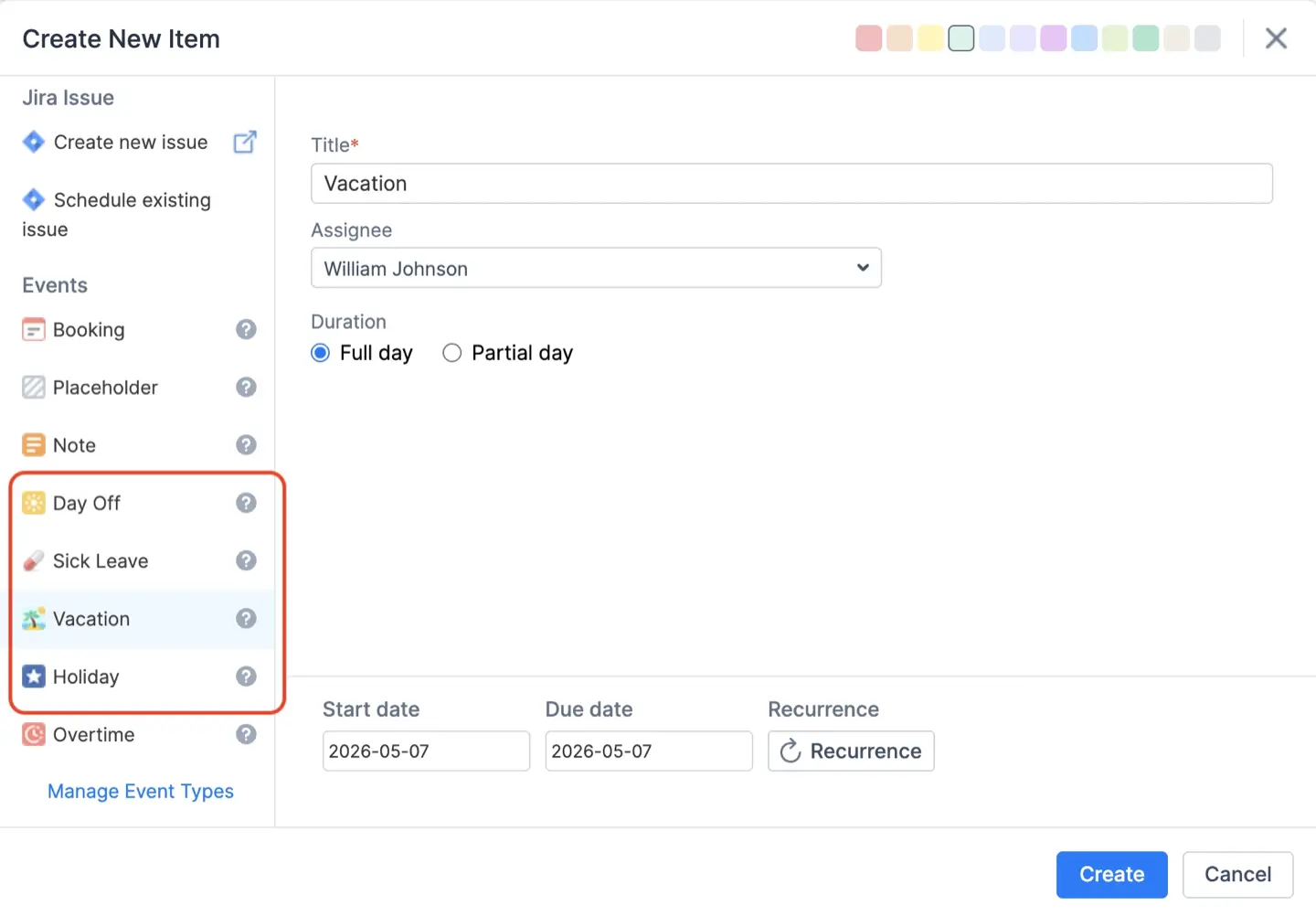
This means that when a manager plans a sprint or assigns work, the capacity calculations already reflect who will and won't be available. There's no risk of a sprint plan being built on hours that don't exist because a key team member is on leave.
Holiday Schemes
Public holidays vary by country, and for teams distributed across multiple regions, tracking these manually is error-prone. ActivityTimeline supports importing public holidays based on specific countries, automatically populating non-working days on team timelines. A company with developers in the US, Germany, and Ukraine can configure separate holiday schemes for each group, ensuring that capacity calculations are accurate across the board without any manual work.

Booking Events
Not all work fits neatly into Jira tasks. Meetings, training sessions, onboarding, and other non-project activities consume real time. Booking Events in ActivityTimeline allow managers to reserve blocks of time for these non-Jira activities, ensuring they're reflected in capacity calculations.
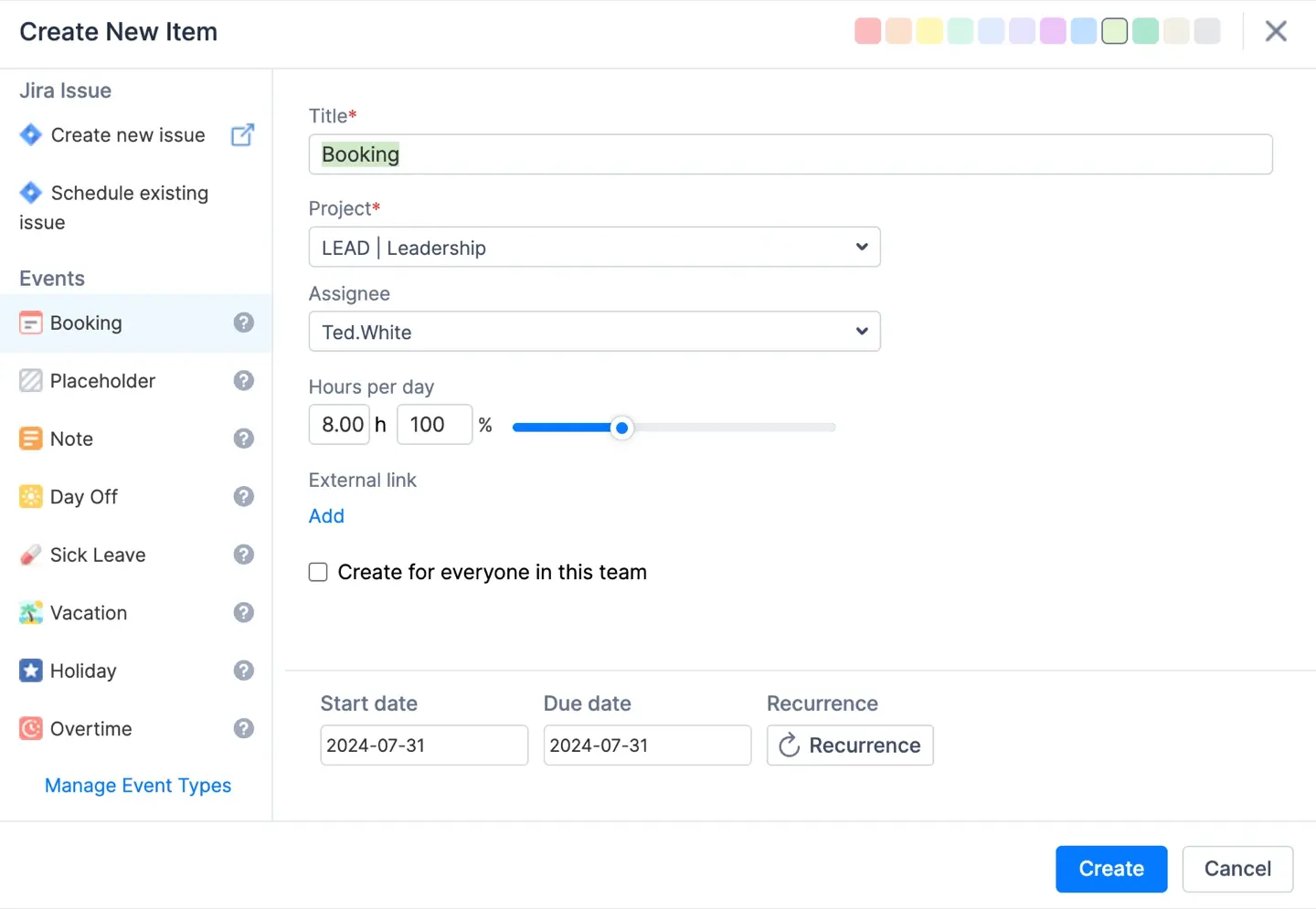
This means the workload picture is complete — not just the tasks on a Jira board, but everything that fills a person's day. Teams can plan more accurately because the data includes all the ways time gets used, not just the work items that end up in an issue tracker.
Conclusion
Jira is a powerful tool for tracking work and managing projects, but capacity planning requires a broader view — one that accounts for individual availability, cross-project workloads, time off, skill gaps, and long-term strategic commitments. Jira Plans helps with the macroscopic roadmap, but the granular, day-to-day resource visibility that teams need for reliable delivery requires more.
ActivityTimeline fills that gap by turning your existing Jira data into a live capacity planning environment. From visualizing individual workloads to planning at the team level, from managing time-off schemes to converting placeholders into real tasks, it provides the tools to plan confidently and execute reliably — all without leaving the Jira ecosystem.
{{rich-cta-4}}