
Jira is the backbone of project management for thousands of teams — but when it comes to project budget tracking, it hits a hard wall.
Out of the box, Jira has no concept of hourly rates, no mechanism to convert logged hours into labor costs, no budget caps, no cost categories, and no way to flag when spending has gone off the rails. Even when teams diligently use Jira Issues and time tracking, all that operational data remains financially inert: hours are hours, not dollars.
This isn’t a niche limitation. Effective budget management requires tracking labor costs, direct and indirect costs, materials, and ongoing expenses — and correlating all of them against an allocated budget in near real time. Jira’s basic version simply lacks any features for this, requiring project managers and scrum masters to either export data manually into spreadsheets or rely entirely on third-party tools for financial management.
Most project managers today use Marketplace apps to automate cost calculations, link labor expenses to specific hourly rates, and surface financial data without leaving their project management workflow. Integration with Jira and other tools is crucial for seamless financial data flow, enabling comprehensive, real-time insights and simplifying data management across platforms. These add-ons enable what Jira cannot do natively: turning time logs and task estimates into actionable financial intelligence.
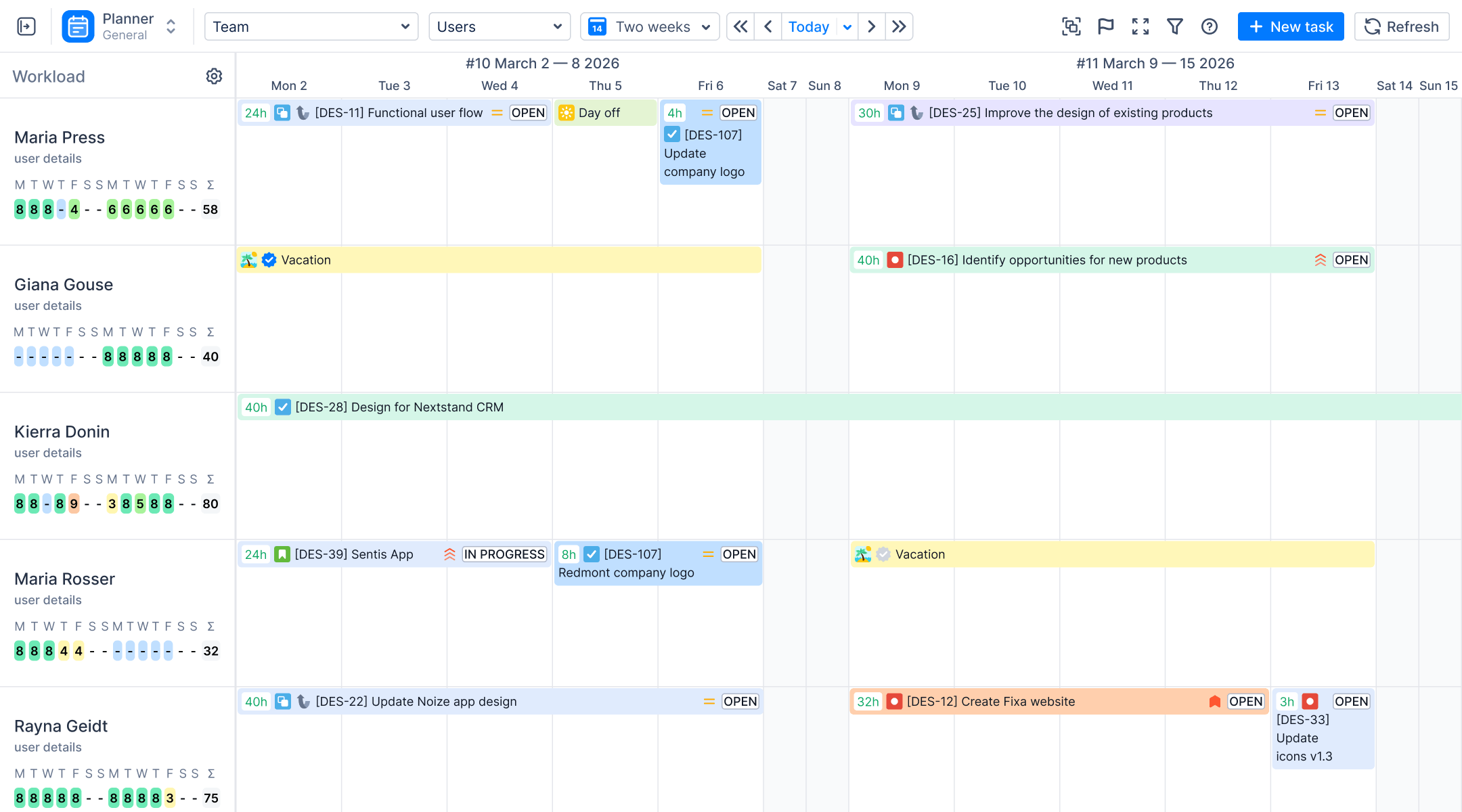
ActivityTimeline is one such system — and with the launch of its Finances module (Advanced Edition), it goes further than traditional cost trackers. ActivityTimeline connects your team’s operational schedule directly to your financial reality, converting logged hours, task estimates, and manual transactions into a unified, near real-time view of financials across different projects, including project costs, budget consumption, and profitability — all inside Jira.

Whether you’re managing internal initiatives, billing clients on a Time & Materials basis, or delivering Fixed-Price contracts, ActivityTimeline’s Finances module gives project managers, finance leads, and stakeholders the financial clarity they need to make informed decisions before problems become crises. The module can be used to manage budgets and financial data for the entire organization, not just individual projects.
Note: The Finances module is currently available to participants in a closed Early Access Program (EAP). Contact the ActivityTimeline support team to join.
What Can You Do With a Cost-Tracking Add-on?
Before diving into configuration, it’s worth understanding what a purpose-built cost tracker inside Jira actually unlocks — including the ability to monitor and manage project budgets and financials — and what problems it directly solves, such as the need to track expenses.
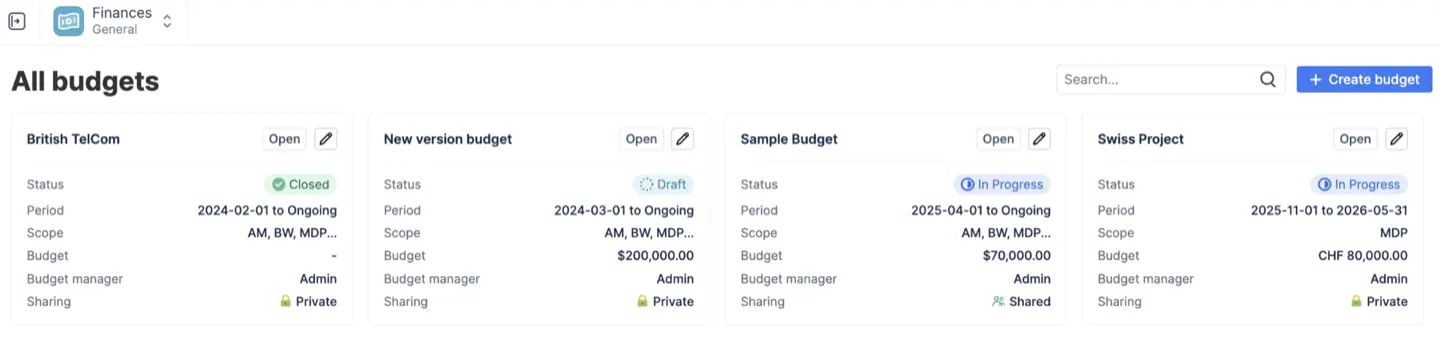
1. Labor Cost Automation
Time tracking is the raw material of financial control. When team members log hours on Jira Issues, those hours represent real labor costs — but only if you can attach a rate to them. For teams that are still setting up or refining their approach, understanding time tracking in Jira and its role in project estimation and efficiency provides essential context for building reliable financial data.
ActivityTimeline's Finances module lets you define hourly rates per role or per individual, then automatically multiplies logged time by those rates to produce actual labor cost figures. This eliminates the manual spreadsheet reconciliation that plagues most teams and ensures that every logged hour immediately contributes to your financial picture.
2. Budget Scope and Allocation
Not every project or team tracks budget at the same level. Some organizations manage finances at the portfolio level across many projects; others need to drill down to the Epic or even individual task. ActivityTimeline supports all three scopes — Jira Projects, Epics, and JQL-filtered work — giving project managers flexible control over how the allocated budget is structured and monitored.
3. Manual Transaction Support
Labor costs are significant, but they're rarely the whole story. Direct costs like software licenses, contractor invoices, infrastructure fees, and other non-labor expenses need to be recorded too. The Finances module supports manual transactions so that fixed and ongoing expenses are captured alongside time-based costs, giving a complete picture of project expenses.
4. Real-Time Cost Visibility
One of the persistent problems with spreadsheet-based budget tracking is latency — by the time data is gathered, consolidated, and reviewed, it's already stale. ActivityTimeline provides near real-time insights into budget consumption, giving stakeholders an at-a-glance view of financial health alongside operational metrics. This enables teams to take timely corrective actions rather than discovering overruns after the fact.
5. Financial Reports for Informed Decisions
Reports are where financial data becomes decision-making power. ActivityTimeline’s Finances module includes a suite of reports — from executive-level summary dashboards to granular, auditable transaction ledgers — designed to answer the specific financial questions that project managers, finance teams, and stakeholders ask most often.
For teams looking to strengthen their overall reporting practices, a broader understanding of Jira reporting and how to create and customize reports helps ensure financial views align with operational and agile metrics. Earned value management (EVM) techniques are also supported, enabling project managers to compare planned versus actual progress and forecast costs effectively.
Prepare Your Jira Project for Budget Management
Good configuration starts with good preparation. Before touching any settings in ActivityTimeline, invest time in the following groundwork, including tracking individual tasks, as this is essential for effective budget management and accurate project planning. A solid foundation in project planning best practices in Jira will also make it easier to align your financial setup with how work is actually structured and delivered.
Inventory Projects and Assign Cost Owners
Start by listing every active Jira project, including different projects that require budget tracking. For each one, identify a cost owner — the person accountable for financial accuracy and budget decisions. This is often the project manager, but on larger teams it may be a dedicated finance business partner. Clear ownership prevents gaps in financial data and ensures someone is responsible for maintaining accuracy over the project’s lifecycle, especially when you are coordinating work across complex Jira timelines for planning and tracking projects.
Decide on Budget Scope
When you choose where to apply a budget, it should mirror how you visualize project progress. Jira’s native timeline views such as Gantt and resource timelines can guide whether you scope budgets at the project, epic, or cross-project level. ActivityTimeline supports three levels of budget scoping:
- Jira Projects — ideal for organizations tracking costs per client engagement or product line
- Epics — useful when a single Jira project contains multiple workstreams with separate budgets
- JQL Filters — the most flexible option, allowing custom-defined scopes that cut across projects or exclude certain issue types
Choosing the right scope before configuration saves significant rework later. For most teams managing a project portfolio, starting at the project level and drilling into epics where needed provides the right balance of unified view and granularity.
Set a Budgeting Cadence
Budget tracking is only as useful as the cadence at which it's reviewed. Before configuring the tool, agree on a review frequency — weekly for fast-moving projects, bi-weekly or monthly for longer-horizon initiatives. Align this cadence with your sprint or delivery rhythm so that budget reviews become a natural part of project governance rather than an afterthought.
Create and Scope Your Budget
With your groundwork in place, you're ready to create your first budget in ActivityTimeline. As you define this budget, consider how it aligns with your overall Jira project timelines and schedule management so that financial periods and milestones match your delivery plan.
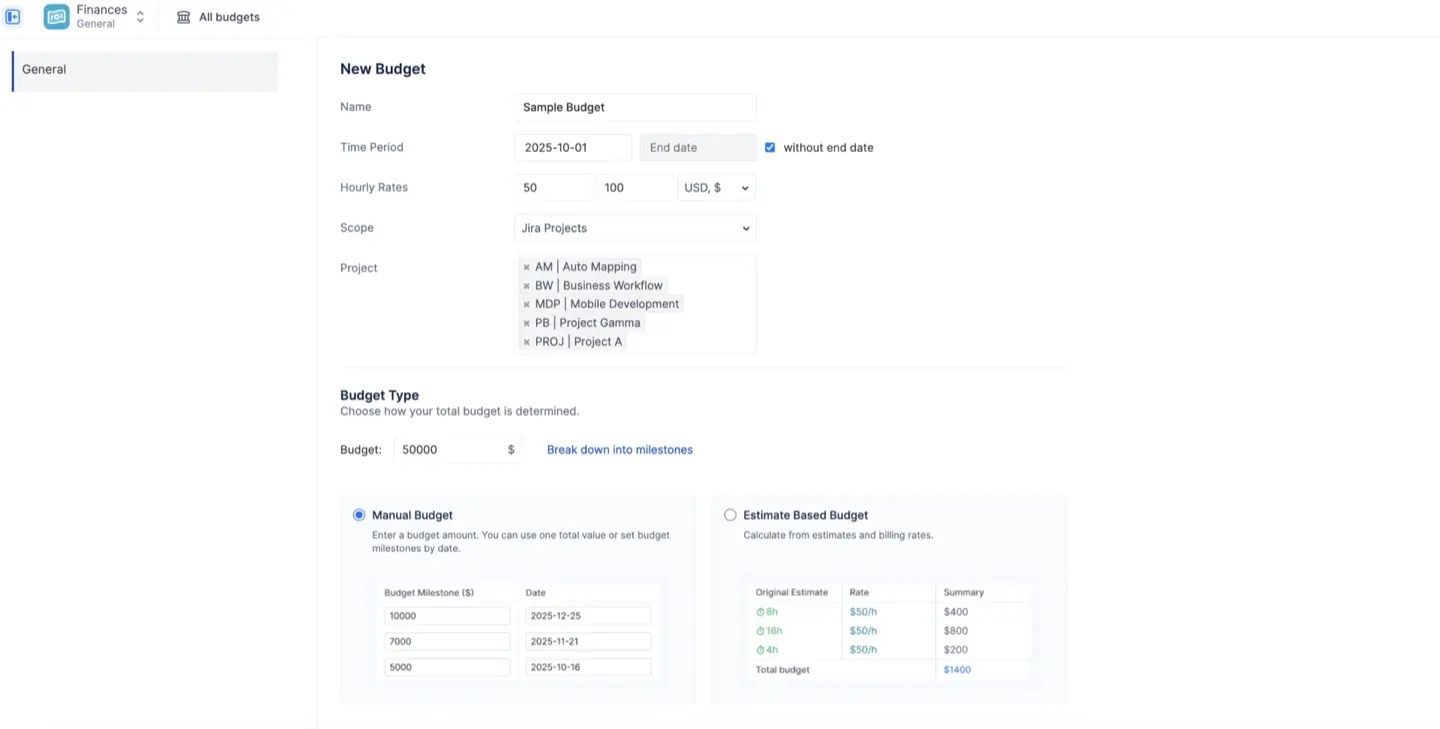
Navigate to the Finances module and create a new budget. You'll be prompted to:
- Name the budget — use a naming convention that reflects the project or client for easy identification across your project portfolio
- Select the scope — choose Jira Projects, Epics, or a JQL filter as your budget boundary
- Set the total budget amount — this is the maximum planned investment for the scope
- Define the budget period — open-ended or time-boxed (e.g., per quarter or per contract term)
Scoping correctly here is critical. A budget scoped too broadly obscures where costs are accumulating; scoped too narrowly, it creates administrative overhead without adding financial control.
Configure Rates and Roles
Rates are the engine of labor cost calculation. ActivityTimeline allows you to define hourly rates at multiple levels:
- Role-based rates — assign a rate to a job function (e.g., Senior Developer, UX Designer, QA Engineer), so that anyone filling that role on a project is costed at the same rate
- Individual rates — override the role rate for specific team members where their actual cost differs from the role average
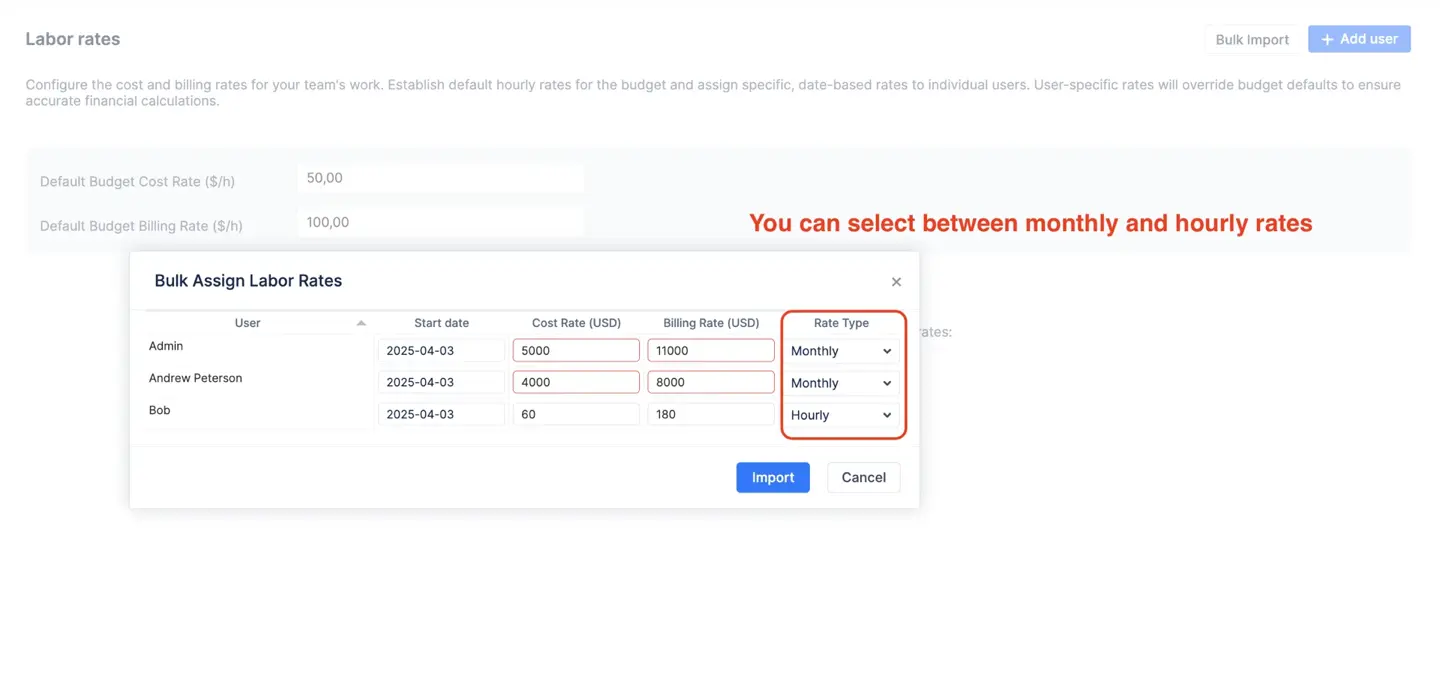
This flexibility is essential for organizations with varied team compositions. A project with a mix of senior and junior contributors shouldn't apply a flat rate — doing so distorts labor cost calculations and makes budget vs. actual comparisons unreliable.
Once rates are configured, every hour logged by team members on Jira Issues within the budget scope automatically converts into a calculated cost. No manual formulas, no spreadsheet exports — the financial data flows directly from operations, provided that teams follow best practices for logging work hours in Jira consistently.
Set Budget Allocations
Budget allocations let you distribute the total budget across categories, phases, or cost types — creating planned spending targets that can later be compared against actual costs.
Common allocation strategies include:
- By cost category — separating labor costs from direct costs like software or infrastructure
- By project phase — allocating portions of the budget to discovery, delivery, and support phases
- By team or workstream — splitting the budget across different sub-teams contributing to the same project

Setting allocations transforms your budget from a single number into a plan — and it's the plan that makes variance reporting meaningful. Without allocations, you can tell whether you're over or under budget in aggregate, but you can't identify which areas are consuming resources faster than expected.
Add Manual Transactions
Not all project costs flow through time tracking. The Finances module supports manual transactions to capture:
- Fixed expenses — one-time costs like hardware purchases or contractor milestone payments
- Ongoing expenses — recurring costs such as software licenses, hosting fees, or operational overhead that continue throughout the project's duration
- Reimbursable expenses — team member expenses that need to be tracked and potentially billed to a client
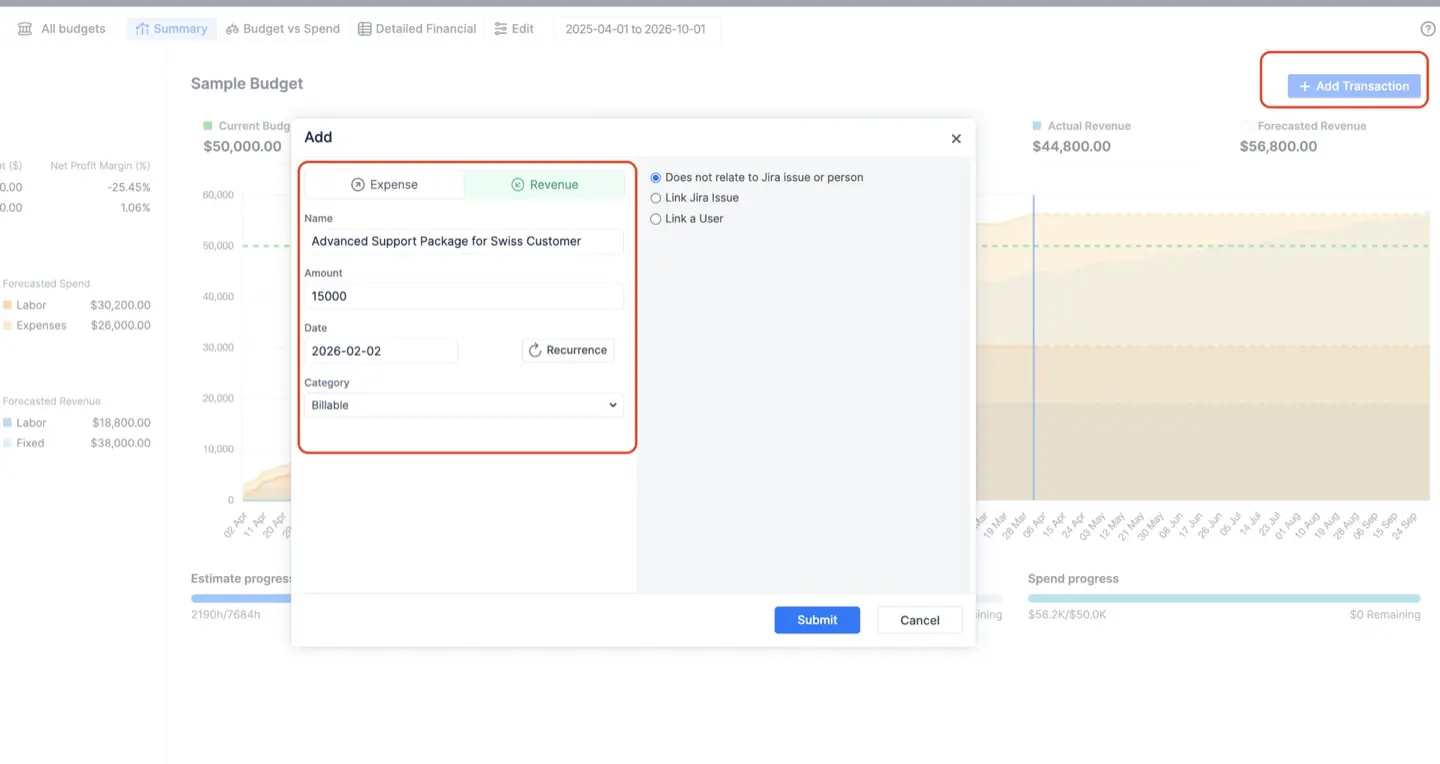
Each manual transaction is categorized, dated, and attributed to the relevant budget scope. This ensures that your financial data reflects the full picture of project expenses, not just the labor component — which is crucial for accurate profitability analysis and client invoicing, especially when combined with disciplined tracking of billable hours in Jira.
Implement Cost Tracking Processes
Technology only delivers value when the team behind it follows consistent processes. To get the most out of ActivityTimeline's Finances module, establish these operational habits:
Time Logging Discipline The accuracy of all labor cost calculations depends entirely on team members logging time accurately and promptly on the right Jira Issues. Establish a clear expectation: time should be logged daily or at the latest by end of week. Stale or missing time logs create gaps in financial data that undermine budget tracking, so it’s worth investing in robust Jira timesheet practices and tooling to support your process.
Expense Submission Workflows Define a process for submitting manual transactions. Who is authorized to add expenses? What documentation is required? How quickly should expenses be recorded after they're incurred? A clear workflow prevents both gaps (missing expenses) and duplication (double-counted costs).
Regular Reconciliation At your agreed cadence, the cost owner should reconcile the Finances module data against any external financial systems. This is especially important for organizations where ActivityTimeline operates alongside accounting tools or billing platforms, particularly in professional services environments that depend on accurate billable hour tracking with Jira add-ons.
Build Reports and Dashboards for Data-Driven Decisions
ActivityTimeline's Finances module includes three core reports, each designed to answer distinct financial questions for different audiences. Together, they provide the financial information needed to manage budgets proactively rather than reactively.
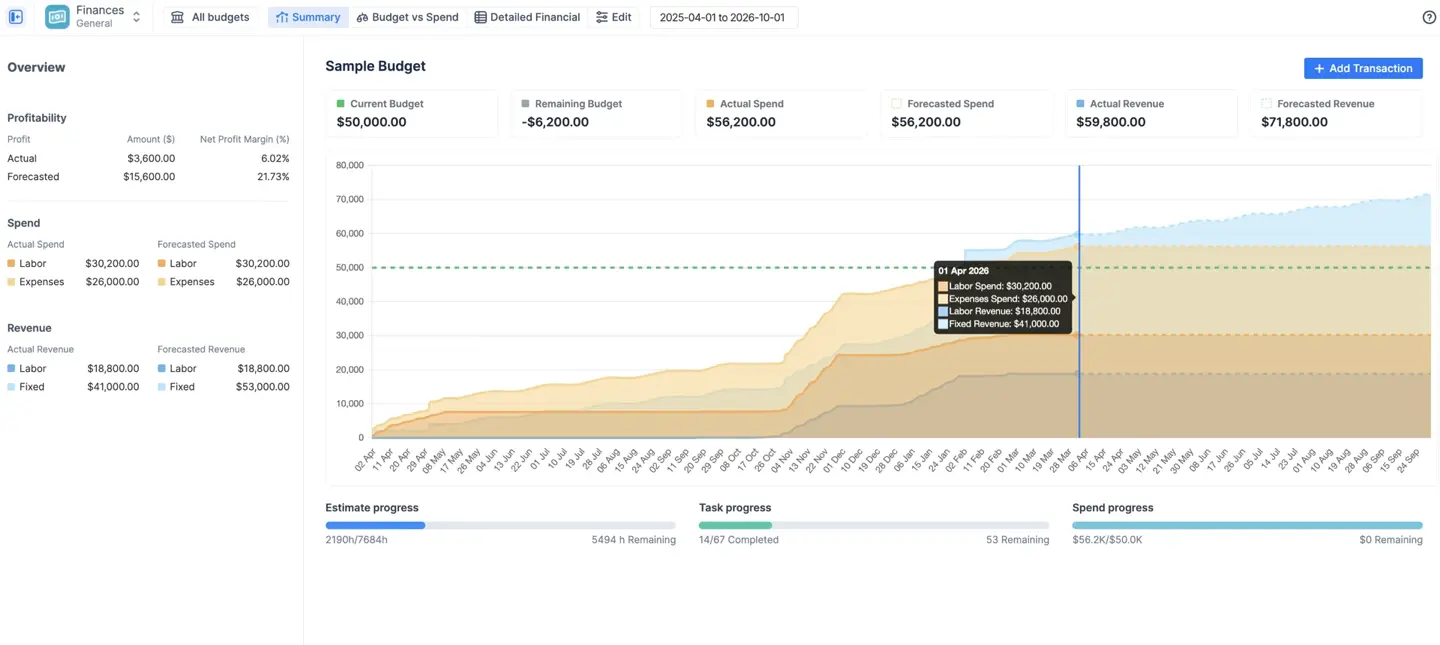
Summary Dashboard
Problem: Project managers and executives need a fast, reliable signal on overall budget health — but assembling that signal typically requires pulling data from multiple sources, reconciling spreadsheets, and waiting for a weekly finance report that's already out of date by the time it arrives.
How does this report fix it?
The Summary Dashboard provides a high-level executive snapshot of overall budget performance in a single view. It answers the three questions that matter most to leadership and stakeholders:
- Are we over or under budget? The dashboard shows total budget consumed versus total allocated budget, with clear visual indicators of budget health.
- What is forecasted profitability? By combining actual costs to date with projected remaining work, the dashboard surfaces an earned value perspective — helping project managers assess whether the project is trending toward the expected return on investment.
- How fast are we burning through the budget? Burn rate metrics reveal whether the current pace of spending is sustainable given the remaining timeline and budget, enabling timely corrective actions before overspend becomes irreversible.
This is the report to open at the start of every budget review meeting and share with stakeholders who need financial transparency without operational detail.
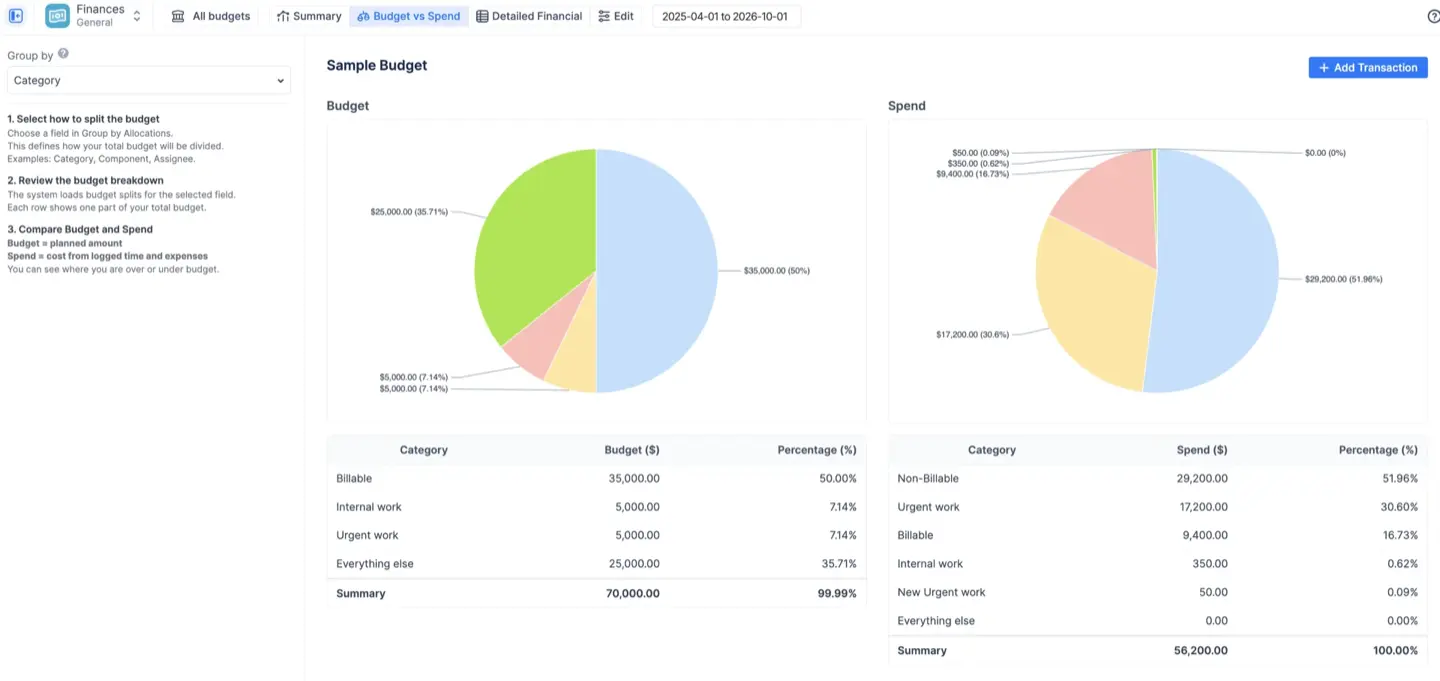
Budget vs. Spend Report
Problem: Knowing the total budget is over or under tells you that there's a problem — but not where. Without category-level visibility, project managers cannot direct corrective actions effectively or make informed decisions about where to reduce spending or shift resources.
How does this report fix it?
The Budget vs. Spend Report compares manual allocation targets against real-time actual spending, broken down by category, phase, or workstream. It directly answers:
- Are we spending in the areas we planned? The report surfaces variances between planned allocations and actual costs, highlighting which categories are on track and which are consuming disproportionate resources.
- Which Jira Projects or Categories are consuming the most resources? For teams managing a project portfolio or multiple workstreams, this report identifies the highest-cost areas — enabling better resource management and more accurate future planning.
This is the report for project managers conducting mid-sprint or monthly budget reviews, and for finance teams tracking whether project expenses align with the approved budget plan.
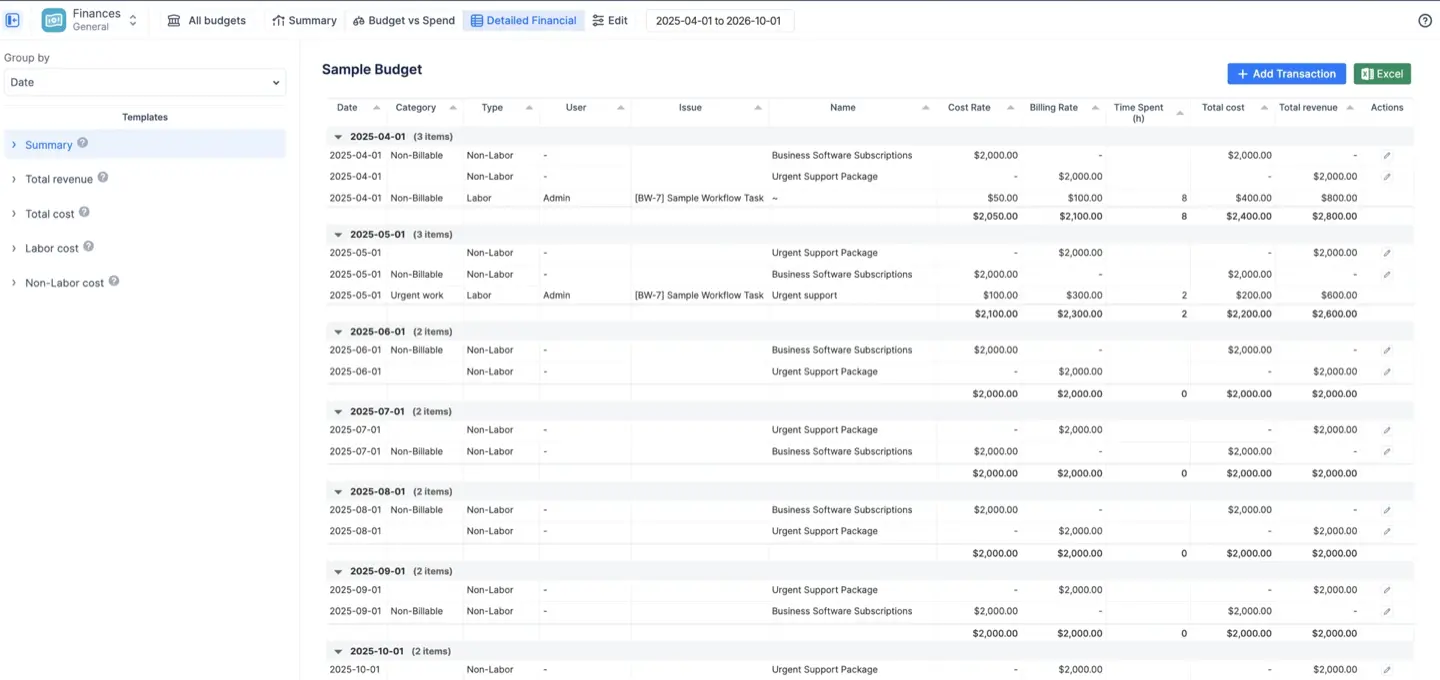
Detailed Financial Report
Problem: High-level dashboards are essential for oversight, but they can't support auditing, invoicing, or root-cause analysis of cost overruns. When a stakeholder asks "why did this category go over budget?", the answer requires a transaction-level view of every cost that was incurred.
How does this report fix it?
The Detailed Financial Report provides a line-by-line, auditable ledger of every logged hour and manual transaction within the budget scope. It answers:
- Who logged time and what did it cost? Every time entry is surfaced with the team member's name, the Jira Issue it was logged against, the hours worked, the applicable rate, and the resulting labor cost — giving complete visibility into how individual task contributions roll up into total costs.
- What fixed expenses were incurred? All manual transactions appear in the ledger with their category, date, and amount — ensuring that direct and indirect costs are fully accounted for.
- What billable work needs to be exported for invoicing? For client-facing projects on Time & Materials arrangements, this report serves as the source of truth for billable hours and expenses, supporting accurate and defensible client invoices.
This report is essential for finance teams, project auditors, and any scenario where detailed financial accountability is required. Its value increases when it is paired with reliable time estimation configuration in Jira, ensuring that planned and actual effort can be compared meaningfully at a granular level.
Best Practices for Ongoing Budget Management
Configuring the Finances module is the beginning, not the end. To maintain financial control throughout a project's lifecycle:
- Run Regular Budget Reviews Using the Summary Dashboard. Make the Summary Dashboard a fixture of your sprint reviews and executive check-ins. Early detection of budget drift allows for timely corrective actions — renegotiating scope, reallocating resources, or adjusting delivery pace — before overruns compound.
- Update Allocations After Major Scope Changes. Scope changes are inevitable in most projects. When a new Epic is added, a phase is extended, or a deliverable is removed, update your budget allocations to reflect the new reality. Stale allocations make variance reports misleading and undermine the value of the Budget vs. Spend Report.
- Train Teams on Time Logging Discipline. The entire financial model depends on accurate, timely time logs. Invest in training team members — including developers, designers, and other contributors — on why time logging matters and how to do it correctly. Consistent time logging discipline is the single most impactful practice for maintaining accurate financial data.
- Use JQL Filters for Cross-Project Visibility. For scrum masters and project managers overseeing work that spans multiple Jira projects, JQL-based budget scopes provide a unified view of costs that project-level scoping cannot. Use this capability to track indirect costs and shared team expenses that don't map cleanly to a single project.
- Leverage Forecasting for Proactive Management. Don't wait until the budget is nearly exhausted to act. Use the burn rate and forecasting features in the Summary Dashboard to model end-of-project scenarios and make resource or scope decisions while options are still available.
Conclusion
Jira is a powerful tool for managing project work — but financial clarity requires more than task tracking. Without native support for rates, cost conversion, or budget caps, teams relying solely on Jira are flying blind when it comes to project costs and budget health.
ActivityTimeline's Finances module changes that. By connecting the operational data already living in your Jira issues — logged hours, task assignments, sprint progress — to a full financial framework of rates, allocations, manual transactions, and real-time reports, it converts your team's day-to-day work into actionable financial intelligence. The result is better financial control, faster identification of budget risk, and the confidence to make informed decisions based on real data rather than guesswork.
For project managers who need to report to stakeholders, finance teams who need to audit project expenses, and executives who need portfolio-level visibility into investment performance, ActivityTimeline's Finances module delivers a unified view that neither Jira alone — nor a disconnected spreadsheet — can provide.
{{rich-cta-1}}