
Jira is one of the most widely used project management tools in the world, and for good reason. It excels at tracking tasks, sprints, and team progress. But when project managers ask the harder question — what is this project actually costing us? — Jira falls short.
Jira does not have built-in features to track employee wages, salaries, or labor costs. It has no way to distinguish billable from non-billable hours, no native support for fixed project expenses, and no financial reporting. Teams that rely on Jira alone for cost tracking are working with an incomplete picture.
This is where the ActivityTimeline Finances module comes in. Built natively on top of Jira, it transforms your existing time-tracking data into a real financial management system — without forcing you to switch tools or manually reconcile spreadsheets.
Why Jira Alone Is Not Enough for Project Costs Management
Jira tracks effort. Finance tracks money. These are related but not the same.
When teams use Jira to log hours spent on tasks, those hours are dimensionless, the platform has no concept of what those hours cost. A senior engineer and a junior developer logging the same number of hours appear identical in Jira. The cost difference can be enormous.
Beyond labor, real-world project costs include software licenses, contractor fees, travel, and other fixed expenses that have no natural home in a Jira ticket. Jira offers custom fields as a workaround, and teams often create them to capture financial information for a specific project, but this creates fragmented, manual data that is hard to aggregate and impossible to report on meaningfully.
Teams often rely on add ons from the Atlassian Marketplace to extend Jira for budget tracking and reporting. Those extras can also introduce hidden costs through paid features such as CRM or reporting tools.
Conducting regular variance analyses, or checking whether actual costs align with budget expectations, is a best practice in project management. Without a dedicated financial layer, Jira users simply cannot do this inside the platform.
The result is that project budgets are managed in spreadsheets alongside Jira, creating duplication, errors, and delays. ActivityTimeline Finances is designed to eliminate that gap.
What ActivityTimeline Finances Actually Does
ActivityTimeline Finances is a financial management module built into ActivityTimeline, a resource planning application for Jira. Its core function is simple: it takes the work your team is already logging in Jira and converts it into cost and revenue data in real time.

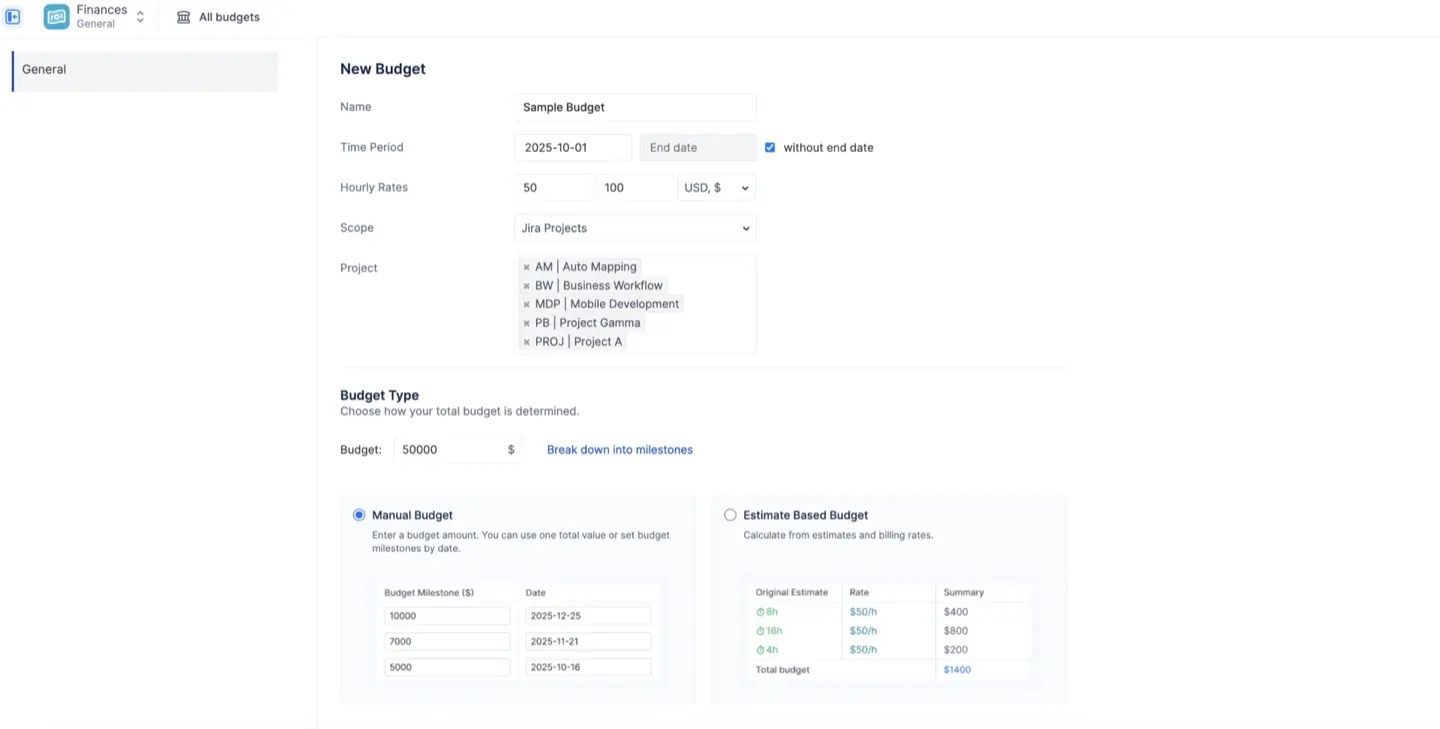
A Budget in ActivityTimeline acts as a financial container scoped to a specific body of Jira work. You define that scope using Jira Projects, Epics, or a saved JQL filter, so whether you manage one project or a cross-team program, the module adapts.
Once a budget is created, the system automatically calculates three financial figures:
- Budget (Planned): The monetary cap you define, either as a fixed manual amount or calculated from original task estimates.
- Actual Spend: The real cost incurred — logged Jira hours multiplied by the applicable cost rate, plus any manually entered fixed expenses.
- Actual Revenue: Income generated — billable hours multiplied by billing rates, plus any fixed revenue items you record.
This three-entity model gives project managers a complete profit and loss view, not just a task completion percentage.
Labor Rates and Time Tracking: Turning Hours Into Dollars
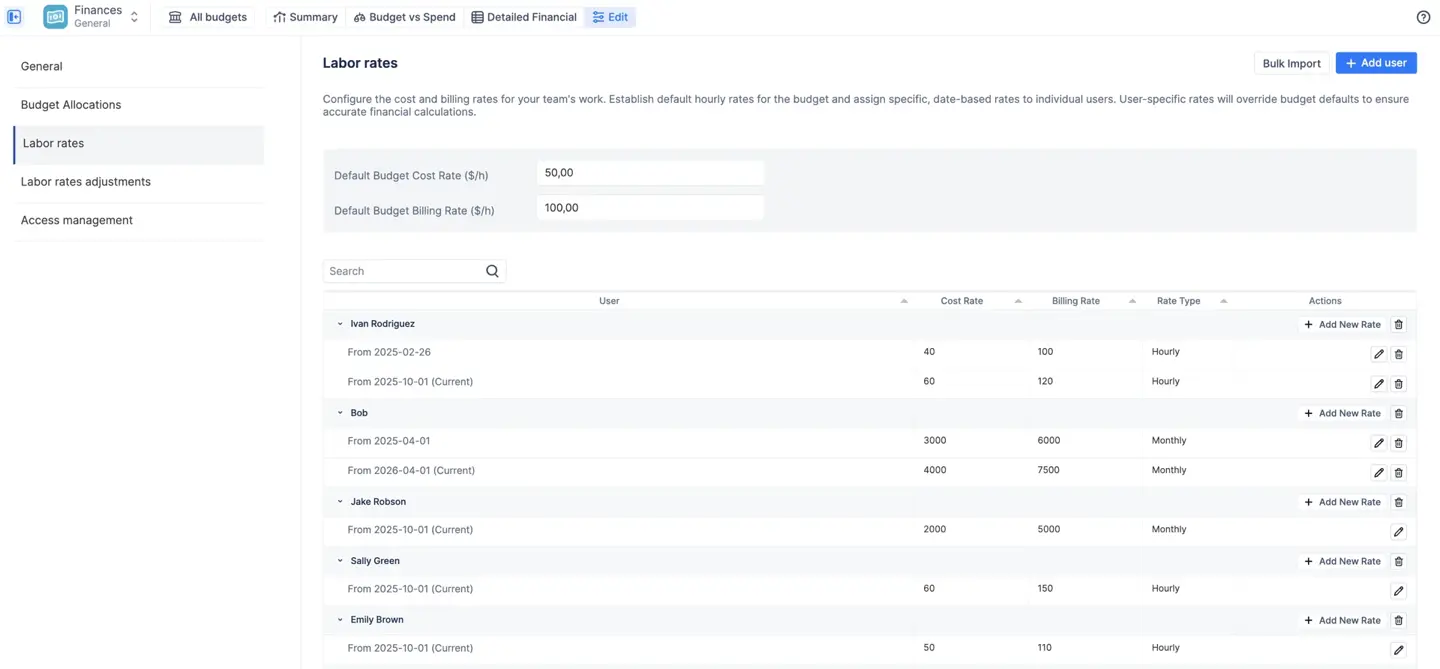
The engine that makes financial tracking accurate is the labor rate system. ActivityTimeline uses a three-tier hierarchy to determine which hourly rate applies to any given worklog:
- Category Rate (highest priority) — a rate tied to a specific type of work, such as "Urgent Support" or "Non-Billable." You can set these as flat amounts or as multipliers on a user's base rate.
- User Rate — an individual rate assigned to a specific team member.
- Default Budget Rate — the fallback rate for anyone without a specific rate assigned.
This hierarchy handles the financial complexity that Jira ignores. A senior developer and a junior developer are different costs. Emergency work may be billed at a premium. Internal meetings should not inflate your billable revenue. The rate system manages all of this automatically.
The module also supports monthly rates for salaried employees or fixed retainers — a fixed monthly amount that is prorated across the active days of the month, independent of logged hours.
A critical feature here is effective dating. When a team member gets a raise or a contract rate changes, you add a new rate with a start date. The system applies the old rate to past worklogs and the new rate going forward. Historical financial data stays accurate. This is something no spreadsheet-based approach can reliably guarantee.

Budget Allocations: Planning Where the Money Goes
A total budget of $100,000 is a ceiling, not a plan. Effective cost management requires knowing how that money is intended to be distributed — and then comparing that plan to reality.
Budget Allocations let you break your total budget into targets by any dimension available in your Jira data: Category, Project, Epic, Component, or Assignee. You can set targets as fixed amounts or percentages, and the system automatically calculates the inverse. They also support clearer cost allocation, for example by separating direct costs into CAPEX- and OPEX-style categories where standardized financial records are needed.
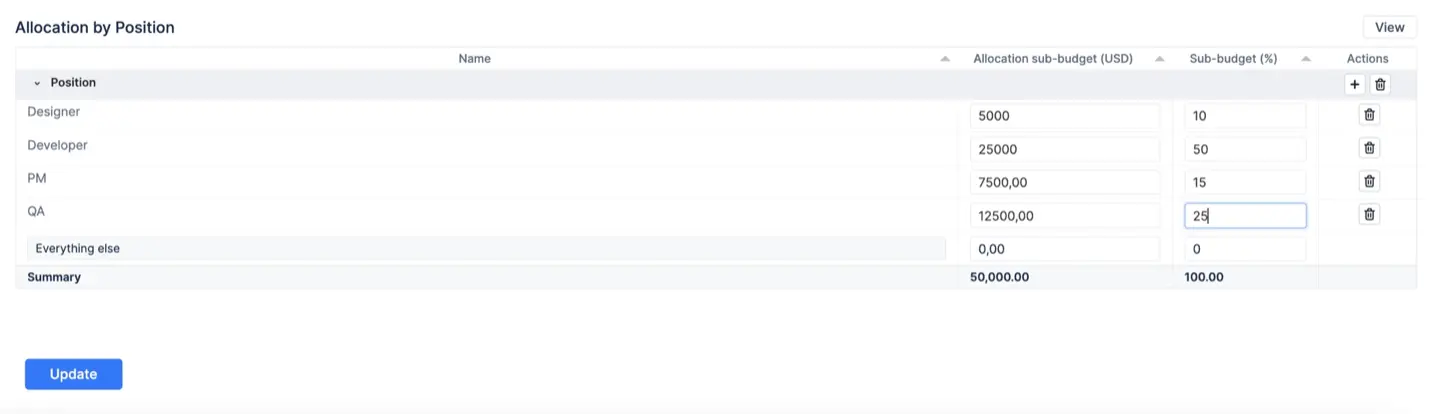
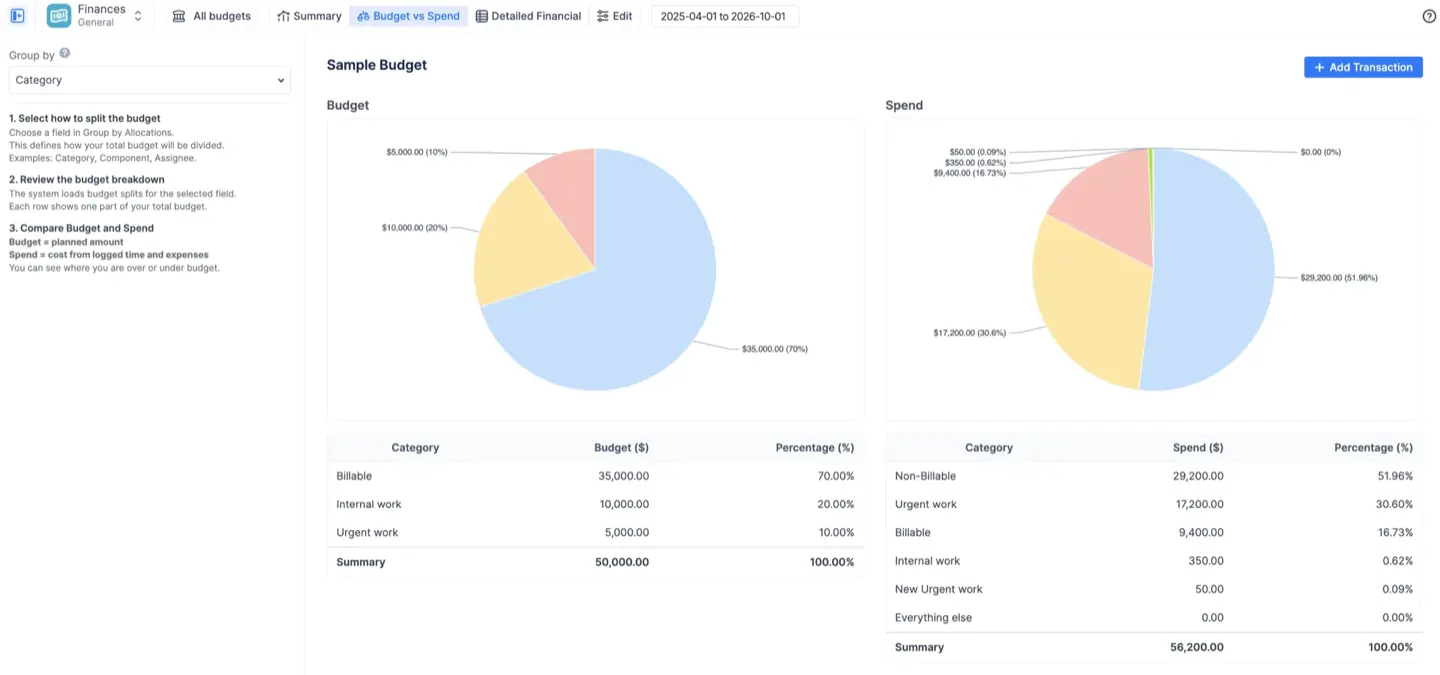
These allocations then power the Budget vs Spend report — the module's strategic comparison tool. The left side of the report shows your plan; the right side shows where money is actually going, calculated automatically from worklogs and fixed expenses.
You can create multiple allocation breakdowns for the same budget. A single budget can be sliced by Category (Billable vs. Non-Billable) and separately by Project — and you switch between views with a single dropdown.
Three Reports for Every Level of the Organization
Once a budget is running, ActivityTimeline generates three distinct financial reports. Each answers a different question.
Summary Dashboard
The executive overview. At a glance, you see six key metrics: Current Budget, Remaining Budget, Actual Spend, Forecasted Spend, Actual Revenue, and Forecasted Revenue. A cumulative trend chart shows your burn rate over time, with a dashed line projecting where you will land by the end of the project.
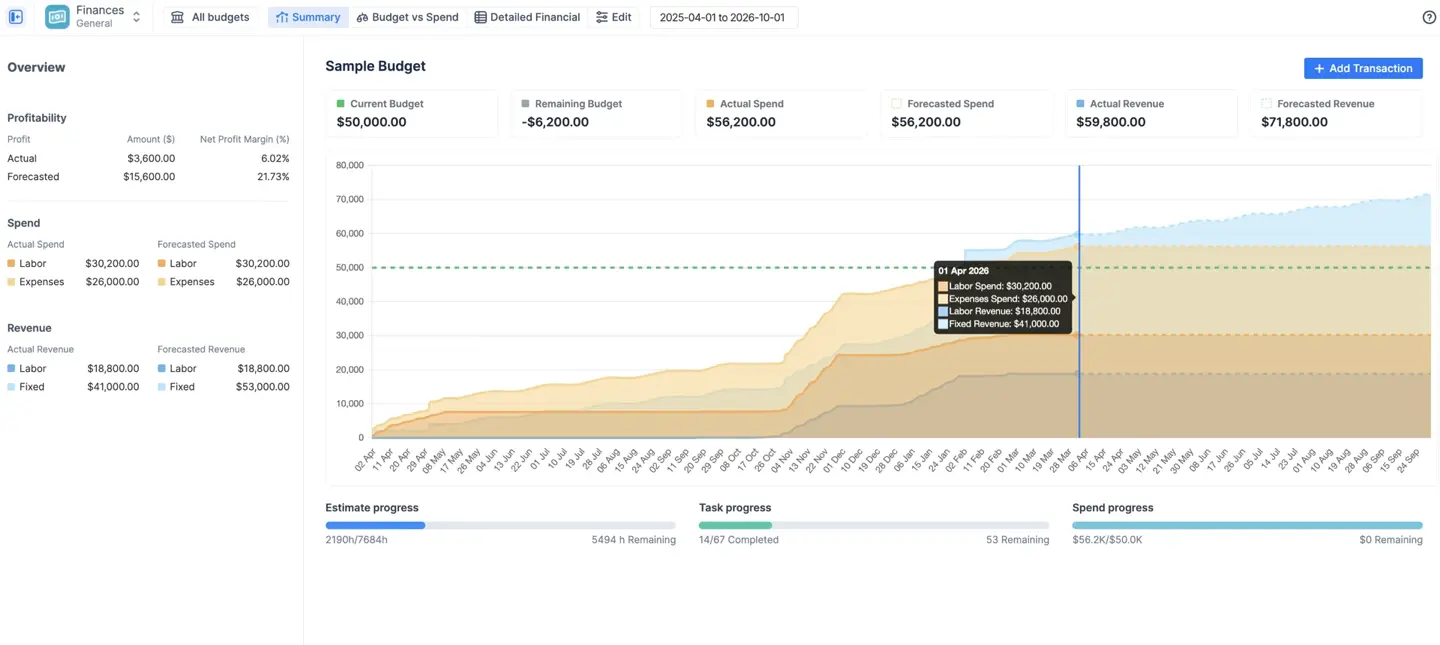
The forecast is built from concrete scheduled data — future worklogs already logged, recurring fixed expenses, and monthly user rates — not abstract estimates. If the forecasted spend line crosses above your budget line, you have a visible early warning.
Three progress bars at the bottom compare estimate progress, task completion, and spend consumption side by side. If your spend is at 80% but task completion is at 40%, you have a problem — and this report makes it impossible to miss.
Budget Tracking: Budget vs Spend
The strategic comparison tool. This report is worth understanding in depth, because it exposes a common trap.
A pie chart view shows proportional spend by category. This can look healthy even when it is not: if your planned allocation to Billable work was 80% and actual Billable spend is 82%, the proportions look fine. But a bar chart view adds the Y-axis in dollar amounts — and may reveal that total spend has already exceeded the entire budget, even while the ratios appear correct.
Both views are available with a single toggle. Using only one gives an incomplete picture.
Detailed Financial Report
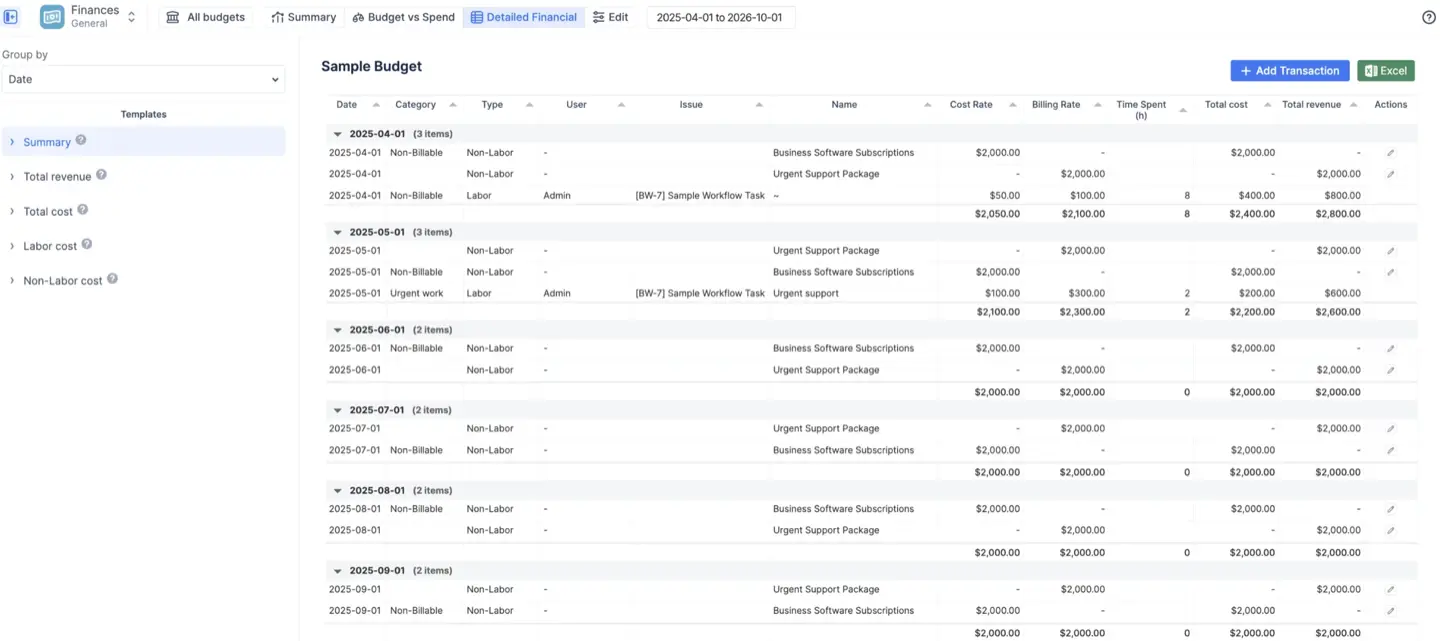
The auditable ledger. Every logged hour and every manual transaction appears as a line item, with the rate applied, the time spent, and the resulting cost and revenue clearly shown. Preset templates filter the view instantly: Labor cost, Non-Labor cost, Total revenue, or a combined Summary.
This report is the right source for invoicing. Filter to Total Revenue, set your date range, and export to Excel — you have a clean, line-by-line breakdown of every billable hour and fixed revenue item ready to attach to a client invoice.
Manual Transactions: Capturing Costs Jira Doesn't Know About
Not all project expenses come from logged hours. Software licenses, travel, contractor invoices, hardware, and milestone payments are real project costs that have no Jira worklog attached to them.
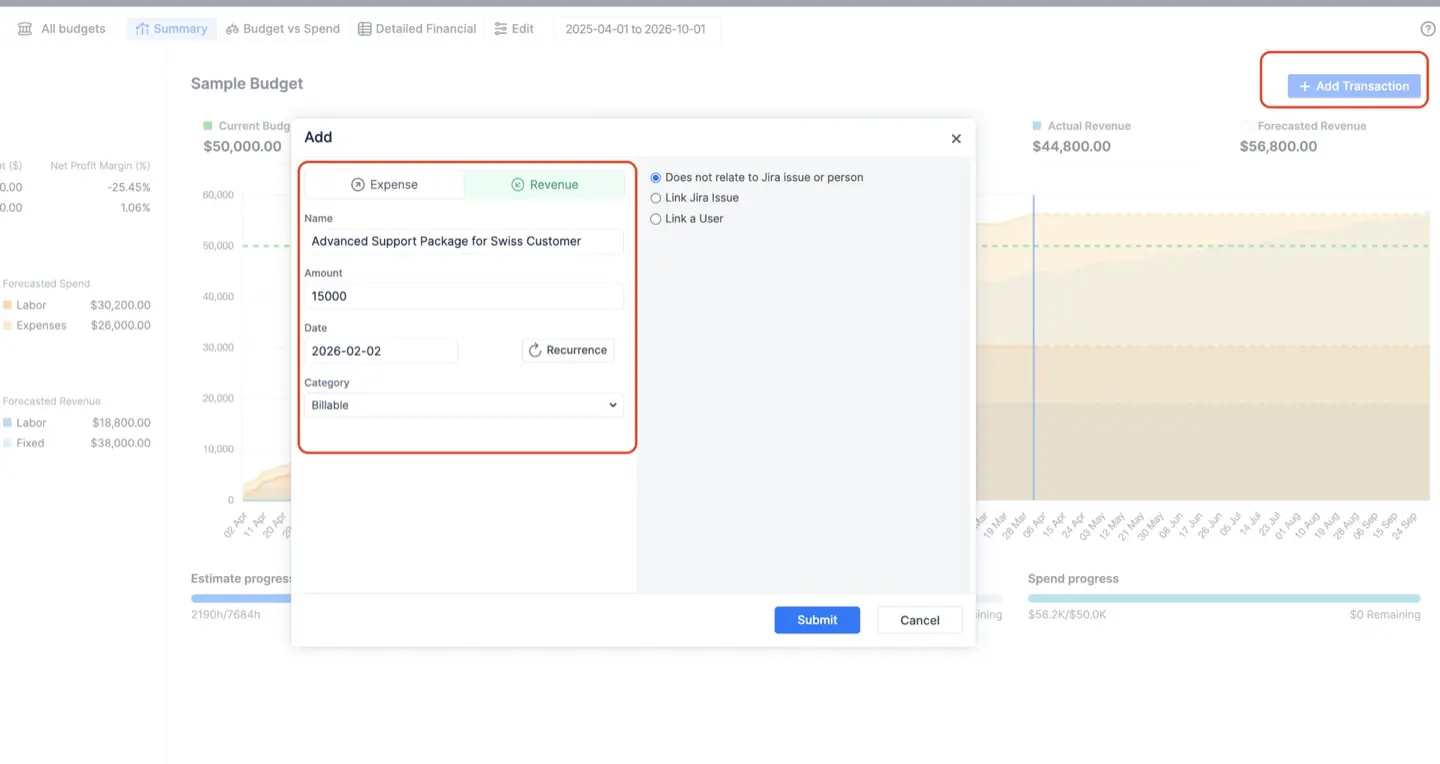
The Manual Transactions feature lets you log these directly into your budget as either an Expense or Revenue item. Each transaction has a date, an amount, and an optional category — which ensures it shows up correctly in your Budget vs Spend report.
Transactions can also be set to recur. A monthly server hosting fee, logged once with a recurrence pattern, automatically generates future entries that appear in your forecasted spend. This makes your financial projections far more reliable than estimates based on team velocity alone.
You can link a transaction to a specific Jira issue for granular audit trails, or link it to a user — in which case the transaction is reclassified as a Labor item, not Non-Labor. This matters for teams that need to capture bonuses, contractor fixed fees, or stipends as part of an individual's total cost to the project.
Access Control: Protecting Sensitive Financial Data
Financial data is sensitive. Not every Jira user who works on a project should see what their teammates cost.
ActivityTimeline Finances has a layered access model. Each budget has a single Owner (the creator, whose role is fixed), Administrators who can edit configurations and transactions, and Read-Only users who can view reports and export data but cannot modify anything.
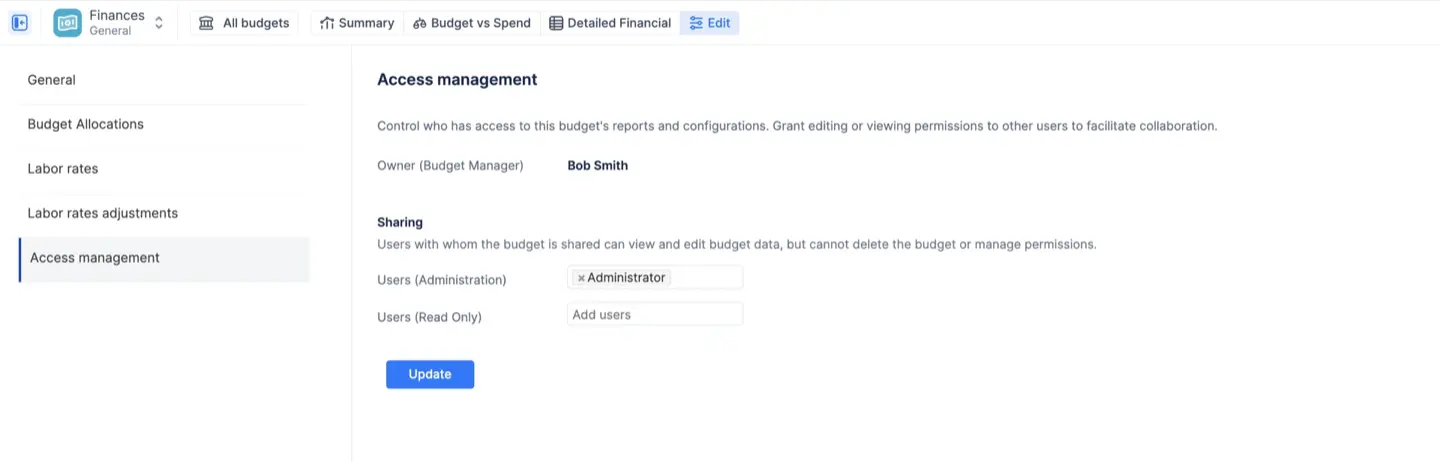
- Critically, Read-Only stakeholders can see the output of the financial reports — costs, revenues, burn rates — without seeing the underlying rate cards. They get the project health information they need for informed decisions without exposure to sensitive salary data.
- At the organization level, the Finances module can be restricted to a specific list of users — bypassing role-based access entirely. For enterprises where financial oversight belongs to a small team (CFOs, controllers, or department heads), every other user sees no Finances module at all.
- A final layer: ActivityTimeline mirrors Jira's own permission system. If a user does not have "Browse Project" access in Jira for a given project, they will not see the financial data for that project's worklogs inside any budget — even if they have been given access to the budget itself. Jira's security perimeter is never bypassed.
Use Cases: Which Setup Fits Your Team
ActivityTimeline Finances is designed to serve different business models without requiring separate tools.
- Service agencies and consultancies use it to track billable margins comparing what they pay their team against what they charge clients, with category rates automatically applying premium pricing to urgent or specialized work.
- Internal departments use it for strict cost control against a fixed budget granted by leadership. Revenue tracking is often disabled entirely; the goal is simply to confirm that delivery stays within the approved spend.
- Product and SaaS companies use it to understand the true cost of building and maintaining a product versus the subscription revenue it generates, including recurring monthly revenue transactions.
- Fixed-price project managers use it by decoupling hours from revenue, setting the contract amount as a single fixed revenue transaction while continuing to track internal labor costs to monitor the actual margin being earned.
For ongoing work with no defined end date like maintenance contracts, platform operations, internal IT, budgets can be created without an end date, accumulating financial data indefinitely.





![Jira Teams with ActivityTimeline: Comprehensive Guide [2026]](https://cdn.prod.website-files.com/60c76f07dc83db305171350c/6a15952034cfc5cca020eedd_thumbnail_Jira%20Teams%20with%20ActivityTimeline.png)