
For many Project Managers and IT Directors, the end of the month brings a familiar dread: the capitalization report. Bridging the gap between agile software development and rigid financial reporting is a constant struggle. Finance teams need precise data to capitalize assets, while developers just want to code without administrative overhead.
The tension often boils down to two acronyms: CapEx and OpEx.
Software development is inherently messy. A single Jira issue can involve both creating new value (Capital Expenditure) and maintaining existing systems (Operational Expenditure). Native Jira time tracking often fails to capture this nuance, leading to financial reporting gaps. Proper classification of business expenses into the correct expense categories is essential for accurate company's financial statements and ensures compliance with accounting standards.
By understanding the fundamental differences between capex vs opex in it projects and utilizing granular time tracking tools (like AT Timesheets and Workspace), IT teams can ensure financial compliance, maximize capitalization opportunities. Understanding business expenses and their correct categorization supports better financial planning and reporting, helping organizations manage their resources more effectively and present clear financial data.
1. The Financial Basics: Understanding CapEx and OpEx
To navigate IT budgeting, we must first establish a common language with the finance department.
Understanding the basics of CapEx (capital expenditures) and OpEx (operating expenses) is crucial. These categories determine how costs are recorded, reported, and managed throughout the business. This clarity is essential for tax optimization, audit compliance, and justifying headcount. Misclassifying CapEx and OpEx can have significant tax implications, as it may affect the company's taxable income and overall tax liability through incorrect depreciation or deduction of expenses.
Defining the Terms: Capital Expenditures
- CapEx (Capital Expenditures): These are funds used by a company to acquire, upgrade, and maintain physical assets, including fixed assets and tangible assets such as land, buildings, and equipment. In the context of technology, IT CapEx isn’t just about buying servers; it includes software development labor that creates long-term value. Capital expenses can also include investments in intangible assets like software licenses or patents. When you build a new feature that will be used for years, that labor is an asset.
- OpEx (Operational Expenditures): These are the ongoing costs required to keep the business running. These are considered operating costs and are necessary for daily operations. But what does opex mean in a practical IT budget? It includes rent, cloud subscription fees, salaries for support staff, and crucially, routine maintenance.
Financial Impact and Why It Matters
The distinction affects how your company reports profit.
- CapEx is recorded on the balance sheet as an asset and depreciated over time. This spreads the cost out, improving the company’s immediate EBITDA (Earnings Before Interest, Taxes, Depreciation, and Amortization). CapEx is reported in the cash flow statement under investing activities, and these investments impact the company's cash flow over time as funds are allocated to long-term assets.
- OpEx hits the income statement immediately. It is fully tax-deductible in the period it is incurred but reduces immediate profitability. These are recurring expenses the company incurs as part of its regular operations.
Accurate classification is critical for tax optimization, audit compliance, and justifying headcount. If you misclassify OpEx as CapEx, you risk audit failure. If you misclassify CapEx as OpEx, you are “leaving money on the table” by understating your company’s investment in innovation.
2. Navigating CapEx vs. OpEx in IT Projects
Classifying hardware is easy. Classifying a developer’s time is hard. When discussing software labor, the lines frequently blur. Distinguishing between capitalizable work and ordinary and customary costs is essential for accurate financial reporting.
General Classification Guidelines
A developer’s work generally falls into these buckets:
Likely CapEx (Capitalizable):
- New feature development that adds functionality.
- Major architectural overhauls or platform migrations.
- Testing and QA for new functionality.
- R&D for new products. Such investments can result in an existing asset that supports long term growth and may be associated with goods sold in the future.
Likely OpEx (Expensed):
- Bug fixes and patches.
- Routine maintenance and technical debt reduction (without new features).
- Administrative meetings (Stand-ups, Retrospectives).
- Training and onboarding.
The "Blended Work" Challenge
The real challenge arises because developers rarely work in silos of pure “New Development” or “Maintenance.”
Consider this common scenario: A developer spends 8 hours on a Jira ticket labeled “Story: Payment Gateway Integration.”
- 5 Hours: Coding the new integration (CapEx).
- 2 Hours: Fixing legacy bugs discovered during the process (OpEx).
- 1 Hour: Attending a team meeting (OpEx).
Accurate categorization is essential, as it helps distinguish between company purchases that are capex purchases—such as infrastructure investments for long-term benefit—and opex purchases, which are recurring operational costs like subscription services or cloud storage.
If your finance team capitalizes 100% of the time logged to that “Story,” your financial statements are inaccurate.
Accounting for CapEx and OpEx in IT Projects
Accurate accounting for capital expenditures (CapEx) and operating expenses (OpEx) is fundamental to the financial health of any IT project. For IT teams, this means distinguishing between large-scale, long-term investments and the recurring costs that keep systems running smoothly.
CapEx in IT projects typically covers major purchases such as servers, network infrastructure, and enterprise software licenses—investments that become capital assets on the balance sheet. These assets are not expensed immediately; instead, their cost is spread out over their useful life, which can range from several years for hardware to a decade for certain infrastructure. This approach allows companies to match the expense with the long-term benefits these assets yield, supporting future growth and innovation.
OpEx, on the other hand, includes the operational expenses that are necessary for short term operational efficiency. These are the recurring costs—like employee salaries, cloud service subscriptions, maintenance contracts, and utility bills—that are expensed immediately in the income statement during the current accounting period. Unlike CapEx, these costs do not provide long term benefits but are essential for the day-to-day operations of the business.
The key differences between CapEx and OpEx in IT projects come down to their impact on financial statements and cash flow. CapEx supports long term investments and is capitalized, while OpEx represents ongoing costs that are fully expensed in the period incurred. For example, implementing a new data center is a CapEx project, but the electricity and support staff required to keep it running are considered operating expenses.
Properly accounting for both CapEx and OpEx ensures that costs are allocated correctly for tax purposes and financial reporting. This not only helps optimize tax benefits but also provides a clear picture of operational efficiency and the true cost of supporting IT initiatives. By understanding and applying these distinctions, IT leaders can make informed decisions that balance innovation with cost control.
Business Operations and Cash Flow Implications
The way a company manages CapEx and OpEx has a direct impact on its business operations and cash flow. CapEx investments often require significant upfront spending, which can temporarily reduce available cash but are intended to yield long term benefits and improve operational efficiency over time. These capital assets, once acquired, can enhance productivity, support new business capabilities, and drive future growth.
OpEx, in contrast, represents the ongoing costs necessary for day to day operations. These recurring expenses—such as software subscriptions, employee salaries, and routine maintenance—are essential for keeping the business running and generating revenue. While OpEx may not deliver the same long-term value as CapEx, it is fully deductible in the period incurred, providing an immediate tax benefit and reducing taxable income on the profit and loss statement.
Understanding the cash flow implications of CapEx and OpEx is crucial for effective financial planning. Companies must ensure their capital budget accounts for both the large expenditures associated with CapEx projects and the recurring costs of OpEx. Overcommitting to CapEx without considering the ongoing operational costs can strain a company’s cash flow, while focusing solely on OpEx may limit opportunities for long-term improvement and innovation.
From a tax perspective, CapEx assets are depreciated over their useful life, offering a tax deduction spread across several years. OpEx, however, is fully deductible in the period incurred, which can provide immediate relief to the company’s tax liability. This difference in accounting treatment means that strategic allocation between CapEx and OpEx can have a significant impact on a company’s financial statements and overall tax benefits.
Ultimately, a balanced approach to managing CapEx and OpEx enables companies to maintain healthy business operations, optimize cash flow, and support both short-term needs and long-term growth. By understanding the financial and operational implications of each expense category, businesses can make smarter investment decisions and achieve sustainable profitability.
3. The Shortcoming of Standard Jira Time Tracking
Native Jira time tracking is built around the Issue. You log time to a ticket, and that ticket has a type (e.g., Story, Bug, Task).
The fatal flaw in this system is that it assumes Issue Type = Financial Treatment.
- Assumption: All time on “Stories” is CapEx.
- Assumption: All time on “Bugs” is OpEx.
Misclassifying work in this way can result in inaccurate reporting of capex spending, which affects financial statements and can disrupt strategic planning.
As we saw in the “Payment Gateway” scenario, this binary approach fails to capture the reality of mixed work. This leads to audit risk (overstating assets) and strategic misalignment (management cannot see the true burden of maintenance/OpEx work).
4. The Solution: Granular Time Tracking with AT
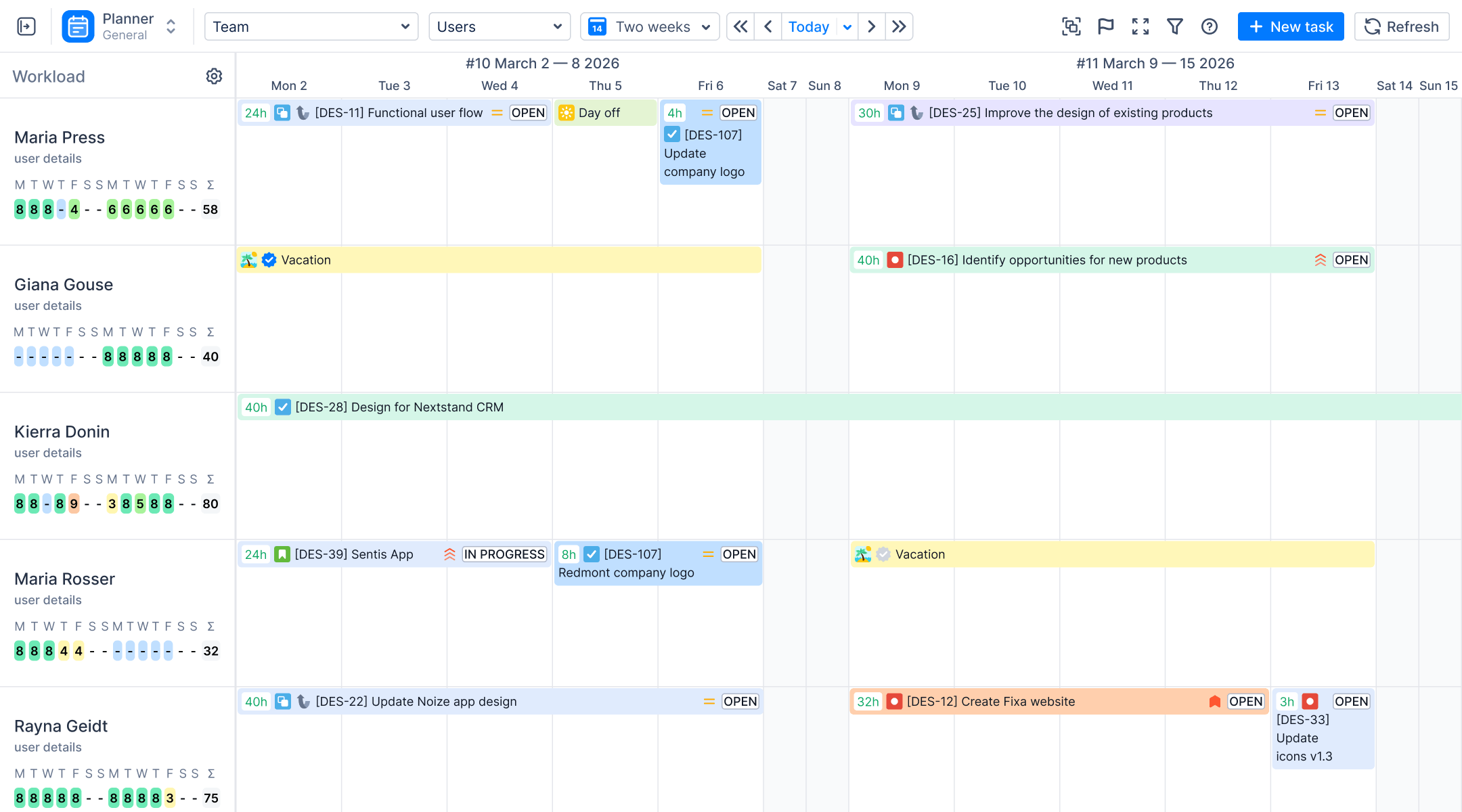
To solve this, Project Managers need a way to log time not just against an Issue, but against the nature of the work itself. This is where ActivityTimeline’s granular tracking modules—specifically Timesheets and Workspace—become essential.
Adopting an opex model alongside traditional capex tracking can provide greater flexibility in managing IT expenses, supporting hybrid IT strategies and enabling organizations to better align with both cloud services and on-premises investments.
The core feature that bridges the gap is Worklog Categories. Unlike standard Jira worklogs, AT allows teams to categorize every entry, decoupling the “type of work” from the “Jira Issue Type.”
Practical Scenario Walkthrough
Let’s revisit our developer working on the Payment Gateway.
Traditional Jira Approach:
- Logs 8 hours to Ticket PROJ-123.
- Finance capitalizes 8 hours. (Inaccurate)
Granular Tracking Approach (with AT Timesheets):
The developer logs their day with precision using Worklog Attributes in addition to Categories. You can create CapEx/OpEx attributes and allow users to select.
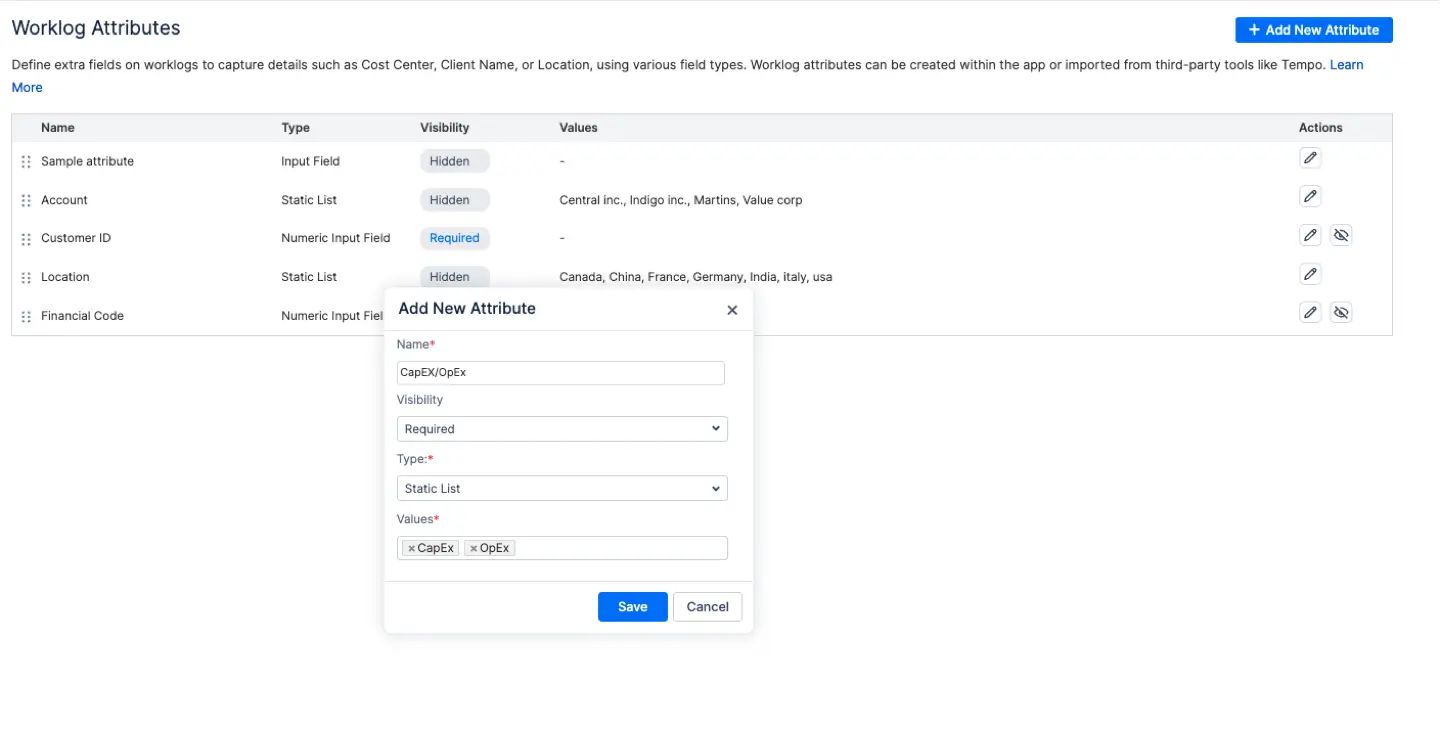
- 6 Hours >Category: “New Feature Development” (Mapped to CapEx).
- 1.5 Hours > Category: “Bug Fix/Maintenance” (Mapped to OpEx).
- 0.5 Hours > Category: “Team Admin” (Mapped to OpEx).
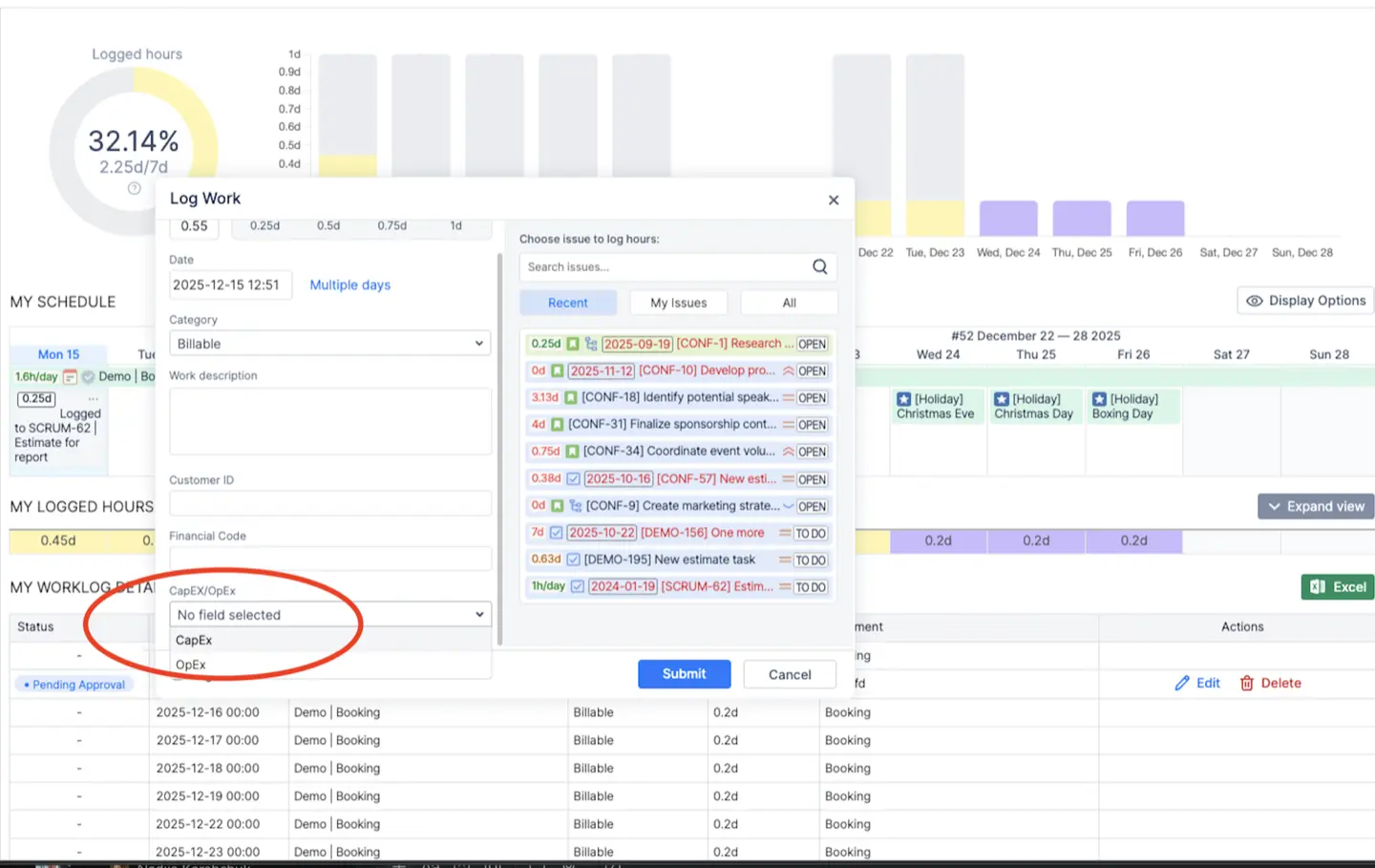
Result: Finance receives precise data showing exactly 6 hours of capitalizable labor, ensuring compliance without requiring the developer to split their work across multiple dummy tickets.
This level of accuracy delivers clear financial benefits, such as improved budgeting and resource allocation by distinguishing between CapEx and OpEx, which can positively impact a company's financial performance and efficiency over time.
5. Implementation Guide for IT Managers
Implementing this structure requires a blend of configuration and culture.
Defining and tracking worklog categories also makes it easier to calculate capex accurately for IT projects.
Step 1: Define Your Worklog Categories
Navigate to the AT Workspace module and define categories that align with your Chart of Accounts. A standard setup includes:
- CapEx: New Feature Dev, R&D, System Architecture.
- OpEx: Maintenance, Support, Bug Fixes, Meetings/Admin.
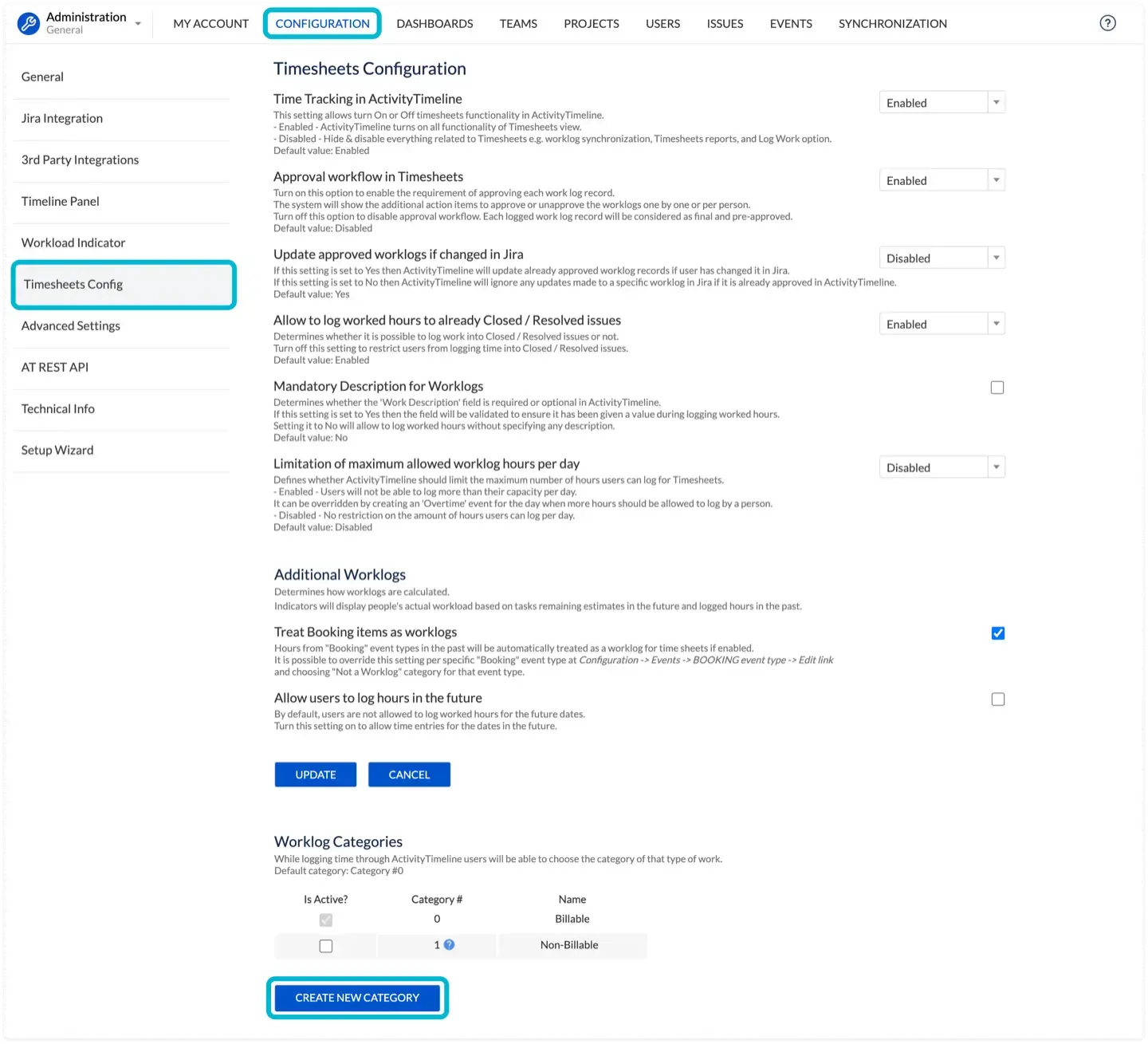
Step 2: Configure Defaults
To reduce friction, configure default categories. For example, make the "New Feature" category the default for "Story" issue types, but allow the user to change it if they are doing maintenance work on that story.
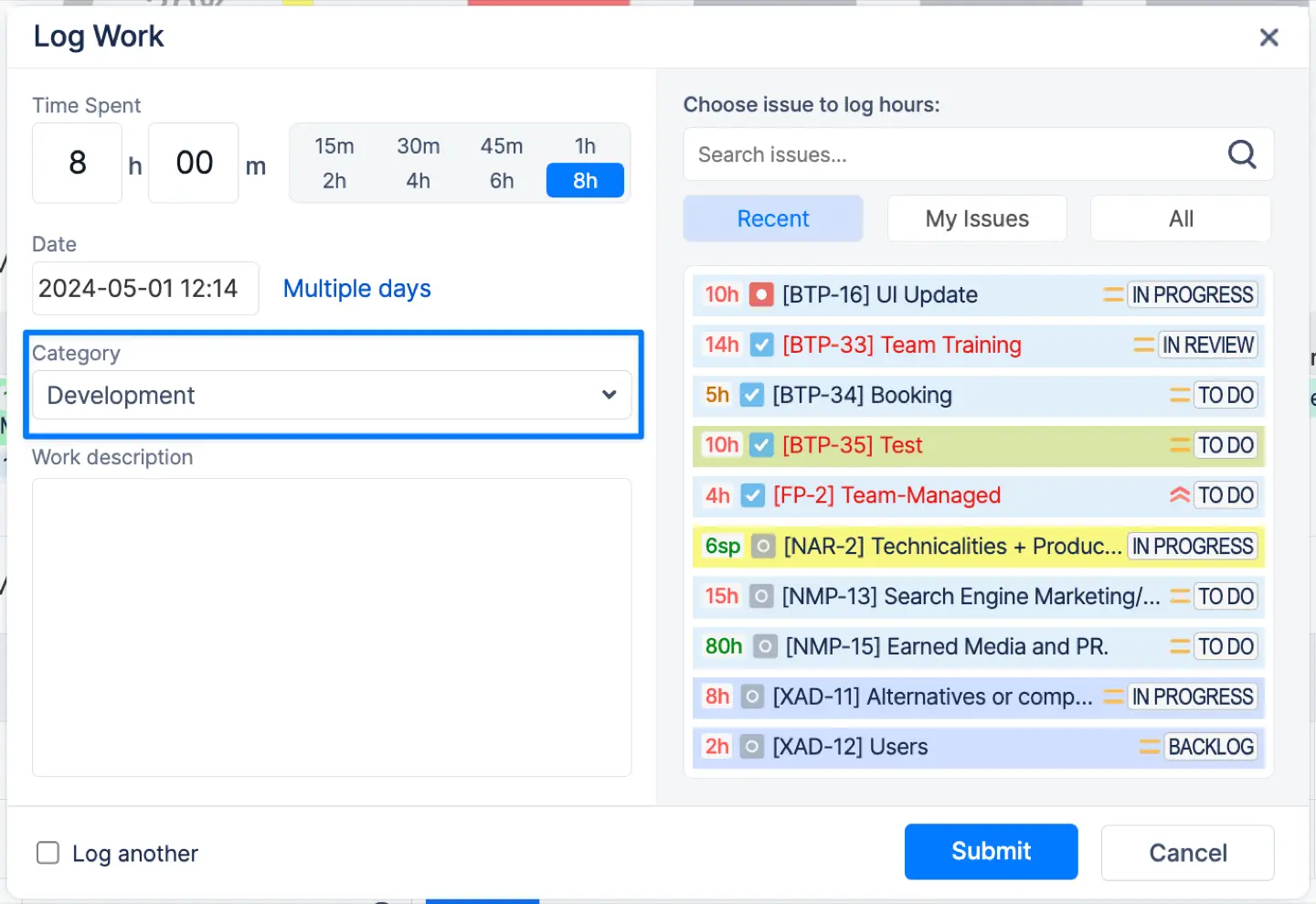
Step 3: Team Adoption Strategy
Department Heads must champion this change.
- Don't frame it as micromanagement.
- Do frame it as budget protection. Explain: "When we accurately track OpEx, we can prove to leadership that we are spending too much time on maintenance and justify hiring more staff."
6. How to Calculate Hours and Optimize CapEx
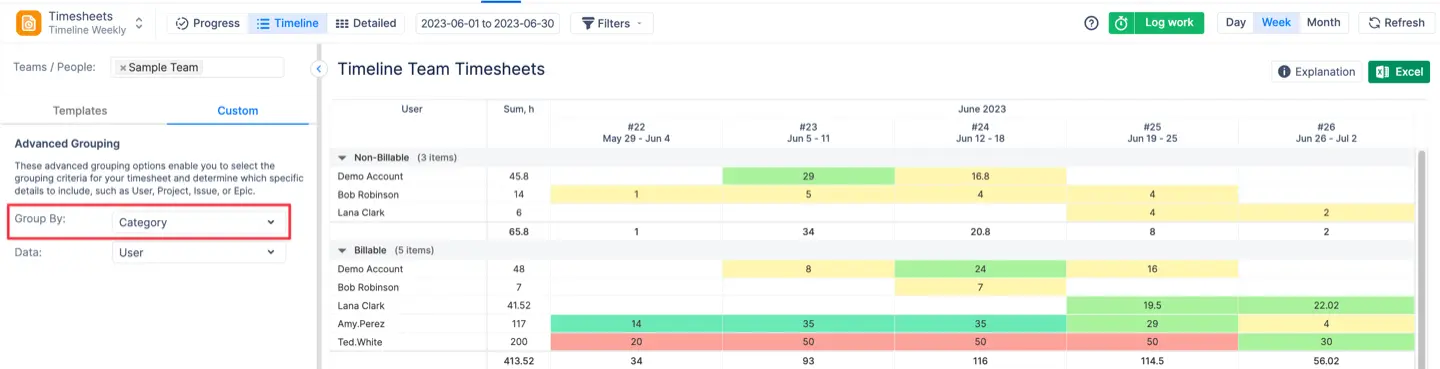
Once your team is using Worklog Categories, calculating your IT CapEx becomes a data-driven exercise rather than a guessing game. By comparing data from the current period to the prior period, you can track changes in capitalizable labor and investment. Then, you will be able to group by this attribute, which will be better from the UX standpoint.
The Calculation Formula
To calculate the capitalization for a specific period (e.g., Q1), use the data from AT Timesheets.
Total Capitalizable Labor = Sum (Hours logged to CapEx Categories * Employee Hourly Rate)
Reporting for Decision Makers
Granular reporting benefits every level of the organization:
- Project Managers: Can view real-time burn rates. If a project is 50% through its timeline but only 30% of the hours are “New Feature Development,” you have a scope creep or technical debt issue.
- IT Managers: Can justify headcount. “We are spending 72% of our time on OpEx. We need to hire 3 new developers to hit our innovation targets.”
- Finance Teams: Benefit from a simplified month-end close. They can export pre-categorized data directly into their capitalization spreadsheets, complete with an audit trail. This ensures the data is ready for accurate reporting on the company's financial statements, reflecting the correct treatment of CapEx and OpEx.
7. Conclusion
In the complex world of software development, the distinction between building the future and maintaining the past is subtle, but financially vital. Accurate financial tracking in Jira is no longer optional.
By using AT granular time tracking modules, teams can move beyond simple hour logging to category-specific tracking. This ensures audit compliance, maximizes capitalization opportunities, and ultimately gives IT leadership the data they need to prove the value of their projects.
{{rich-cta-4}}