
There is a quiet failure happening inside many high-performing teams.
On the surface, everything looks structured. Tasks are tracked in Jira. Sprints are planned. Deadlines are set. And yet, work slips.
Deadlines move. The same people are always overloaded. Others drift underutilized. Managers compensate with longer hours, tighter controls, or more meetings. In most cases, the issue starts earlier — at planning.
Why Capacity Planning Fails in Practice
Most teams using Jira are not actually planning capacity. They are planning work in isolation — task by task, sprint by sprint — without a reliable understanding of how much their team can realistically deliver.
This creates what can be called optimistic planning bias.
Work is committed based on:
- Rough estimates
- Incomplete visibility
- Implicit assumptions about availability
One of the most common misunderstandings is equating capacity with time. A team of five people does not have 200 hours of weekly capacity. That number exists only in theory. In reality, capacity is shaped by constraints:
- Meetings and coordination overhead
- Context switching across projects
- Interrupt-driven work
- Skill mismatches
- Absences, planned or unplanned
Even teams that recognize the importance of capacity planning struggle to implement it effectively. The reasons are rarely philosophical — they are structural. The consequences of poor capacity planning are often underestimated because they rarely manifest as a single failure. Instead, they accumulate. Over time, this creates systemic issues:
- Burnout disguised as dedication
- Inefficiency masked by activity
- Unreliable forecasting presented as uncertainty
Capacity planning answers whether it can be done. So, to move beyond this, teams need something Jira does not natively provide: a real-time model of capacity.
1. Visibility Is Fragmented
Jira is excellent at answering: “What needs to be done?” It is far less effective at answering:
- Who is overloaded right now?
- Where is unused capacity?
- How does work distribute across multiple projects?
Without a unified view, managers operate reactively.
2. Capacity Is Modeled Poorly
Most planning exercises ignore non-project work. Meetings, internal initiatives, support tasks—these are treated as exceptions rather than constants. As a result, plans are built on inflated assumptions.
3. Planning and Reality Drift Apart
Even when capacity is estimated at the beginning of a sprint or quarter, it is rarely updated. But capacity is not static. Priorities shift. People get pulled into urgent work. Without continuous adjustment, plans quickly become outdated.
Jira Capacity Planning Native Tools
Standard Jira is the first step toward Atlassian capacity planning and project planning. It is important to know what your current setup does before adding more apps. Take a look at how to do capacity planning in Jira and handle resource planning across Jira projects.
Jira organizes work into issues like project tasks and Sub-tasks. Every issue has one Assignee to keep responsibility clear. It's easy to create tasks:
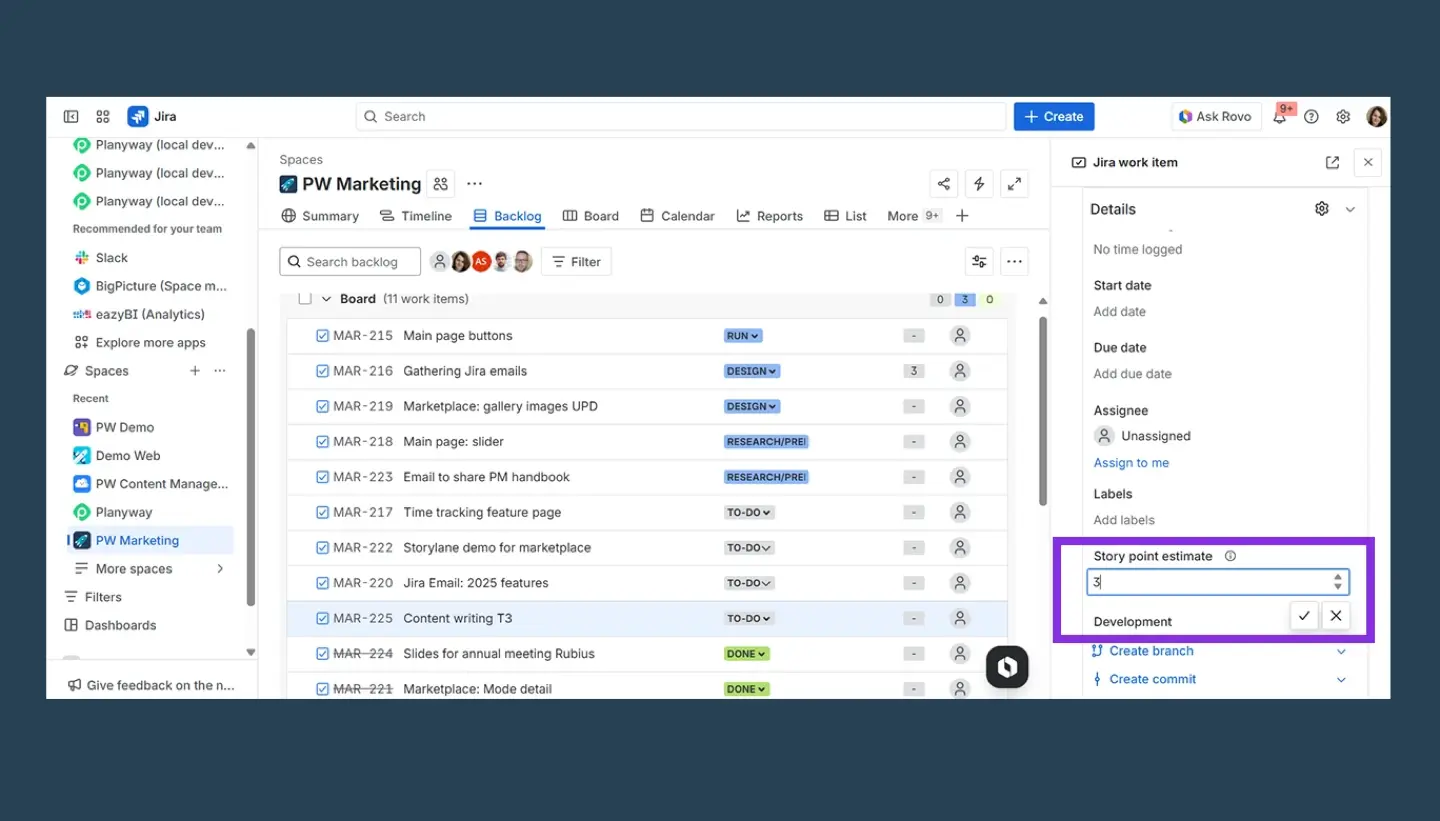
During sprint planning, you just pull tasks from the backlog based on team availability. To forecast accurately, try estimating using story points. This helps you monitor remaining capacity as the team logs work.
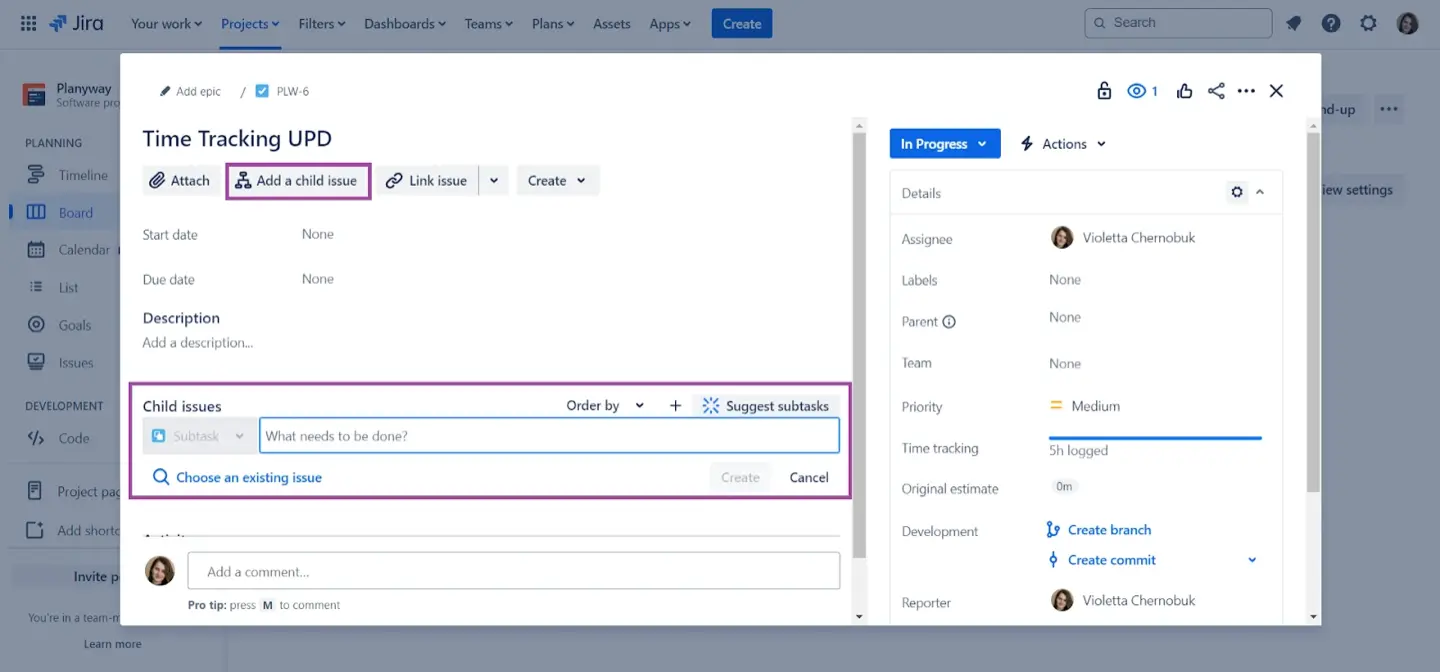
For larger projects, Jira Plans tracks team-level capacity planning across multiple teams. It uses a timeline to show if the team's workload is healthy or there is a overload. You can also test different scenarios without changing live data to see which tasks are blocking others.
You can also integrate Jira Plans with ActivityTimeline to keep your project goals and tasks in sync.
Why Native Tools Often Fall Short
Although Atlassian capacity planning tools are a good place to start, they are not flawless. They often look at the team’s current workloads instead of the individual members. This makes it challenging to identify who is underutilized or overworking. Also, these tools typically ignore non-Jira time like meetings or vacations. Finally, many project management features are locked behind expensive Premium tiers.
ActivityTimeline and Capacity Planning
What is ActivityTimeline?
Your project plan looks perfect on your Jira board until a few people call in sick or go on vacation. Suddenly, your realistic deadline is impossible because you didn't see who was actually free to work.
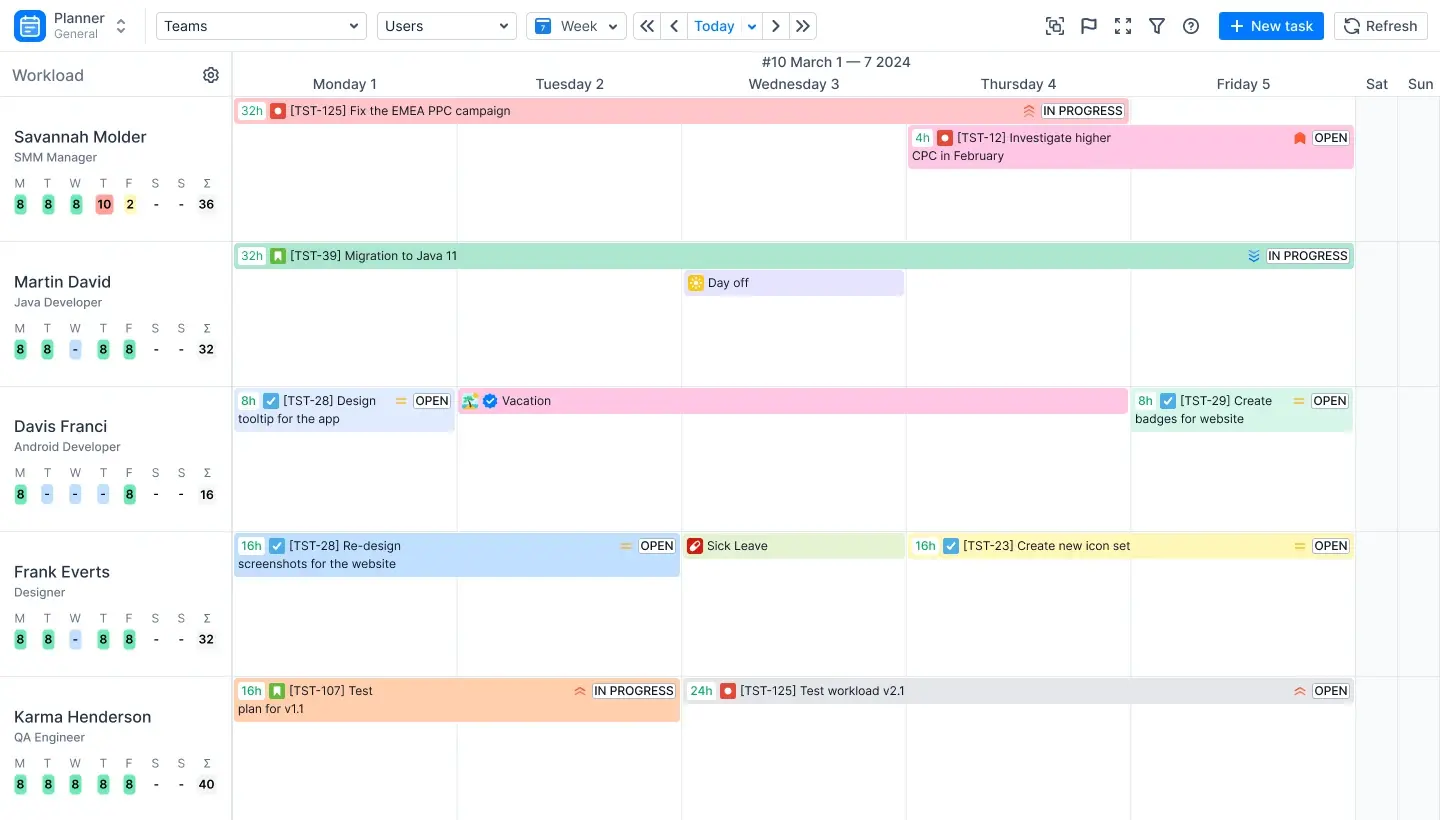
For Jira resource capacity planning you need ActivityTimeline. Jira capacity planning boils down to seeing who does what in one dashboard to optimize capacity planning and manage capacity without switching between boards. ActivityTimeline fixes this by:
- showing who is actually available
- visualizing workload in real time
- accounting for non-project work
- comparing planned vs actual
When capacity becomes visible, planning becomes reliable.
The Path to Better Capacity
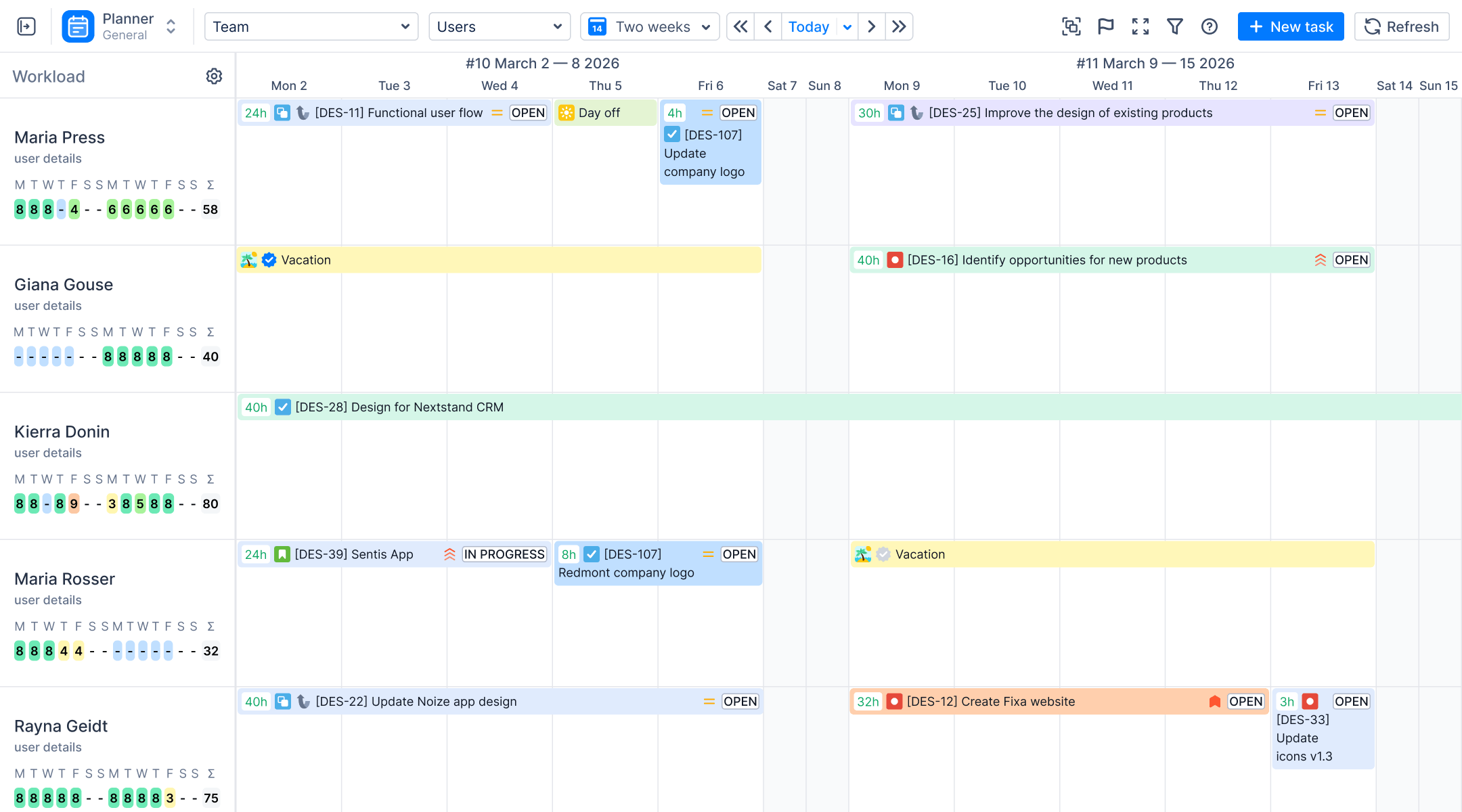
ActivityTimeline turns Jira into a visual system because it organizes tasks and people in one place to allocate resources and shows you how much capacity your team actually has every day.
ActivityTimeline uses color-coded workload indicators, so you can see if someone is under- or overloaded. Also, you can use "Bookings" to schedule future projects and keep track of things that Jira misses, like meetings or vacations. This guarantees that your plans are always based on actual availability.
How to do capacity planning in Jira with ActivityTimeline?
Managing your team's capacity doesn't have to rely on random estimates. ActivityTimeline is one of the top capacity planning tools Jira can offer. Here’s a simple guide.
Step 1: Start with a Unified View
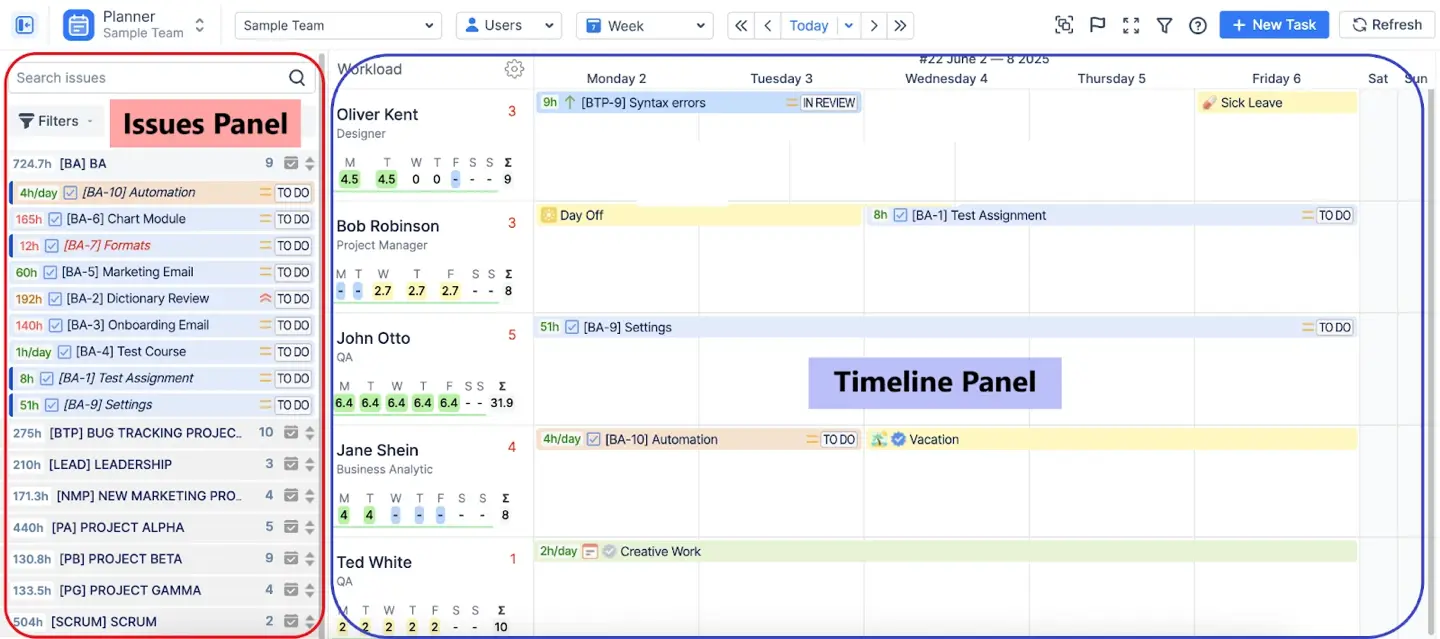
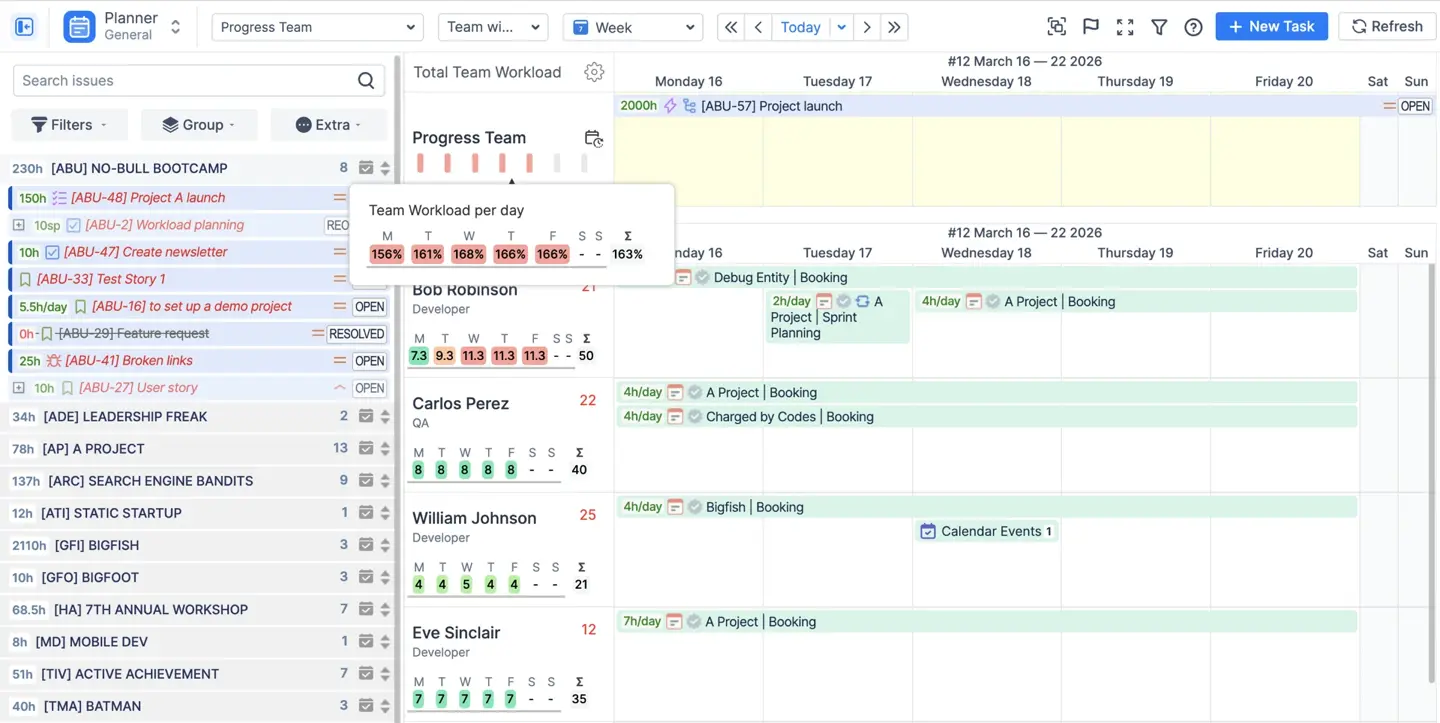
You do not have to go through many Jira boards to see what is going on. The Planner module in ActivityTimeline lets you see all the tasks in one interface on a scalable dashboard. Within the Planner, the Issue Panel displays your backlog and the Timeline Panel shows the calendar. You can view all projects and teams at once and without multiple tabs.
Step 2: Define Real Capacity
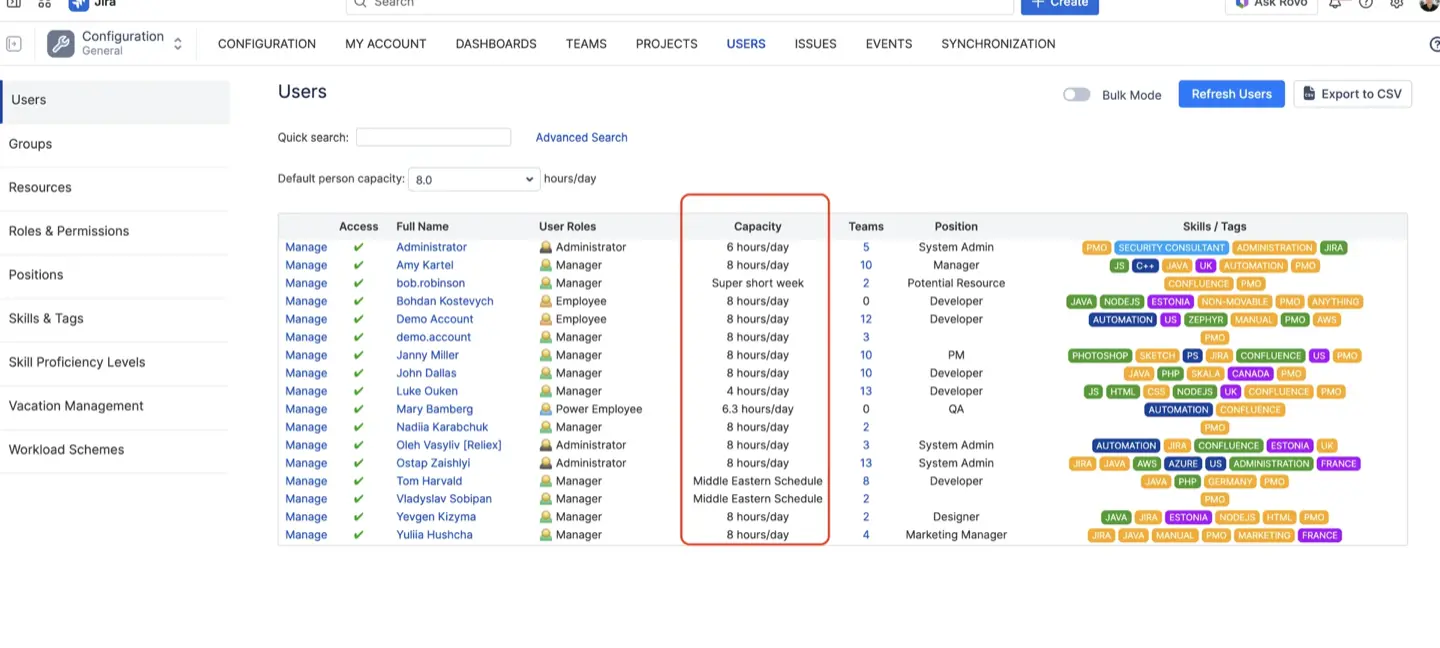
The idea of working 40 hours a week is not real. People have things like dentist appointments and long meetings. ActivityTimeline acts as a Jira capacity tracker to automatically subtract this non-working events, calculate available hours. This provides a baseline for the capacity planning process that is based on reality. Check the description for event types to understand its impact.
Step 3: Visualize Workload in Real Time
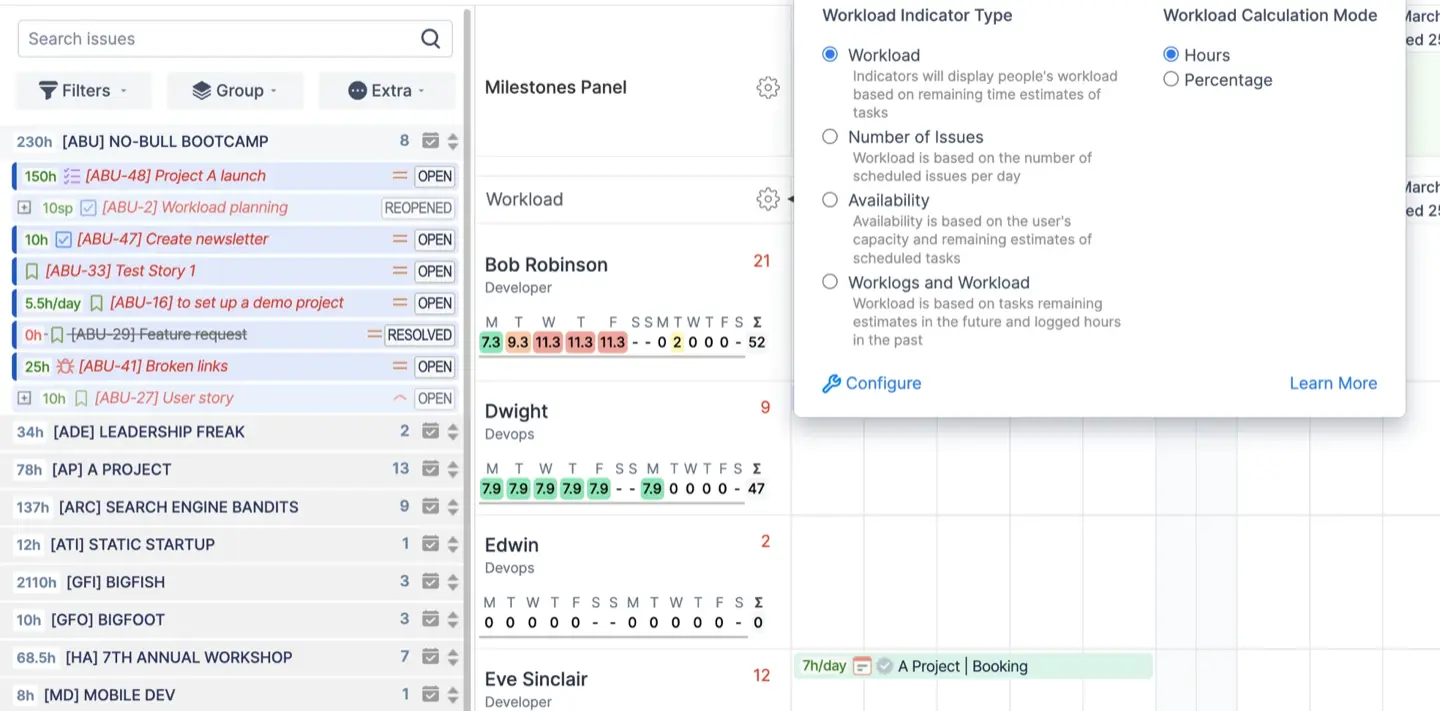
To plan effectively, you need to monitor your team's productivity and health for optimal performance. As a specialized capacity planner ActivityTimeline uses color-coded indicators to give you an accurate view of who is available and overworked. Just follow the colors to understand your team's status.
Step 4: Smart Task Assignment
With features in ActivityTimeline, resource allocation is easy. Use drag-and-drop to pull a ticket from the backlog and place it directly onto someone's timeline.
Or use Auto-Scheduling and let the app place tasks for you. Alternatively, you can assign a task directly from Jira screen or Jira plans and the task will appear on the timeline and calculate the capacity and utilization.
Step 5: Balance Workload
When you prioritize consistency, use "Balance Mode" to spread the workload across days. If someone’s schedule is messy, "Liquid Mode" can automatically find the small gaps in their day to fit work in. This keeps the workload steady without overwhelming anyone.
Step 6: Plan at Multiple Levels
Plan at different levels to handle daily tasks and larger goals simultaneously. ActivityTimeline lets you do this with individual timelines and the Team Panel. You can track specific Jira tasks or check high-level epics. This shows if your team has space for new tasks before you assign them.
Step 7: Monitor with Reports
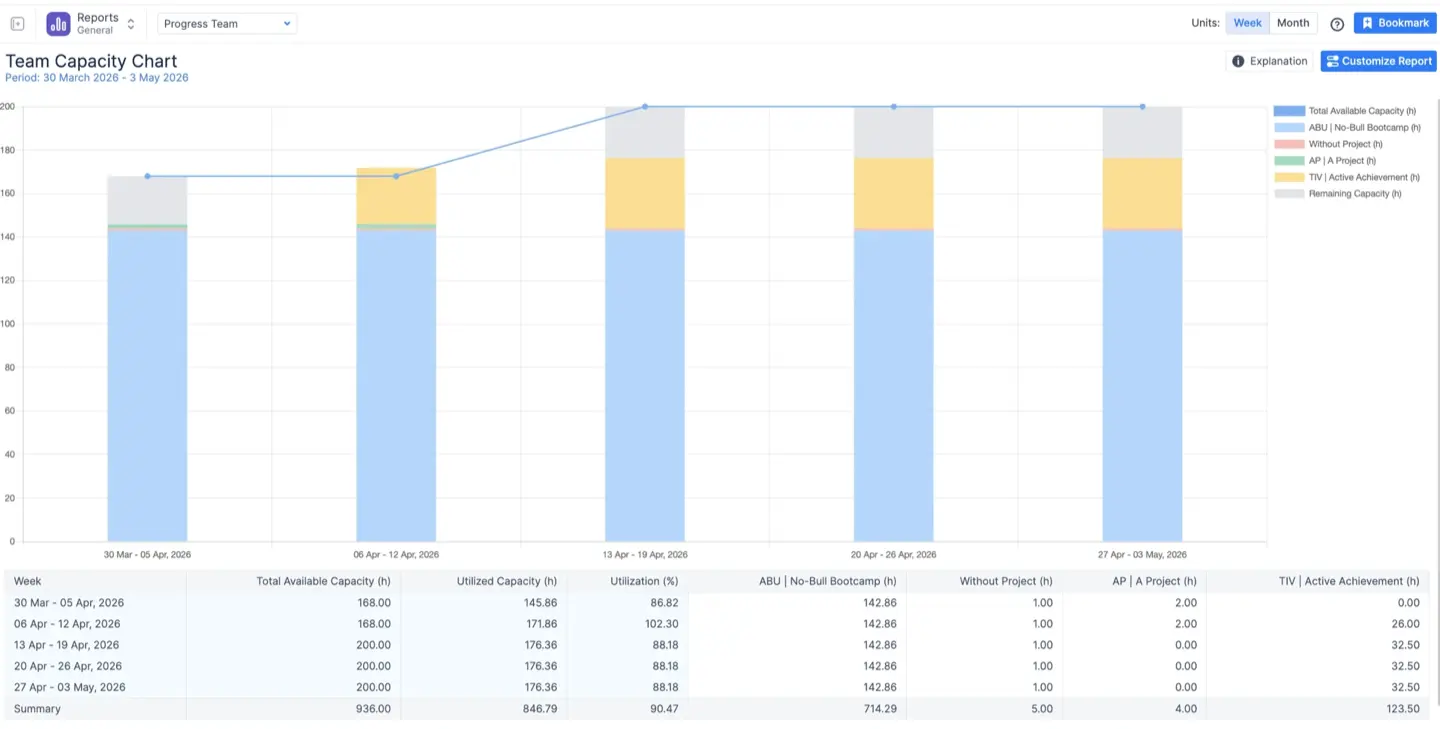
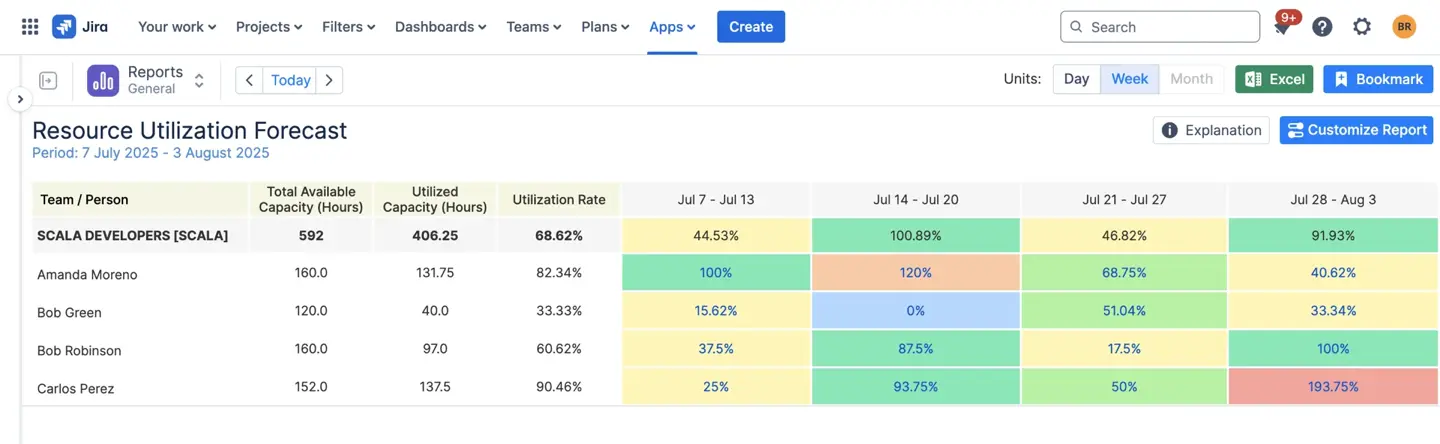
Finally, make informed decisions with your capacity planning in Jira by gathering data and using various reports. The Resource Utilization Forecast predicts feature workload, while the Planned vs Actual Report shows the actual time spent. You stop guessing and start knowing if your project is on track with Jira reporting in ActivityTimeline.
Tips for Capacity Planning Jira Users
Jira capacity management works well when you do it all the time not just once in a while. Avoid making mistakes when you plan things with these tips:
- Plan Based on Reality
It is not an idea to just guess how long something will take. Instead you should use historical data to set realistic deadlines.
ActivityTimeline helps you figure out what is real by comparing what you thought something would take to the actual time spent. When you look at the Planned vs Actual Report you can see if your team is thinking things will take time than they really do. This helps you change your plans so they are more realistic for what you want to do in a period of time.
- Prioritize Transparency
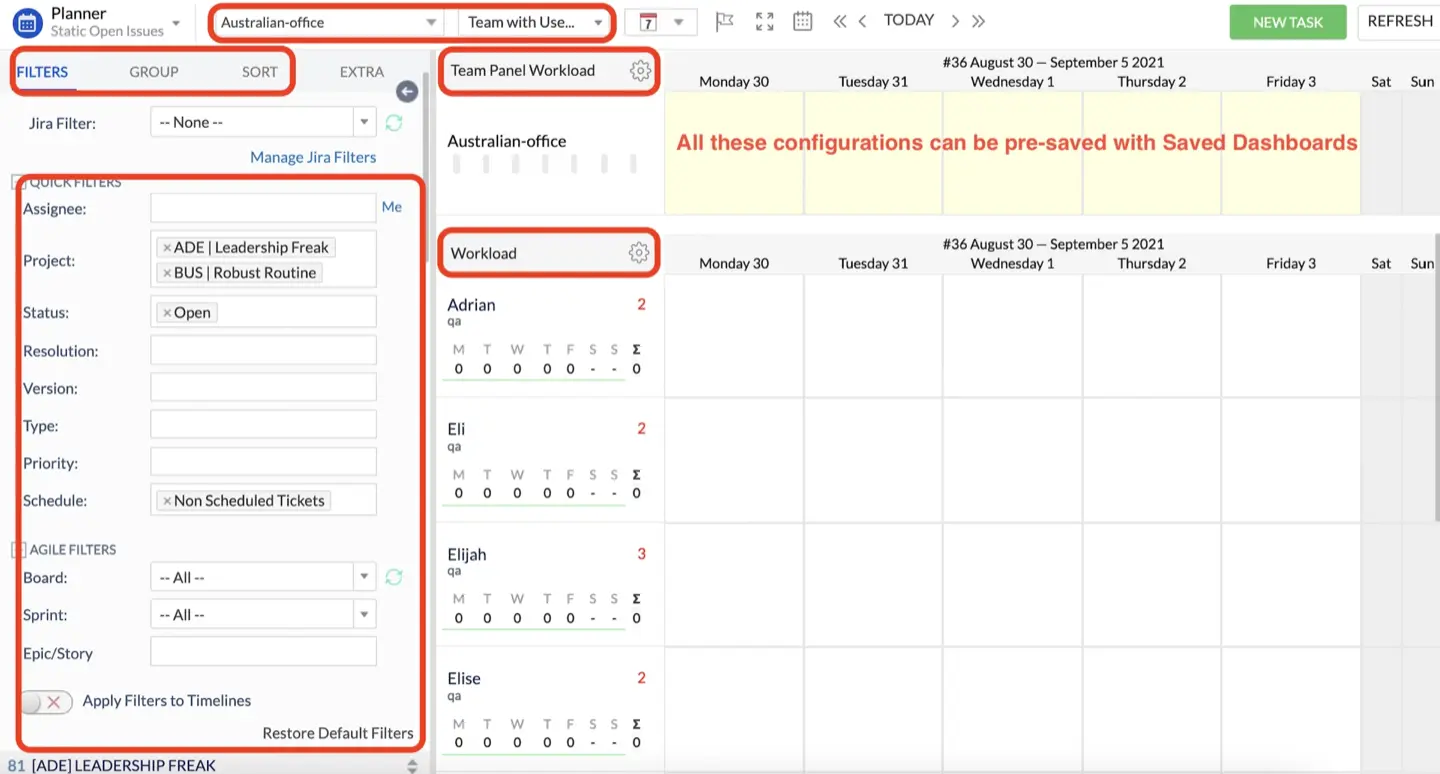
If team members are looking at different schedules, there will be no project success. So to make sure everyone is on the page they all need to see the same timeline. ActivityTimeline supports Jira resource capacity planning by letting you share your individual and team's schedule. Managers can even make Saved Dashboards to share specific views with the team. This way everyone sees the deadlines and knows who is available.
- Maintain Regular Reviews
Don't just create a plan and then forget about it. To detect changes early, check in once a week or at the end of each sprint.
ActivityTimeline allows you to view the planner from a particular review period for that purpose.
The Milestones Panel lets you see all tasks and their statuses inside the sprint.
Setting up regular timesheet approvals also helps keep your data accurate and up to date.
- Use the Right Reports
ActivityTimeline offers many Jira reports for different situations.
You might find a project falling behind and need to know why. The Planned vs Actual Report clearly highlights where estimates were off. Also, you can use Resource Utilization Forecast that considers vacations to identify possible resource overloads and avoid team burnout.
Common Scenarios for Capacity Planning Jira Users
Let’s look at how Jira capacity planning works in real life. Most managers run into the same few situations where they need to see who is actually available to work.
Sprint Capacity Planning
This is where you decide how much work to pull into a two-week block. Look at your team's velocity using a Jira capacity tracker and compare it to the backlog. Overbooking will cause the sprint to fail, underplanning will lead to your team being idle.
Cross-Team Resource Management
If a developer is split between three projects, things get messy fast. Without capacity planning tools Jira users can find that every manager believes they have 100% of that person's time. By displaying the overall workload for each project, managers will stop fighting for employee time.
Planning Based on Skills
Sometimes you need an expert expert, like a DevOps engineer, and not just availability. If your plan only shows total hours, you might think you are fine when you are actually missing a key specialist. Effective Jira capacity planning lets you track capacity by roles ensuring the right experts are ready when required.
Scenario Planning
When clients change their minds or deadlines move, you use Jira capacity management to test "what-if" scenarios. Before making changes, you can see how a new project will affect your schedule. It can be used to identify whether you must allocate work, change the deadline, handle capacity constraints.
Conclusion
Most teams don’t fail because they lack visibility into how that effort is distributed. Without capacity planning, structure alone is not enough.
When teams begin to see capacity clearly — when workload, availability, and constraints are visible in real time — planning changes. It becomes grounded, and that is when execution starts to follow.