
Are you searching for the best project planning tools to optimize your workflow in Jira? This guide is for project managers, team leads, and business decision-makers looking to optimize project planning in Jira and beyond. We will cover why traditional planning fails, how ActivityTimeline addresses these challenges, and review the top 8 project planning tools for Jira in 2026, including leading solutions outside the Jira ecosystem.
When choosing a project management tool, it's important to consider a user-friendly interface and evaluate user experience to ensure the tool is easy to adopt and has a gentle learning curve. The core challenge for most managers is not a lack of work, but a lack of visibility into who is doing that work and when they are available.
While Jira is a powerhouse for issue tracking, it often leaves a gap in resource-level planning. ActivityTimeline is a resource planning application designed to fill this gap, helping organizations better plan teamwork, schedule events, and track workload in a unified timeline format. Project management software selection is often guided by technology buyers, who help organizations make informed decisions about the right software for their needs.
Let's explore why traditional planning methods often fall short and how modern tools can bridge the gap.
What Is Project Management Software? (Core Functions and Benefits)
Project management software includes functions such as project planning, scheduling, task management, and resource allocation. These tools help businesses and organizations achieve their goals and objectives more efficiently and effectively. The best project management software offers features that help the team build a project plan, track tasks, and collaborate on tasks to ensure on-time completion.
These tools cater to a wide range of needs, offering free plans for small teams and startups, as well as advanced business and enterprise plans for larger organizations managing multiple projects and diverse teams. Many project management tools offer free plans with limitations on features and user counts, and free project management tools can help teams track projects, collaborate, and maintain visibility without financial commitment. A free plan typically provides core features with certain limitations, a basic plan adds essential project management capabilities, a business plan includes advanced features and organizational support, and an enterprise plan offers the most comprehensive set of tools, security, and scalability for large organizations.
Why Traditional Jira Planning Often Leads to Project Delays
Most project managers start with a perfect plan on paper, but reality quickly intervenes. When you rely solely on standard Jira boards, you are viewing work in a vacuum, isolated from the people performing it. This approach ignores the “human” variable—vacations, sick leaves, and overlapping responsibilities across multiple projects.
Without one of the best project planning tools integrated into your workflow, you face several critical risks. Being able to manage projects and track tasks is essential to avoid these pitfalls and ensure your team stays aligned and productive.
- Invisible Overload: You might assign a high-priority task to your best developer, unaware they are already at 130% capacity across three other projects.
- Wasted Investment: Research shows that 11.4% of business investment is squandered due to poor asset allocation.
- Team Burnout: Continuous overallocation leads to decreased morale and retention issues, which ultimately derails your project progress.
- Scattered Information: When teams manage assignments in spreadsheets outside of Jira, the “single source of truth” disappears, creating “time black holes”. Without streamlined collaboration and the ability to track tasks or manage projects effectively, information silos and inefficiency quickly develop.
Transitioning from these challenges, let's see how ActivityTimeline can help you overcome them and bring clarity to your project planning.
ActivityTimeline: The Definitive Solution for Jira Resource Management
ActivityTimeline is a comprehensive project management system that extends Jira’s functionality by providing a cross-project view of shared resources and tasks. As a task management tool, ActivityTimeline supports sprint management for agile teams, making it easier to plan, organize, and execute sprints efficiently. Unlike native Jira boards that focus on issues, ActivityTimeline focuses on the team members who bring those issues to life.
Defining project requirements is the first step in selecting the right project management software, and ActivityTimeline addresses these requirements for Jira users.
Visual Workload and Availability Indicators
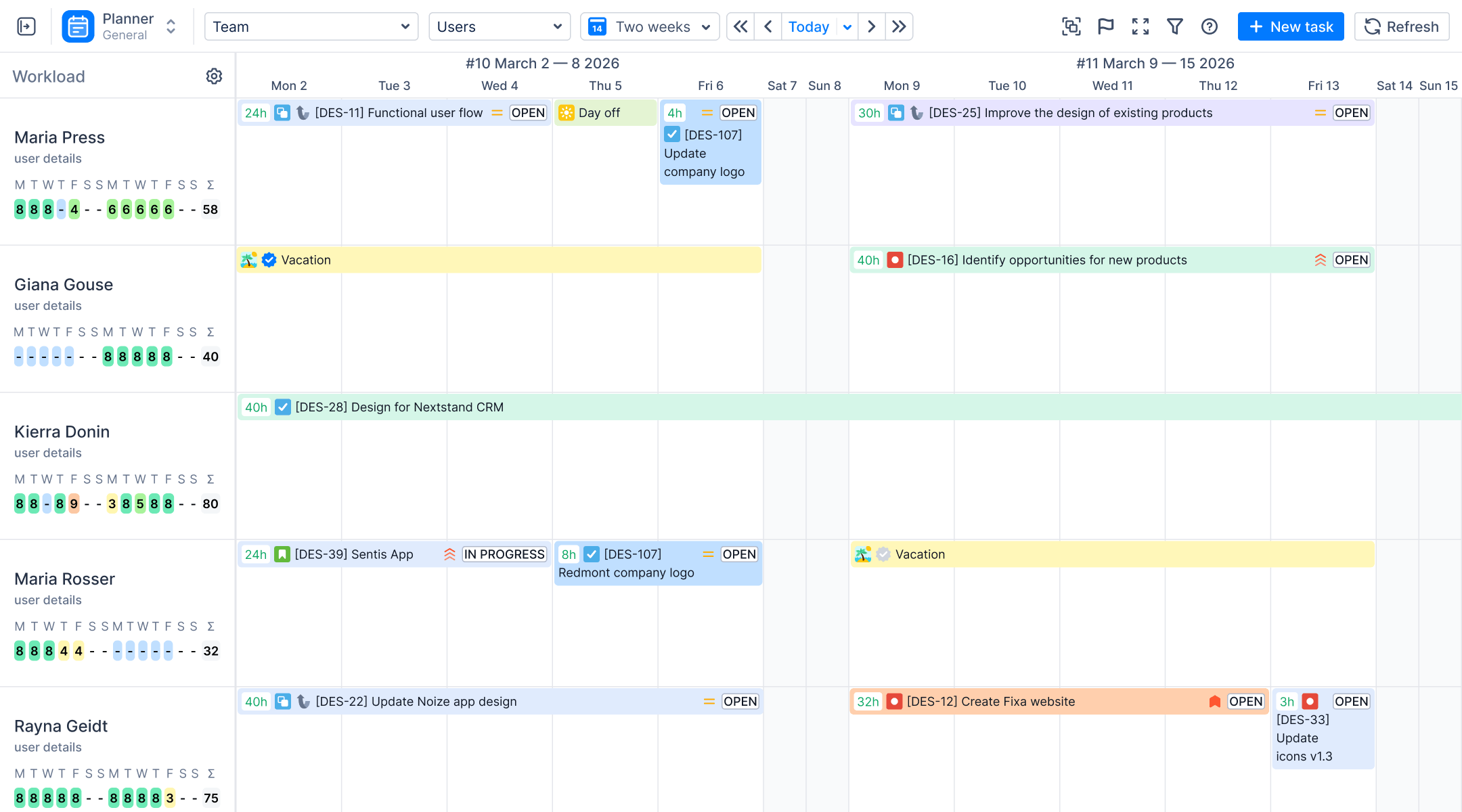
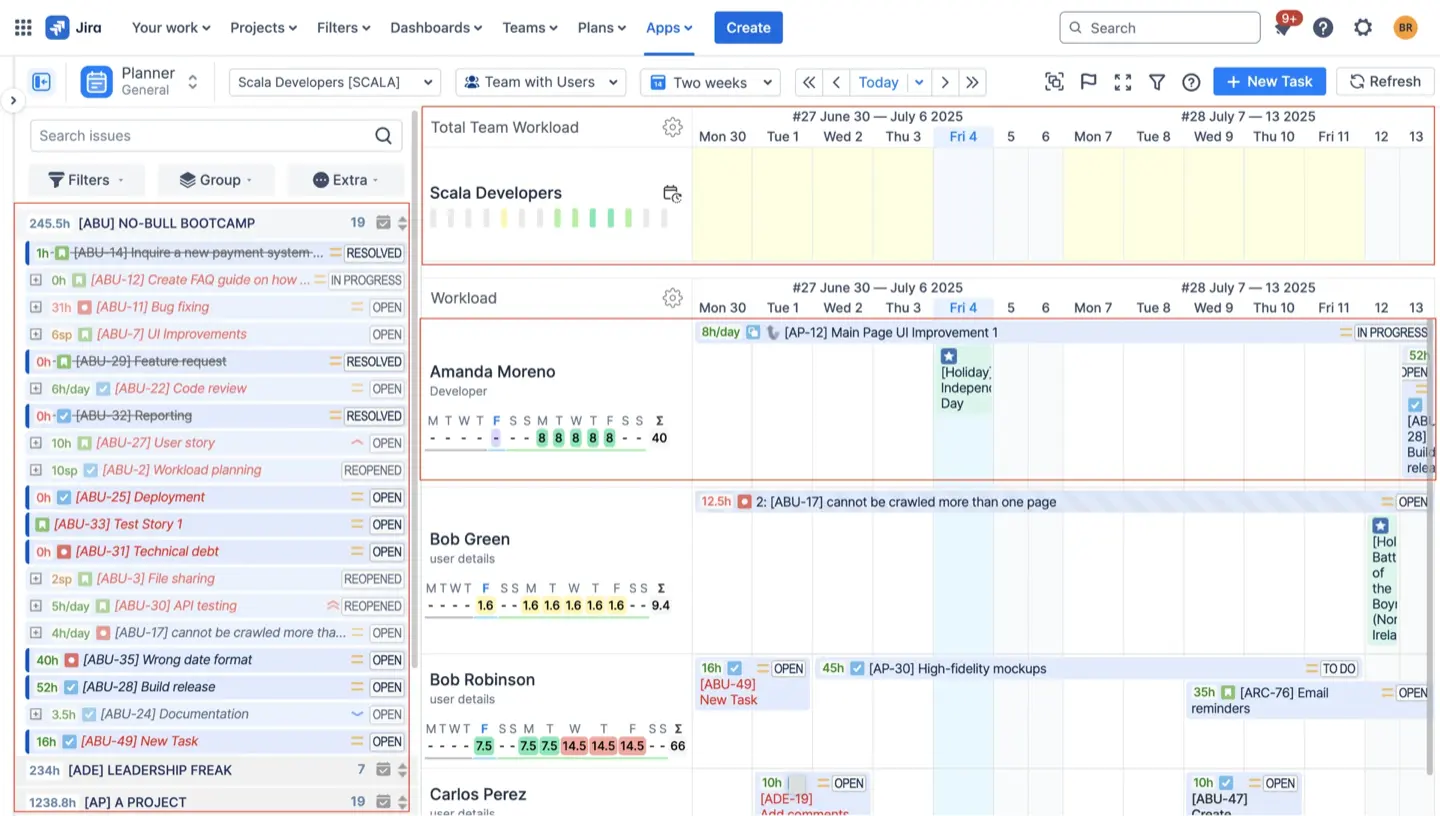
The most immediate benefit you will notice is the color-coded workload indicator located under each resource’s name. This feature uses a "heat map" logic to signal the health of your schedule:
- Green: Workload is optimally balanced (88-100% capacity).
- Yellow/Olive: The user is underloaded and can accept more assigned tasks.
- Red: The person is overloaded (above 125%), and you must redistribute work to maintain project planning integrity.
- Blue: The user is out of the office due to a vacation, holiday, or sick leave.
Strategic Team Panel for High-Level Oversight
For managers handling complex projects or multiple projects, the Team Panel offers a high-level roadmap view. It allows you to plan at the team level, assigning Jira epics or initiatives to an entire group without needing to micro-manage individual daily tasks. This is particularly useful for long-term planning where certainty is low.
Custom Events and Hybrid Planning
ActivityTimeline allows you to create "Local Events" that do not exist in Jira, such as bookings for meetings or placeholders for tentative work. Bookings allow you to reserve a person's time for a specific project before the actual Jira tasks are even created.
Measuring Success with Planned vs. Actual Metrics
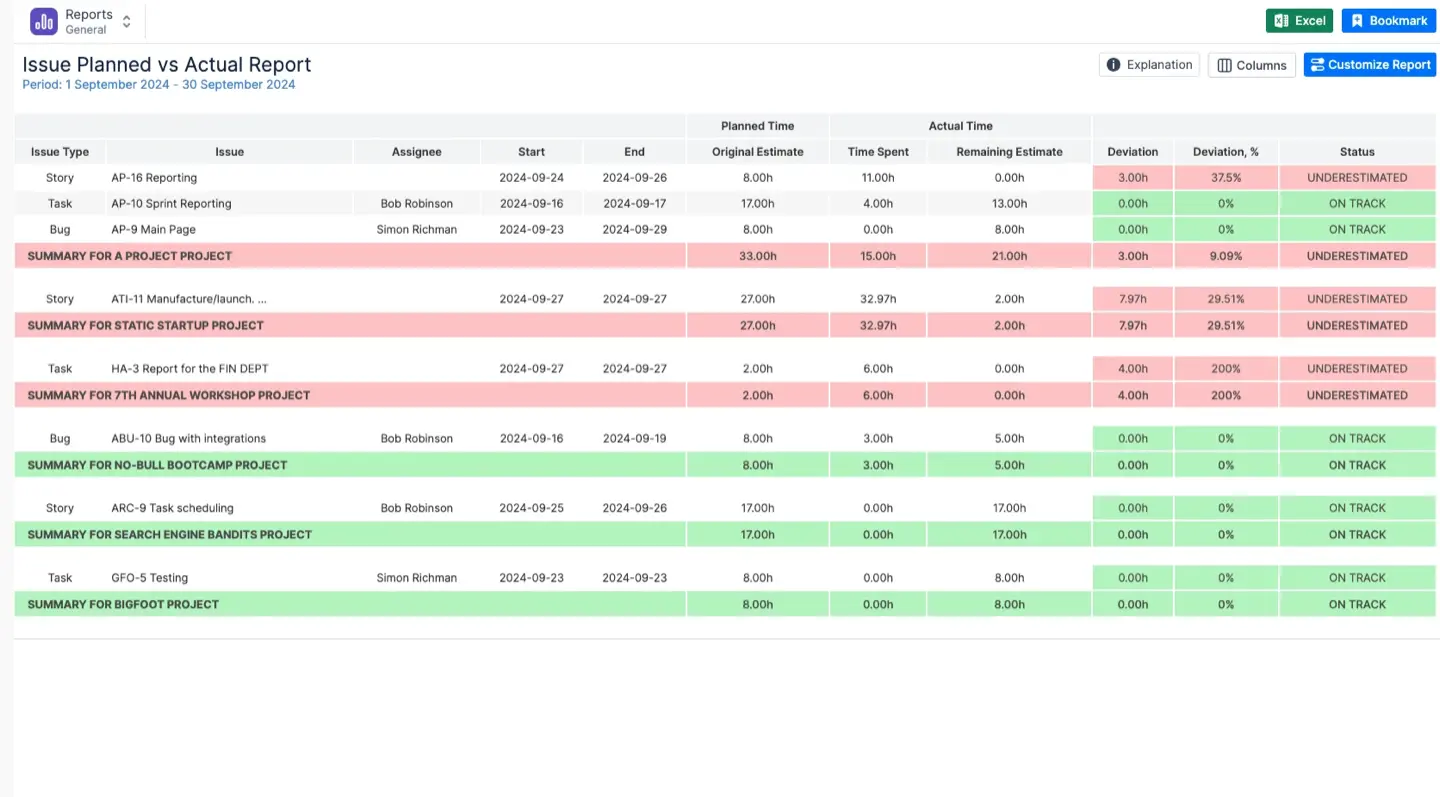
Project planning is only useful if it matches reality. ActivityTimeline includes a Planned vs. Actual Report that compares your original estimates with the real time logged by team members.
This report highlights deviation status using clear visual indicators:
- On Track (Green): The actual time matches your planned estimate.
- Underestimated (Red): The team spent significantly more time than planned, alerting you to a potential bottleneck.
- Overestimated (Yellow): The task was completed faster than expected, freeing up resources for other unlimited tasks.
By analyzing these reports during your sprint retrospectives, you can refine your agile development estimation process and ensure your entire team remains productive without facing burnout.
Top 10 Best Project Planning Tools for Jira in 2026
While ActivityTimeline is the leader for resource-centric planning, a well-rounded project management software stack often includes other specialized plugins and leading tools outside the Jira ecosystem. When evaluating these tools, it's essential to identify your must-have features and compare pricing plans—including paid plans, premium plan, standard plan, starter plan, team plan, unlimited plan, advanced plan, and generous free plan options—to find the best fit for your needs. Comparing pricing plans and scalability is necessary to determine how the software's benefits justify the investment.
Below, we review the top 8 project planning tools for Jira, followed by a brief overview of other leading project management solutions:
#1. ActivityTimeline
A visual-first, user-centric resource planning application designed to bridge the gap between Jira’s issue-tracking backlog and a dynamic execution schedule.
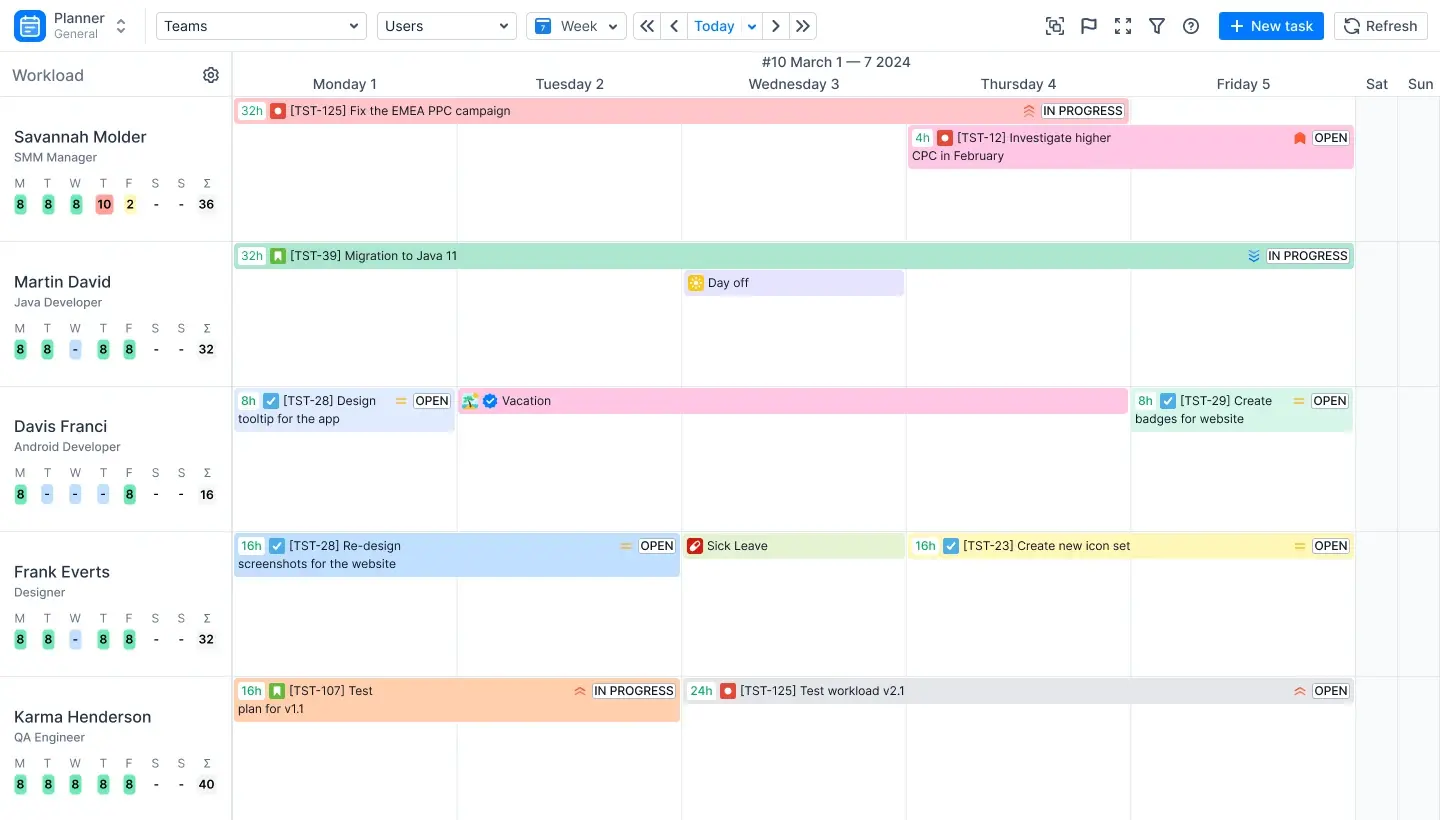
- Interactive Planning Dashboard. Provides a scalable timeline where managers can drag and drop Jira issues directly onto team member schedules.
- Visual Workload Indicators. Uses color-coded "heat maps" (Red for overloaded, Yellow for underloaded, Green for optimal) to provide an instant heuristic for capacity health.
- Non-Jira Entities ("Shadow Planning"). Allows for the creation of placeholders, bookings, and internal events (vacations, sick leaves) that do not exist as Jira issues, preventing "invisible work" from skewing capacity.
- Calculation Algorithms. Supports Balance mode (even distribution of hours) and Liquid mode (front-loading work to utilize capacity upfront).
- Skill & Metadata Management. Enables tracking of specific competencies (e.g., "Java Developer," "React Native Expert") to ensure tasks are assigned based on actual expertise rather than just availability.
ActivityTimeline is best for large organizations requiring a unified solution that combines capacity planning, time tracking, and report management into a single license, reducing administrative overhead and license bloat.
#2. Jira Plans (formerly Advanced Roadmaps)
A strategy-first portfolio planning tool built to connect long-term business objectives with Jira’s execution layer, enabling organizations to visualize, sequence, and govern large-scale initiatives across multiple teams.
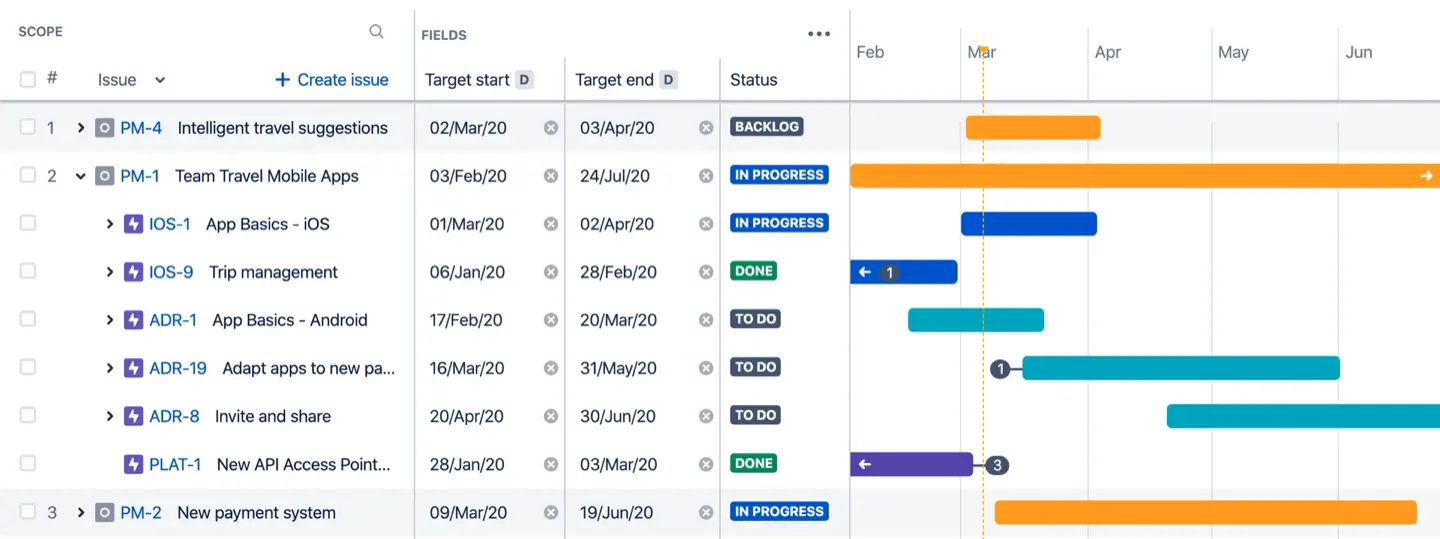
- Hierarchical Roadmaps. Enables planning across multiple levels (initiatives → epics → stories), allowing leadership to align execution with strategic goals.
- Cross-Team Dependency Management. Visualizes dependencies between teams and projects, helping prevent delivery risks caused by hidden blockers and sequencing conflicts.
- Scenario Planning. Supports multiple plan versions (“what-if” scenarios) to model delivery outcomes under different staffing, scope, and timeline assumptions.
- Capacity-Aware Scheduling. Estimates delivery feasibility based on team velocity and available capacity, helping validate whether strategic plans are realistic.
- Integrated Governance Controls. Provides guardrails for leadership through approvals, scope boundaries, and roadmap visibility across the organization.
Jira Plans is best for organizations that prioritize strategic alignment, portfolio governance, and cross-team dependency management, especially at scale, where leadership needs high-level control and predictability over execution.
#3. BigPicture (by Appfire)
A modular portfolio and program management platform designed to extend Jira into a full-scale enterprise planning system, combining strategy, execution, risk, and financial oversight.
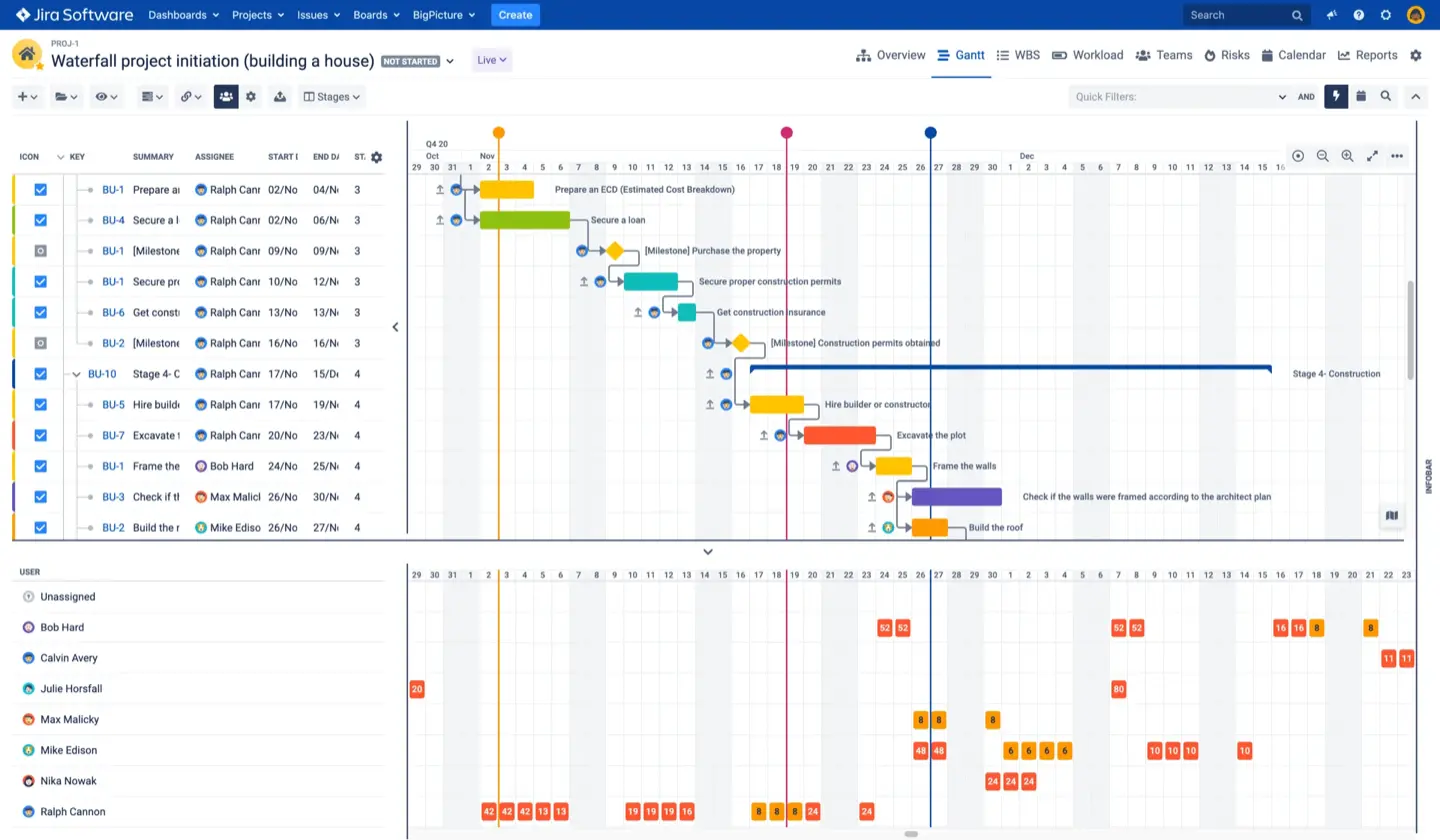
- Multi-Framework Planning. Supports Scrum, SAFe, LeSS, and custom frameworks, making it suitable for diverse agile and hybrid delivery models.
- Advanced Roadmaps & Gantt Charts. Provides configurable Gantt views for long-term scheduling, milestone planning, and cross-project coordination.
- Risk & Dependency Tracking. Visualizes risks, blockers, and dependencies across multiple levels, enabling proactive portfolio risk management.
- Resource & Capacity Planning. Allows allocation of people and skills across projects and programs, supporting both role-based and individual planning.
- Financial Tracking & Budgeting. Enables cost tracking, budget forecasting, and financial reporting across initiatives and portfolios.
BigPicture is best for large enterprises and regulated industries that require deep configurability, multi-framework support, financial governance, and risk management across complex portfolios.
#4. ScriptRunner for Jira
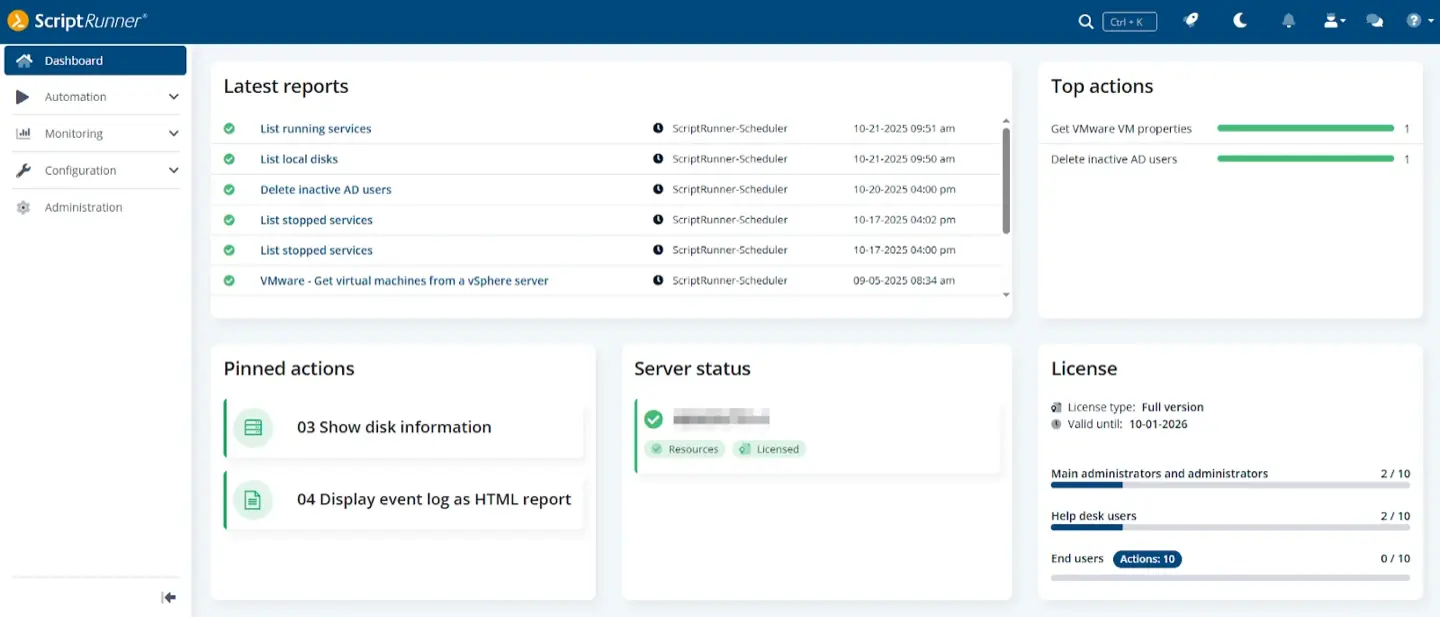
The administrative "Swiss Army Knife" for Jira, offering deep customization and automation through Groovy scripting.
- Behaviours. Enables unique client-side logic to make fields mandatory or hidden dynamically based on user input.
- Scripted Fields. Calculates values (e.g., Risk Scores) on the fly based on data from other custom fields.
- Enhanced JQL. Extends search capabilities to find issues based on subtask properties or complex link dependencies.
A non-negotiable layer for high-maturity organizations needing to automate repetitive tasks and enforce complex governance rules.
#5. Planner by Tempo
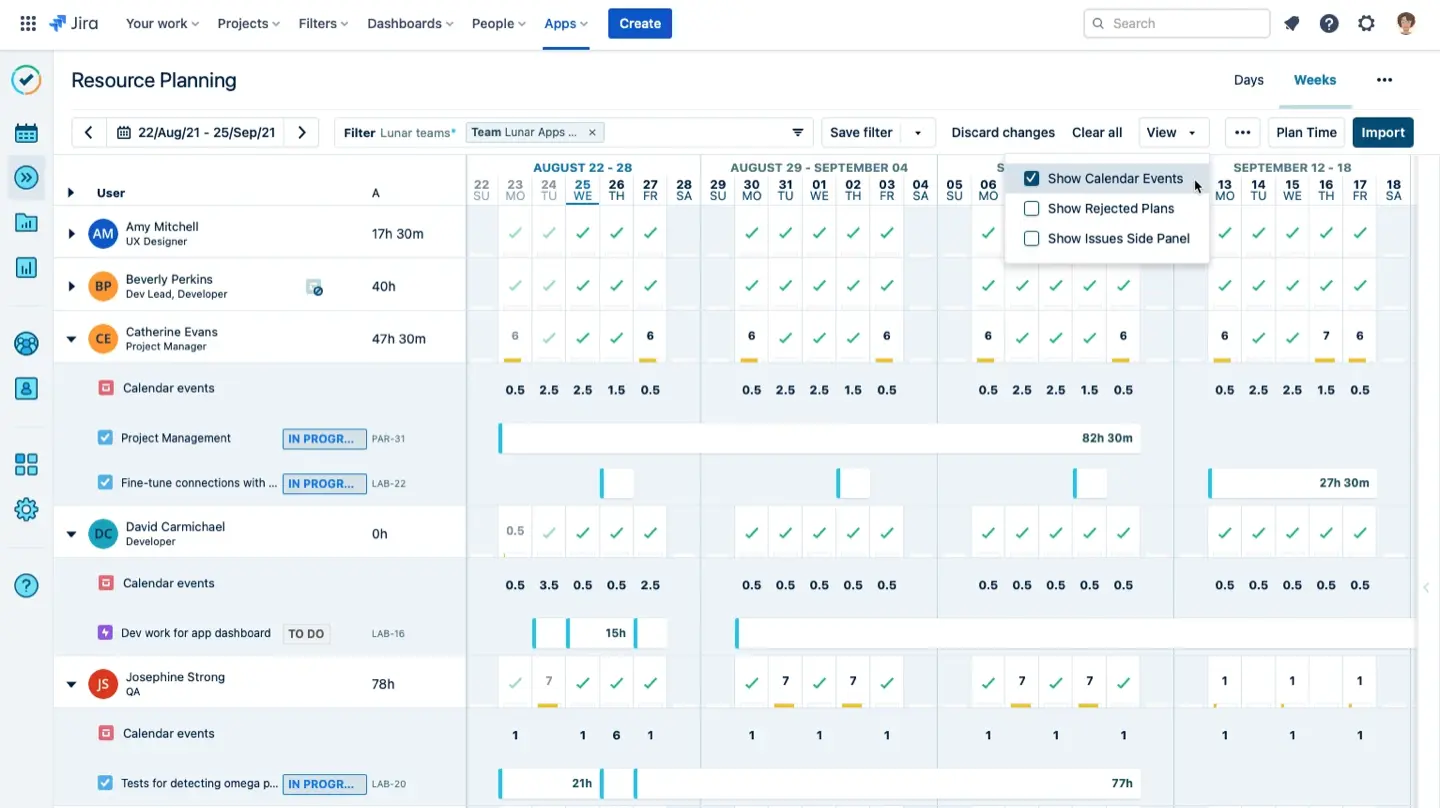
A team-centric resource management tool that functions as the "supply side" of the resource equation within the Tempo ecosystem.
- Tempo Team Abstraction. Allows for the grouping of resources into "Tempo Teams" independent of Jira project permissions for flexible capacity planning.
- High-Level Reporting. Excels in aggregating large datasets for Program Management Offices to view broad capacity trends.
Tempo Planner is best reserved for environments where Tempo Timesheets is already the established. If it’s not your case, we recommend reading our detailed ActivityTimeline and Tempo Planner comparison to weigh the benefits each tool can give your project.
#6. Easy Agile TeamRhythm
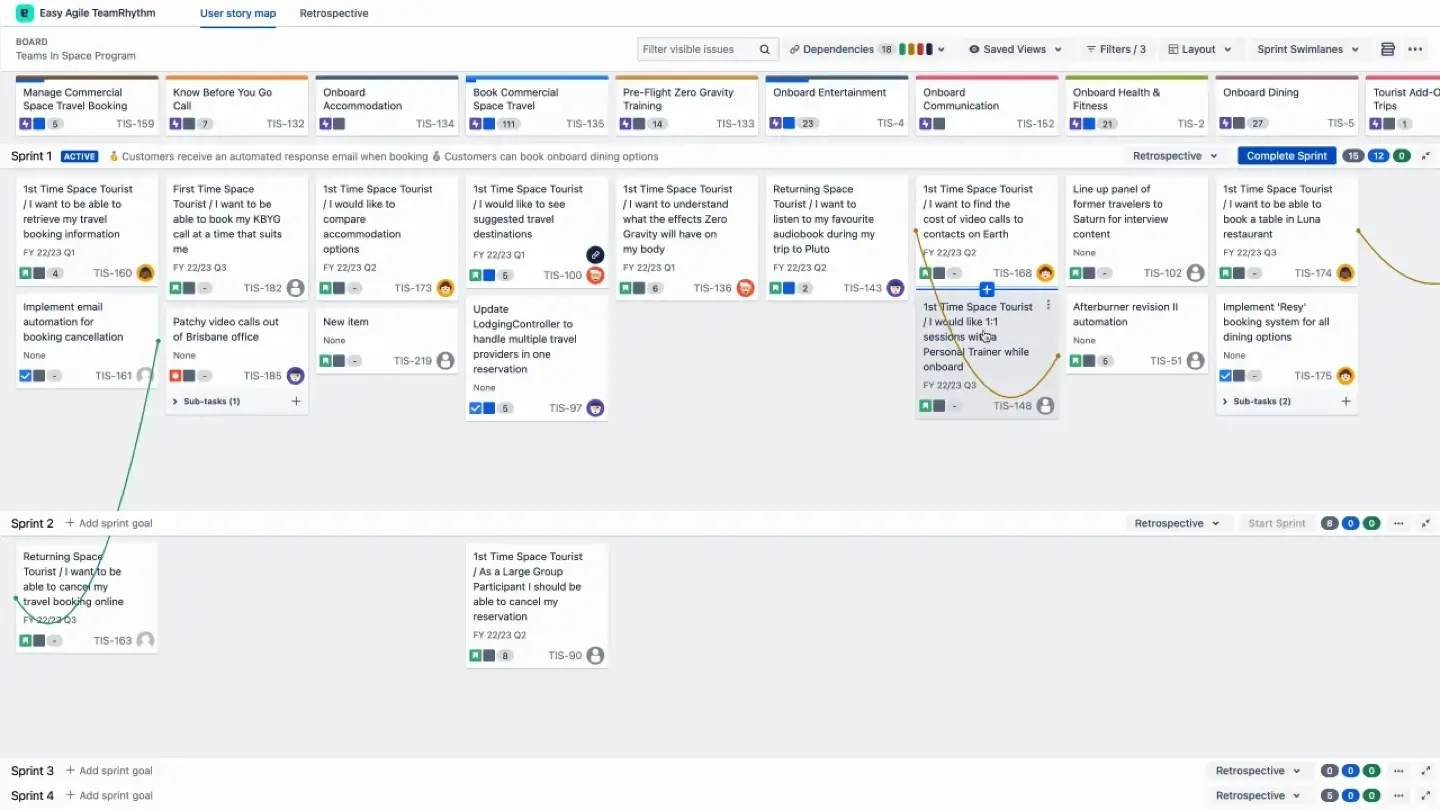
Enhances agile planning by overlaying a spatial User Story Map onto the flat Jira backlog. Easy Agile TeamRhythm supports agile methodologies such as Scrum and Kanban, enabling efficient planning, tracking, and delivery of projects. Jira stands out for Agile compatibility and is ideal for organizations that follow the Scrum or Kanban framework.
- User Story Mapping. Arranges Epics horizontally (the “backbone”) and Stories vertically (prioritized releases) to visualize the entire user journey.
- Retrospectives Integration. Action items from team retrospectives can be converted into Jira issues and scheduled directly on the board.
Essential for Scrum or SAFe teams to ensure they are delivering coherent value rather than disjointed tasks.
#7. Flowchart Maker & Online Diagram Software (draw.io)
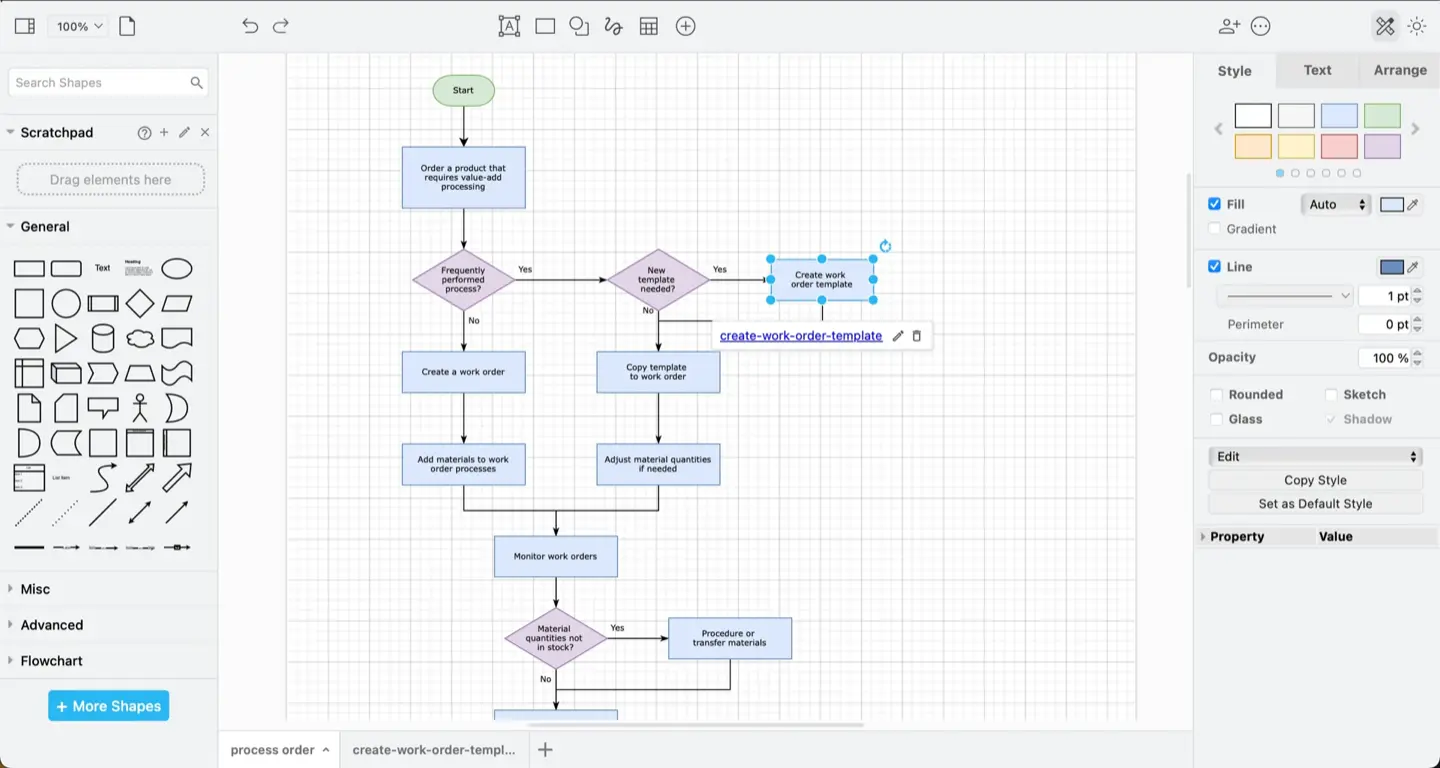
Draw.io is a visual communication tool integrated directly into the Jira issue view to maintain a "Single Source of Truth".
- Zero Context Switching: Diagrams are stored as attachments to Jira issues, allowing developers to see architecture or workflows without leaving the ticket.
- Data Security: In Data Center configurations, diagram data never leaves the customer's instance, making it suitable for high-security industries.
Preferred by security-conscious enterprises (Banking, Defense) that need to document complex interdependent tasks visually.
#8. Timepiece (formerly Time in Status)
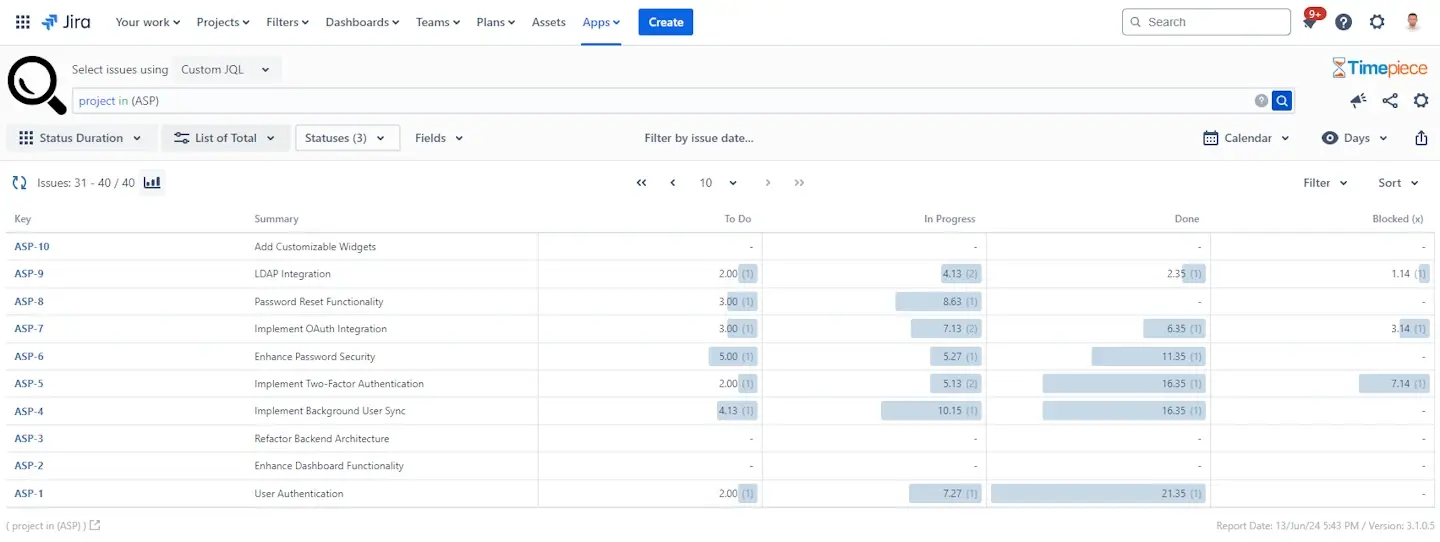
Timepiece provides metric analytics and performance tracking necessary for evidence-based project planning.
- Cycle & Lead Time Calculation. Offers accurate reporting on how long issues spend in each status, accounting for custom work calendars (weekends/holidays).
- Bottleneck Identification. Visualizes "Time in Status" across assignees to reveal process delays (e.g., tickets stalling in "Code Review").
Drives process improvement (Kaizen) and informs more accurate future planning estimations based on historical data.
Other Leading Project Planning Tools Beyond Jira
In addition to Jira-centric solutions, several leading project management tools are widely recognized for their robust features and ease of use:
- Monday. Considered the best overall project management software due to its essential features that efficiently support project management. It is a cloud-based, highly customizable visual project management tool designed to support teams of all sizes and industries.
- Asana. Excels in ease of use and has a straightforward yet feature-rich interface that is easy to navigate. Asana is a comprehensive project and task management tool that offers a user-friendly interface for teams to organize and track work.
- Trello. A highly visual project management tool that uses a kanban-style board to organize tasks into cards and lists. Trello has the lowest barrier to entry, making it suitable for non-technical departments. Trello offers a free plan that allows unlimited cards and members, with a limit of 10 boards per workspace.
- Wrike. Offers robust proofing and Gantt charts suitable for agencies, creative teams, and enterprises. Wrike is a highly flexible and powerful project management platform built to support diverse teams, from marketing and design to product management and business operations. It also offers AI-powered risk prediction and predictive analytics for enterprise-level foresight.
- Smartsheet. Combines traditional project management features with a spreadsheet-like interface. Smartsheet is ideal for organizations that prefer a spreadsheet-based interface with advanced automation and is superior for scalability within large organizations.
- ClickUp. Ideal for resource management and demonstrates strength in several areas of project management. ClickUp is considered one of the best project management software solutions for its generous free plan that supports unlimited users and projects.
- Microsoft Project. The standard for complex, multi-year projects requiring thousands of dependencies, making it a staple for large enterprises with advanced project planning needs.
These tools, along with Jira and its ecosystem, provide a comprehensive range of options for teams of all sizes and industries to streamline project planning, scheduling, and collaboration.
Conclusion
Successful project management in Jira requires a balance between issue tracking and human capacity. By moving beyond static lists and embracing the best project planning tools, you can transform your team’s productivity and eliminate the chaos of missed deadlines.
ActivityTimeline provides the visual clarity needed to manage diverse teams, allocate resources based on skills, and track progress in real-time. Whether you are leading agile teams or managing non-technical projects, a structured, person-centric approach is the key to consistent delivery. This approach gives your team just that—precisely the features and simplicity needed to deliver results without unnecessary complexity.
{{rich-cta-4}}