TL;DR — the short version:
- Best for Jira teams: ActivityTimeline — resource planning, time tracking, and reporting inside Jira, from $2.5/user/month.
- Best standalone scheduler: Ganttic — flexible Gantt-based planning, no Jira integration.
- Best for small teams: Toggl Plan — simple and fast, limited advanced features.
- Also reviewed: Capacity Planner by Tempo, Resource Guru, and DevSamurai ProScheduler.
Do you need better resource management tools? This guide compares the top options for 2026 — what each one costs, where it shines, and where it falls short — so you can match a tool to how your team actually works.
And yes — resource planning tools measurably improve team productivity: they surface each person's real capacity before work is assigned, so managers stop overbooking some people while others sit idle. The gains come from three things: visibility into workloads, early warning on capacity conflicts, and less time spent building plans by hand.
Which Tools Are Best for Avoiding Resource Overbooking?
The best tools for avoiding overbooking are the ones that show each person's remaining capacity before you assign work: ActivityTimeline, Ganttic, and Resource Guru all flag capacity conflicts visually, while spreadsheet-style planning hides them until someone is already at 120%.
What to look for if overbooking is your main problem:
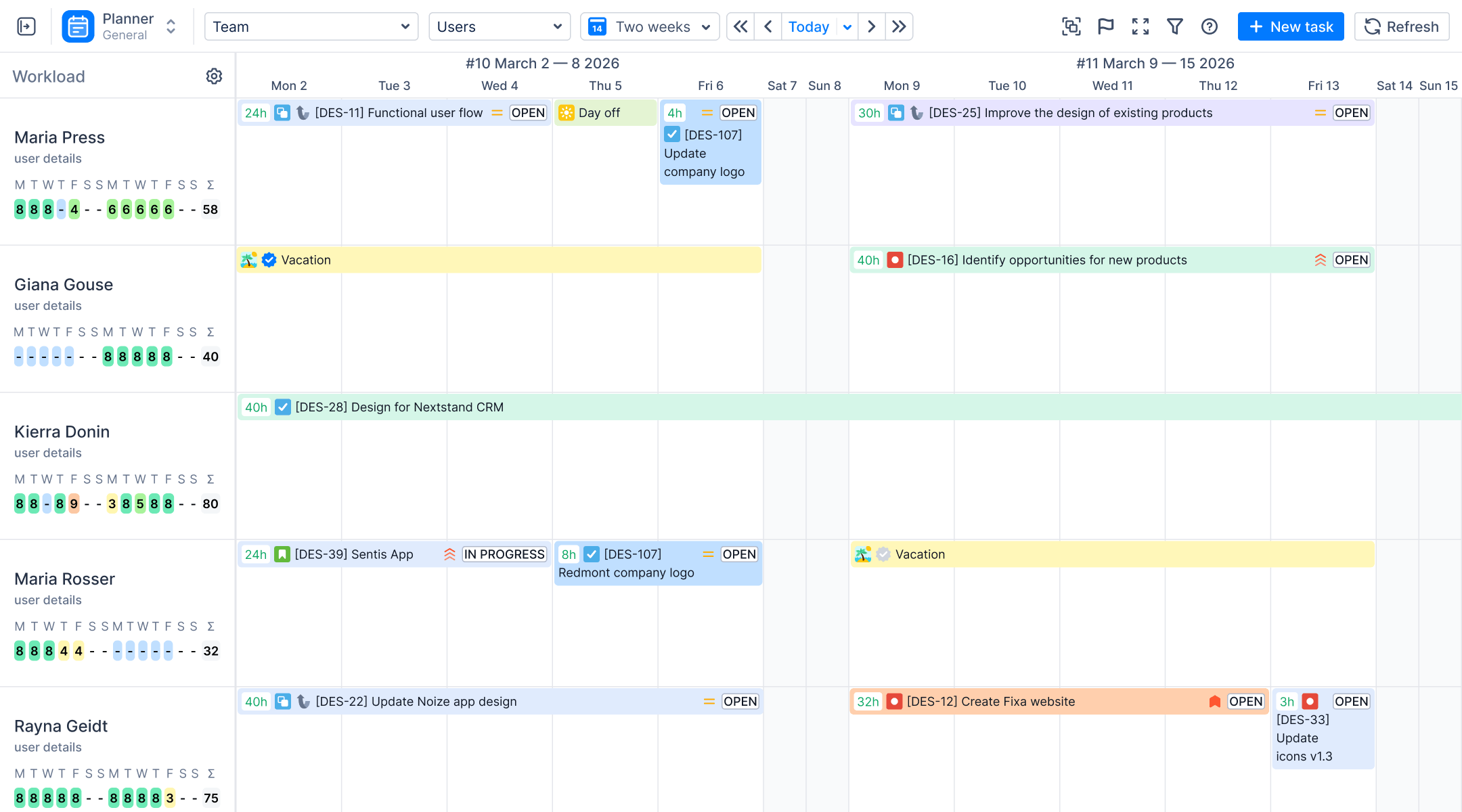
- Live workload indicators. ActivityTimeline color-codes each person's timeline by load level, so an overloaded week is visible at a glance — before it becomes overtime.
- Utilization reports with a 100% line. ActivityTimeline's Resource Utilization Forecast shows each team member's scheduled hours against available capacity; anything over 100% means an overbooked person and a plan that needs rebalancing.
- Capacity warnings at scheduling time. Ganttic identifies capacity issues and overbookings as you plan; Resource Guru's calendar view exposes double-bookings across projects.
- Leave and absence data in the same view. Overbooking is often just a forgotten vacation — tools that show time off on the planning timeline (ActivityTimeline, Resource Guru) prevent it at the source.
Best Tools for Tracking Resource Utilization
A resource utilization tool answers one question: how much of each person's available capacity is actually scheduled or spent? For teams working in Jira, ActivityTimeline is the strongest option here — it generates utilization reports directly from Jira estimates and worklogs, with no manual data entry.
Three reports do the heavy lifting (learn more on the Utilization Jira Reports page):
- Resource Utilization Forecast — projected workload per person against available capacity, in hours or percentages, viewable on the web or exported to Excel. Under-utilized people show up as clearly as overloaded ones.
- Team Utilization Pie Chart — how the team's time splits across projects. Run it on past data (from worklogs) to see where time really went, or on future data (from estimates and bookings) to sanity-check the plan.
- Team Capacity Chart — total team capacity vs. utilized hours over time, which makes bottlenecks and idle capacity visible week by week.
Standalone tools like Ganttic and Resource Guru also report on utilization, but they can't read your Jira data — you maintain a second system to get the numbers Jira already has.
Overview of the Best Resource Management Tools
The right resource management tool can transform your resource management and project management tools and project planning. Each tool we cover caters to different needs and excels in specific areas.

The instruments provided cater to the typical hurdles encountered in resource management, presenting cutting-edge functionalities and intuitive layouts for efficient resource handling. These tools encompass various aspects such as human resources, project materials, timelines, and asset distribution. They include various solutions, such as resource management software and resource planning tools, that aim to optimize resource use across different projects and schedules.
Visual Planning: ActivityTimeline

Price: From $2.5/user/month.
Specifications:
- Visual indicators for workload levels
- Availability indicator for resource allocation
- Report generation (planning reports, timesheets, tracking reports)
Pros:
- Clear visual aids for managing resources
- Comprehensive report generation
- Availability indicator for efficient resource allocation
- Premium customer support
- One price for all resource management, time tracking, and reporting features
Cons:
- Can be complex for users new to Jira
- May require a learning curve to use advanced features fully - jump on a quick demo call to fix that.

ActivityTimeline revolutionizes visual planning in project management by using colors to indicate workload levels. It offers a quick visual overview of tasks and schedules, making it incredibly easy to manage projects and resources effectively. The availability indicator highlights remaining hours, facilitating efficient resource allocation.
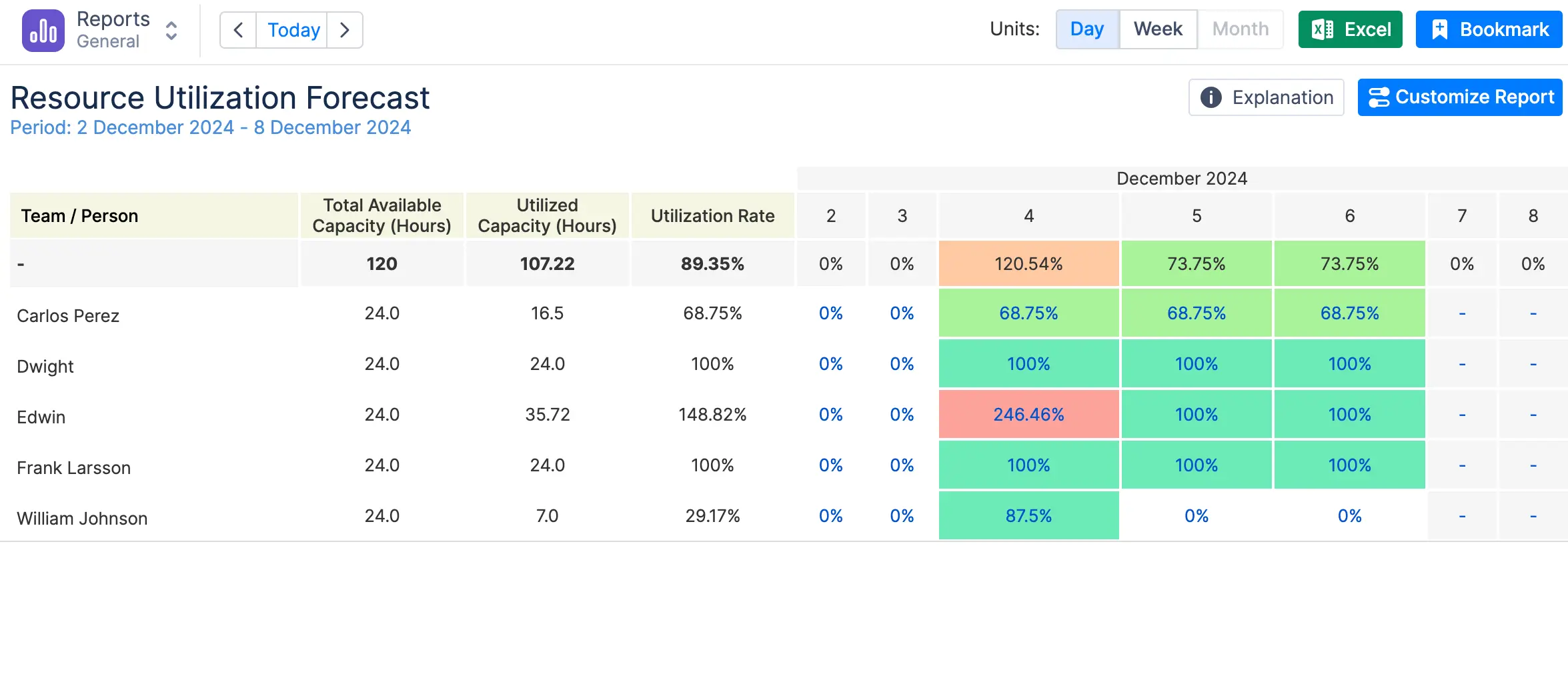
With all this information, users can generate various reports, including planning reports, timesheets, and tracking reports, which are essential for detailed time tracking and project timeline performance assessment (learn more on the Time Tracking for Jira page). You can generate reports on both individual and team levels. One notable report for individual level is Resource Utilization Forecast, which gives you an idea what future workload each individual has. For a team level, use reports like Team Capacity Chart, which perfectly signals any bottlenecks and underutilized resources at your disposal.

Like any powerful tool, ActivityTimeline has a learning curve. New users might initially find the advanced planning features overwhelming. However, once mastered, the benefits far outweigh the initial complexities. The ability to monitor project progress, manage timelines, and adjust resource planning in real time makes ActivityTimeline indispensable for project managers who prioritize visual planning.
Rating: Price: 4.5/5 Design: 5/5 Usability: 4.5/5 Features: 4.5/5
Dwell on Capacity: Planner by Tempo

Price: From $3.63/user/month for only Capacity Planner by Tempo; other modules like Timesheets will add up costs.Pros:
- Real-time resource allocation adjustments
- Informative dashboards
- Customizable roles and workload management
- Clear and uncluttered design
Cons:
- Can be complex for users
- Limited functionality without Tempo Timesheets (+$4.53/user/month)
- Slow review of support requests
- High cost due to modular pricing structure
Capacity Planner by Tempo is a tool for project managers needing detailed reporting capabilities. It offers extensive data-gathering features, including informative dashboards, planned vs. actual time comparisons, and easy export options. Customizable roles and workload management enable teams to tailor the tool to their specific needs, improving resource management.However, the complexity of these features can be daunting for new users, and full customization may take some time. Also, their customer support is slow and may prioritize huge enterprise clients. Its ability to visualize workloads and track project expenses makes it suitable for resource planning.
Rating: Price: 4/5 Design: 4/5 Usability: 3.5/5 Features: 4.5/5
Flexible Scheduling: Ganttic

Price: From $1,25/resource/month.Pros:
- Gantt charts for planning
- Custom data fields for project organization
- Flexible scheduling options
- Efficient resource management
- Identifies capacity issues and overbookings
Cons:
- Uses waterfall approach, which is not very flexible
- Not integrated with Jira
Ganttic shines in flexible scheduling, using Gantt charts for effective resource planning. Its flexible scheduling options help eliminate missed deadlines and costly overtime. Features designed to identify capacity issues and overbookings reduce stress and enhance resource management.Custom data fields facilitate effective project organization, making Ganttic a strategic management tool. However, the mobile app's functionality could be improved, and setting up custom fields can be time-consuming. Despite these minor drawbacks, Ganttic's robust features and strong customer service make It a top choice for teams seeking flexible scheduling and real-time project transparency.
Rating: Price: 4.5/5 Design: 4/5 Usability: 4/5 Features: 4.5/5
Best for Small Teams: Toggl Plan

Price: starts from $5/user/month.Pros:
- User-friendly for small teams
- Simple and intuitive interface
- Frequent updates
Cons:
- Limited advanced features
- May not scale well for larger teams
Small teams highly regard Toggl Plan for its uncluttered and intuitive interface, which allows them to concentrate on their projects without extra hassle. Proactive customer service provides prompt aid when needed, which is a substantial plus. Regular bi-monthly updates ensure that the tool remains efficient and up-to-date.
While the Toggl Plan perfectly suits small, autonomous groups, it might not offer the sophisticated functions required by bigger organizations or intricate endeavors. Due to its uncomplicated nature and user-friendliness, it’s particularly well-suited for creative sectors like design and marketing.
Ratings are as follows: Pricing earns a 4 out of 5. Design scores a high 4.5 out of 5. Usability matches this with another 4.5 out of 5. Features receive a solid score of 3.5 out of 5.
Cloud Accessibility: Resource Guru

Price: starts from $4.16/user/month.Pros:
- Absence tracking
- Calendar syncing
- Versatile for companies of all sizes
Cons:
- Costs can add up with extensive use
- Not integrated with Jira
Resource Guru is a cloud-based platform that can be accessed anywhere, making it perfect for remote teams or those who need flexible options. Its key features, such as cloud availability, absence tracking, and calendar synchronization, facilitate effective and streamlined resource management. Due to its flexibility, it has become an essential tool for businesses of various sizes.
On the downside, extensive usage can lead to rising costs, which may be prohibitive for larger groups. Nevertheless, advantages like cloud accessibility and thorough tracking capabilities position Resource Guru as a top option for organizations looking to enhance their flexibility.
The tool earns ratings of 4 out of 5 for Price and Design. Usability scores slightly higher, at 4.5 out of 5, while Features also receive ratings of 4 out of 5.
Team Collaboration: DevSamurai ProScheduler

Price: starts from $1.5/user/month.Pros:
- Excellent for team collaboration
- View of planned issues with daily capacity on a single timeline
- Comprehensive view of team tasks and schedules
Cons:
- May require customization for unique workflows
- Very limited reporting capabilities
- Reported performance issues for larger organizations
ProScheduler stands out for its coordination of team schedules and task allocation. The platform offers a straightforward, user-friendly interface that allows for smooth operation and maximizes efficiency. A key attribute is its dashboard, which displays team members, their respective tasks, and the time they have recorded or planned to work on them. This all-encompassing view promotes alignment among team members, auguring individual productivity and overall project health.
DevSamurai ProScheduler is a decent pick if you’re looking for a no-frills scheduler, but it’s not built for growth or complexity. ActivityTimeline, on the other hand, offers a richer set of features for resource planning, time tracking, and customization. If you want a tool that can handle your team’s needs now and in the future, ActivityTimeline is the way to go.
The ratings provided are: Price – 4/5. Design – 4/5. Usability – 4.5/5. Features – 4/5.
How to Choose the Right Resource Management Tool
Choosing the right resource management tool comes down to five questions:
- Does your team live in Jira? If yes, a native app (ActivityTimeline, Capacity Planner by Tempo) means one source of truth. A standalone tool (Ganttic, Resource Guru, Toggl Plan) means re-entering or syncing work data forever.
- What's the real problem — scheduling, utilization, or time tracking? Pick the tool whose core feature matches: visual scheduling (Ganttic, Planyway), utilization reporting (ActivityTimeline), lightweight planning (Toggl Plan).
- How is pricing structured? Watch for modular pricing where planning, timesheets, and reports are separate paid modules — the sticker price can double. Flat per-user pricing that includes everything is easier to budget.
- Will it scale? A tool that's perfect for 10 people (Toggl Plan) can run out of road at 100. Check reporting depth and permissions before committing.
- Can you try it on real data? Run a 2–4 week trial with your actual projects — a tool that demos well but fights your workflow will be abandoned by the team within a quarter.

Summary
Resource management tools solve the problems Jira and spreadsheets leave open: overlapping schedules, invisible capacity, and uneven workloads. Of the seven tools reviewed, ActivityTimeline is the strongest pick for Jira teams (planning, tracking, and reporting in one price), Ganttic for standalone scheduling, and Toggl Plan for small teams that value simplicity. Match the tool to your actual bottleneck — then trial it on real projects before you commit.