Time tracking in software development often gets a bad rap. Ask a developer about it and you'll usually hear about Friday afternoons spent guessing what happened on Tuesday, or a manager who started counting hours instead of asking why a ticket was stuck.
Both complaints are fair, and neither is a reason to stop. You need the hours to estimate the next sprint honestly, to see who's overloaded, and, if you bill clients, to get paid. The fix is to make logging take seconds, keep it where the work already is (for most teams that's Jira), and agree up front what the data is for. Below: four ways developer teams do it in Jira, what each one gets right, and the habits that keep time tracking from turning into surveillance.
Why Time Tracking Matters for Developers
Time tracking helps developers understand where their time goes. It’s not just about logging work hours—it’s about seeing how much time you spend on specific tasks like debugging or handling repetitive tasks. This insight helps you improve estimates, plan better, and manage your time across different projects.
Good time tracking also highlights patterns in how you work. You can use that data to stay on track, improve your time management skills, and even deliver more accurate billing. For teams, it keeps everyone aligned, whether you’re handling a single client or juggling unlimited projects.
The problem is that clunky time tracking tools feel like micromanagement. That’s why tools like ActivityTimeline are better for developers. They’re designed to blend into your workflow with features like real-time tracking, mobile apps, detailed reports, and integrations with your favorite tools. They’re built to track your work, not interrupt it.

Key Features of ActivityTimeline
- Track the time spent on non-Jira tasks.
- Intuitive interface and automatic time-tracking.
- Specialized work log charts allow remote employees to easily find their tasks and projects.
- Customized approval workflows for individual timesheets.
- Report by different categories, such as billable/non-billable hours, informing you where the time spent went.
Whether you’re managing remote teams or working solo, this tool simplifies time tracking. You get clear insights without the hassle, so you can focus on building great software.
Benefits of Using Time Tracking Software for Developers
- Improved time management skills and productivity
- Enhanced project management and organization
- Accurate tracking of billable hours and time spent on specific tasks
- Better estimation of project timelines and resource allocation
- Increased transparency and accountability in team work
The Don'ts of Time Tracking

Don’t Turn Time Tracking into a Job Itself
Time tracking should help, not slow you down. Complex systems with endless manual input or confusing timesheets only add to your workload. With that, 69% of employees admit to not tracking their time accurately, leading to productivity losses.
ActivityTimeline solves this by automating time tracking. ActivityTimeline syncs directly with your Jira workflows. When you log time in Jira, ActivityTimeline automatically captures this information.
Don’t Use Time Data as a Weapon
Time logs aren’t about policing developers. Using tracking software to enforce quotas or micromanage kills morale fast. Instead, tools like ActivityTimeline let you use time tracking data to spot bottlenecks, balance workloads, and improve team efficiency. It’s about collaboration, not control.
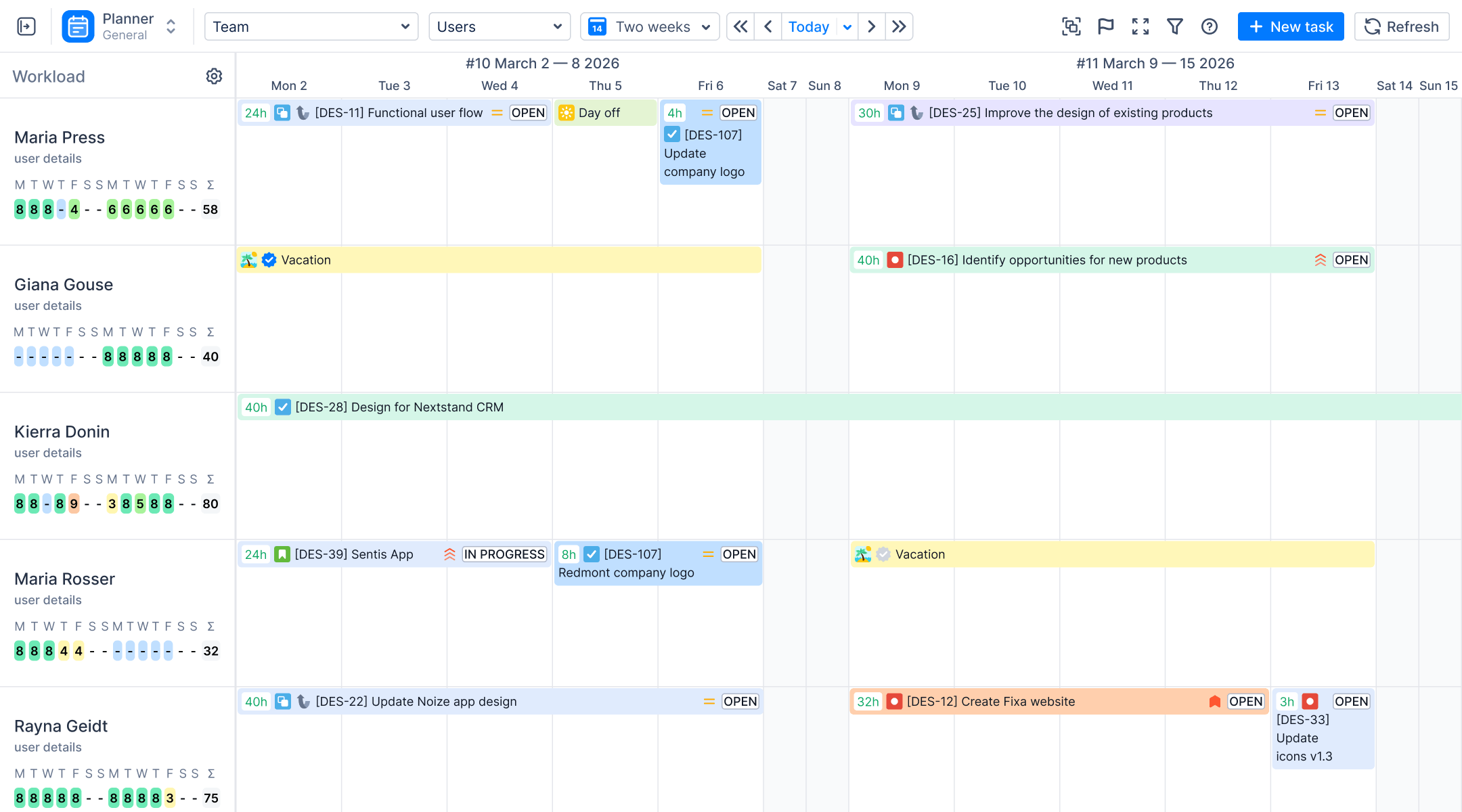
In ActivityTimeline, you can configure how to distribute and indicate the workload of every team member.

See which tasks they have in progress and quickly re-arrange their agenda by dragging and dropping tasks on the timeline.
Don’t Conflate Time with Effort
Just because someone logs long hours doesn’t mean they’ve delivered more value. Time spent and effort aren’t always the same thing. ActivityTimeline helps keep tracking contextual by linking logged time to specific tasks, projects, and priorities. This way, you’re focused on outcomes, not just hours.


The Dos Time Tracking
Start with a Transparent Discussion
Time tracking works best when everyone is on the same page. Make it clear that tracking time isn’t about micromanaging—it’s a tool for developers to improve their workflows and manage time more effectively. Discuss how time tracking data will be used, such as identifying bottlenecks or improving estimates, and set clear rules to keep it fair and transparent.
One way to keep time tracking transparent is to set up timesheet approval period when everyone should submit their logged hours. This feature is easily configurable and allows to avoid adding logs afterwards. Define such rules and discuss them with a team. You can also add a grace period of 3-5 days for those who didn’t submit their hours by accident.
Integrate Tracking into Workflow
ActivityTimeline integrates directly with Jira, to make it seamless. As developers update task statuses or log time in Jira, ActivityTimeline captures it automatically, so there’s no extra effort.
Use the data in retrospectives or planning sessions to show its value. For example, you can analyze how much time was spent on specific tasks or track billable hours for clients, using this data to improve future sprints and capacity planning.
Provide Context with Visual Insights
Raw time tracking data is useful, but visual insights make it actionable. ActivityTimeline’s Timesheets section breaks down time spent across projects, tasks, and clients, giving both developers and managers a clear picture.
These visualizations can highlight repetitive tasks, show how overtime hours affect productivity, and reveal opportunities to streamline workflows. Instead of just tracking time, you’re gaining insights that help the whole team work smarter.
How to Use ActivityTimeline Effectively
- Set Up the Integration. Sync your Jira instance with ActivityTimeline for real-time tracking.
- Customize Job Codes and Workflows. Tailor the tool to your team’s processes, whether they involve tracking overtime hours or specific tasks.
- Encourage Consistent Updates. To ensure the most accurate tracking, developers should keep time logs up to date in Jira.
- Leverage Dashboards and Reports. Use these visual tools to review progress, identify bottlenecks, and align team efforts.
- Optimize Planning. Use historical data from ActivityTimeline to refine future estimates, improve time blocking, and allocate resources better.
With ActivityTimeline, time tracking isn’t just easier—it’s smarter. It removes the hassle of manual tracking and gives you the insights you need to manage projects, teams, and personal productivity more effectively.

Conclusion
Time tracking doesn’t have to be frustrating or intrusive. With the right approach and tools, it can be a powerful ally for software developers. Tools like ActivityTimeline allow you to seamlessly track time, gain actionable insights, and make data-driven decisions that benefit both individual developers and the entire team.
Whether you’re managing a small project, collaborating with remote teams, or working on multiple clients, time tracking software designed for developers can make all the difference. It’s time to move beyond outdated tracking systems and embrace tools that help you work smarter, not harder.