


Today, the line between "working from home" and "working from the office" is blurred. We don’t need remote work tools that track hours in a chair. Remote collaboration requires tools that track output and support work-life balance. Regardless of location, employees should stay productive using remote workforce management software.
The best apps for remote work must seamlessly blend forward-looking planning with backward-looking time tracking. ActivityTimeline bridges this gap by combining a Planner for future work and Timesheets for past performance.
Why is separate time tracking obsolete in a hybrid workplace?
Most remote teams still jump between Jira and a separate time tracking software every single day. When you force your team to leave their planning environment just to log hours, you sabotage their focus. This friction often prevents teams from utilizing effective remote work productivity tools that support deep work. You want your people to work effectively, yet they waste mental energy navigating different tools instead of tracking tasks and finishing ongoing tasks. This constant context switching quietly drains productivity and slows down project execution. This fragmentation is a common problem across many collaboration tools for remote teams that rely on disconnected systems and other team members working asynchronously.
Another critical issue is the massive data disconnect. You simply cannot improve your future estimates if your "Planned" data lives in one system while your “Actual” results sit in another. For midsize businesses, this separation makes it difficult to monitor progress accurately and learn from past work. The only way to boost productivity long-term is by providing managers with the full picture. You need to see exactly where time goes and where you thought it would go, without manual cross-checking or guesswork.
As Susan Cain said:
"What looks like multitasking is really switching back and forth between multiple tasks, which reduces productivity and increases mistakes by up to 50%."
What criteria define the best tools for managing remote teams?
Whether your teams continue to be productive or not depends on the software they use and what features hybrid team tools offer in diverse hybrid environments. The best tracking solutions remove friction, support employee recognition through transparency and align with specific business needs. This is especially important when evaluating hybrid team tools designed for remote work environments.
- Top tools provide a unified, user-friendly interface and secure access management.
Do you know exactly what your team is committed to right now? What if you had a clear view of every active project and the availability of other team members? It would immediately stop the frustration of hunting for updates across multiple apps. Also, centralizing everything into one workspace is vital for collaboration tools for remote teams. It creates a culture of transparency that teams actually appreciate.
ActivityTimeline’s Personal Workspace lets remote team members plan and log time in one single spot. You simply drag a task to plan it and click once to log it. This keeps your hybrid teams on the same page and ensures project progress is always visible.
- To work effectively, teams require flexibility.
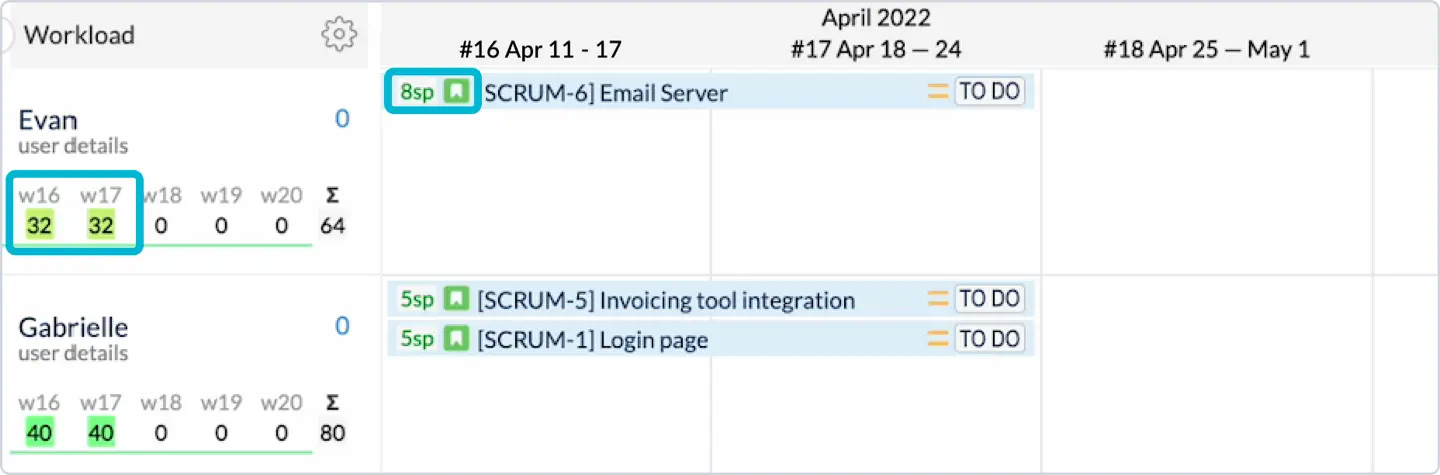
While Agile squads use Story Points for complexity, managers still need time-based data for budgets. However, managers and finance teams still need time-based data to effectively control budgets and capacity. Tools for managing remote teams should allow these different methodologies to coexist without forcing anyone into a rigid process.
ActivityTimeline supports both "Duration" (hours) and "Story Points". That allows Agile and Waterfall teams to work effectively within a single Jira instance. Managers can view the total workload in both points and hours by converting them (for example, 1 Story Point = 8 hours). The system retains each team’s processes by displaying points on agile task cards, while showing time in general reports.
The final requirement is billable accuracy.
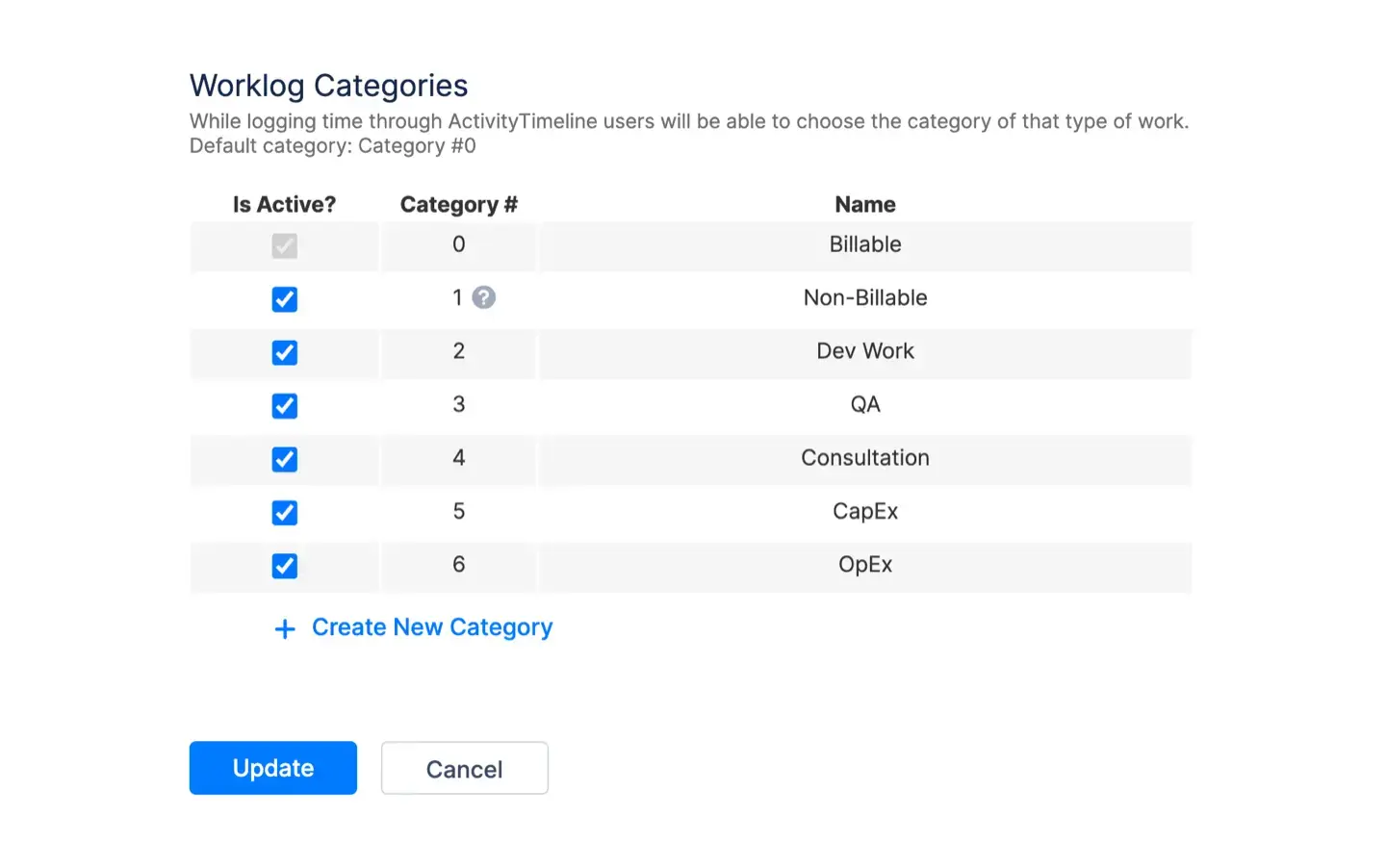
Precise separation between billable and non-billable work hours is essential for revenue forecasting and client trust. Without this clarity, companies are facing the risk of losing money as a result of human error and forgotten entries.
ActivityTimeline addresses this challenge by providing features that automate tasks related to worklog capture. Individual employees can log billable work directly at the point of entry or use one-click timers to eliminate guesswork. You can define up to 100 custom categories to separate client work from internal meetings or support. This level of control is often missing in many best apps for remote work that focus only on basic tracking.
The "Booking" feature even captures non-Jira work and converts those plans into actual worklogs. Syncing with Google calendar ensures every billable minute is tracked accurately without extra effort. This ensures your hybrid teams stay organized while every task is accounted for and ready for accurate billing.
What do real remote and hybrid teams say about capacity planning?
Leading remote and hybrid organizations no longer treat engineering capacity as a linear function of headcount and hours. Instead, they have shifted toward complex, decentralized systems that prioritize team health, economic efficiency and predictive forecasting. Let's explore their approaches to capacity planning.
Spotify is a strong example of this mindset. They have revolutionized organizational design by focusing on "Aligned Autonomy," where leaders set the mission and squads decide how and when work gets done. Rather than using traditional time-tracking, they use a "Squad Health Checks" traffic-light system to boost morale. This qualitative model (Green, Yellow, Red) monitors both technical and team health, allowing leaders to identify risks early without micromanaging. Visual dashboards in project management tools provide real-time project visibility, reducing the need for constant status updates.
By the way, in ActivityTimeline, you can replicate this by using Custom Workload Indicators to reflect qualitative "Health", which allow teams to visualize not only hours but also qualitative signals such as workload health or risk levels.
Basecamp's "Shape Up" methodology offers a unique take on capacity planning. They focus on "Appetite" instead of traditional time estimates. Instead of traditional estimates, Basecamp sets fixed six-week limits to prevent projects from dragging on. Their hybrid work model includes a mandatory two-week Cool-Down for bug fixes after every cycle. To effectively monitor progress, they use Hill Charts, which visualize execution speed and uncertainty. This approach supports work-life balance for distributed teams working across different time zones.
GitLab, as an all-remote pioneer, treats capacity planning as a predictive science. They use internal tools to forecast "Saturation" (the point at which a team will be fully utilized) looking up to 90 days into the future. This moves the organization from reactive firefighting to predictive planning across multiple time zones and aligning it with company goals.
ActivityTimeline helps teams achieve this through its Capacity Forecasting views, which allow managers to predict "Human Saturation" months in advance and identify potential burnout before it happens.
A powerful example of these principles in action is FractureCode Corporation, which manages global teams across Europe. Before implementing a specialized solution, they struggled with inconsistent tracking and a lack of structured reporting. By adopting ActivityTimeline, they achieved full visibility into time spent across diverse teams and customers.
Similarly, the Swiss office of Medtronic transformed its workflow by moving from error-prone Excel sheets to a centralized cloud system. This shift led to a significant decrease in overloaded employees and improved their ability to meet critical deadlines through enhanced visibility of resource availability.
How does ActivityTimeline’ key features streamline hybrid workflows?
The primary role of remote project management tools is to facilitate the organization and delegation of work to a distributed workforce.
ActivityTimeline streamlines hybrid workflows by centralizing Jira data into a single visual environment designed for a hybrid workplace. It connects high-level planning with daily execution to help teams work effectively across multiple locations. Several key features in ActivityTimeline help streamline hybrid work:
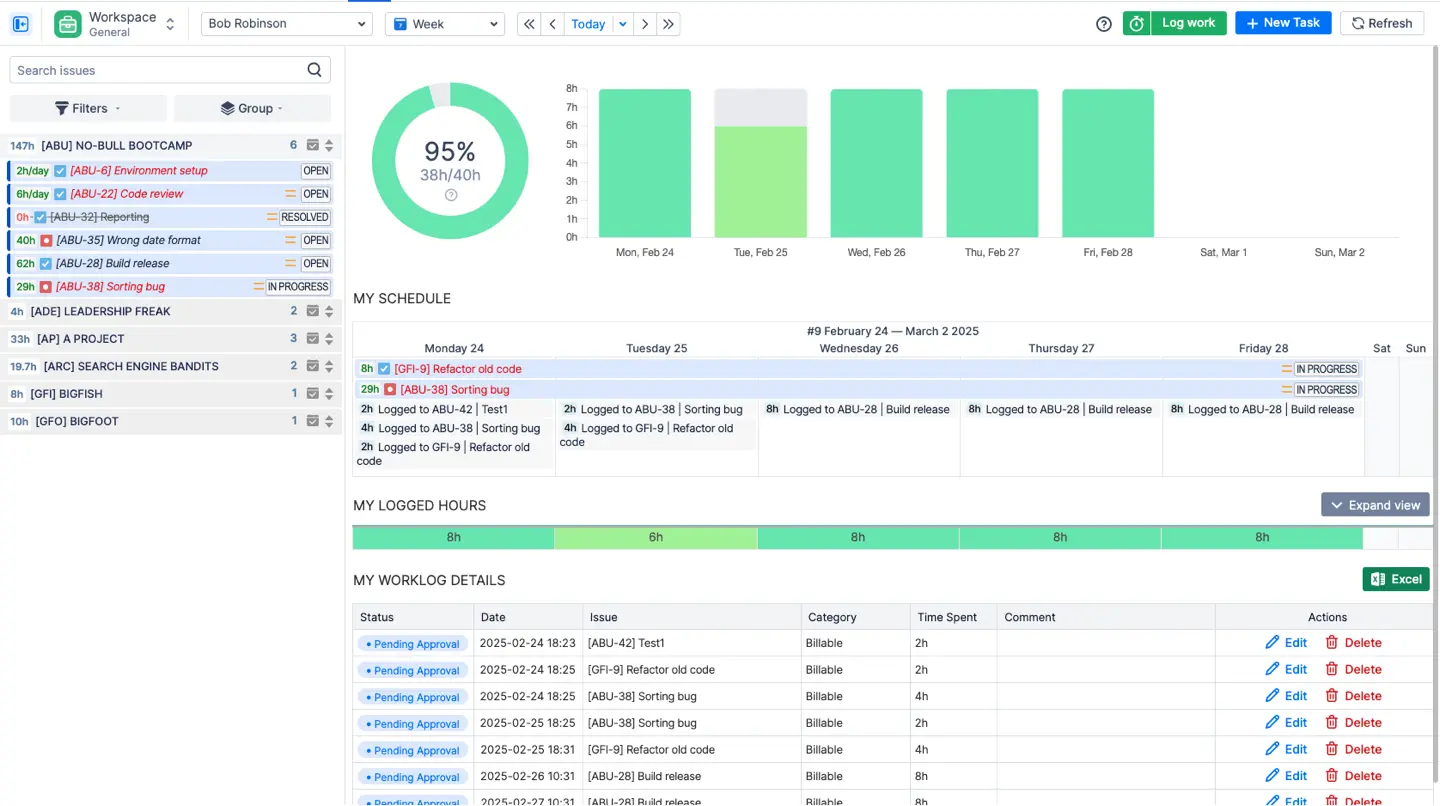
- Web-Based Timesheets provide a clear view of work hours, enabling staff to separate billable tasks and keep records up to date. Also, to simplify logging for users, ActivityTimeline has a built-in timer and autofill options. And for accounting purposes managers can review, approve and lock these entries.
- Workload indicators show each team member’s availability and capacity. These indicators display the workload in hours, percentages, or tasks, using a color-coded system. The system factors in not only Jira tasks but also holidays or sick leaves.
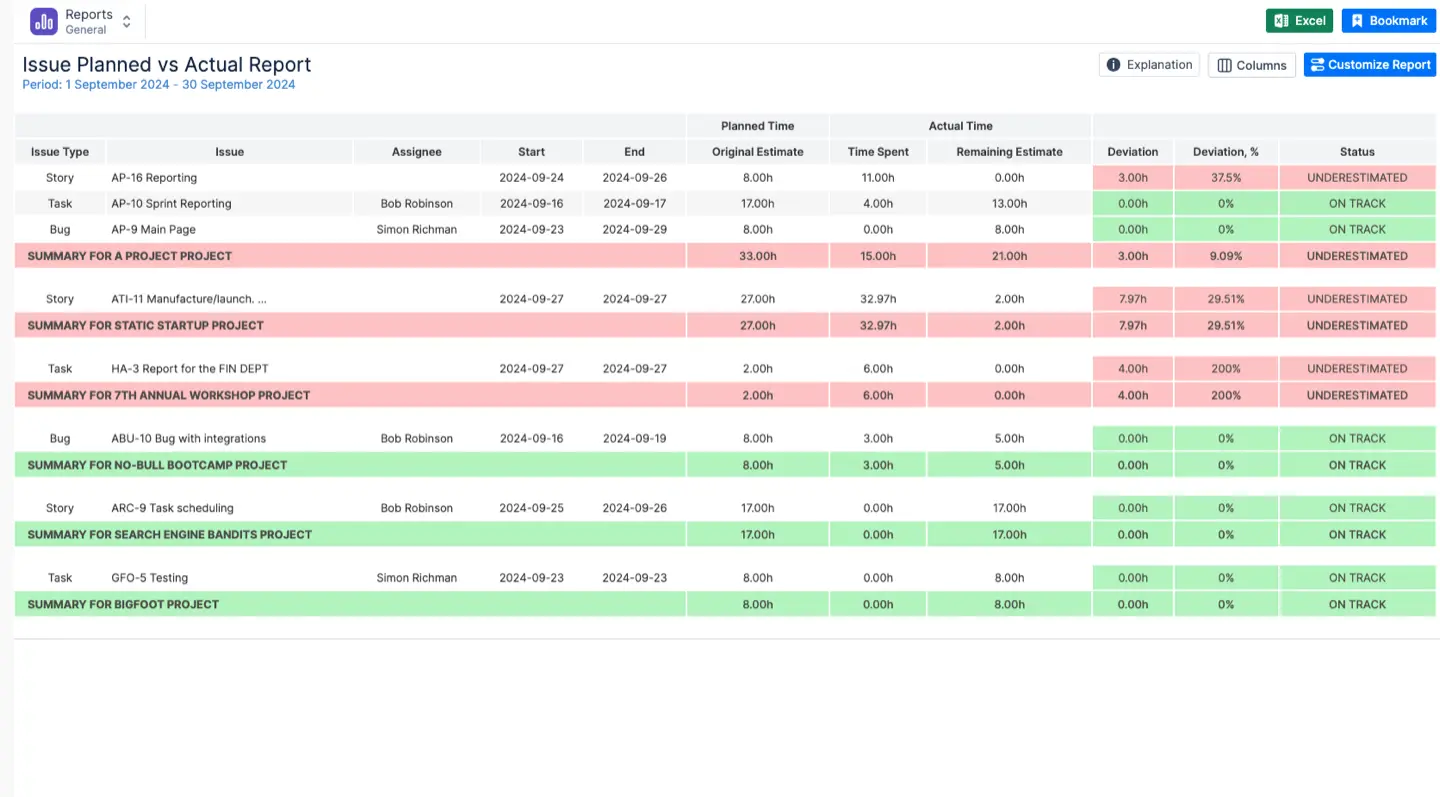
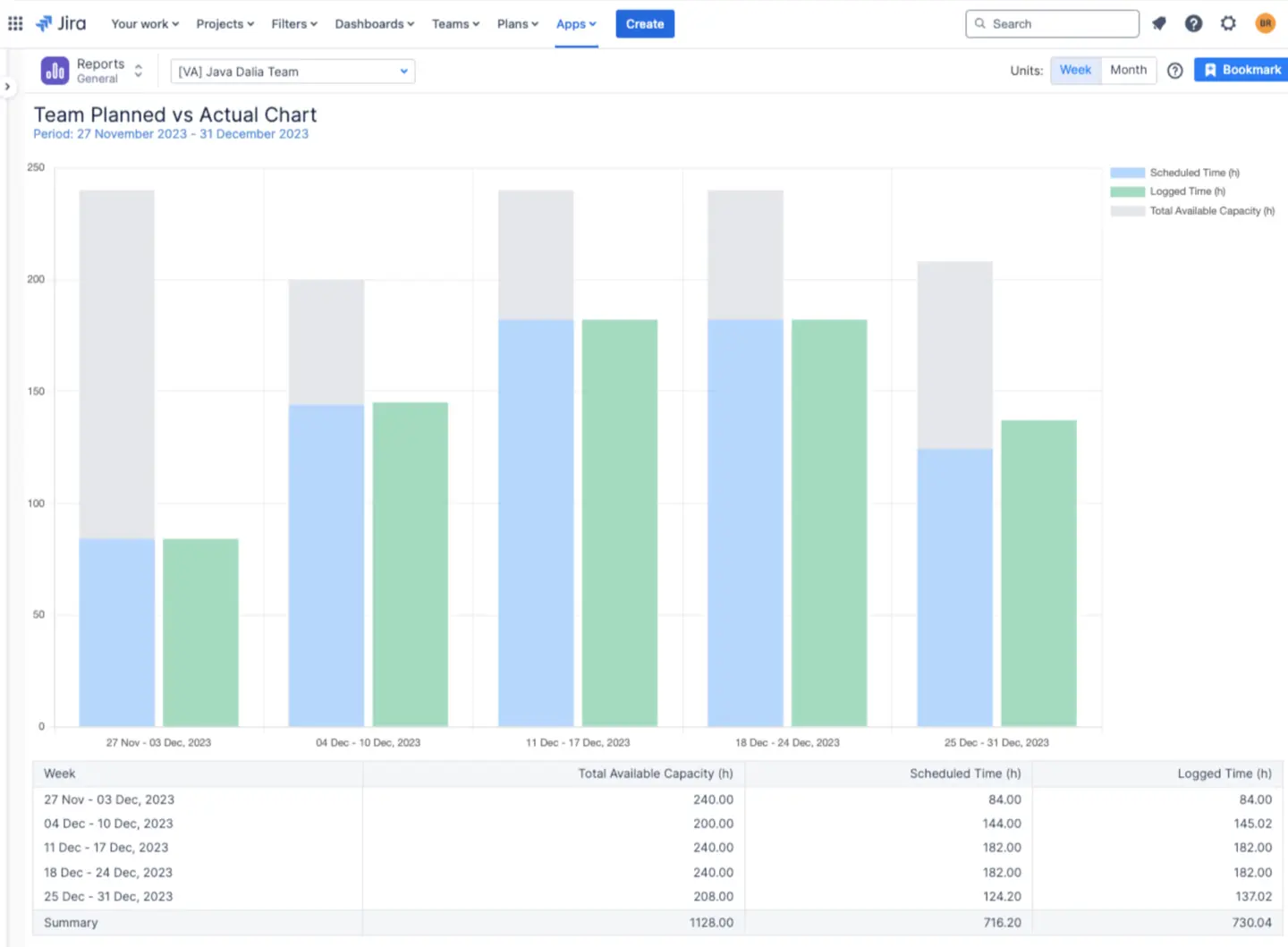
- Planned vs. Actual Report. This feature compares initial estimates with actual logged worklogs to identify differences in project progress. By visualizing it through graphs, managers can adjust future estimates and boost productivity to ensure more reliable project planning.
- Story Points to Hours Conversion. With this feature, you can convert story points into work hours. But at first, the manager must configure a Global conversion factor. This ensures a shared understanding of workload across teams.
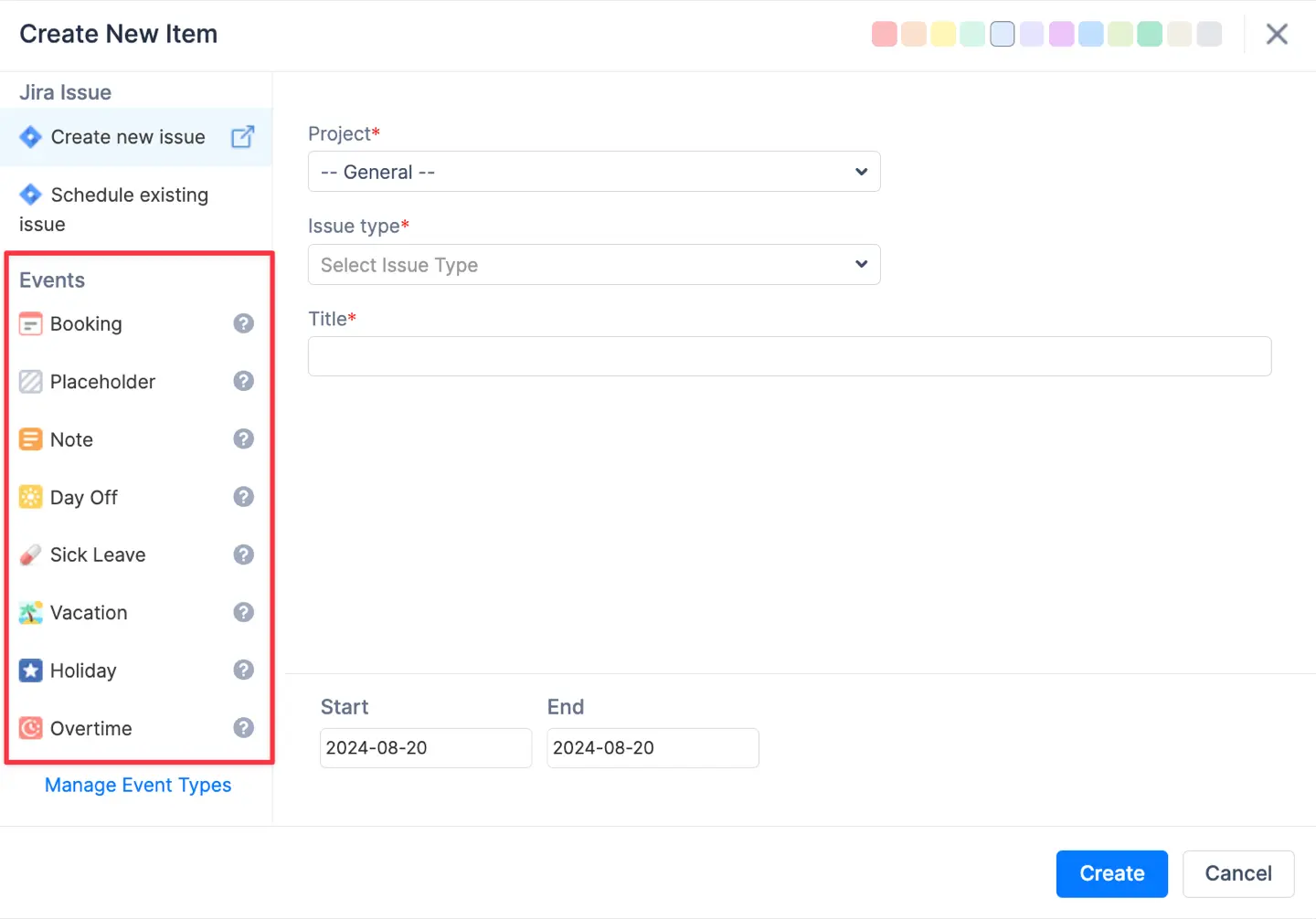
- Custom Events. Teams can organize tasks (activities outside of Jira) like meetings or training through "Bookings" and "Placeholders." You can even add employee birthdays on planer. This ensures that non-working periods are respected during the planning phase. This is essential when coordinating schedules across various time zones.
- Bulk Reschedule. Project managers can swiftly modify the timing of several tasks during delays or changes in priorities by using this feature. You can shift groups of tasks or reassign work to available team members in few steps without manual work.
Imagine a fast-growing team in a hybrid workplace. They are currently managing a high-priority collaboration software release. Some of them are remote workers, while others work in office. The lead developer is silently burning out. Unfortunately, the project manager lacks the visibility to notice the issue. The developers estimate their tasks in Story Points. However, the finance department needs a breakdown in work hours for budgeting. Suddenly, a key team member goes on sick leave. Critical tasks are now stranded in the backlog.
A company can resolve these frustrations by centralizing their workflow in ActivityTimeline. To bridge the communication gap, the manager can use Story Points to Hours Conversion. This feature instantly translates complexity estimates into a tangible workload for all departments. When a resource shortage occurs, Workload Indicators turn red on the visual timeline. This shows exactly who is over-allocated and who has the capacity to help.
The manager can then use Bulk Reschedule to shift delayed tasks to available members in just a few clicks. This saves hours compared to moving Jira tickets manually. Finally, a Planned vs. Actual Report helps the team present a data-driven update to their client. By visualizing "Capacity Drift," the company can adjust future estimates for a more reliable schedule.
Choosing the right remote management tools can streamline communication, ensure accountability and track productivity effectively.
How do we ensure team adoption?
If logging time feels like a chore, remote employees simply won't do it. Most tech teams dream of a tracking process that takes no more than a couple of clicks, and ActivityTimeline turns that dream into a standard workflow.
Ease of use is the first driver of adoption. The "Suggest Hours" feature automatically analyzes assigned tasks and past patterns to propose time entries for remote workers. This way, team members don’t need to worry about manual data entry, turning what was once a repetitive chore into a few easy steps.
The other foundation of team adoption is trust and a positive employee experience. A healthy remote-first company culture, often supported by human resources, is built on capacity planning and workload balance, not invasive measures like screenshots. This approach ensures individual employees feel supported because the data is used to prevent burnout and ensure a fair distribution of tasks. When people see that tracking is a tool for their own balance rather than a spy tool, they are much more likely to maintain accurate worklogs. This shift also supports team building and preserves company knowledge within the team.
Finally, keeping everything within the familiar Jira environment removes the frustration of switching between other tools. Users can log time directly from the Jira issue page or their dedicated Personal Workspace. To further improve loyalty, managers can implement a "Grace Period," giving hybrid teams a few days to finalize their work hours without stress.
This combination of automation and transparency makes the tool a natural and appreciated part of the daily routine. Choosing the right tools helps manage workloads, strengthen employee engagement and support long-term team building.
Conclusion
Modern hybrid work demands a shift from tracking “hours in a chair” to enabling real team output through visibility and balance. Selecting the right tools for managing remote teams is essential. It helps plan better, avoid burnout and stay productive without unnecessary control.
{{rich-cta-1}}






![Top 11 Best Jira Add-ons: A Detailed Guide [2026]](https://cdn.prod.website-files.com/60c76f07dc83db305171350c/692dadbde37b1016cdc2657e_thumbnail_Best%20Jira%20Plugins.png)


