
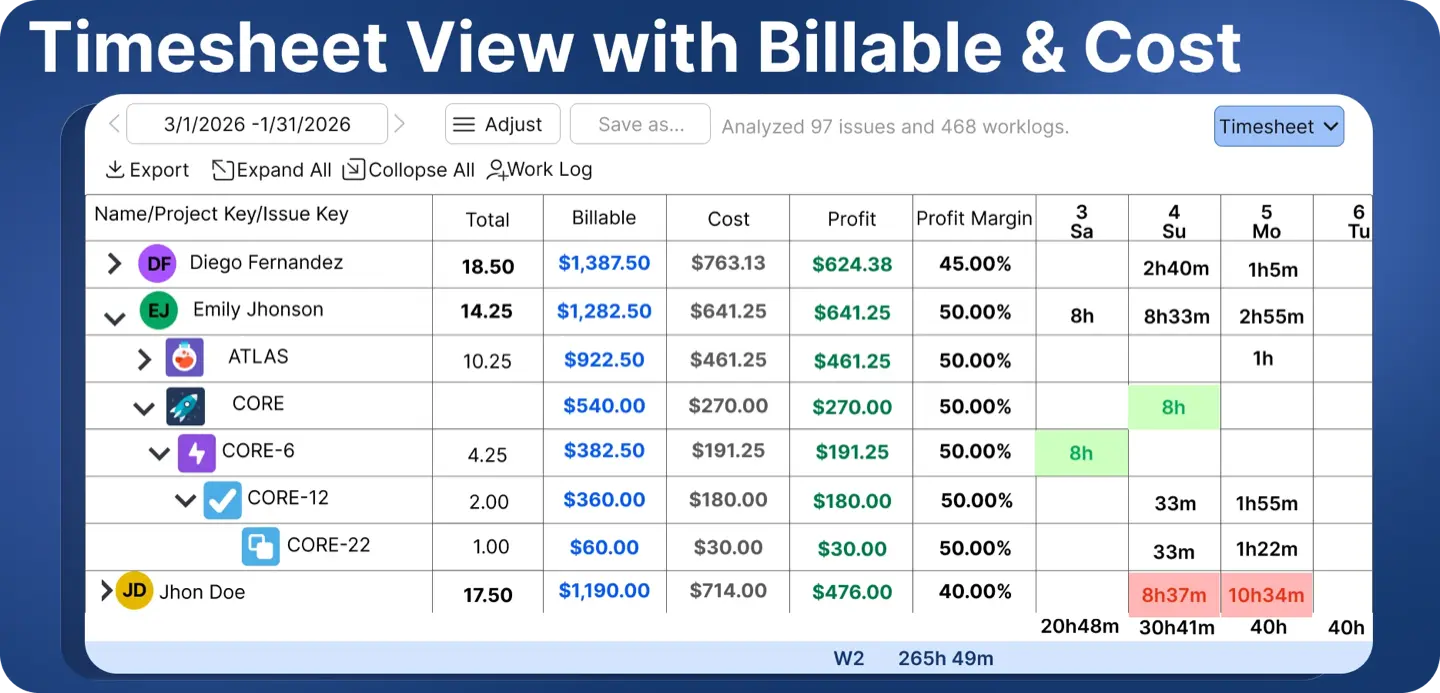
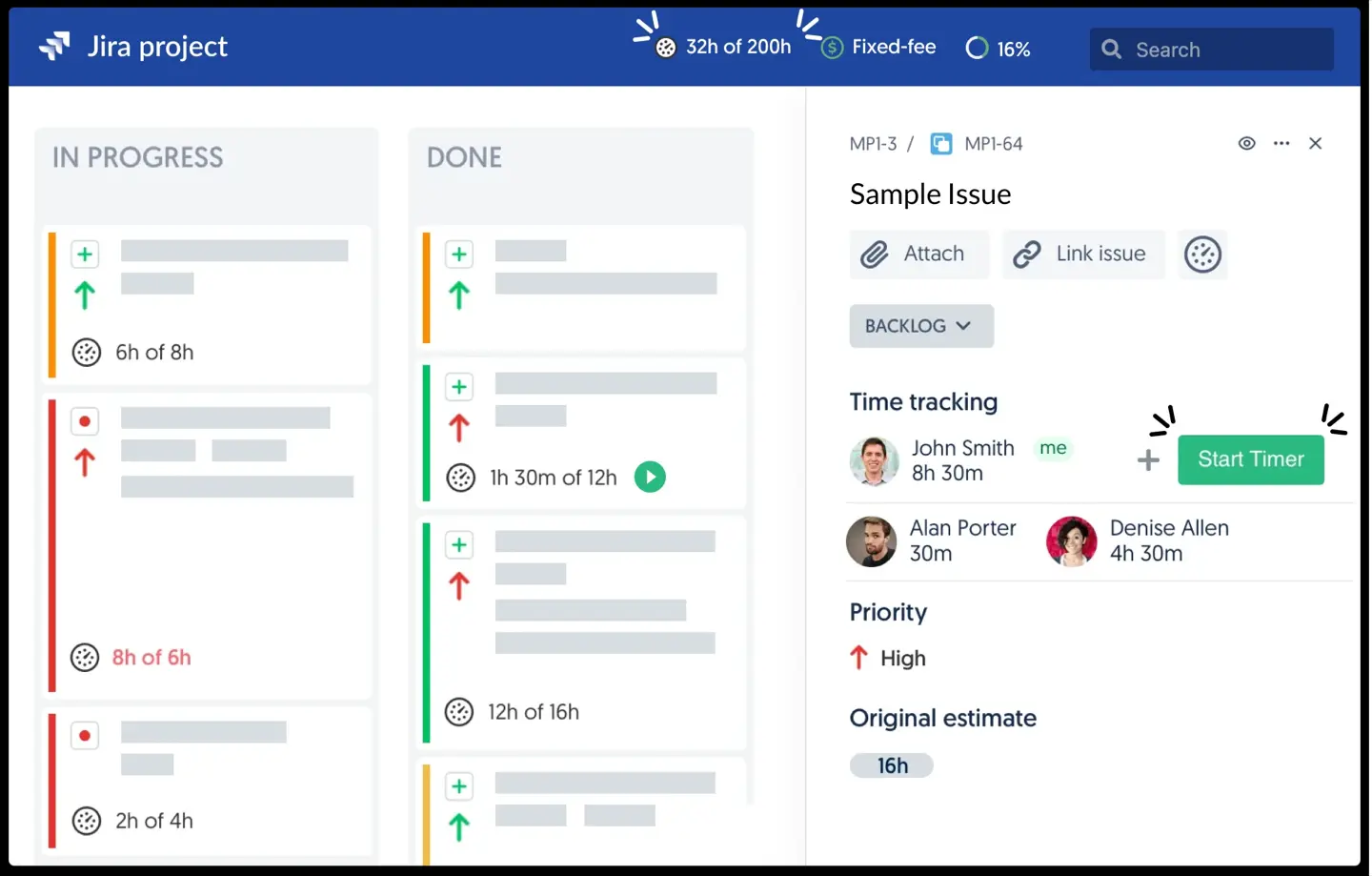
Clockwork is HeroCoders' time tracking app for Jira Cloud, and it integrates seamlessly with Jira to make it easy to track time inside existing issue workflows. Its main idea is the automatic timer: when a work item has an assignee and moves into an "In Progress" status, a timer starts; when it is unassigned or moved out, the timer stops, and the elapsed time lands in Jira's native worklog. There are manual start and stop timers as well, and a normal log work form so users can create worklogs manually in Jira issues. Working hours and holiday calendars tell the timer what to count, worklog attributes let you tag entries (billable, customer, whatever you define), and the timesheet view filters and groups the result and exports it to Excel.
Clockwork comes in two Cloud-only editions. Both are completely free for up to 10 users and have a 30-day free trial. Monthly billing starts at $0.40 per user for Lite and $1.30 for Pro, with volume discounts as your team size grows. Annual plans start at $60 a year for Lite and $195 a year for Pro, scaling with your user tier. Pro adds attributes, approvals, billing periods that lock past time, calendar sync and a Rovo agent.
And for a certain kind of team it is exactly right. A small development team that refuses to log time by hand, where nobody invoices anyone and the only question is roughly how long tickets take, uses Clockwork to track development hours against Jira stories for project estimation with zero effort. We would rather say that plainly than pretend everyone needs what we sell. If you are eight developers and your PM just wants a sanity check on estimates, Clockwork Lite is a good answer, and it costs nothing.
The trouble starts when someone outside the dev team needs to trust the numbers. The limitations teams run into, each with a concrete example:
- Automatic timers measure ticket status, not work. In flexible mode a timer that starts and stops on the same day counts every minute in between, working hours ignored, so a ticket moved to In Progress at 9 and to Done at 6 logs nine hours including lunch. Overnight, Clockwork guesses the person's working day from the start time; HeroCoders' own worked example shows a ticket picked up at 5:45pm on Wednesday and closed at 9am on Thursday producing a worklog of 15 hours 15 minutes. Strict mode only counts configured working hours, but it still counts the time a ticket sat in a column, so a developer pulled into an incident while their feature stays In Progress logs a full day against the feature. Someone has to find those rows and fix them
- Lite is thin once a manager gets involved. The old cap of 300 automatic timers a month is gone since May 2026, credit to HeroCoders for that. What Lite still lacks is everything finance eventually asks for: no worklog attributes, no approvals, no billing periods, export of worklogs only, working hours at the global level only, no saved reports and no dashboard gadgets. Every one of those is Pro
- Money is a single number per person. Pro has one hourly cost and one hourly billing rate per user. No date ranges, so a raise in March rewrites February's cost; the docs say so: "we do not support defining costs and rates for a certain period of time or different rates for different spaces." No budgets, no per-project or per-client rates, no revenue forecast. You get cost or billable amount as a column on the timesheet, and "amount to invoice" is still built in a spreadsheet, just with one more column pre-filled
- No planning side. Clockwork shows what happened. It does not know remaining estimates, sprints or who is booked next week, so it cannot tell you a project is heading over before it is over
- Approvals and locking are recent and deliberately simple. Timesheet approvals arrived in Pro in May 2026, described by HeroCoders as "a clear yes/no on the week, not a multi-tier compliance system." That is an honest design choice and it suits a small team; for a PMO it means no bulk approval across teams and little approval history. Billing periods lock past worklogs, but the docs note the lock is enforced inside Clockwork only and can be bypassed through the Jira REST API or the Jira mobile app, so approved data is not fully locked for payroll-grade control. A team member can still end up with numbers finance will recheck
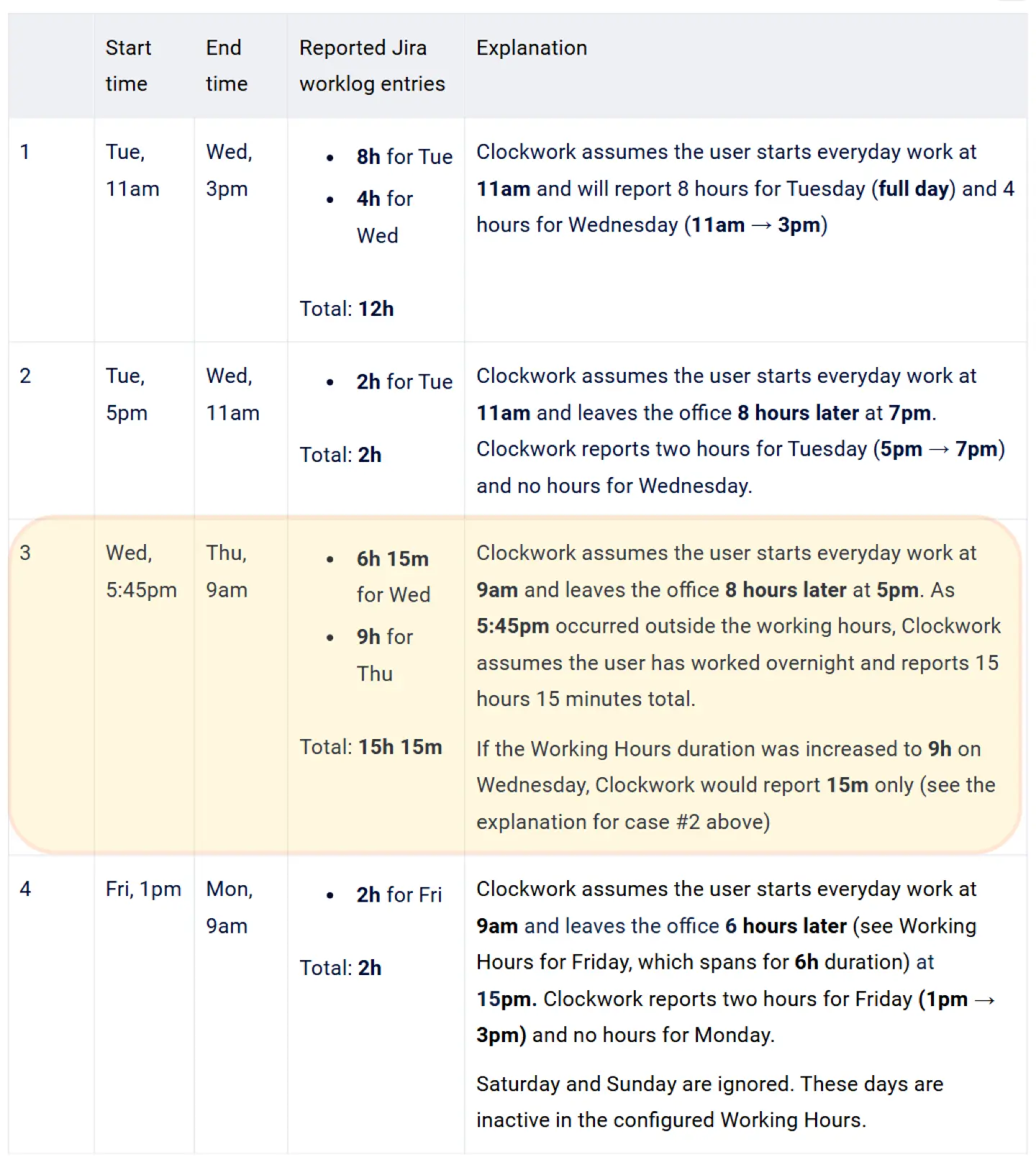
Alt text: Clockwork's documentation example where an overnight automatic timer logs 15 hours 15 minutes.
You would think, reading that list, that the fix is a better timer. Actually, for most teams the timer was never the problem. The month-end report was. Every item above comes back to the same fact: the hours were captured, but nobody could turn them into a number a client or a CFO would sign off on.
Which Jira apps work better for Jira time tracking, and when
What to pick depends on which question you are trying to answer. If it is "how many hours," several cheaper apps below will do. If it is "what did those hours cost and what do we bill," the requirement is usually one Jira-native app that captures time, plans capacity and converts hours to money without a second subscription. That is the comparison that matters most, so here it is side by side before the list.
Comparison table: Clockwork vs ActivityTimeline
If you only need hours, most of the list below is overkill and Clockwork Lite at $135 a month for 500 people is hard to argue with. If you need hours turned into money, read #1 and #2 first.
#1 ActivityTimeline Advanced Edition: Finances Module
Best for: agencies, consultancies, IT service teams and any PMO where sooner or later someone asks "what did this project cost us, and what do we bill for it?"
ActivityTimeline is a resource planning and time tracking app for Jira with a Finances module on top. Its broader functionality makes more sense for teams that need more than a single-purpose timer. Planner, Workspace, Timesheets, Reports and Finances run in one application, so the same hours that fill a timesheet also fill the budget report and the capacity forecast. If nobody in your company will ever ask what a project cost, skip to #3 and save yourself the reading.
Take a 25-person services team. Everyone logs time in Jira, some through a timer, some on Friday afternoon from memory. Invoicing happens in a spreadsheet: export the worklogs, match people to rates, match tickets to clients, fix the rows where the timer ran over a weekend. One fixed-price project, quoted at $100,000, shipped in June. In July, when the spreadsheet was finally reconciled, it turned out the team had spent 30 percent more hours than the price covered. Nobody had done anything wrong. The hours were all there, in Jira, the whole time. There was just no moment during the project when anyone could see them as money.
Clockwork Pro users logged 20 million timesheets in 2024, which shows real scale, but volume alone does not solve finance and reporting gaps.
Key features
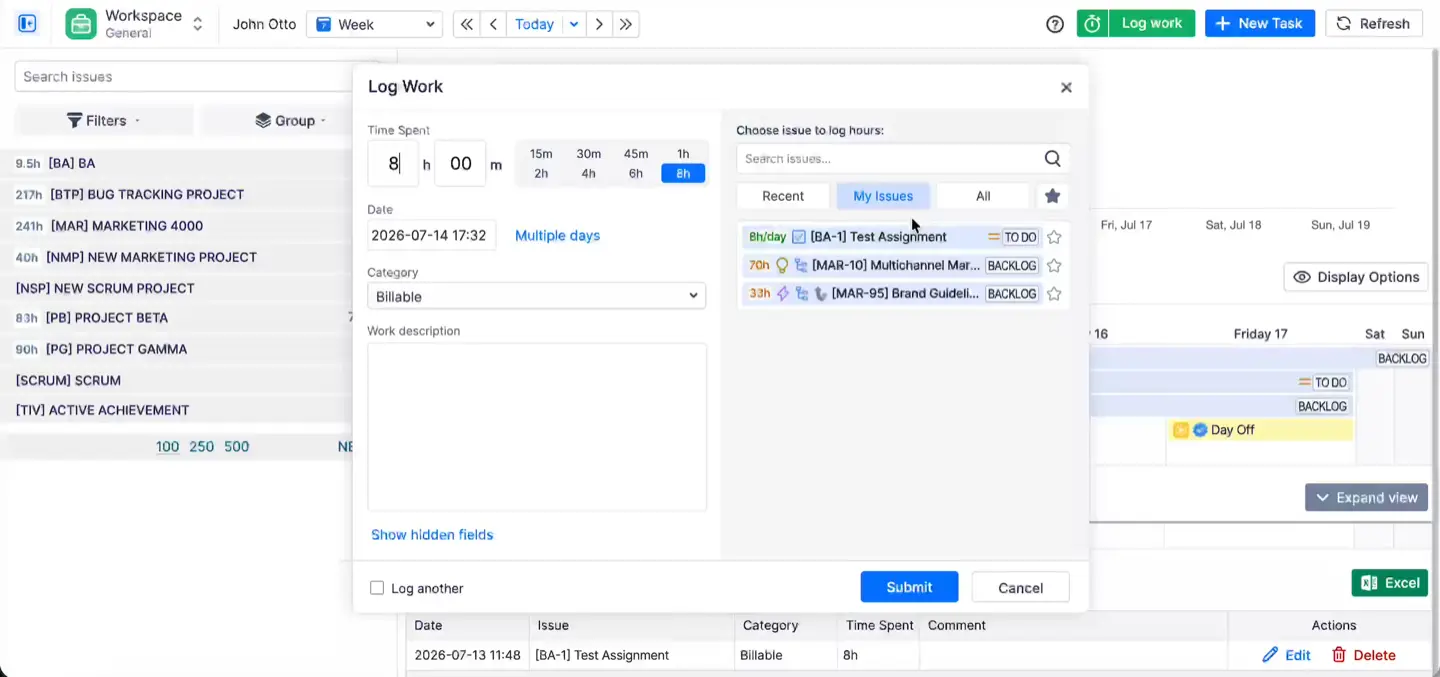
Everyone logs time the way they already do. In Jira Cloud you can set ActivityTimeline as the time tracking provider, so the Log Work action on any issue opens ActivityTimeline's dialog, with a category dropdown and the option to spread one entry across several days. The same dialog lives in the Workspace page (one person's issues and week in one view) and in the timesheets, and teams can track time with a timer or manually, depending on workflow. Whatever gets logged in Jira shows up in ActivityTimeline and the other way round, because everything is a native Jira worklog.
The 20 to 30 percent of the week that never gets a ticket. Meetings, client calls, the support rotation. ActivityTimeline imports events from Google Calendar, Outlook or any iCal feed, and the default setting treats them as worklogs once the event has passed. If you would rather people confirm, switch to "Treat none as Worklogs" and they click the event, pick a Jira issue and log it. Internal bookings (a placeholder for "support rotation" with no Jira issue behind it) can be counted as worklogs too, which adds more automation to non-ticket time capture. This is the part Clockwork users notice first, because an automatic timer cannot see a meeting.

Every hour already carries the tag finance needs. Worklog categories mark time as billable, non-billable or whatever kinds of work your organization distinguishes, and a project can have a default category so the right one is pre-filled. Worklog attributes carry the rest: cost center, client name, a dropdown, a checkbox, a free-text field, each one required, optional or hidden as you decide. If you are coming from Tempo, your existing attributes and Tempo Accounts import with a token so people keep picking from the same lists.
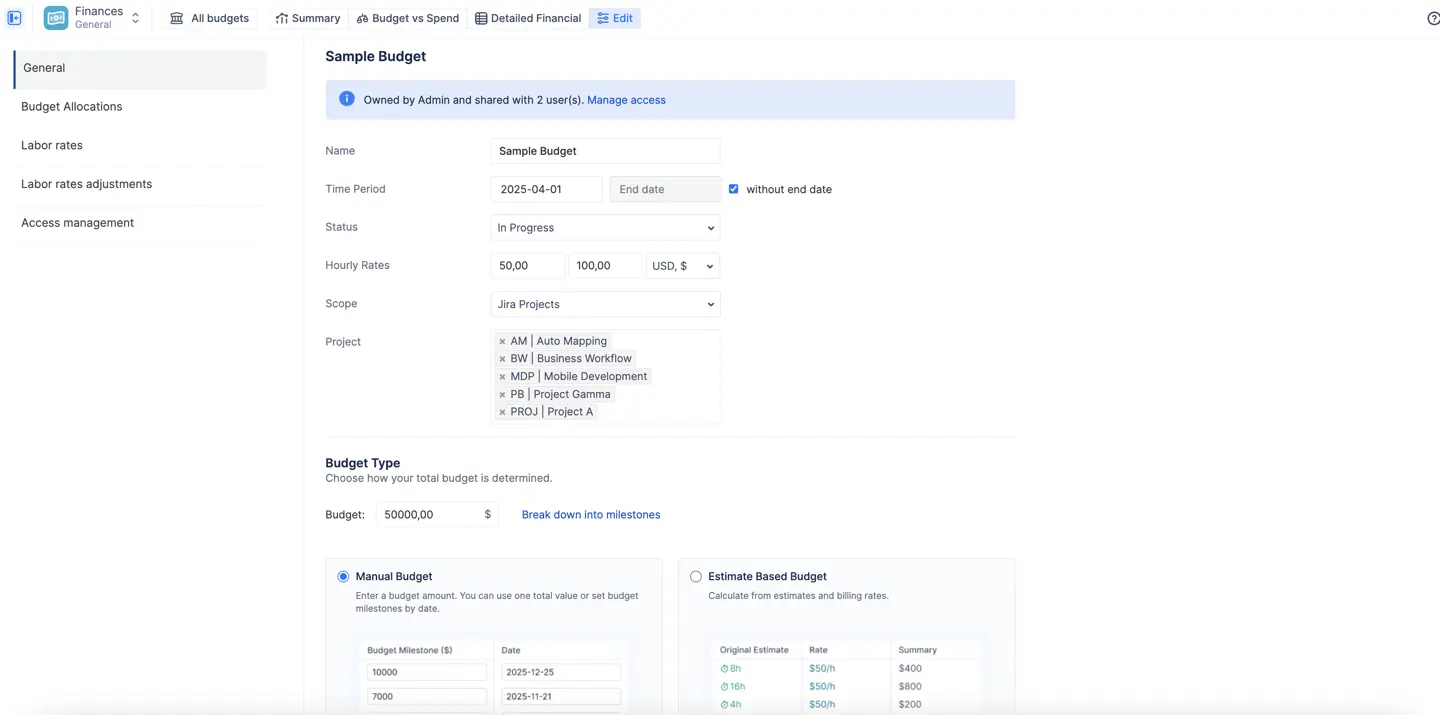
Budgets that are a scope plus a cap. Point a budget at a Jira project, a set of epics or a saved JQL filter, give it a period (or none, for maintenance work that never ends), and set the cap in one of two ways:
- Manual budget: a fixed amount leadership approved, optionally broken into milestones
- Estimate-based budget: calculated by the app from the original estimates in scope times your cost rates
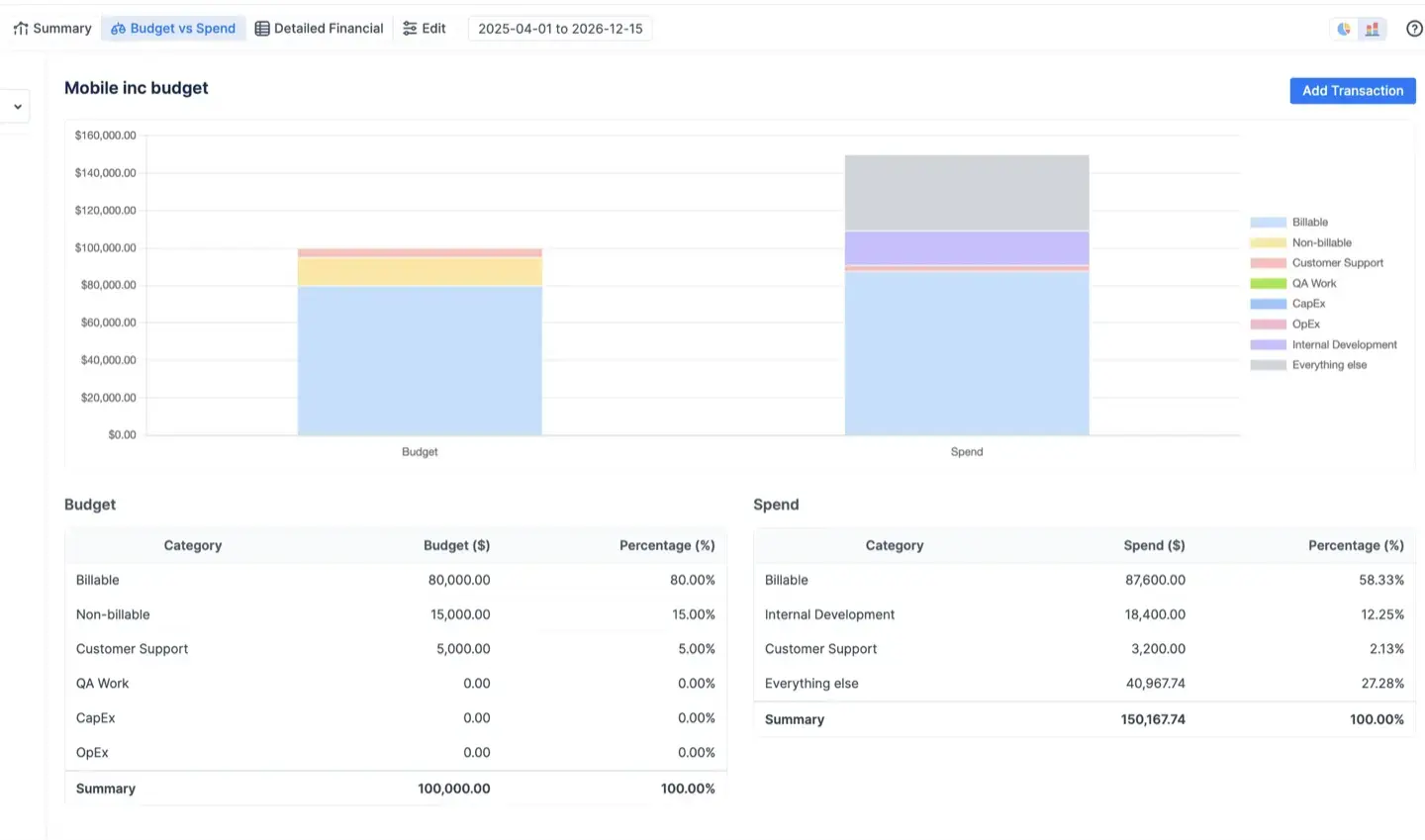
Cost tracking and revenue tracking switch on independently, so an internal department tracks cost only and an agency tracks both. Budget Allocations let you split the total across categories, positions, components or people before work starts (70 percent billable, 20 percent internal, 10 percent urgent), and the Budget vs Spend report shows where reality is drifting from that split while there is still time to do something about it.
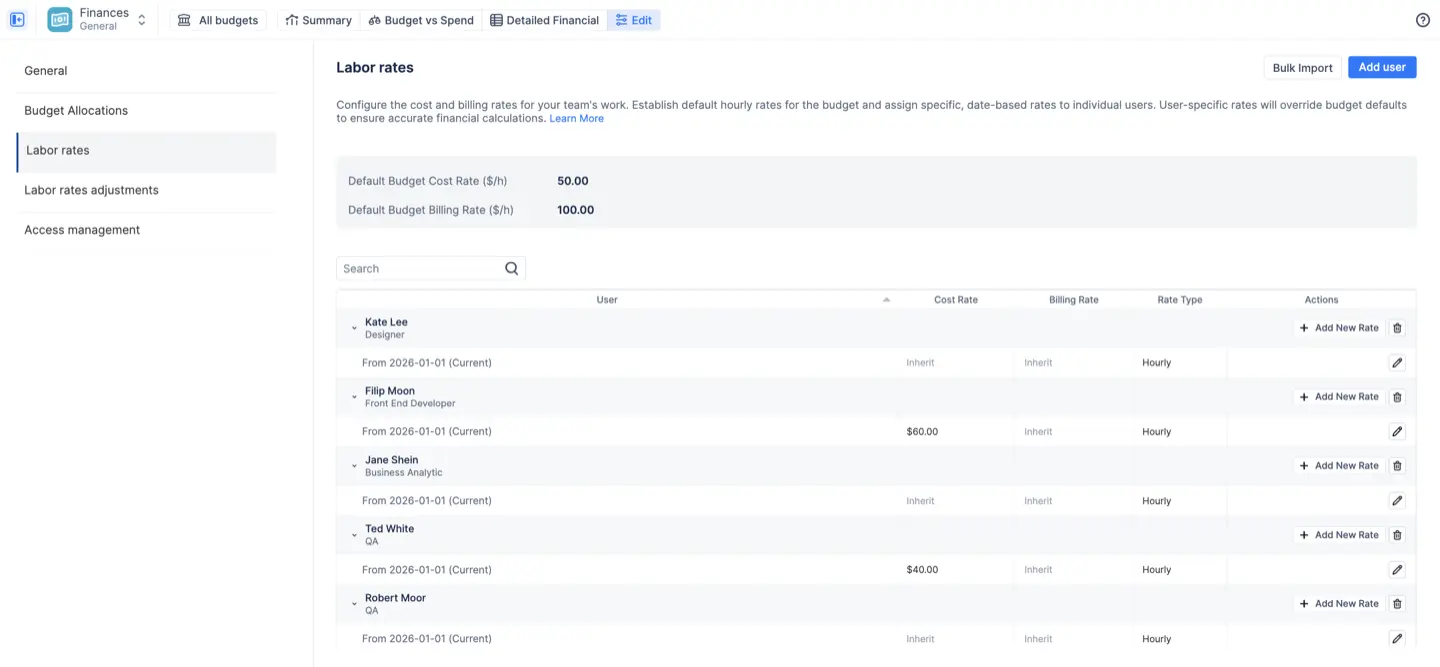
Rates that match how you actually pay people. Each person gets a cost rate and a billing rate, hourly or monthly; monthly rates suit salaried staff and retainers and are prorated across the days of the month. A category rate on top handles the hour that costs or bills differently: urgent support at 1.5 times the base rate, non-billable at zero. A rate hierarchy applies the most specific rate available, category first, then the user's rate, then the budget default. All rates are effective-dated, so a raise in March applies from March and February's numbers stay as they were, which is exactly the thing Clockwork's single number per user cannot do.
Costs that are not hours. Licenses, contractor invoices, travel, hosting. Add them as manual transactions, as an expense or as revenue (a milestone payment, a retainer), link them to an issue or a person, and set a recurrence so a monthly hosting fee enters itself. They land in the same reports as labor costs.
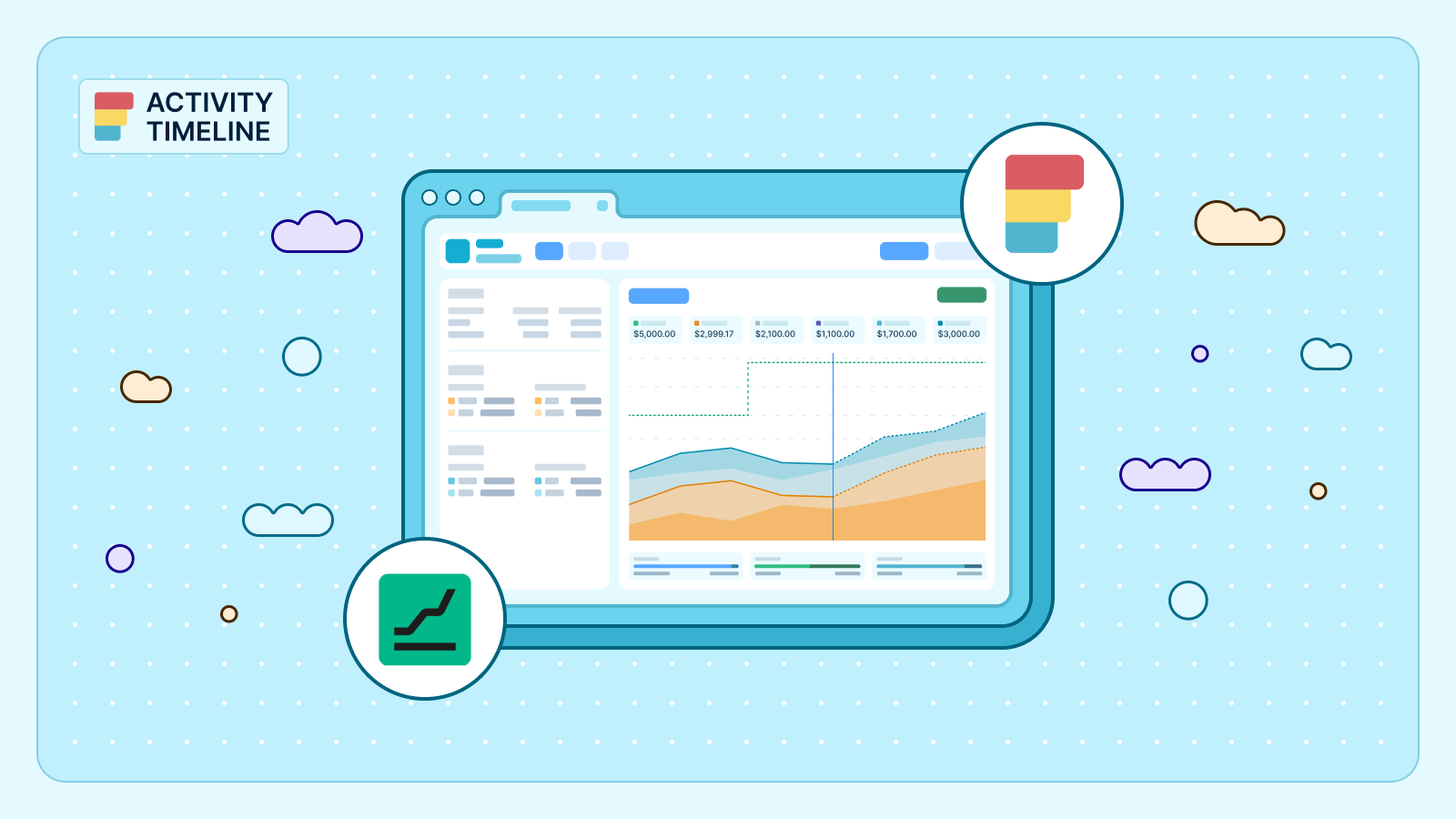
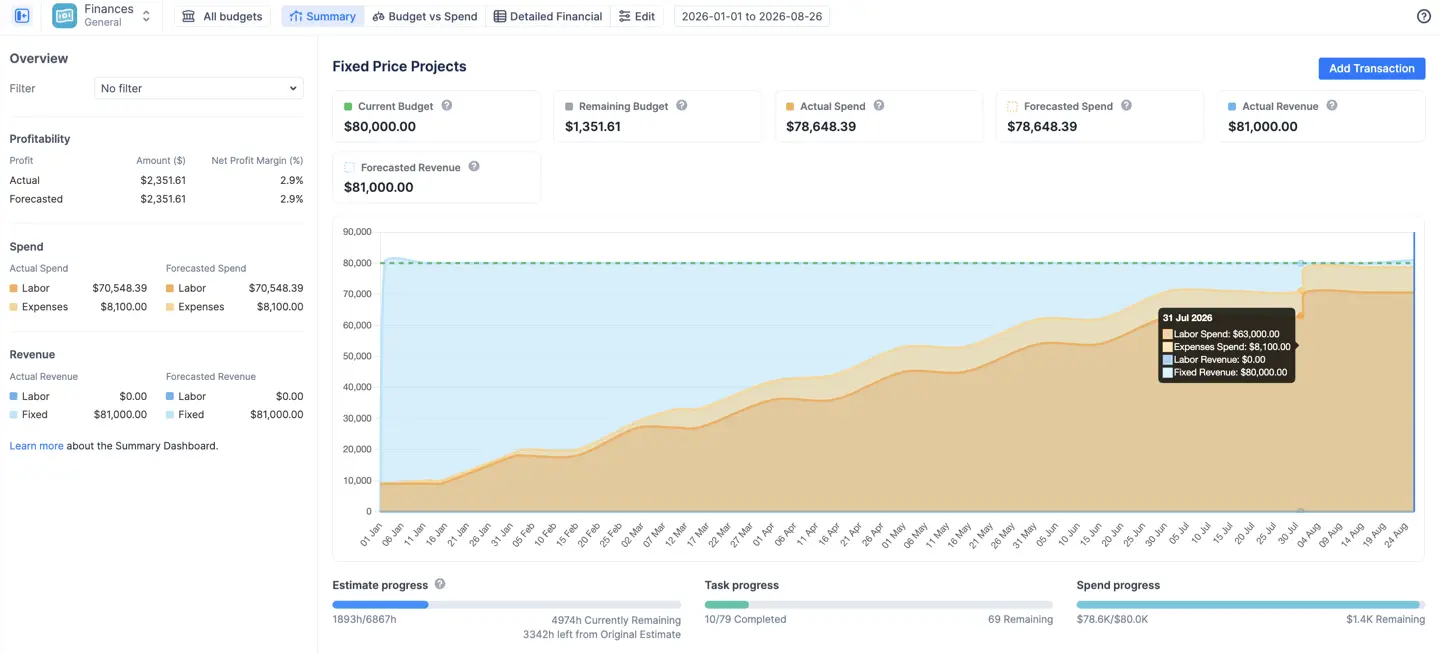
Built-in forecasting. Forecasted spend and revenue are calculated from what is already scheduled: planned work, recurring transactions and monthly rates projected through the budget period. The cumulative trend chart shows the forecast crossing the budget line weeks before the actual line does, which is the moment the fixed-price project in the story above should have been caught.
Three live financial reports.
- Summary Dashboard: current and remaining budget, actual and forecasted spend and revenue, profit and margin, the cumulative burn chart, and progress bars comparing money spent against estimate burned and tasks resolved, which is how you notice that 60 percent of the budget bought 35 percent of the work
- Budget vs Spend: allocations against reality, grouped by category, project, epic or assignee, as pie charts for proportions or bars for amounts, with a red bar where an allocation is over
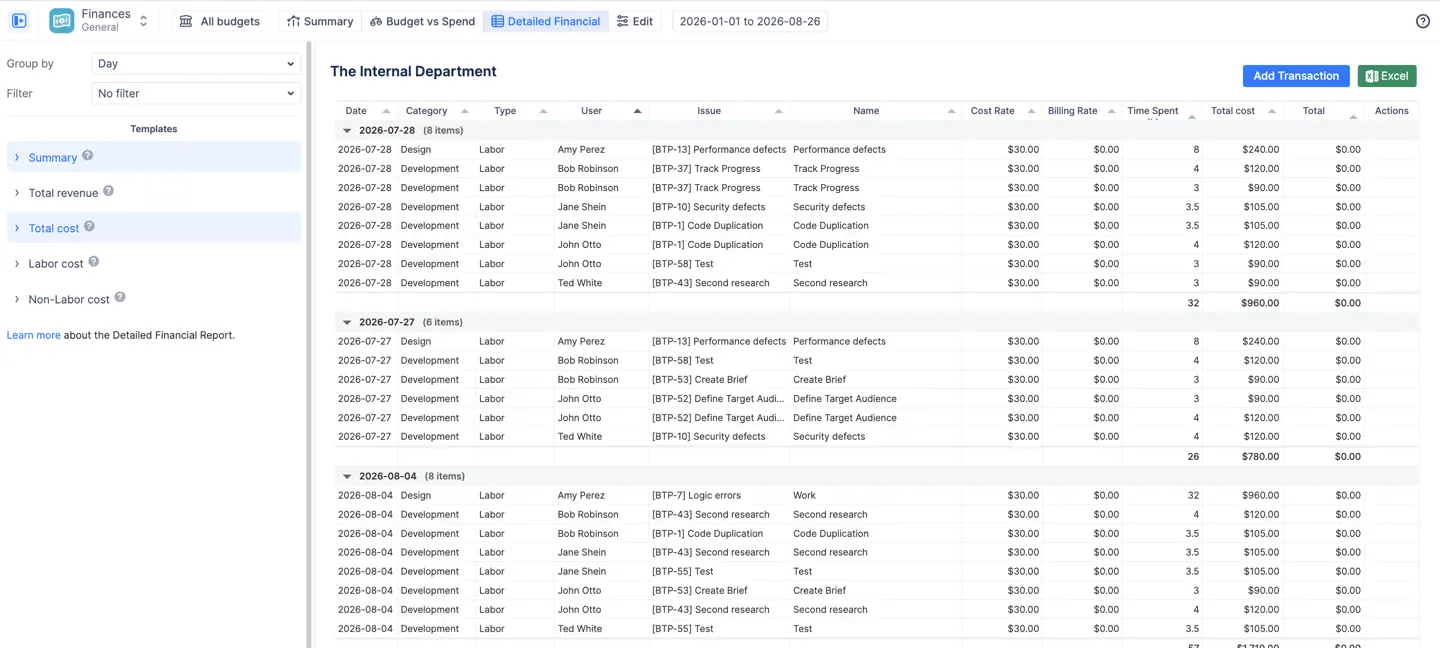
- Detailed Financial: the ledger, every logged hour and every transaction as a line with the rate applied, filterable by date range and exportable to Excel through an intuitive UI for the accountant who will never log in to Jira and should not have to
Approvals that close the loop. Managers, team leads and admins approve worklogs one at a time or in bulk, approved worklogs lock, the app records who approved what, and admins can limit how far back anyone may log so the books actually close, making downstream reporting and payroll review more reliable. Then the Detailed timesheet, with any Jira field added as a column, exports to Excel in one click.
Who sees the money. Three roles per budget: Owner, Administrator and Read-only. Read-only sees every report but never the rate cards, which is how a project manager gets to see margins without seeing salaries. Budgets also respect existing Jira project permissions, so finances never show someone issues they could not otherwise see.
The part Clockwork cannot do at all: automatic time tracking
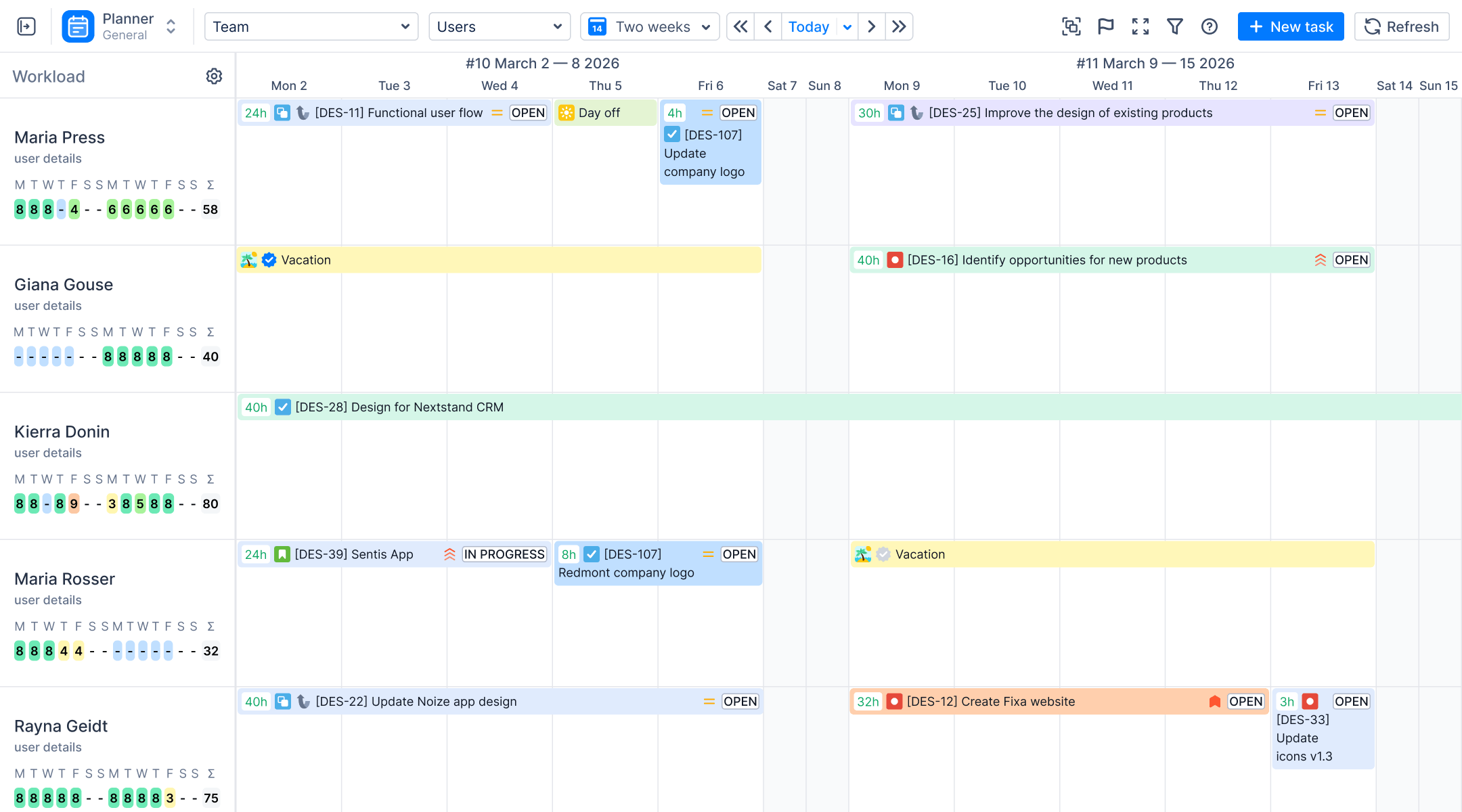
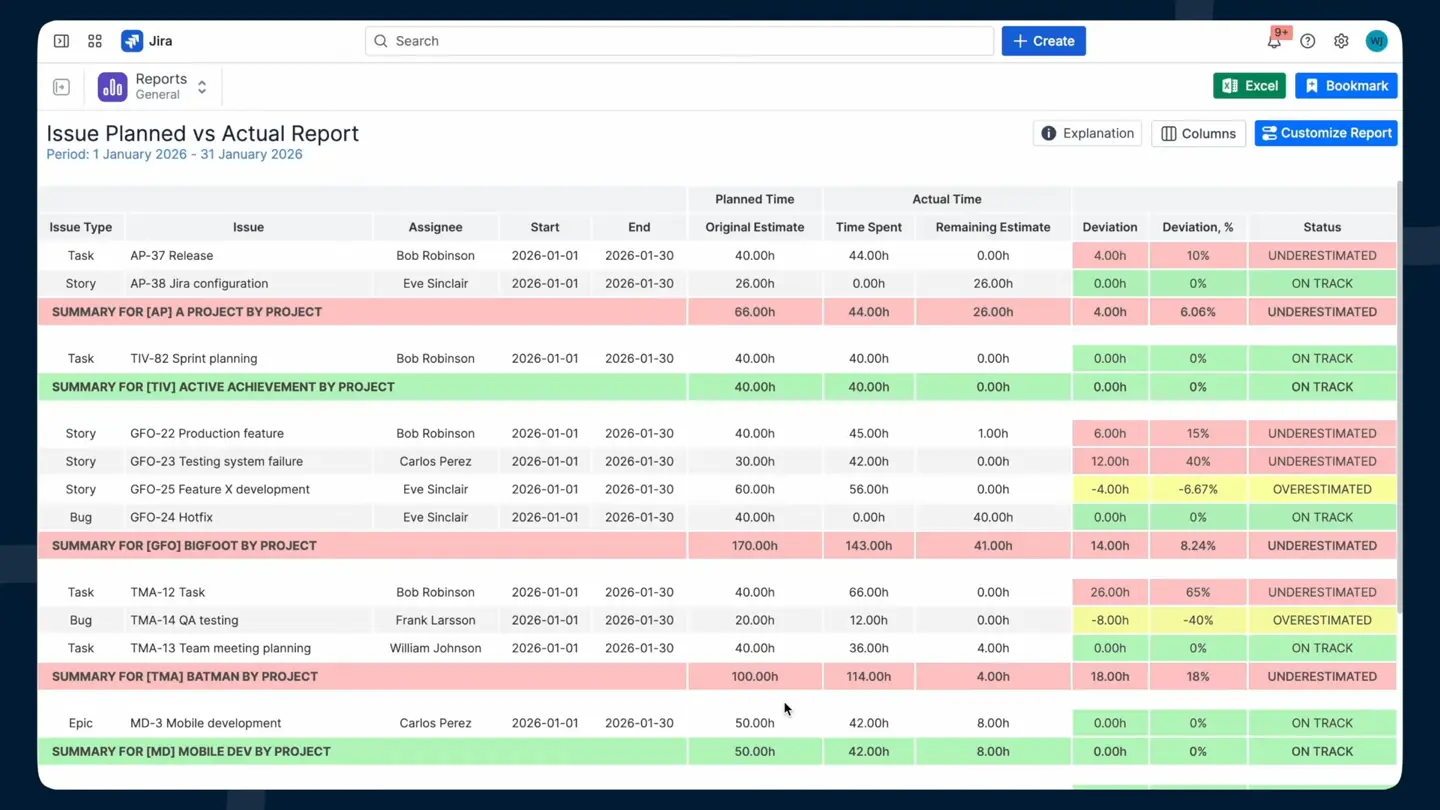
The same app plans the work. Because ActivityTimeline is a resource planner first, the Jira estimate and the logged hours already sit side by side. The Planned vs Actual report puts original estimate against logged time per project and team, and you can also break results down by team member to spot overruns earlier, with a deviation threshold you set, so the $100,000 project shows up as running over in week six, not in the July reconciliation. The workload view and the Resource Utilization Forecast show who is overbooked next week from remaining estimates and scheduled bookings, so you find out Anna is at 130 percent before the sprint starts, not in the retro. On the Advanced Edition the Alignment timesheet shows planned hours against logged hours per person, as a delta or a match percentage. The budget conversation happens before the overrun instead of after, and that is the whole difference.
What it doesn't do
There is no status-based automatic timer, and we are fine with that: an hour someone confirmed is worth more than three hours a workflow guessed, because nobody has to clean it up before it goes on an invoice. Finances tracks internal cost and revenue rather than external billing, so there is no invoice generator and no native QuickBooks or Xero connector; the Detailed Financial export is what goes to the accounting system. Finances is Cloud only for now, and if you are on Data Center and need it, tell us, because that is how we decide what to build next. And the Advanced Edition is more than most five-person teams need. The Standard Edition already does timesheets, categories, attributes, approvals and the planning reports, and that covers what most customers actually use; our own senior PM put it this way about the timesheet reports: 80 to 90 percent of customers use the simple report and never need more, and the people who do can click two or three more buttons.
Moving from Clockwork
Clockwork writes native Jira worklogs, so every hour it ever logged is already visible in ActivityTimeline the moment you install, and the initial data load is immediate rather than requiring a migration step. There is nothing to migrate and nothing to re-enter. The one thing that does not carry over is Clockwork Pro's worklog attributes, which are Clockwork's own fields rather than Jira fields; you would recreate them as ActivityTimeline attributes and apply them from the switch date forward. If part of your team is on Tempo, worklogs from Tempo sync in with an API token, along with Tempo teams, holiday schemes and attributes, so a mixed setup does not mean starting from zero either.
Ideal customer profile and pricing
ActivityTimeline fits project and resource managers who need capacity planning connected to financial reporting, especially teams that need more financial/reporting power than basic time logging; agencies, consultancies and professional services teams billing by the hour; and teams already using ActivityTimeline for planning who want the money view in the same place. One subscription covers planning, timesheets, reporting and finances. The Advanced Edition is $1,245 a month for 500 users ($2.49 per user), $2,195 for 1,000 ($2.19 per user) and $2,895 for 2,000 ($1.45 per user), billed on the same Atlassian invoice as Jira, with a 30-day trial and no credit card. You can contact the support team during the trial if setup questions come up. You can trial either edition and switch between them during or after the trial, so start on Advanced if you want to see Finances and drop to Standard if money tracking turns out not to be your problem.
Hours are only useful once someone can put a price on them. That is the whole argument for this section.
#2 Tempo Timesheets
Best for: large enterprises that already live in the Tempo ecosystem and want one vendor for everything.
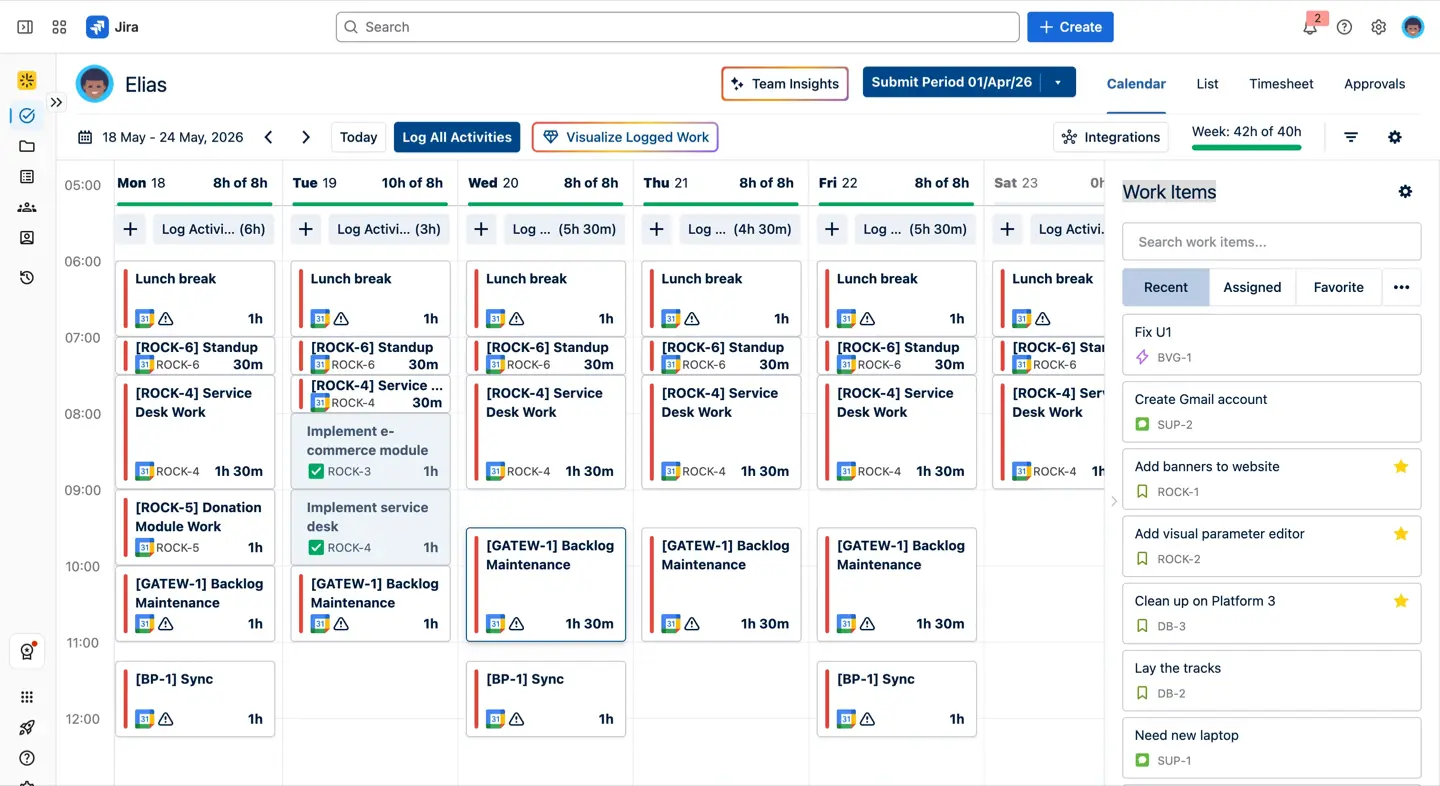
This is the one everybody compares against, and its strengths are real: mature approvals at the timesheet or project level, Tempo Accounts and customers on worklogs, very deep reporting, Cloud and Data Center, and native Jira worklogs. If you have 500 or more users and a one-vendor policy, nobody gets in trouble for choosing Tempo.
The weak spot is that the hours-to-money path is two or three licences. Cost and revenue live in Financial Manager (formerly Cost Tracker), a separate paid app and Cloud only. Planning lives in Capacity Planner, a third purchase. Setup is heavy, and at 500 users Timesheets alone is $1,728 a month, with Financial Manager another $909.50 on top. So the pair costs roughly twice ActivityTimeline Advanced for equivalent capability, and Tempo raised list prices by 10 to 25 percent across its brands in September 2025. Tempo Timesheets also lets you try it out for free for 30 days. One practical detail: time logged through Tempo appears in Jira as logged by "Tempo User," so any other tool reading Jira worklogs sees the wrong author unless it also talks to Tempo's API.
Pick it if you are 500-plus users, budget is not the constraint, and you would rather buy a known ecosystem in pieces than evaluate a smaller vendor.
#3 Timetracker by Everit
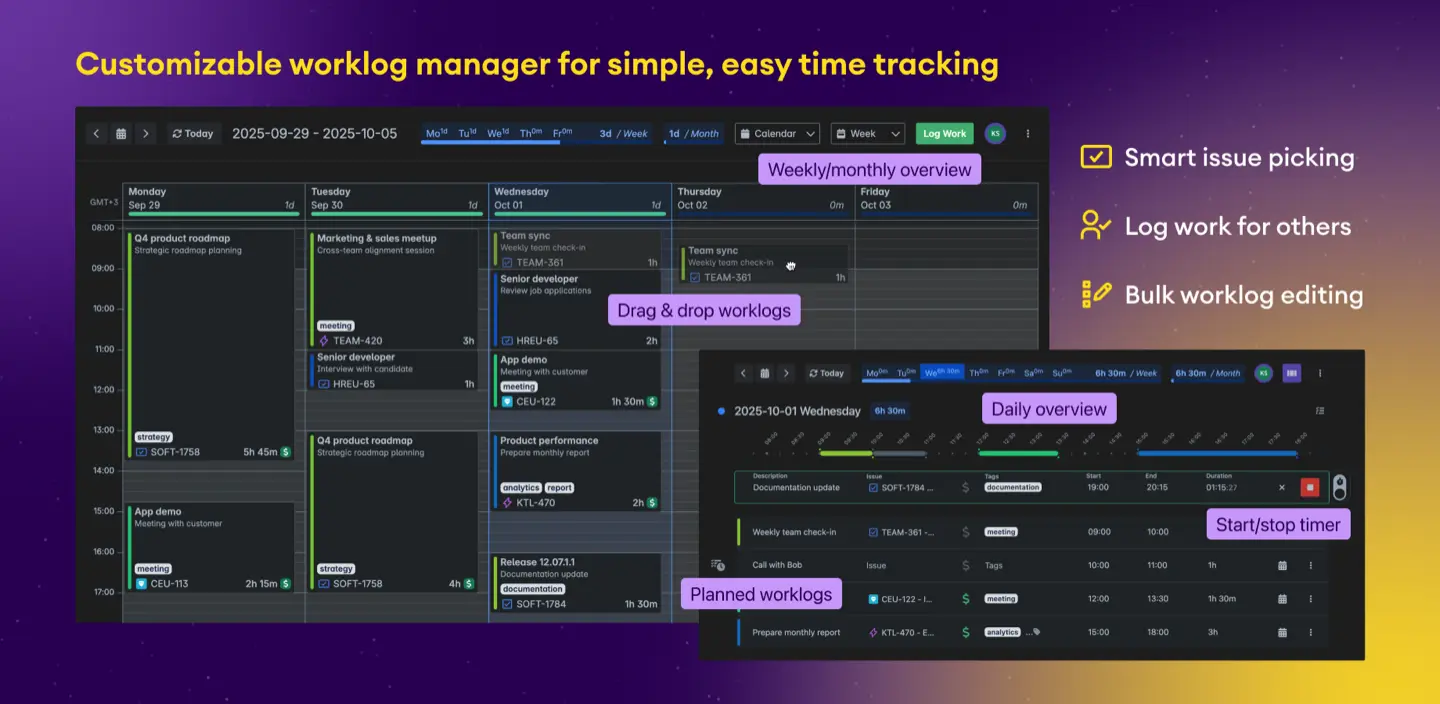
Best for: teams who liked Clockwork's simplicity but want a clean, quick worklog UI and a calendar-style day view instead of a status-driven timer.
Timetracker (now published under STAGIL by catworkx) gives you calendar, timeline and issue views for entering time, a start and stop timer, reports with pivot tables and grouping by custom field, worklog tags to mark billing categories, and Excel export. It runs on Cloud and Data Center, and with 110 Marketplace reviews at 4.1 out of 5 it clearly does what it says.
What it does not do: rates or budgets, approvals (the vendor's own docs suggest pairing it with a third-party Confluence approval app), and no planning against estimates. Pick it if you want hours only, a small to mid-size team, and less clicking than Tempo.
This tool costs $290 per month for 500 users, which is around $0.58 per user. Teams with 1 to 10 members can use it for free, and it also comes with a 30-day free trial.
#4 Timesheet Reports and Gadgets (now Time Tracker for Jira, by Tempo)
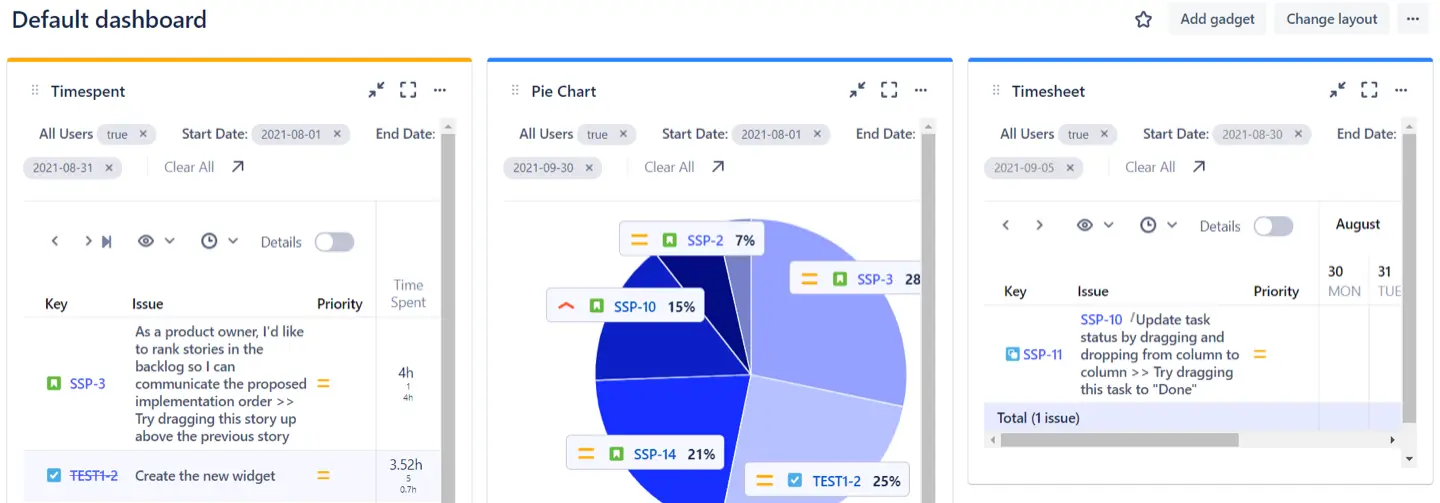
Best for: teams who do not want a new way to log time at all, just better reports and Jira dashboard gadgets on top of the worklogs they already have.
This one has a history worth knowing: it started as Primetimesheet's app and is now listed as "Time Tracker for Jira Cloud & DC" under Tempo Software, which bought the Prime brand. The product is the same idea. It reads native Jira worklogs (or Tempo's) and gives you ten or so report templates, a pivot view, estimate versus actual per issue, billable hours totals, dashboard gadgets and scheduled email reports, on Cloud and Data Center. The app costs $324 per month for 500 users, which works out to $0.65 per user. It is completely free for teams of 1 to 10 people, and you get a 30-day free trial to test it out. Because it captures nothing itself, it works with whatever logged the hours, including Clockwork.
The weak spot is that it is reporting only: no timers, no approvals, no rate configuration, no planning. Pick it if your problem is only the monthly report and you are happy with how people log time today.
#5 WorklogPRO
Best for: Data Center shops that need worklog attributes and an approval step with a lighter footprint than Tempo.
WorklogPRO (The Starware) has worklog attributes captured at logging time (billable, overtime, work type, your own text, number and select fields), timesheet periods with submit and approve per project, timesheet, calendar, pivot and chart reports, and, which surprised us, rate tables: a billable table and a cost table with rules, and a profit column when both are set. It is on Cloud and Data Center, with 43 reviews at 4.4 out of 5.
The weak spot is what is around the rates. There are no budgets, no forecast and no planning against estimates, so you get cost per row, not "are we going to be over on this project." Pick it if you are on DC, you need approvals and attributes, and the budget is tight. WorklogPRO costs $455.00 per month for 500 users, which comes to $0.91 per user. It is free for teams of 1 to 10 users, and you get a 30-day free trial.
#6 Everhour with the Jira integration
Best for: teams where half the billable work is not in Jira at all (design, sales, client calls) and invoicing happens outside Atlassian.
Everhour's timer and controls sit inside the Jira issue view, and it can support automatic time tracking within those Jira views, while projects and issue names sync automatically. Budgets, rates, threshold alerts, and invoicing are built into the paid plan. Everhour is completely free for up to 5 seats, while larger teams pay $10 per seat each month when billed monthly. You can also test all features with a 14-day free trial. When worklog sync is enabled, entries made in Everhour are pushed into Jira's native worklog. Harvest with its Jira integration plays a similar role.
The weak spot is that it is a second system. The sync is one-way: Everhour's documentation says it does not sync time entered directly in Jira and does not carry over history, so Jira only sees what Everhour decided to send, and anything logged natively in Jira never reaches the invoice. Two logins, sync lag, a second admin surface, no planning against Jira estimates, and per-seat pricing on top of Jira. Pick it if Jira is one of several tools and the invoice is the main output.
Conclusion
Clockwork is not a bad app. It solves make hours appear in Jira, and for a small dev team that is the whole job. Most teams that outgrow it have not found a flaw in the timer. They have moved on to a different question: "what do these hours cost, and what do we bill?"
If you need hours only and the team is small, Timetracker gives you a nicer way to log and the Reports and Gadgets app gives you a nicer way to read what Clockwork already logs. If you are an enterprise with money to spend and a one-vendor policy, Tempo, bought in pieces. If invoicing happens outside Jira and half the work is not in Jira anyway, Everhour. If you are on Data Center and need approvals plus cost per row, WorklogPRO. And if what you want is hours, planning and money in one Jira app, that is ActivityTimeline Advanced Edition, with the same caveat as above: no automatic status timer, Finances on Cloud only for now, and more than a five-person team needs, in which case start on Standard.
This data was taken from HeroCoders' and other alternatives official English-language sites on Sep 22, 2026
{{rich-cta-1}}