
If you're looking for Everhour alternatives, the real comparison is not "which timer also makes invoices," but which Jira time tracking app keeps worklogs, budgets, and billing close enough to the work that a PM, account manager, or delivery lead can explain overruns without a half-day of exports. For teams, agencies, consultancies, and internal PMO or IT groups that run delivery in Jira, we've narrowed the field to six serious options: ActivityTimeline, Tempo Timesheets, Clockwork, Timetracker, Toggl Track, and Clockify, each with a different fit depending on whether you want Jira-native tracking, stronger budgeting, or a more flexible external workflow.
You picked Everhour because the timer sits right in the Jira issue and the invoice comes out clean at the end of the month, and both of those are still true. The trouble shows up on the delivery side. The PM plans sprints in Jira, the account manager bills from Everhour, and when a client asks "why did this cost 40% more than the estimate," nobody has one screen that answers it. The hours are in one database, the plan is in another, and the answer takes a Friday afternoon of exports.
Everhour is a time tracking and billing tool that lives inside the project management apps your team already uses. For Jira, that means a Marketplace add-on that adds a timer, manual entry and a time summary to every issue, syncs your Jira projects and tasks into Everhour, reads the Original Estimate, and can push Everhour entries into the Jira work log if you switch that on. Around the timer you get project budgets in hours or fees with alerts and a hard stop, worklog-level billable and non-billable flags, expenses, a Timeline for scheduling, timesheet approval, and invoicing that syncs to QuickBooks Online, Xero or FreshBooks. All of it is on one plan: Team, at $8.50 per seat per month billed annually or $10 monthly, with a 5-seat minimum. Everhour does have a Free plan for up to five users, but it includes no integrations. For a Jira team, that makes the Free plan useless, leaving the 14-day trial as the only way to test it.
Where Everhour is good, it's really good. Agencies and consultancies whose main output is the invoice. Teams with a lot of billable work that never touches Jira: design reviews, client calls, sales support. Anyone who needs expenses on the same invoice as the hours, or a budget that stops the timer at 100%. If invoicing clients is 80% of why you track time, Everhour is a fair choice, and we'd say so to a customer.
It starts to hurt when Jira is where the work is actually managed. Here's what teams tell us when they come to us from Everhour, each with the concrete version.
The worklog lives in Everhour, not in Jira. The sync to the Jira work log is optional, and it's one direction only: time entered directly in Jira never reaches Everhour, historical entries don't sync at all, and only invited Everhour users can log in the first place, because Jira users aren't synced automatically. So the sprint burndown, Jira's time tracking field, remaining estimate: empty or wrong unless everyone uses the Everhour control and the sync behaves. A developer's 12 hours on a ticket show up on the invoice and nowhere in the sprint report.
Sync breaks quietly. Everhour re-syncs all Jira projects periodically and you can't pick which ones. An issue moved between projects or an epic reorganised can leave orphaned entries in the tracker, and someone finds out at month end when the client's total doesn't match the board.
Planning happens beside Jira, not in it. Everhour's Timeline is decent: it shows a task's estimate, syncs the Jira assignee and due dates, and lets you drag assignments around. But it's still Everhour's calendar. The plan doesn't know the sprint, doesn't write back into Jira, and "planned vs actual per ticket" still means an Everhour report next to a Jira export and a pivot table.
No capacity view of the team's Jira work. You see hours logged and hours planned in Everhour. You don't see who is overbooked next week against the estimates that live on the Jira issues.
Cost stacks. Jira Cloud per user, then Everhour per seat on a separate invoice from a separate vendor. At 50 people that's roughly $400 for Jira Standard and $500 for Everhour on monthly billing, about $900 a month across two invoices for one workflow, and the Everhour seat stays paid even after a person is removed until you reassign it.
Approvals and locking are lighter than a PMO expects. Time Approval locks an approved week so members can't edit it, but admins still can, the rules live in Everhour, and Jira admins can't govern them. Whoever owns the tracker owns the rules.
You'd think a better invoicing tool fixes this. Actually, the invoicing was never the weak part. The weak part is that invoicing happens two databases away from where the work was planned. That's why this guide compares six Everhour alternatives across features, costs, workflows, strengths, weaknesses, and real delivery scenarios, so you can choose the right tool based on team size, billing needs, and whether you want Jira-native tracking or an external tracker with eyes open.
Which Jira Time Tracking Tool Works Better and When
Six options, two groups. The first four write native Jira worklogs, so sprint reports, timesheets and finance read the same field. The last two are Everhour-style external trackers, listed for teams that really do need a tool outside Jira, or want a cheaper one.
- ActivityTimeline Advanced Edition (Finances module): plan, hours and money in one Jira app. Best for agencies, consultancies and internal PMO teams whose delivery already runs in Jira.
- Tempo Timesheets with Cost Tracker: the closest Jira-native match to Everhour's finance features, at enterprise scale and enterprise price.
- Clockwork by HeroCoders: automatic timers from issue status, for dev teams where nobody presses the button.
- Timetracker by Everit: Everhour's simple day view inside Jira, hours only.
- Toggl Track: the nicest timer in the category, still outside Jira.
- Clockify: the cheapest exit, with invoicing on a paid plan.
Comparison Table: Everhour vs. ActivityTimeline
#1 ActivityTimeline Advanced Edition: Finances Module
Best for agencies, consultancies, and internal IT or PMO teams whose delivery already happens in Jira and who want cost and billing to sit next to the plan, not in a separate tool.
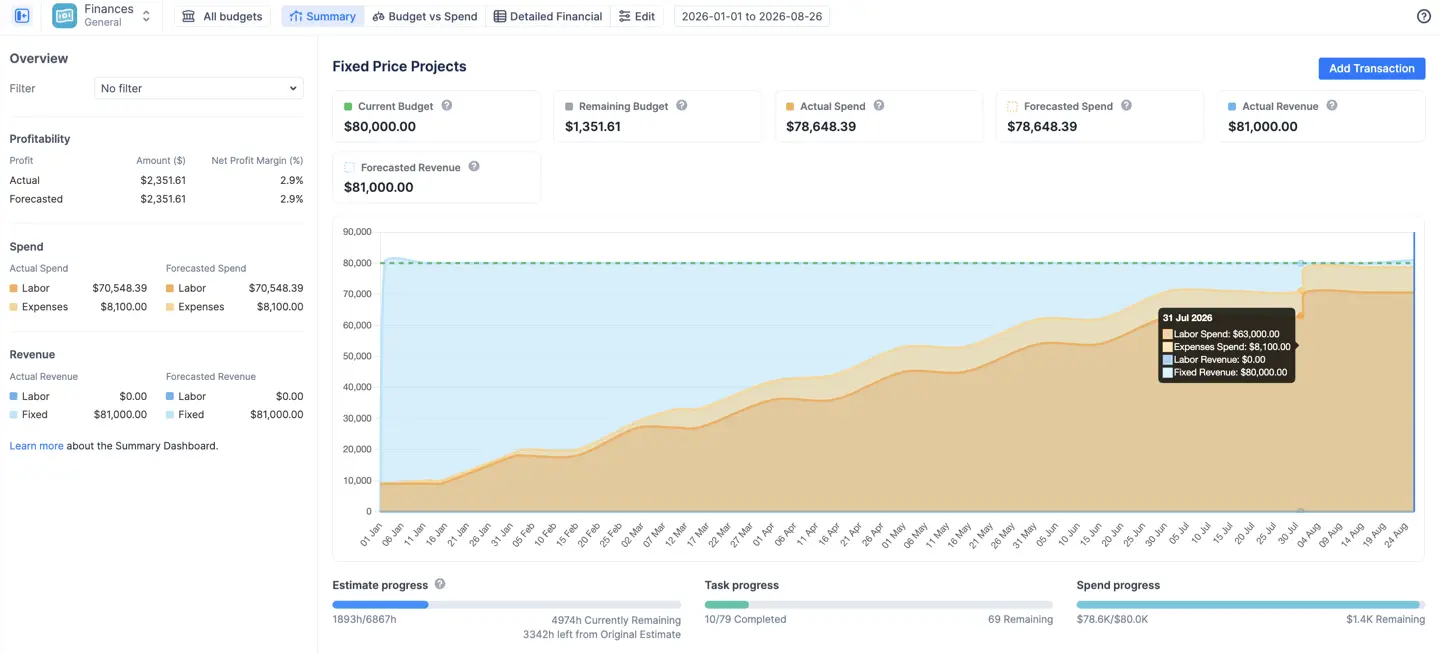
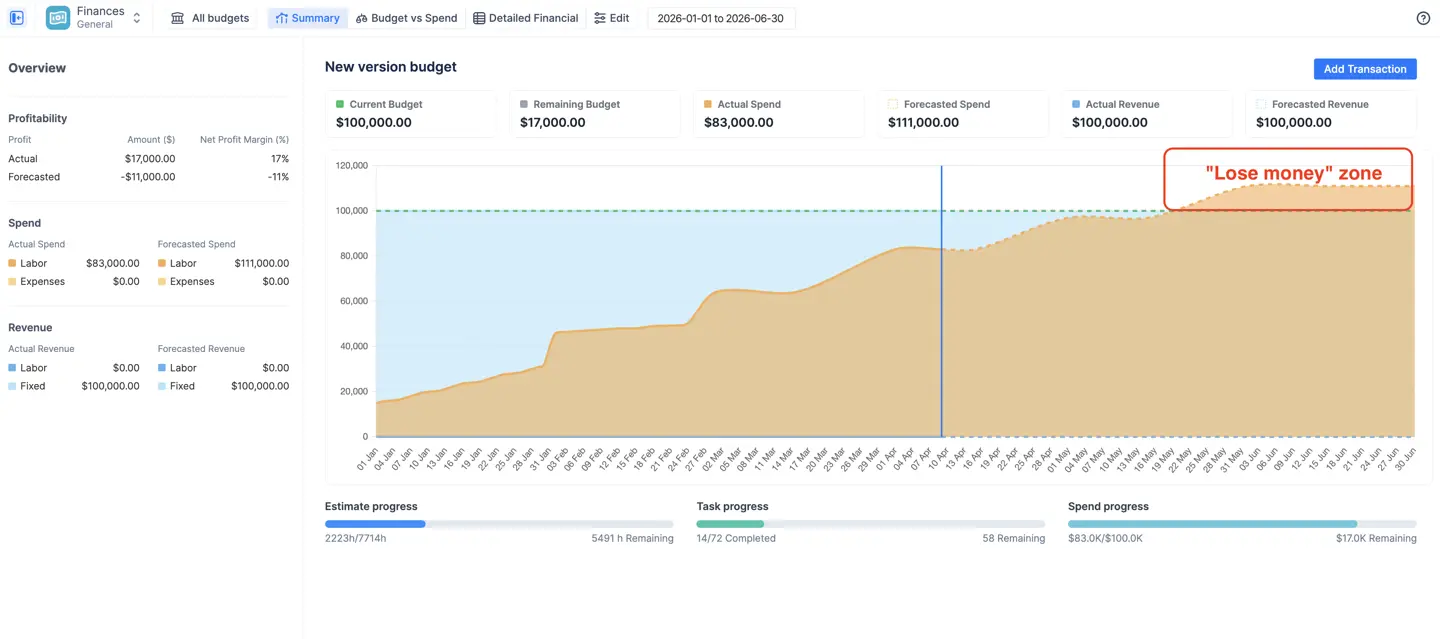
Here's the situation we see most often. A 30-person digital agency runs delivery in Jira and bills from Everhour. A fixed-price project comes in 25% over, and everyone learns about it at invoice time, because nobody compared Everhour hours to the Jira estimates while the project was running. There was no moment to compare them: the hours were in one tool, the estimates in another, and the person who could have joined them was busy delivering. After they moved logging into Jira and set up a budget in ActivityTimeline Finances, the Summary chart showed forecasted spend crossing the fixed budget line in week three. Same team, same kind of project, but the warning arrived while there was still time to cut scope.
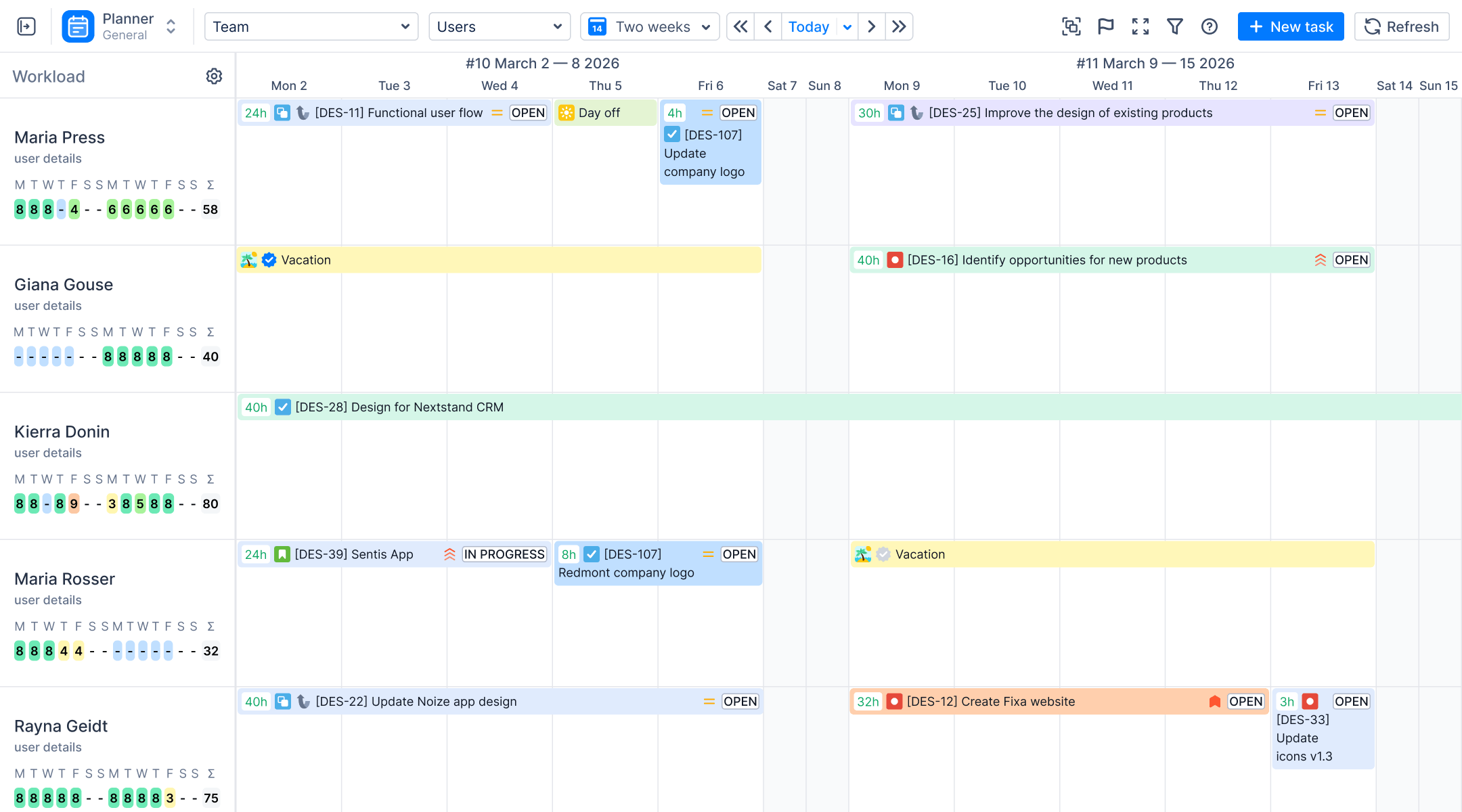
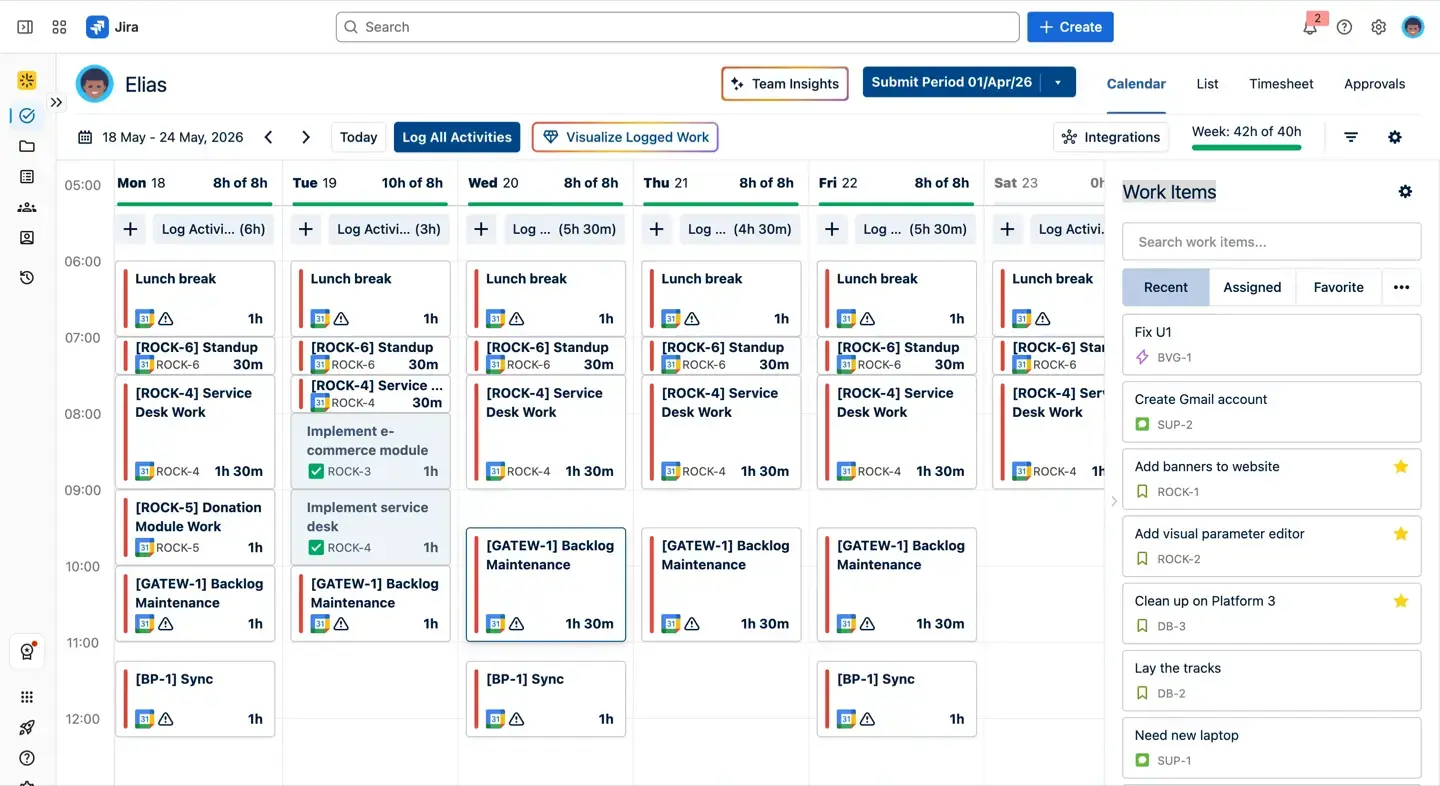
The simple version first: log time where the work is. Jira's own Log Work field, ActivityTimeline's Log Work dialog in the issue view (with categories, multi-day entries and a per-user breakdown right on the issue), a timer, or the Work and Track views for people who prefer a weekly grid. Every entry is a native Jira worklog, so the sprint report and the timesheet finally agree because they read the same field. The 20 to 30% of the week that isn't a ticket is covered too: Google or Outlook meetings can be treated as worklogs, and booking events cover internal work, so that time gets billed or written off on purpose rather than lost. Worklog categories (billable, non-billable, or your own per project, with a default per project so different departments follow different rules) and worklog attributes like client name or cost center tag the hours the way the invoice needs them. If you're coming from Tempo, attributes import.
The Finances module sits on top of that data.
Key features
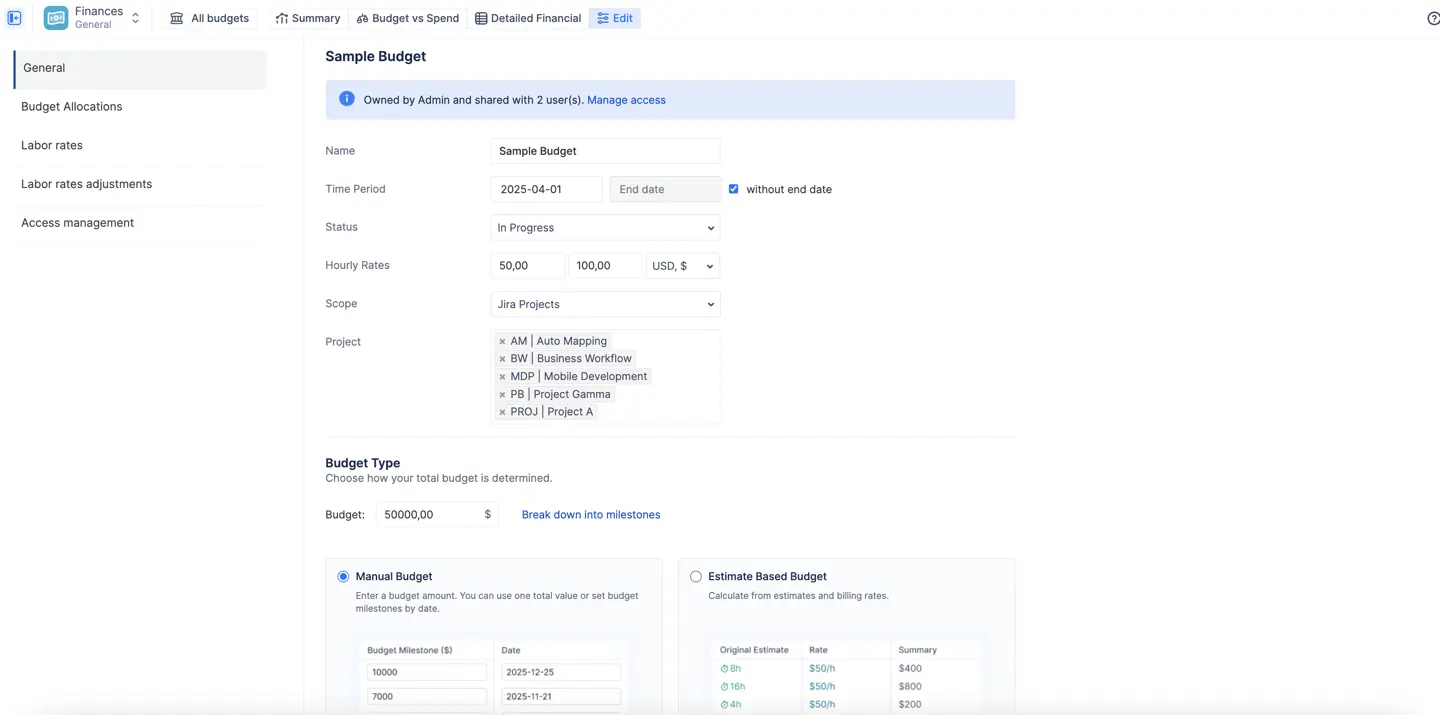
Flexible budget containers. A budget is scoped to Jira projects, epics or a saved JQL filter, given a time period (or no end date for ongoing work) and a currency. The total is either a manual amount, optionally broken into dated milestones for staged contracts, or estimate-based, calculated from the original estimates of the issues in scope multiplied by cost rates. One Jira project can sit in several budgets, so you can track a development phase and a maintenance phase separately.
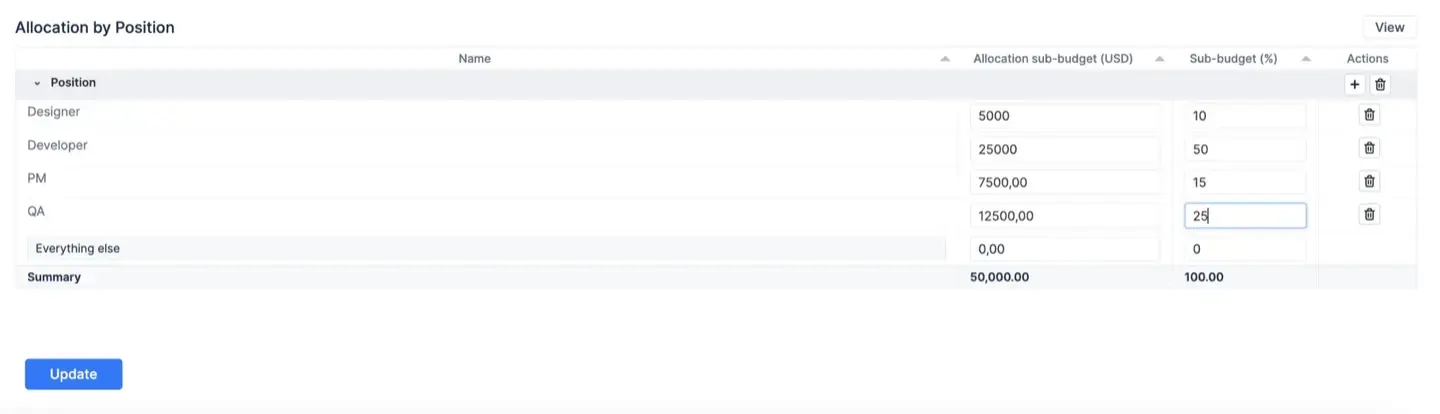
Forward-looking budget allocations. Instead of a single number you set targets by category, project, component, epic, position or assignee, as amounts or percentages, and the report compares them to what was actually spent. You can keep several breakdowns for the same budget and switch between them.
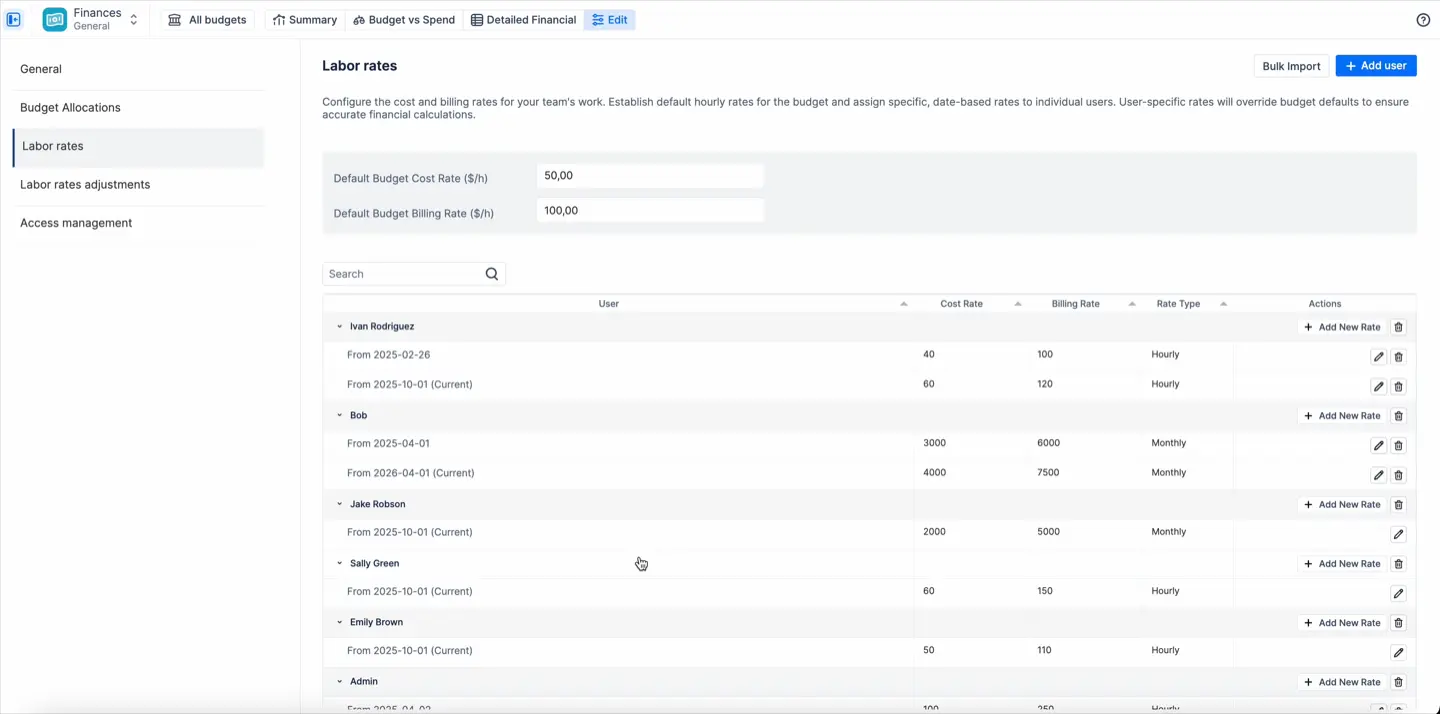
Labor rates that match how you actually pay people. Cost and billing rates can be hourly or monthly. Hourly rates multiply logged hours; monthly rates are prorated across the month whether or not the person logged time, which is how salaried staff and retainers behave in real life. Every rate is effective-dated, so a raise in July doesn't rewrite June. The hierarchy is strict: a category rate (urgent work at 2x, internal QA billed at zero) beats a user rate, which beats the budget default. Rates can be bulk-imported from a Jira group, an ActivityTimeline team, or another budget.
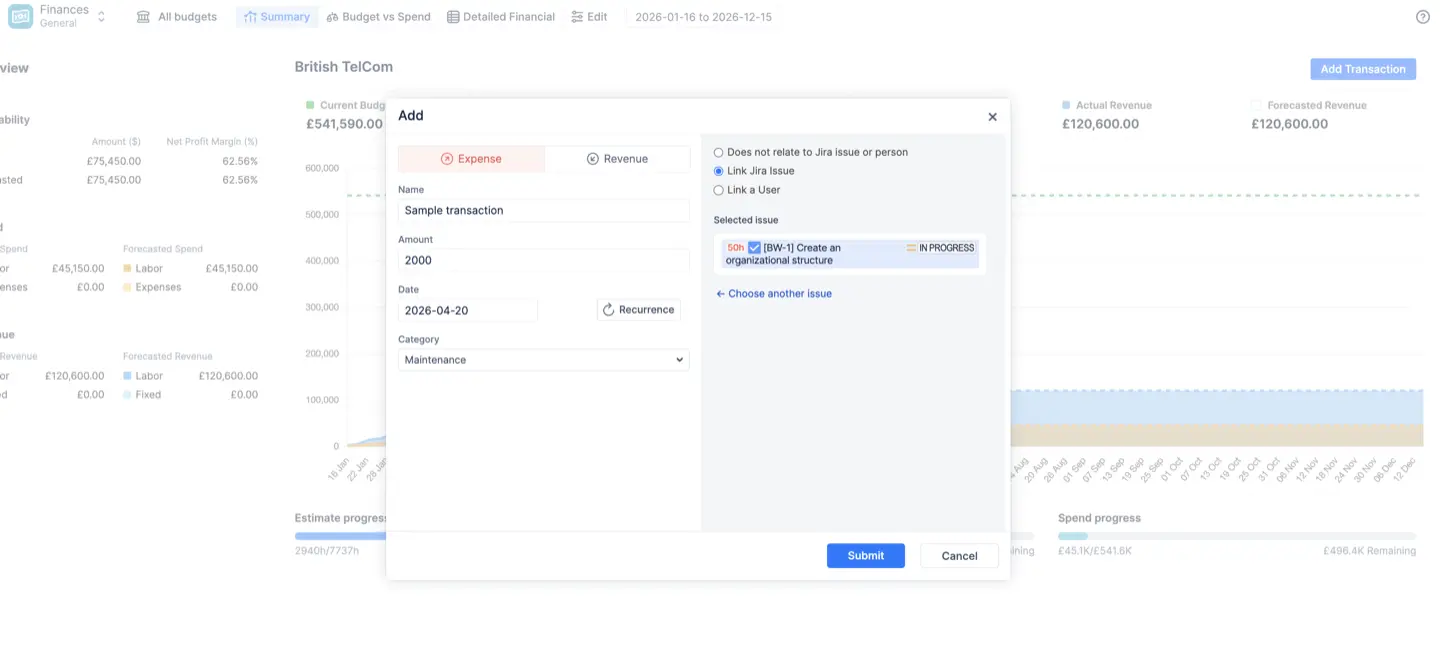
Person-aware manual transactions. Contractor invoices, licences, travel, a milestone payment, a retainer: each is an expense or revenue transaction with a date, a category, optional recurrence, and an optional link to a Jira issue or a person. Link one to a user and it counts as labor cost for that person, which is how a bonus or a fixed contractor fee shows up in the right place.
Built-in forecasting. Forecasted spend and revenue are built from future-dated worklogs, scheduled transactions and monthly rates, not from remaining Jira estimates. That's deliberate: estimates change daily, scheduled money doesn't. If the forecasted spend line crosses the budget line before the end date, the chart shows it, and you're still inside the project when it does.
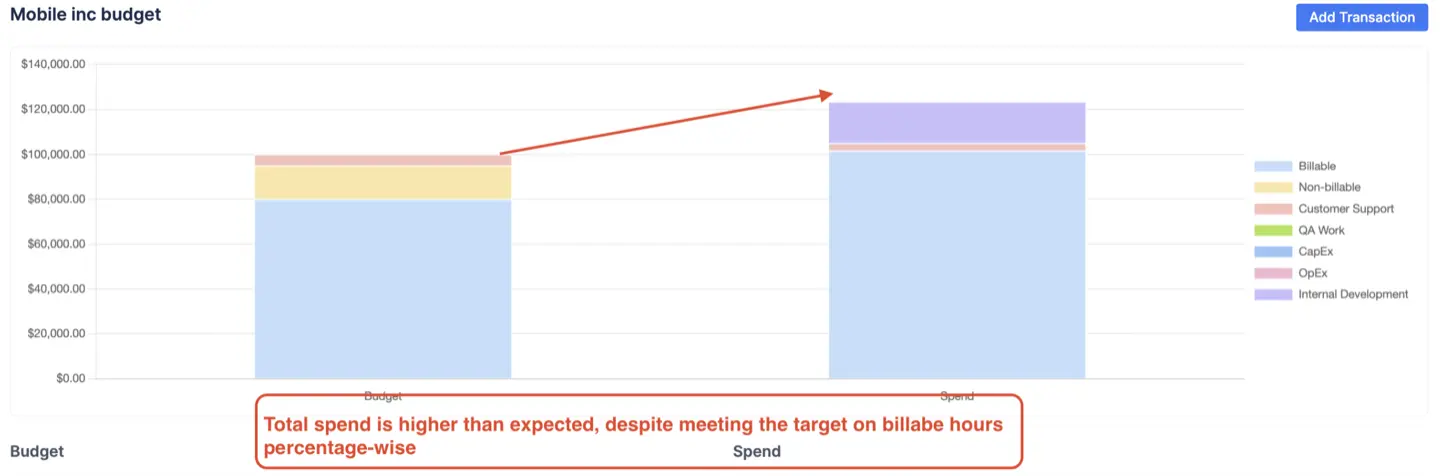
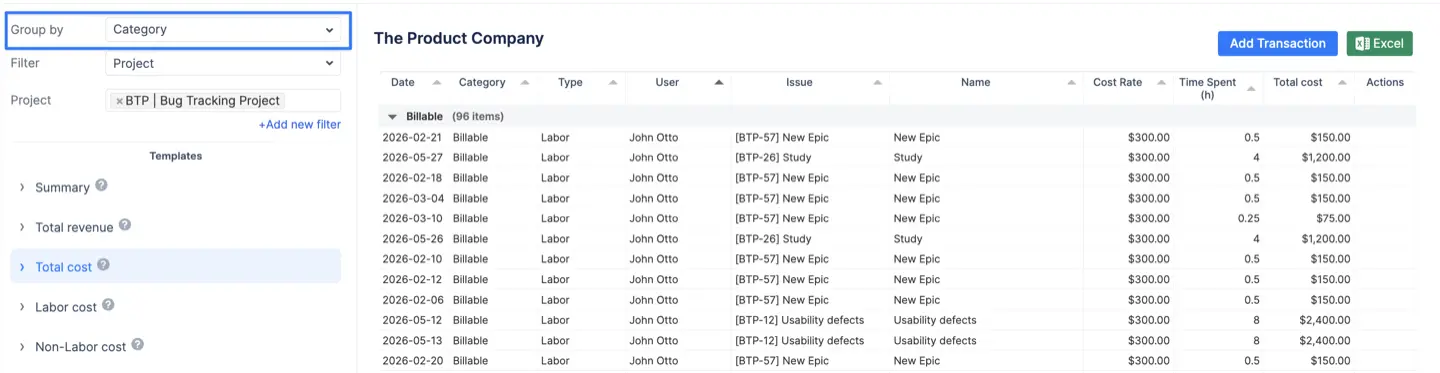
Three live financial reports. The Summary dashboard shows six numbers (current budget, remaining, actual and forecasted spend, actual and forecasted revenue), a cumulative burn chart, profit and margin percentage, and three progress bars: estimate progress, task progress and spend progress. When spend progress reads 80% and task progress 40%, you don't need an accountant to explain what's coming. Budget vs Spend puts your allocations next to actual spend by any dimension, as pie charts for ratios or stacked bars for absolute money; the bar view is the one that catches a project that looks healthy by percentage while already being $23,000 over the cap. Detailed Financial is the ledger: every worklog with its cost and billing rate, every transaction, grouped how you like, with templates such as "Total revenue" that filter to billable lines only. These reporting features also help create reports from native Jira worklogs and budget data. Everything exports to Excel.
Governance and access control. The module can be limited to admins, managers and team leads, or to a named list of people. Each budget has an owner, administrators and read-only viewers; read-only users see resulting costs but not the rate card. Jira project permissions are mirrored, so a viewer only sees costs for projects they can browse in Jira. Timesheet approvals are the same story: managers approve or bulk approve, approved periods lock on Track and Work, approval details are recorded, and everything exports for accounting.
Real-world scenarios out of the box. The documentation walks through four setups: fixed-price projects (manual budget, fixed revenue tracking, labor cost tracking on, so the chart shows margin as the gap between a flat revenue line and a rising cost line), time and materials agencies (labor and fixed on both sides, category rates to zero out internal work), product companies (monthly rates for salaried teams, sales logged as revenue transactions) and internal departments (cost-only, allocations by category for reporting back to leadership).
What it doesn't do
It is not an invoicing tool in the Everhour sense. There's no client-facing invoice, no QuickBooks or Xero sync, no receipt capture. Expenses exist as line items in a budget, not as an expense report someone submits and you approve. What you get for billing is a clean, filtered list of billable hours and fixed revenue for a date range, exported to Excel, to attach to an invoice produced in your accounting tool. There's no free tier, no standalone desktop app, and no browser extension for tracking time in tools outside Jira. The Finances module is currently in a closed early access program inside the Advanced Edition, so you ask support to switch it on. And if most of your billable work happens outside Jira, we'd rather tell you now that it's not a fit, especially for teams focused on tracking work across tools outside Jira.
Migration is undramatic. Your existing Jira worklogs are visible the day you install, including anything Everhour already pushed into the Jira work log. Time that only ever lived in Everhour doesn't import automatically, so most teams pick a switch date and keep Everhour's reports for what came before. From that date forward there's nothing to double-enter.
Ideal customer profile and pricing
ActivityTimeline fits agencies, consultancies and professional-services teams that deliver in Jira and bill by the hour or by fixed price; internal IT and PMO teams that report spend against a hard budget; and teams already using ActivityTimeline for planning who don't want a second subscription to see the money. A single subscription on the Atlassian Marketplace covers planning, timesheets, reporting and finances, billed on your Atlassian invoice, with a 30-day trial. Pricing is tiered by the number of Jira users: 500 users - $1245 ($2.5/user), 1000 users - $2195 ($2.19/user), 2000 users - $2895 ($1.45/user). Against Everhour's $8.50 to $10 per seat, the time tracking line drops to a fraction, and it moves onto the invoice your Jira admin already pays.
The budget should warn you, not the invoice.
#2 Tempo Timesheets (with Cost Tracker)
Best for large enterprises that want the closest Jira-native match to Everhour's finance features and can afford the stack. Timesheets is mature: solid multi-level approvals, accounts and customers on worklogs, native Jira worklogs, Cloud and Data Center. Add Cost Tracker (now sold as Financial Manager) and you get rates, budgets and revenue per project.
Tempo is one Jira-native route, while external alternatives such as Harvest and Toggl Track lean more heavily into client billing and invoicing.
The weak spot is arithmetic. It takes two or three Tempo licences (Timesheets, Cost Tracker, and Planner for capacity) to do what Everhour did on one plan, setup is heavy, and per-user cost climbs quickly past a few hundred people. At 500 users Timesheets is $1,728 a month and Financial Manager another $909.50. All apps include a 30-day free trial. Pick it if you're 500+ users, have a single-vendor policy, and budget isn't the constraint. TMetric is another Everhour alternative with similar time tracking and reporting capabilities.
#3 Clockwork by HeroCoders
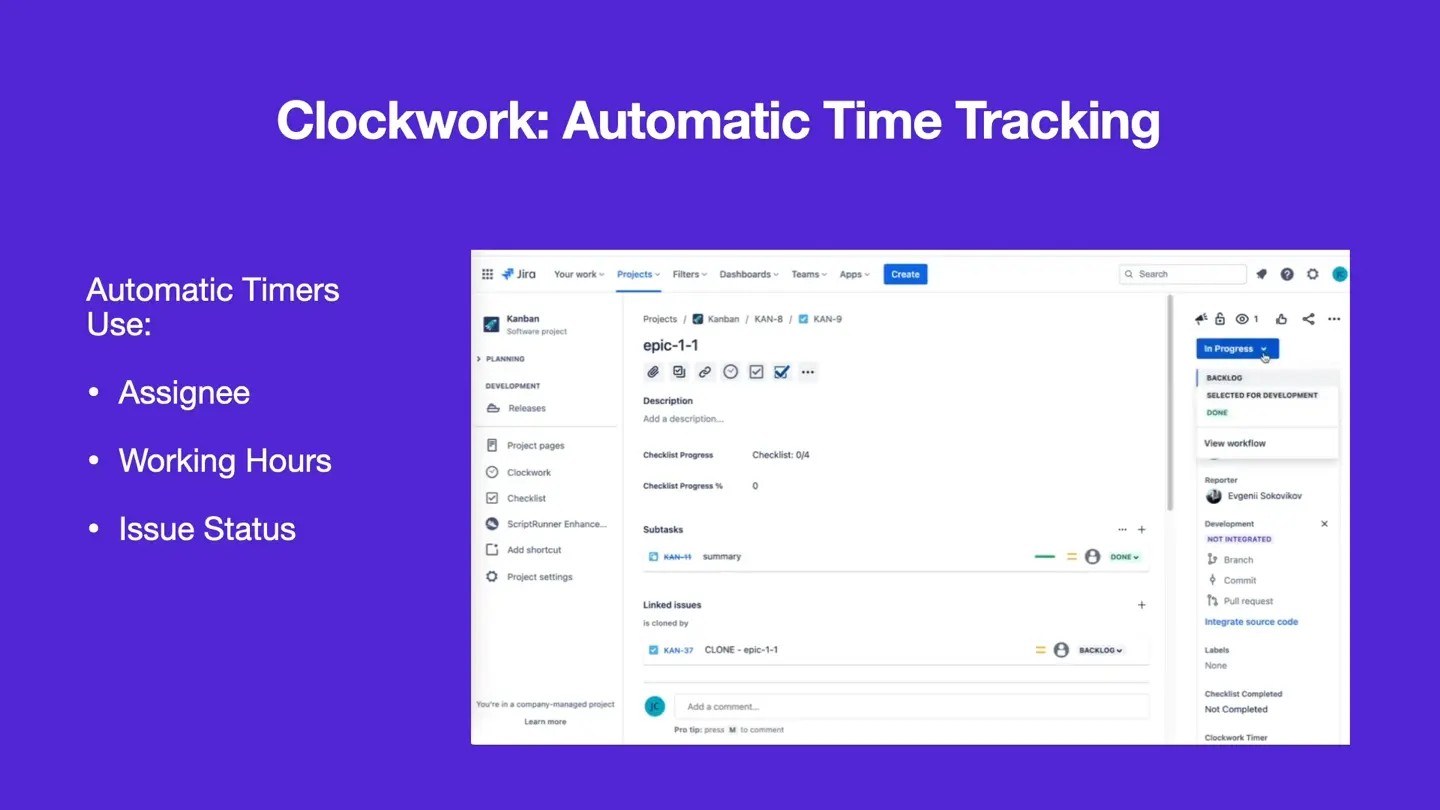
Best for dev teams that want time to land in Jira without anyone pressing a timer, and that don't need invoicing. Timers start and stop from issue status and assignee changes, so the worklog appears by itself. Pro adds worklog attributes for billable and client tagging, approvals, and cost and revenue tracking, all as native Jira worklogs. Clockwork comes in two Cloud-only editions. Both are completely free for up to 10 users and have a 30-day free trial. Monthly billing starts at $0.40 per user for Lite and $1.30 for Pro, with volume discounts as your team size grows. Annual plans start at $60 a year for Lite and $195 a year for Pro, scaling with your user tier.
The catch: no invoicing at all, status-based timers count the time a ticket sat in "In Progress" while someone was at lunch, and Lite caps automatic timers per month. Pick it if you're leaving Everhour because nobody pressed the timer, and finance can live with Excel.
#4 Timetracker by Everit
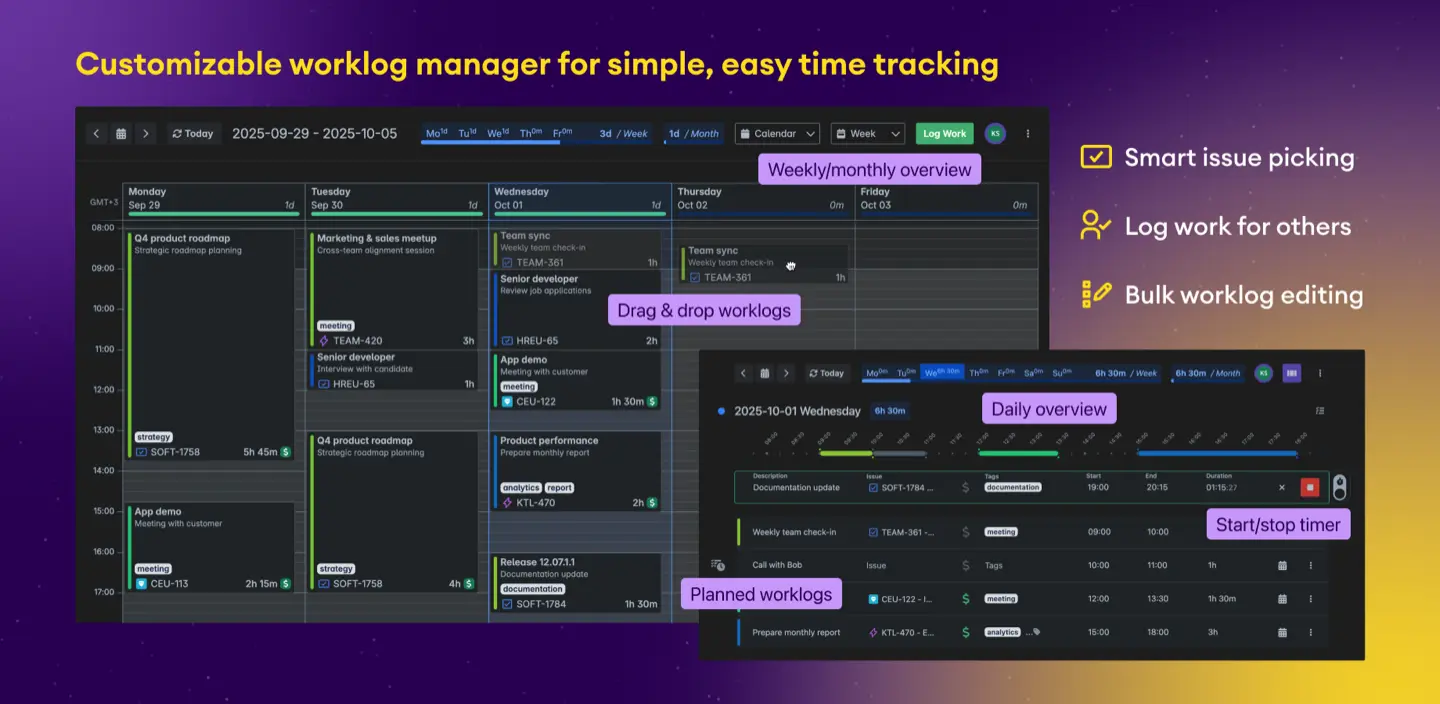
Best for teams that want Everhour's simple day view inside Jira, writing native worklogs, at a lower price. Logging is fast, the calendar-style view is easy to live in, and per-user and per-project reports cover the basics, including project tracking.
There's little on the finance side, approvals are basic, and there's no planning against estimates. Pick it if it's hours only, small to mid team, and invoicing is already handled elsewhere, so it can still help manage projects at a basic level without broader finance or planning depth.
Timetracker costs $290 per month for 500 users, which is around $0.58 per user. Teams with 1 to 10 members can use it for free, and it also comes with a 30-day free trial.
#5 Toggl Track (with Jira Integration)
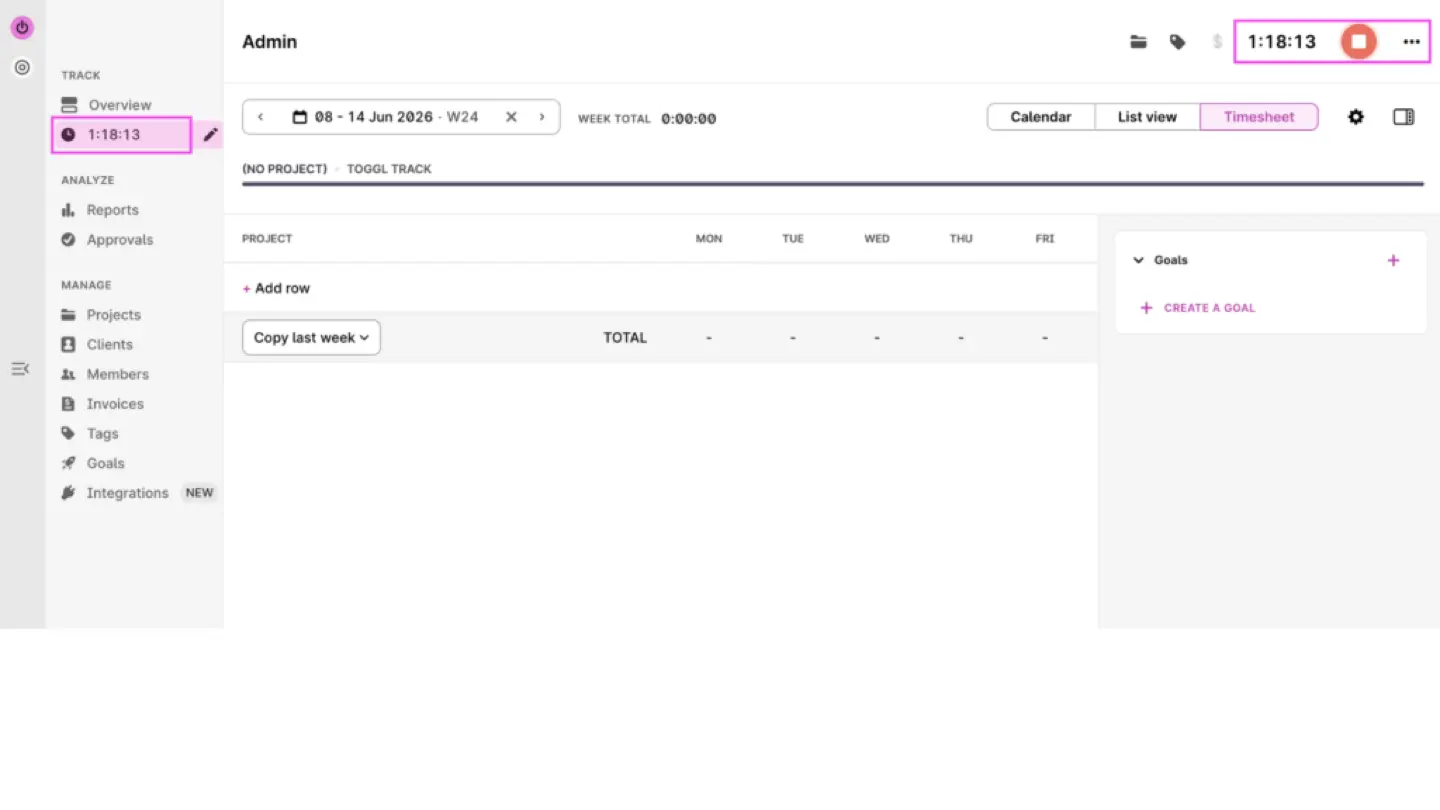
Best for teams staying with an external tracker but wanting a nicer timer than Everhour. The timer is the best in the category, the browser extension puts a button inside Jira. It also connects with over 100 third-party integrations and many existing tools. Billable rates and project budgets come with the Starter plan ($9 per user per month billed annually, or $12 monthly), approvals with Premium ($16 annually, or $24 monthly), and the reports are good; plans also include optional automatic time tracking for time entry via background tracking, but it still sits outside Jira.
The wall is the same one you're already standing at. Worklogs live in Toggl, Jira stays empty, sync and admin are doubled, and there's no invoicing, so it's weaker than Everhour on the one thing Everhour does best. Pick it if Jira is one of several tools and you're switching for the UX, not to close the gap, while noting GDPR compliance and advanced data encryption for remote teams using an external tracker.
#6 Clockify
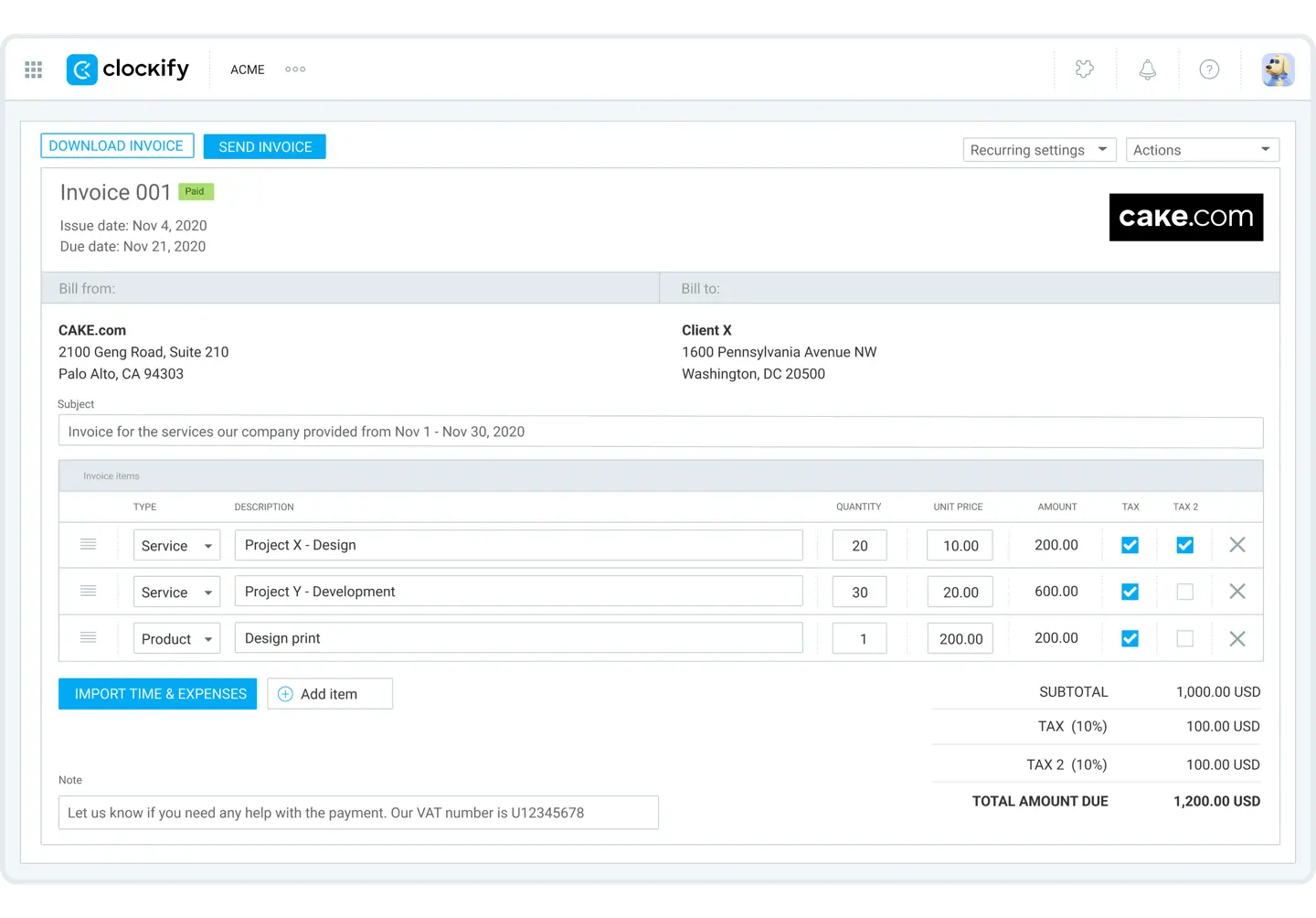
Best for the cheapest exit: small teams that want Everhour-style tracking with rates and invoicing but can't justify per-seat pricing or the 5-seat minimum. The free plan covers basic tracking for up to five users, and the browser extension runs directly inside Jira.
Paid tiers start with Basic at $3.99 per user a month billed annually for hourly and billable rates. Standard ($5.49) adds timesheet approvals, locked timesheets, and invoicing, while Pro ($7.99) brings project budgets, expenses, and scheduling.
Same structural problem though: the data is outside Jira, the finance features are all paid, and reporting is thinner than Everhour's custom columns and dashboards. Pick it if budget is the reason you're leaving, and the two-databases problem isn't.
Conclusion
Everhour is good at the invoice. It's just far away from the plan, and that distance is where the overruns hide until it's too late.
If you need an invoice straight out of the tracker and a lot of your work never touches Jira, stay external and pick Toggl or Clockify on UX or price. If you have an enterprise budget and a single-vendor policy, Tempo Timesheets plus Cost Tracker is the safe choice. If nobody on your team presses timers, Clockwork. If you only need hours in Jira, Timetracker. If you want the plan, the hours and the money in one Jira app, ActivityTimeline Advanced Edition. To repeat the limitation so this doesn't read as a pitch: ActivityTimeline won't generate your invoice. It will tell you, in week three, that the invoice is going to be a problem.
Ready to see it in practice?
If the overrun keeps showing up on the invoice instead of in the sprint, try ActivityTimeline free for 30 days on the Atlassian Marketplace and check whether the Finances module covers what you bill for before paying anything. Your Jira worklogs are already there, nothing to re-enter.
This data was taken from everhour.com and other alternatives official English-language sites on September 29, 2026.