Someone asks "who can take this ticket next sprint?" — and suddenly three people are cross-checking a Jira board, a spreadsheet, and someone's memory of who booked vacation. If that sounds like your Mondays, you're not alone: it's the most common problem customers describe to us when they first reach out.
Workload management is the process of planning, distributing, and tracking work across a team so that nobody is overloaded, nobody sits idle, and deadlines stay realistic. In practice it comes down to three things: knowing each person's real capacity, matching tasks to the right people, and spotting imbalances early — before they turn into missed deadlines or burnout.
This guide covers the strategies that actually move the needle, what Jira gives you out of the box (and where it stops), and how to get a cross-project view of team workload.
Key Takeaways
- Workload management means matching assigned work to real capacity — most overload problems are visibility problems first.
- Jira's built-in workload reports work per project only; cross-project capacity needs a dashboard-level view or a Marketplace add-on like ActivityTimeline.
- Watch three numbers per person: scheduled hours vs. capacity, number of issues per day, and remaining availability.
- Reassessing workload weekly beats reacting to burnout monthly — small rebalancing early is cheap, escalation later is not.
What does workload management actually involve?
It's not just assigning tasks and hoping. Workload management is a loop: estimate the work, check it against each person's capacity, assign, then keep watching — because estimates drift, priorities shift, and someone always goes on vacation mid-sprint.
Research backs up how much of the problem is plain visibility: Atlassian's 2025 State of Teams study found that about a quarter of executives and teams spend at least 25% of their workweek just searching for information about work, rather than doing it. When a manager can't see who's doing what, they can't balance anything — they're guessing.
The maxim we keep coming back to: you can't balance a workload you can't see.
Why workload management is important
Half the value of workload management is simply that everyone can see the plan. When task assignments and progress are visible to the whole team, misunderstandings drop, duplicated work disappears, and nobody discovers on Thursday that two people quietly picked up the same ticket.
Optimal Resource Allocation
Team workload management allows you to allocate resources efficiently by tracking team capacity and effectively allocating tasks. It ensures that team members are assigned tasks that match their skills and availability, preventing overloading or underutilization.
Balanced Work Distribution
It’s crucial to distribute tasks evenly among the entire team. This prevents some individuals from being overwhelmed with work while others have lighter workloads, which can lead to burnout and decreased productivity.
Real-Time Visibility
Jira provides real-time visibility into the progress of tasks and projects. Team members can easily track their tasks and monitor the status of tasks assigned to others. This transparency reduces the likelihood of misunderstandings and promotes accountability.
Enhanced Collaboration
When everyone has a clear view of who is working on what, it fosters transparency and teamwork, leading to better communication within the team.
Workload Management Tools and Software
Effective workload management is accentuated when integrated with other essential business tools, streamlining operations and enhancing productivity. Team workload management tools are crucial for effectively tracking and managing team members' workloads across multiple projects.
Integrations with the following tools allow for seamless data flow between systems, mitigating manual input and reducing errors.
How do you manage team workload in Jira?
Jira gives you two built-in options: workload reports (the User Workload Report and Workload Pie Chart) and dashboards with workload gadgets. Both are genuinely useful — and both work per project only. For team workload across multiple projects, you'll need a Marketplace add-on such as ActivityTimeline, which shows every person's scheduled work, capacity, and time off on one timeline.
Let's look at the built-in options first, because for a single-project team they may be all you need.

Another variant is the Jira Dashboard. You can create various dashboards for better visualization including the Workload Dashboard.

These options are useful, but reports are available only for a single project and cannot provide a clear picture of the resource workload on both team and individual levels.
Jira offers add-ons like ActivityTimeline that can advance your resource and workload tracking. Users can find them in the Atlassian Marketplace.
The following integrations allow managers to track project and personnel progress, promoting transparency and accountability:
Enhanced Communication and Collaboration
Connecting your workload management system with communication platforms like Slack or Microsoft Teams ensures that team members receive real-time updates and stay informed on project developments. This fosters a better team dynamic through improved collaboration and timely feedback.
Embrace Visualization Tools
Use integrations with visualization tools such as Gantt charts or flowcharts to organize tasks clearly. These visual aids help teams conceptualize project timelines and task dependencies, paving the way for more effective resource management.
Monitoring Through Data Analytics Tools
Leverage integrations with data analytics tools to gain insights into workload trends and resource efficiency. These can be invaluable in refining workload management strategies and ensuring optimal performance and productivity.
By embracing these integrations, team leaders can harness the full potential of their workload monitoring systems, aligning them more closely with business objectives and facilitating smoother project execution.
Implementing a Workload Management Process
Implementing a workload management process begins with setting clear objectives, outlining roles and responsibilities, and establishing an efficient workflow. Adopting effective workload management practices is crucial to addressing common issues like bottlenecks and uneven team contributions. This process requires regular check-ins, tracking progress, and providing feedback.
When well executed, a workload management process empowers teams to produce outstanding work and achieve their objectives.
ActivityTimeline is an app designed for resource planning and time tracking, aiding in managing team and individual tasks and workloads. It offers a unified view of all projects and tasks, enabling forward planning and time tracking via timesheets. Furthermore, it includes numerous reports to enhance planning.
This tool helps you understand resource allocation within your organization by providing a comprehensive view of shared resources and project tasks in one convenient location.

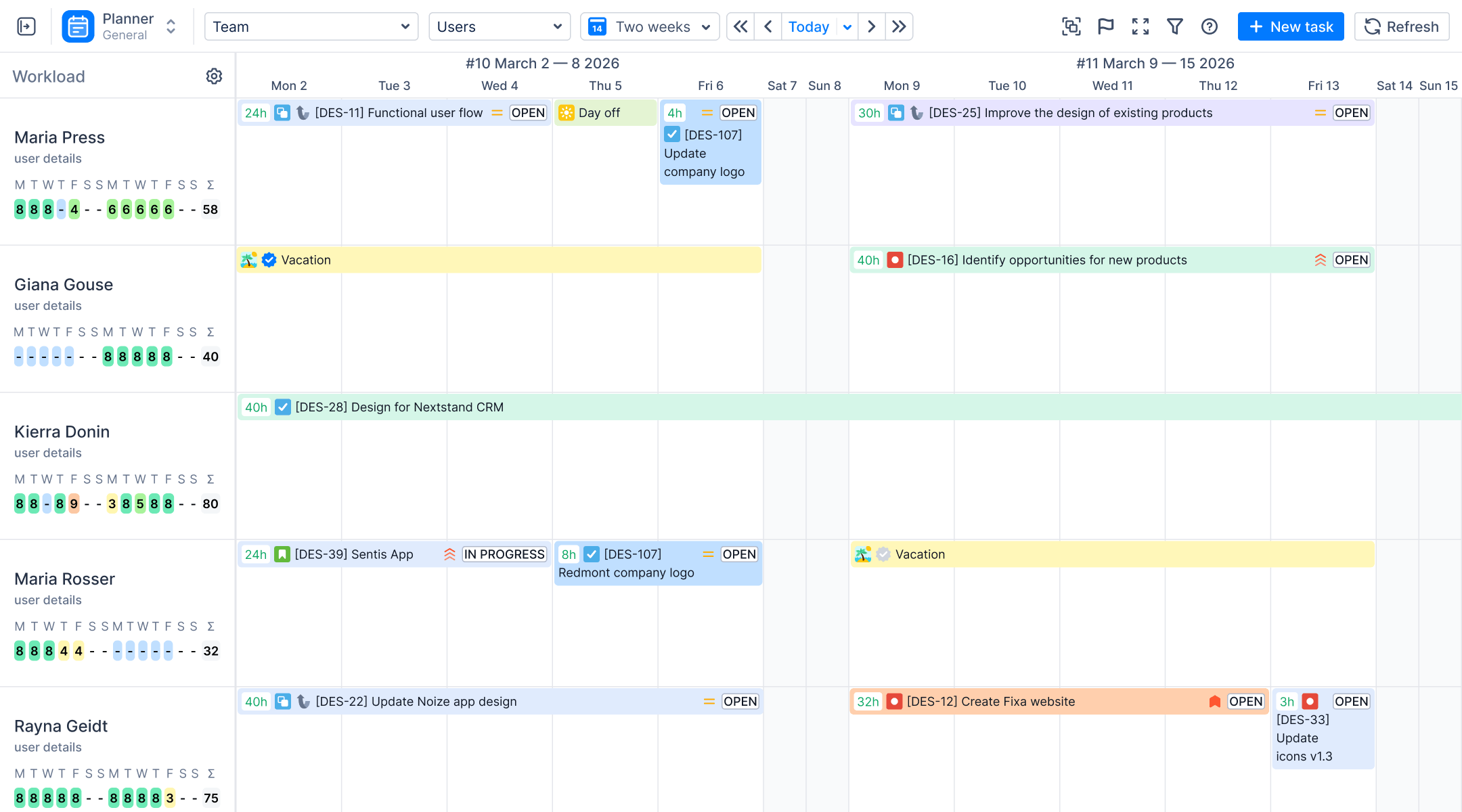
The app’s dashboard gives an overview of all projects accompanied by tasks, team, and user timelines. Equipped with Special Workload Indicators, it clarifies user workload for a selected period to avoid both underload and overload:

The indicators run from yellow (less than half a day's capacity scheduled — room for more) through green (a healthy 88–100% of capacity) to red (overloaded past 125% — something has to move). Blue means the person is out of the office — vacation, sick leave, or a day off — so you don't schedule work onto someone who isn't there.
You can also switch what the indicator counts. There are four modes: Workload (hours, based on remaining and daily estimates), Number of Issues per day, Availability (how much room is left), and Worklogs and Workload — useful when your team logs time and you want past days to reflect what was actually logged rather than spreading old estimates backward.

The default setting displays workload per day. You can choose to show the number of issues per day or show the user’s availability to allocate tasks with a clear understanding. These indicators are also available for individual teams:

Assessing Team Workload and Capacity
Evaluating team workload and capacity is a fundamental aspect of successful workload management. This process involves examining your team's workload, pinpointing any capacity limitations, and understanding the availability of resources.
Grasping the workload and capacity of your team empowers project managers to allocate tasks more effectively.
To ensure efficient workload management, you need to:
- Carefully plan your tasks. Define and structure each task in your workload with clarity so everyone knows what needs to be accomplished and who is responsible.
- Prioritize tasks based on urgency. Understand that some tasks need immediate focus and should be handled before others. Assign due dates to each task and give precedence to those of high importance.
- Estimate the time required for each task. Knowing how long tasks will take is essential for meeting deadlines and managing expectations effectively.

- View workload indicators. When managing tasks, it’s essential to consider each team member's workload capacity. Use the workload indicators or the app’s comprehensive resource reports to guide your planning.
These reports provide invaluable insights into how resources are utilized, helping you to understand team dynamics effectively:

Also, leverage the power of visual representations with tools such as the Team Utilization Pie Chart. This engaging visual aid offers a detailed overview, showing you exactly how your team’s time and resources are distributed across various projects.

Such insights ensure you can easily identify areas of overutilization or underutilization, allowing for more strategic workload balancing:

Workload Management Challenges
Common workload management issues include uneven workload distribution, under-resourcing, and an overly demanding work culture. These issues can lead to decreased team productivity, missed deadlines, and increased stress levels. Identifying and addressing these issues is crucial to effective workload management.
Uneven Workload Distribution
One of the most prevalent issues is the uneven distribution of tasks. Certain team members may be overburdened with too many responsibilities, while others are underutilized. This imbalance can lead to decreased morale, burnout, and inefficiencies across the team.
Unrealistic Deadlines
Setting deadlines that don’t align with the team’s capacity or the complexity of tasks can create unnecessary stress. When teams are consistently pushed to meet unrealistic expectations, the quality of work may suffer, and burnout becomes a real risk.
Inadequate Visibility into Workloads
Managers often lack the tools or systems to monitor the status of ongoing tasks and team workloads effectively. Without proper visibility, it's challenging to balance workloads and ensure that tasks are evenly distributed and progressing as planned.
Changing Priorities
Priorities can shift frequently. While flexibility is crucial, constantly changing objectives can overwhelm employees, leading to confusion and wasted effort as they adjust to new directions.
Poor Communication
Miscommunication or a lack of transparency between team members and managers can lead to misunderstandings about who is responsible for what. This can lead to missed tasks, duplication of work, and conflicts among team members.
Effective Workload Management Strategies
Effective workload management goes beyond merely distributing tasks; it’s a dynamic process requiring ongoing adjustments and fine-tuning. Workload management skills are crucial for project managers in effectively assigning tasks and managing team workloads. It involves using project management tools to track progress, identify dependencies, and optimize resource allocation.
Below are the strategies to help you come up with a well-planned workload management strategy and deliver excellent work without the risk of burnout.
Use Effective Workload Management Tools
Modern tools like ActivityTimeline and Jira provide features that allow managers to track task progress, monitor team capacity, and distribute workloads evenly. Workload management software is essential for helping to monitor tasks, assess team capacity, set deadlines, and improve resource management. ActivityTimeline offers visual dashboards and reports that give clear insights into who is working on what, enabling better decision-making regarding task assignments and rebalancing workloads when needed:
Define Clear Priorities and Deadlines
Establish a clear prioritization framework for your team. This can be based on urgency, business value, or deadlines. Ensure that each task is categorized with its priority level, allowing team members to focus on high-impact work first. Setting realistic deadlines is also key. Understand the complexity of tasks and align them with your team’s capacity to ensure they are achievable.
Regular Workload Assessments
Conduct regular reviews of your team's workload to identify any potential bottlenecks or imbalances. These assessments allow you to proactively redistribute tasks and adjust deadlines to maintain team morale and avoid burnout. Use tools that provide real-time updates on team workload to make informed decisions. To help you with comparing planned and actual workload, ActivityTimeline provides Planned vs. Actual reports:
Create a Flexible Plan to Handle Changing Priorities
Develop a flexible workload management system that can accommodate shifting priorities. This could include schedule buffer times for unplanned work or clearly defined processes for reprioritizing tasks. While changes will always occur, having a structured approach to dealing with them ensures that your team stays focused and productive.
Encourage Open Communication and Collaboration
Establish an environment where team members feel comfortable discussing their workloads. Encourage them to provide feedback on task assignments and deadlines. Open communication ensures that managers are aware of any challenges team members are facing, allowing for adjustments that maintain a balanced and productive workload.
Delegate Appropriately
Managers must avoid taking on too much responsibility themselves or overburdening a few high-performing employees. Instead, delegate tasks effectively by matching the right task to the right person, considering individual skills, capacity, and areas of expertise. This ensures that tasks are completed efficiently and contributes to professional development across the team.
Automate Repetitive Tasks
Leverage automation to reduce your team's manual workload. Automated workflows can handle routine tasks, freeing up time for team members to focus on more strategic activities. For example, in Jira, automation rules can be set to update statuses, send notifications, or assign tasks based on specific triggers, saving valuable time.
Balance Long-term and Short-term Goals
Ensure that your team’s workload includes a mix of quick wins and long-term projects. Focusing solely on short-term tasks can lead to burnout, while too many long-term goals can cause frustration if there aren’t enough visible accomplishments. Balancing these types of work helps keep the team motivated and progressing steadily.
Summary
Effective workload management is crucial for team productivity, job satisfaction, and reducing burnout risks. It involves planning, estimating, and tracking work to balance workload demands. By implementing a workload management process, using workload management tools and software, and overcoming challenges, teams can deliver excellent work and achieve their goals.


![Jira Teams with ActivityTimeline: Comprehensive Guide [2026]](https://cdn.prod.website-files.com/60c76f07dc83db305171350c/6a15952034cfc5cca020eedd_thumbnail_Jira%20Teams%20with%20ActivityTimeline.png)


.png)