
El cronómetro es sencillo. Todos lo activan, se envían las facturas y se reciben los pagos por Stripe. Luego llega la revisión del sprint y el gráfico de trabajo pendiente (burndown) está plano, porque ni una sola de esas horas llegó a Jira. El jefe de proyecto abre Harvest para explicar el sobrecoste, el líder de ingeniería abre Jira para explicar la estimación, y ambos miran números que nunca iban a coincidir. Si esto describe más o menos tu mes, este artículo trata sobre qué cambiar y sobre la única pregunta que vale la pena hacerse primero: ¿quieres un mejor rastreador de tiempo junto a Jira, o quieres las horas, la planificación y el dinero dentro de Jira?
Qué es Harvest y por qué podría no ser la opción adecuada para tu empresa
Harvest es un producto independiente para el seguimiento del tiempo, gastos y facturación. Los usuarios registran el tiempo en la aplicación web, en las aplicaciones para Mac y Windows, en las de iPhone y Android, o mediante una extensión del navegador, todo bajo una estructura plana de clientes, proyectos y tareas. Los proyectos son de tres tipos (Tiempo y Materiales, Tarifa Fija y No Facturable), cada uno puede tener un presupuesto en horas o tarifas, y las tasas de facturación pueden establecerse por proyecto, por persona o por tarea. Las tasas de coste se asignan a cada persona, con una fecha de vigencia para los aumentos. Las hojas de horas se pueden enviar y aprobar, los gastos incluyen recibos y las facturas se emiten desde la misma cuenta, con Stripe o PayPal para el cobro y QuickBooks Online o Xero para la contabilidad. Existe un complemento gratuito para Jira Cloud que añade un panel de Harvest en la incidencia, además de un producto hermano, Forecast, para la planificación de empleados.
Y para cierto tipo de empresa, es exactamente lo que necesita. Una agencia de 15 personas donde la mitad del trabajo no está en Jira, la factura es el resultado principal y nadie planifica la capacidad más allá de ver "quién está libre el viernes", obtiene seguimiento, gestión de gastos y facturación en un solo lugar desde 11 dólares por usuario al mes. Para poner en contexto los precios de Harvest, un equipo de 10 personas puede terminar pagando 110 dólares al mes o más. Preferimos decirlo claramente antes que fingir que todo el mundo necesita lo que vendemos. Si a tu contable le encanta la sincronización con Xero y tus desarrolladores son minoría, Harvest es una buena respuesta.
El problema comienza cuando Jira se convierte en el lugar donde se planifica, estima y reporta el trabajo, mientras que Harvest sigue siendo el lugar donde se cronometra. Estas son las limitaciones con las que se topan los equipos, cada una con un ejemplo concreto de la propia documentación de Harvest:
- Las horas nunca llegan a Jira. El complemento de Jira abre Harvest en la incidencia y rellena automáticamente la clave de la incidencia en las notas; Jira muestra un panel con el tiempo registrado. Nada en la documentación de Harvest indica que se cree un registro de trabajo (worklog) en Jira, por lo que las estimaciones restantes, los informes de sprint y los gráficos de burndown permanecen en cero, y "estimación frente a real por ticket" significa tener que comparar dos exportaciones. Además, el complemento solo funciona con Jira Cloud.
- Clientes, proyectos, tareas: esa es toda la jerarquía. Las preguntas frecuentes de Harvest son directas: no hay subproyectos, subtareas ni fases; "puede resultarle beneficioso dividir cada fase en su propio proyecto". Un epic, un componente, un filtro JQL o una iniciativa que abarque varios proyectos no pueden ser el objeto de tu presupuesto.
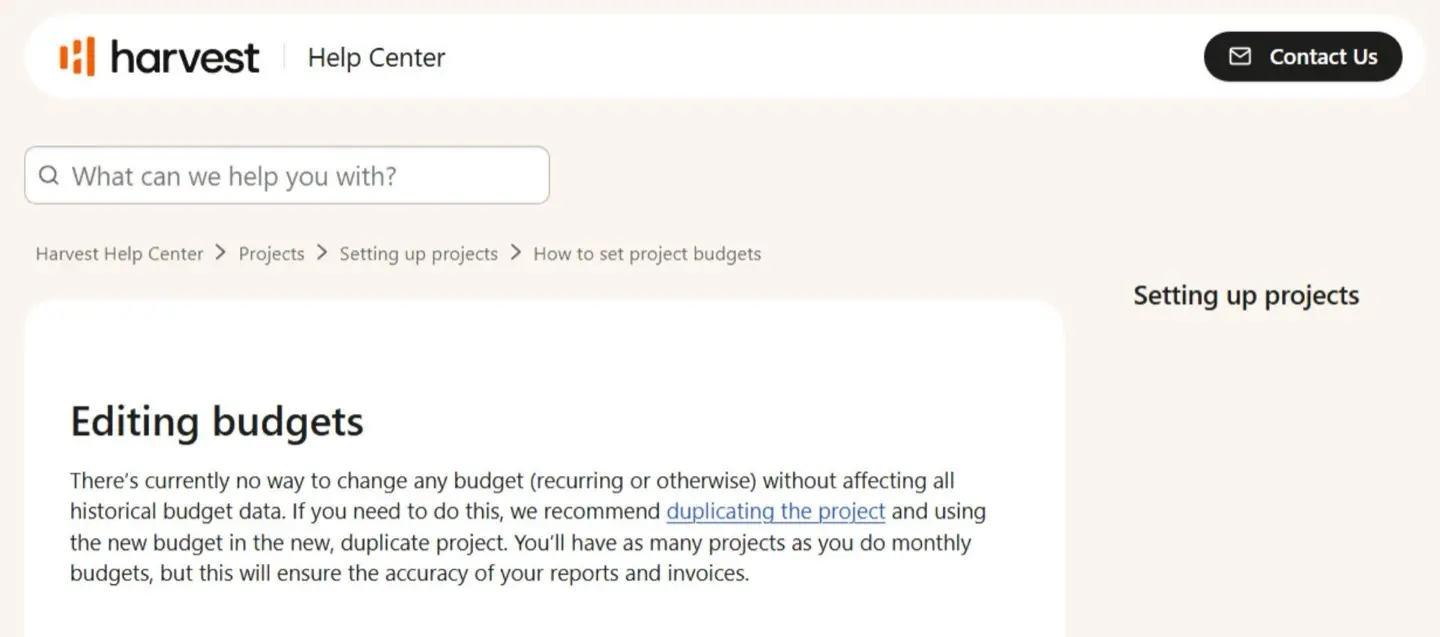
- Los presupuestos son por proyecto y editar uno reescribe el pasado. Un presupuesto es una cantidad de horas o una tarifa en un proyecto. Según la documentación: "Actualmente no hay forma de cambiar ningún presupuesto (recurrente o no) sin afectar a todos los datos históricos del presupuesto", y la solución recomendada es duplicar el proyecto, lo que te deja con "tantos proyectos como presupuestos mensuales tengas". La documentación también dice claramente que Harvest "no tiene informes de presupuesto robustos", por lo que no hay un informe de presupuesto dedicado que ejecutar, y en los planes inferiores lo que obtienes se acerca más a un informe básico que a un control presupuestario real.
- Las funciones financieras están reservadas para el plan superior. El informe de rentabilidad, las aprobaciones de hojas de horas, el registro de actividad, las notas obligatorias y los informes personalizados ilimitados son exclusivos de la versión Enterprise, que cuesta 14 dólares por usuario al mes con facturación anual o 17,50 dólares mensuales. En el plan Teams (9 dólares anuales, 11 dólares mensuales) obtienes tasas de facturación y costes y hasta cuatro informes personalizados, pero no el informe que los convierte en margen.
- La previsión es un producto aparte. Harvest por sí mismo no realiza previsiones. La página de análisis de proyectos solo muestra "la cantidad proyectada del presupuesto que utilizará tu equipo" cuando la cuenta está conectada a Forecast, que se factura por separado a 5 dólares por persona al mes con facturación anual (6,25 dólares mensuales). Puedes probarlo con una versión gratuita de 30 días. Harvest también ofrece descuentos para organizaciones sin ánimo de lucro, instituciones educativas y equipos de más de 50 personas en planes anuales. La capacidad dentro de Harvest es un número único por persona, de 0 a 60 horas a la semana, y cambiarlo "afectará a la capacidad mostrada para todas las semanas anteriores y futuras".
- Las aprobaciones bloquean la semana, no la entrada. Aprobar una hoja de horas bloquea todas las entradas de tiempo y gastos de esa semana natural; el tiempo y los gastos se aprueban juntos, y si alguien envía su hoja un miércoles, un administrador debe retirar la aprobación antes de que esa persona pueda registrar el jueves.
- Una tasa de coste por persona, en una sola moneda. Cada persona tiene una única tasa de coste global (es posible personalizarla por proyecto), solo los administradores pueden verla, y las tasas de coste "siempre permanecen en la moneda predeterminada de tu cuenta". Harvest admite múltiples monedas de facturación pero no realiza conversiones; una tasa predeterminada de 50 dólares se convierte en 50 euros en un proyecto en euros hasta que alguien lo corrige manualmente.
- La factura se volvió más difícil de predecir en 2026. Tras la adquisición por parte de Bending Spoons, Harvest sustituyó Pro y Premium por Teams y Enterprise, aumentó las tarifas mensuales e introdujo un modelo de facturación Flex en el que "pagas una tarifa por puesto más cargos basados en el uso" de proyectos, clientes, tareas y facturas activos, sin que las tarifas por unidad se publiquen en la página de precios. Esto significa que los precios basados en el uso, las tarifas por uso y los cargos adicionales pueden convertir lo que parecía un coste sencillo por puesto en una factura menos predecible.
Al leer esa lista, uno pensaría que la solución es un mejor rastreador con un mejor plugin para Jira. En realidad, para la mayoría de los equipos que llegan a este punto, el rastreador nunca fue el problema. El problema era el muro entre el rastreador y Jira. Cada punto anterior es un síntoma de tener las horas en una base de datos y las estimaciones, los sprints y las incidencias en otra.
A quién va dirigido este artículo: Equipos de Jira que están evaluando Harvest antes de decidirse, o equipos que ya usan Harvest, planifican y generan informes en Jira y están cansados de que la hoja de horas, el informe de sprint y la factura no coincidan.
Cuáles son las mejores alternativas a Harvest para Jira y cuándo utilizarlas
La alternativa adecuada a Harvest depende de para qué necesites las horas. Si facturas a clientes desde el rastreador y Jira es solo una herramienta más, un rastreador externo con un botón de Jira seguirá siendo útil, y dos de ellos están en esta lista. Si necesitas que las estimaciones de Jira y las horas registradas coincidan en las mismas filas para poder presupuestar, prever y calcular los costes de un proyecto mientras está en curso, lo que necesitas es una aplicación nat iva de Jira que registre el tiempo, planifique la capacidad y convierta las horas en dinero sin necesidad de una segunda suscripción. Esa es la comparación que más importa, así que aquí la tienes lado a lado antes de pasar a la lista.
Tabla comparativa: Harvest frente a ActivityTimeline
Una nota de equidad sobre la última fila: Harvest cobra por puesto que registra tiempo, mientras que ActivityTimeline fija sus precios según el nivel de usuarios de Jira. Por tanto, una empresa con 2000 usuarios de Jira y 300 personas que registran tiempo compararía los 4200 dólares de Harvest Enterprise frente a los 2895 dólares de ActivityTimeline, no 28 000 dólares. La brecha se reduce, pero no desaparece, y la línea de previsión sigue estando por encima.
#1 ActivityTimeline Advanced Edition: Módulo de Finanzas
Ideal para: Agencias, consultoras, equipos de servicios de TI y cualquier PMO donde el trabajo ya esté en Jira y, tarde o temprano, alguien pregunte: "¿cuánto nos ha costado este proyecto y cuánto facturamos por él?".
ActivityTimeline es una aplicación de planificación de recursos y seguimiento del tiempo para Jira que incluye un módulo de Finanzas. Algunas alternativas a Harvest se inclinan más hacia el software de gestión de proyectos integral, incluyendo herramientas de seguimiento del tiempo diseñadas para una gestión de proyectos más amplia, como Scoro, una plataforma de automatización de servicios profesionales con CRM y facturación, o Paymo, que añade tableros Kanban y diagramas de Gantt a sus herramientas de gestión de proyectos. El planificador, el espacio de trabajo, las hojas de horas, los informes y las finanzas funcionan en una sola aplicación con un único conjunto de datos: los registros de trabajo nativos de Jira. Las mismas horas que completan una hoja de horas rellenan el informe de presupuesto y la previsión de capacidad, y la estimación de Jira ya aparece junto a ellas. Si nadie en tu empresa va a preguntar nunca cuánto costó un proyecto, pasa al punto #3 y ahórrate la lectura.
Imagina una consultora de software de 30 personas. Los desarrolladores planifican y estiman en Jira, todos registran el tiempo en Harvest a través de la extensión y el responsable de operaciones factura desde Harvest el primer día del mes. Un proyecto de precio fijo, valorado en 90 000 dólares para una ejecución de cuatro meses, tenía un presupuesto en Harvest de 900 horas. El correo electrónico de alerta de presupuesto llegó la mañana después de que el equipo superara el 80 por ciento, en la novena semana de dieciséis. Para entonces, las estimaciones restantes de Jira llevaban tres semanas indicando "exceso", pero nadie miraba ambas pantallas el mismo día porque eran dos pantallas distintas. Las horas estaban ahí, simplemente no hubo un momento en el que la estimación y las horas fueran la misma cifra en el mismo lugar.
Características principales
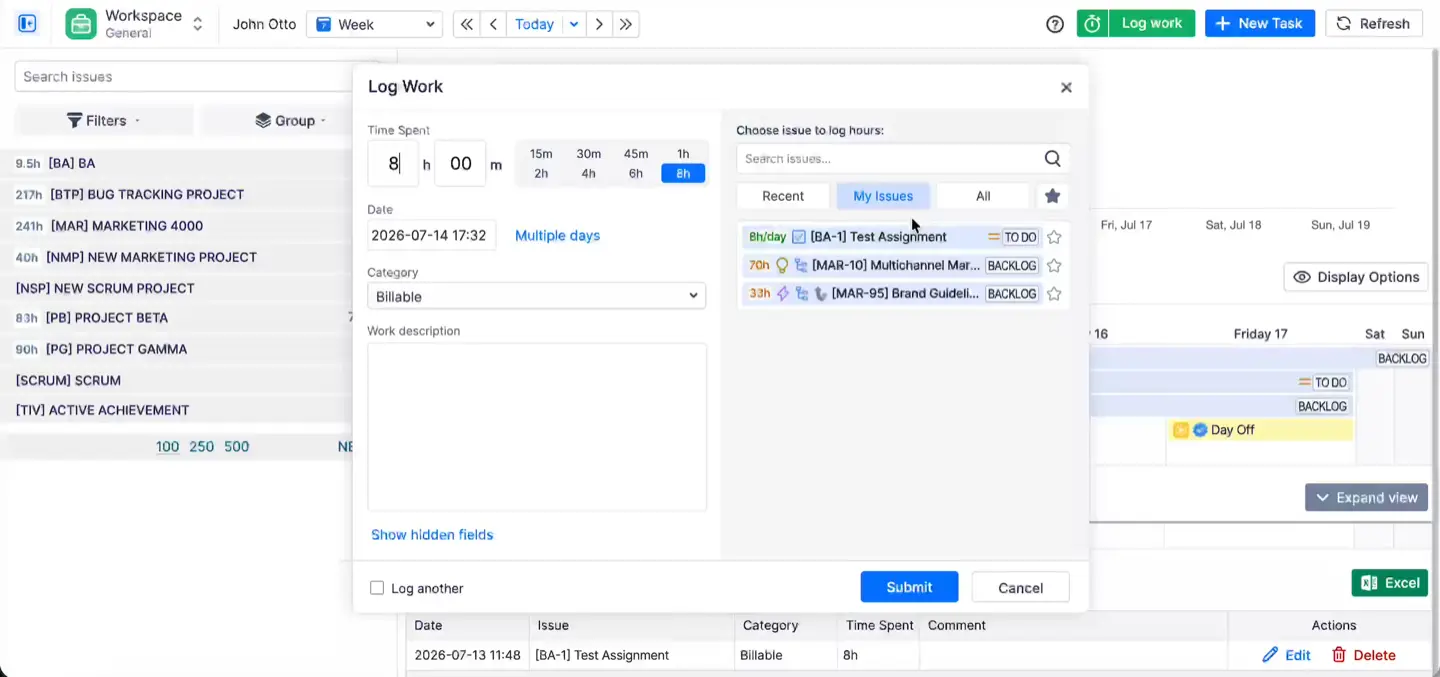
Todo el mundo registra el tiempo donde está el trabajo. En Jira Cloud puedes configurar ActivityTimeline como el proveedor de seguimiento de tiempo, de modo que la acción "Registrar trabajo" en cualquier incidencia abra el cuadro de diálogo de ActivityTimeline con un menú desplegable de categorías y la opción de repartir una entrada en varios días. El mismo cuadro de diálogo aparece en la página del Espacio de trabajo (las incidencias y la semana de una persona en una sola pantalla) y en las hojas de horas. Hay un temporizador si prefieres pulsar un botón, y la página de seguimiento optimizada para móviles cubre las necesidades fuera de la oficina. También admite el seguimiento manual del tiempo y permite crear entradas directamente en las incidencias de Jira, mientras que algunas herramientas externas se basan en el seguimiento automático, con productos como Rize que capturan sesiones de trabajo en segundo plano y TimeCamp que combina el registro basado en temporizador con reglas de palabras clave. Cada camino genera un registro de trabajo nativo de Jira, por lo que el informe de sprint, la estimación restante y la hoja de horas finalmente coinciden, algo que el complemento de Harvest no puede hacer.
El 20 al 30 por ciento de la semana que nunca tiene un ticket. Llamadas de clientes, revisiones de sprint, rotación de soporte. ActivityTimeline importa eventos de Google Calendar, Outlook o cualquier feed iCal y, por defecto, los trata como registros de trabajo una vez que el evento ha pasado; si prefieres que la gente confirme, cambia a "No tratar ninguno como registro de trabajo" y podrán hacer clic en el evento, elegir una incidencia de Jira y registrarlo. Las reservas internas sin una incidencia de Jira asociada también pueden contarse como registros de trabajo. Los usuarios de Harvest que registraban las reuniones manualmente en una tarea de "Reuniones" notarán esto de inmediato.
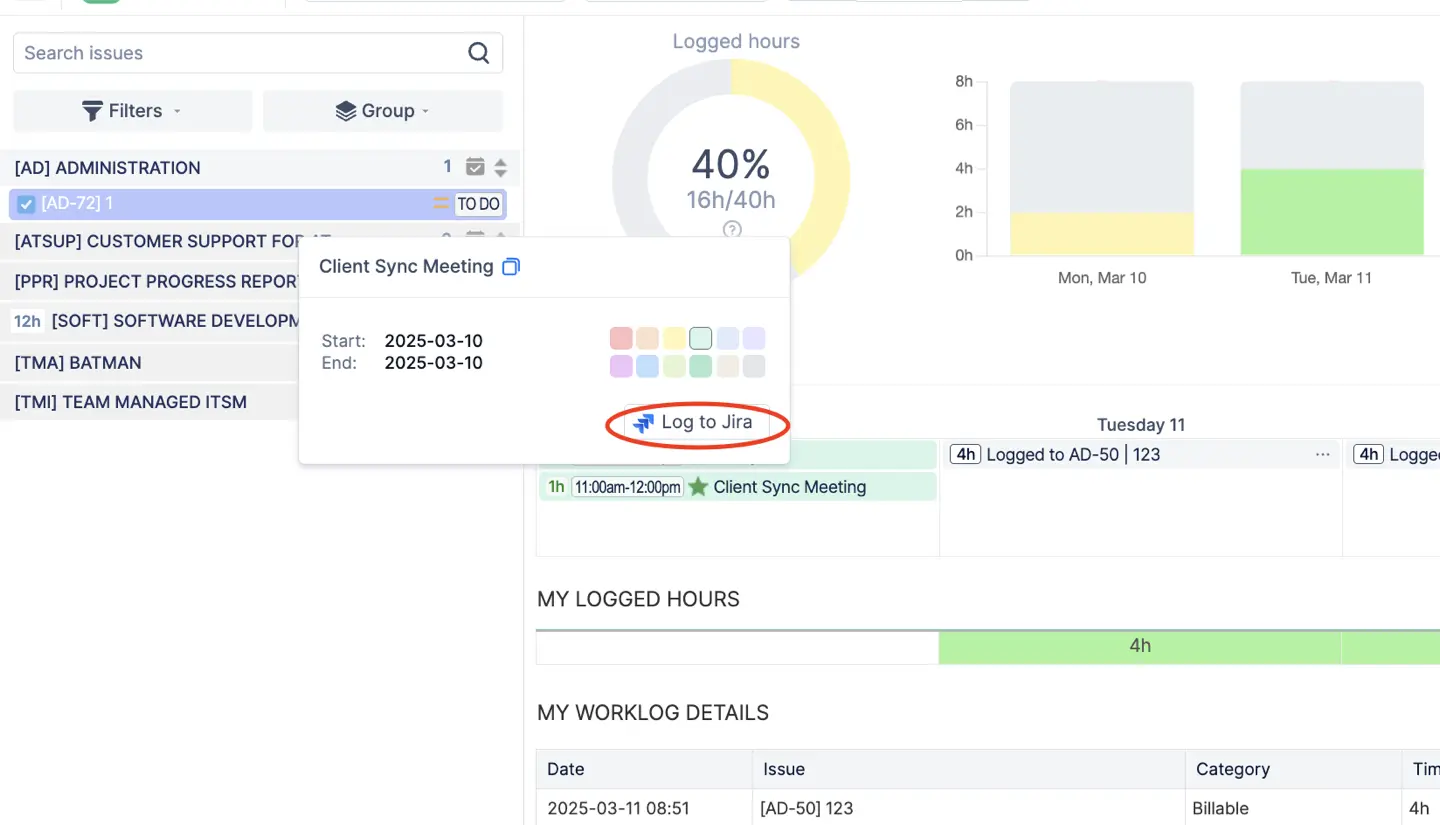
Cada hora ya lleva la etiqueta que necesitan las finanzas. Las categorías de registro de tiempo marcan las horas como facturables, no facturables o cualquier otro tipo de trabajo que necesites distinguir, y un proyecto puede tener una categoría predeterminada para que la correcta se rellene automáticamente. Los atributos de registro de tiempo se encargan del resto: centro de costes, cliente, CAPEX u OPEX, menús desplegables, casillas de verificación o campos de texto libre, cada uno de ellos obligatorio, opcional u oculto según decidas. En Harvest, esto es lo que hacían los nombres de las tareas ("Diseño: Logotipo", "Diseño: Página de inicio"); aquí es un campo por el que puedes filtrar y agrupar.
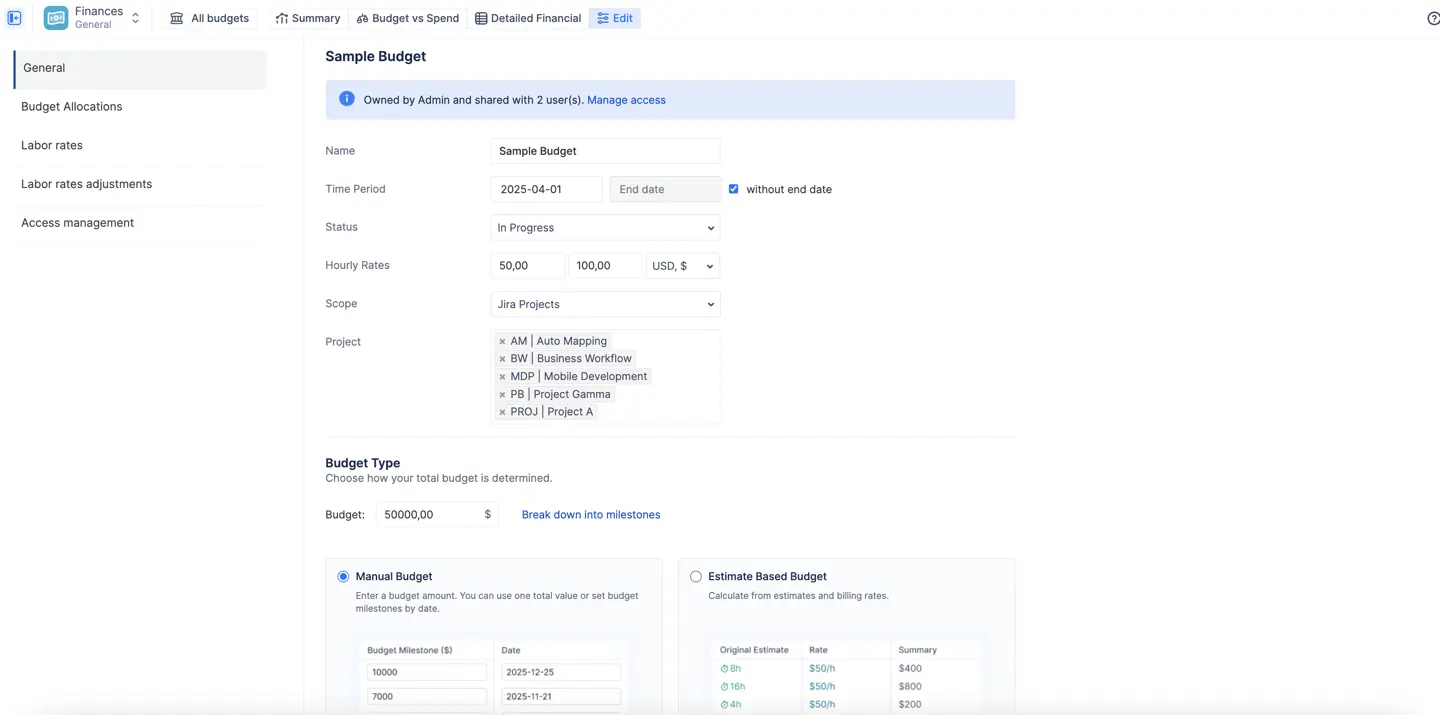
Presupuestos que son un alcance más un límite. Asigna un presupuesto a un proyecto de Jira, a un conjunto de épicas o a un filtro JQL guardado, establece un periodo (o ninguno, para tareas de mantenimiento continuas) y define el límite de una de estas dos formas:
- Presupuesto manual: una cantidad fija aprobada por la dirección, opcionalmente dividida en hitos, que es en lo que se convierte aquí el proyecto de tarifa fija de Harvest.
- Presupuesto basado en estimaciones: calculado por la aplicación a partir de las estimaciones originales del alcance multiplicadas por tus tarifas de coste, de modo que el presupuesto es el plan, antes de que nadie registre una sola hora.
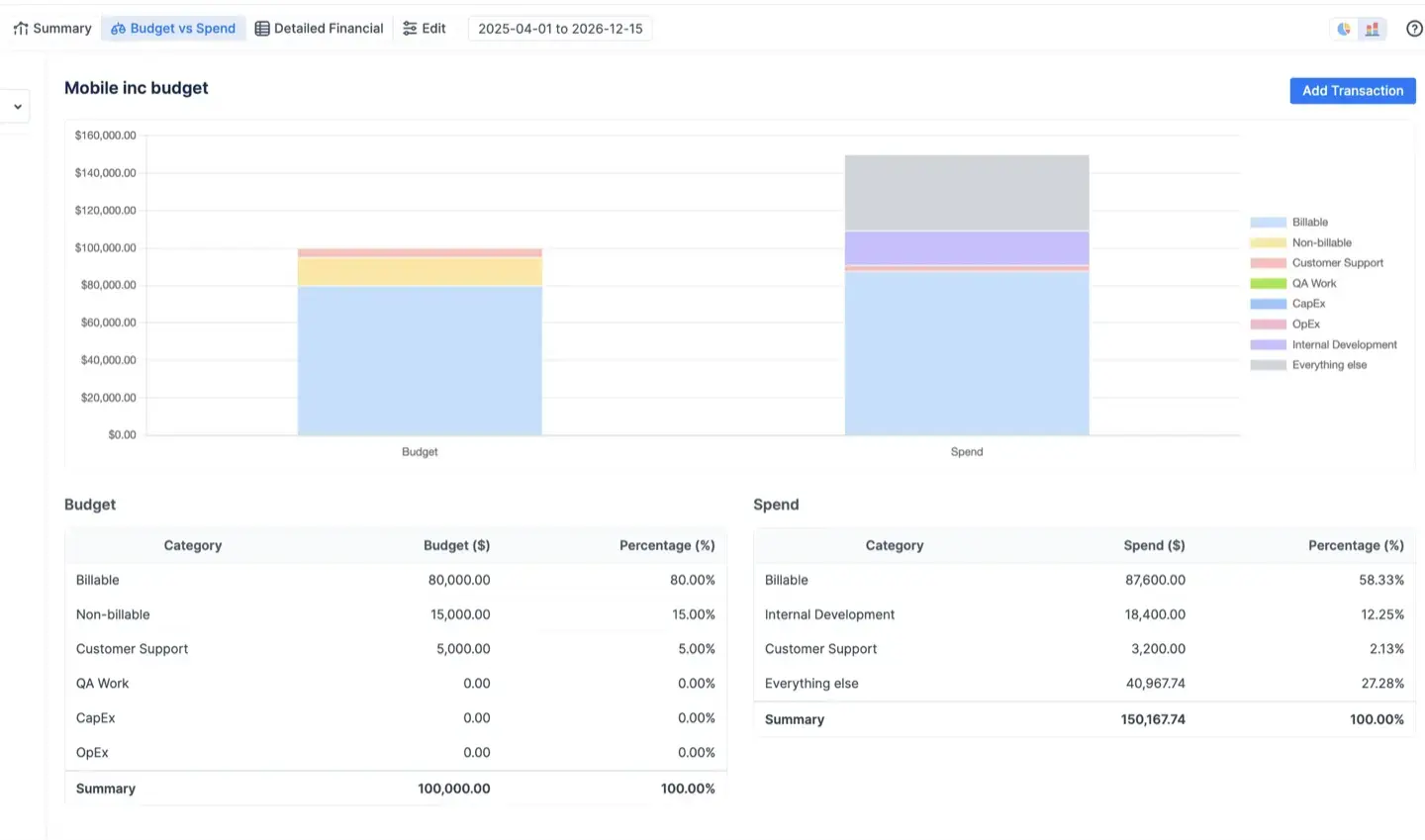
El seguimiento de costes y el de ingresos se activan de forma independiente, por lo que un departamento interno puede realizar el seguimiento solo de los costes, mientras que una agencia puede hacer ambos. Las asignaciones presupuestarias te permiten dividir el total entre categorías, puestos, componentes o personas antes de que comience el trabajo (70 por ciento desarrollo, 20 por ciento control de calidad, 10 por ciento urgente), y el informe de Presupuesto frente a Gasto muestra dónde se desvía la realidad de esa distribución mientras aún estás a tiempo de hacer algo al respecto. Cambiar un presupuesto no altera el mes pasado; el historial permanece intacto.
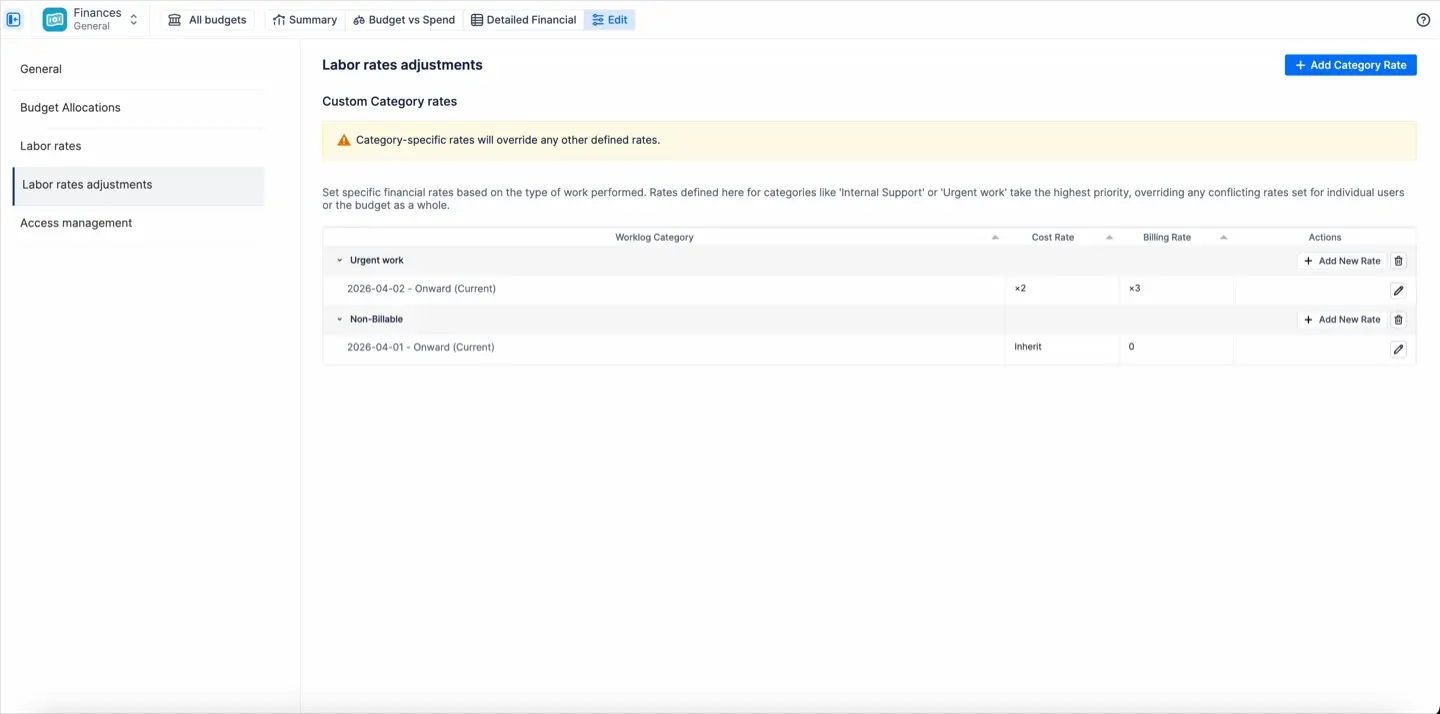
Tarifas que se ajustan a cómo pagas realmente a tu equipo. Cada persona tiene una tarifa de coste y una tarifa de facturación, ya sea por hora o mensual; las tarifas mensuales se adaptan al personal asalariado y a los contratos de iguala, y se prorratean a lo largo de los días del mes. Una tarifa por categoría adicional gestiona las horas que tienen un coste o facturación diferente: soporte urgente a 1,5 veces la tarifa base, no facturable a cero. Una jerarquía de tarifas aplica la tarifa más específica disponible: primero la categoría, luego la tarifa del usuario y, finalmente, la predeterminada del presupuesto. Todas las tarifas tienen fecha de vigencia, por lo que un aumento en marzo se aplica a partir de marzo y febrero permanece como estaba. Harvest hace esta parte bastante bien para las tarifas de coste; lo que le falta es el tipo mensual y la capa de categorías.
Costes que no son horas. Licencias, facturas de contratistas, viajes, alojamiento. Añádelos como transacciones, como un gasto o como ingreso (un pago por hito, una iguala), vincúlalos a una incidencia o a una persona, y establece una recurrencia para que una cuota de alojamiento mensual se registre sola. Aparecerán en los mismos informes que los costes laborales.
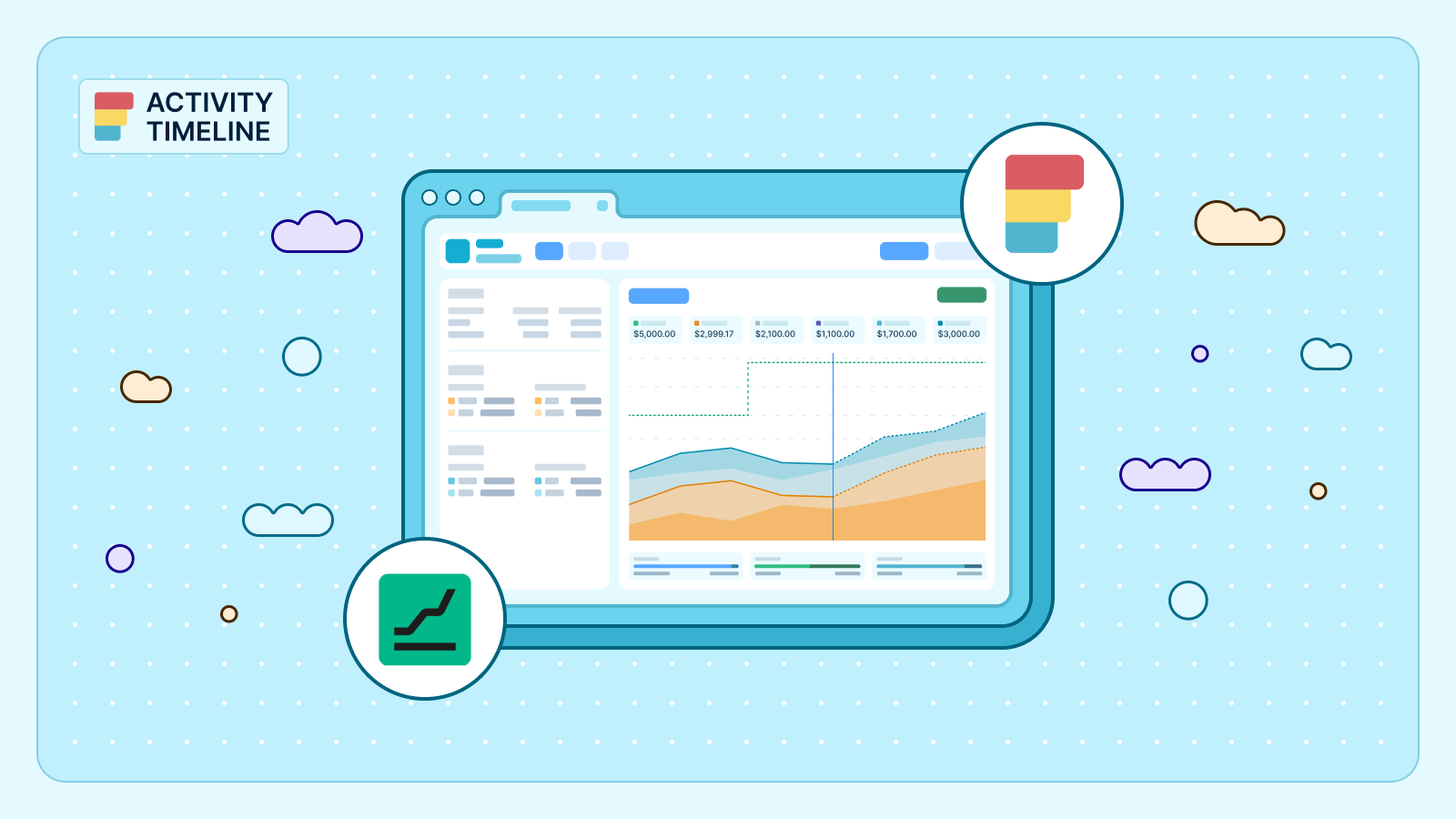
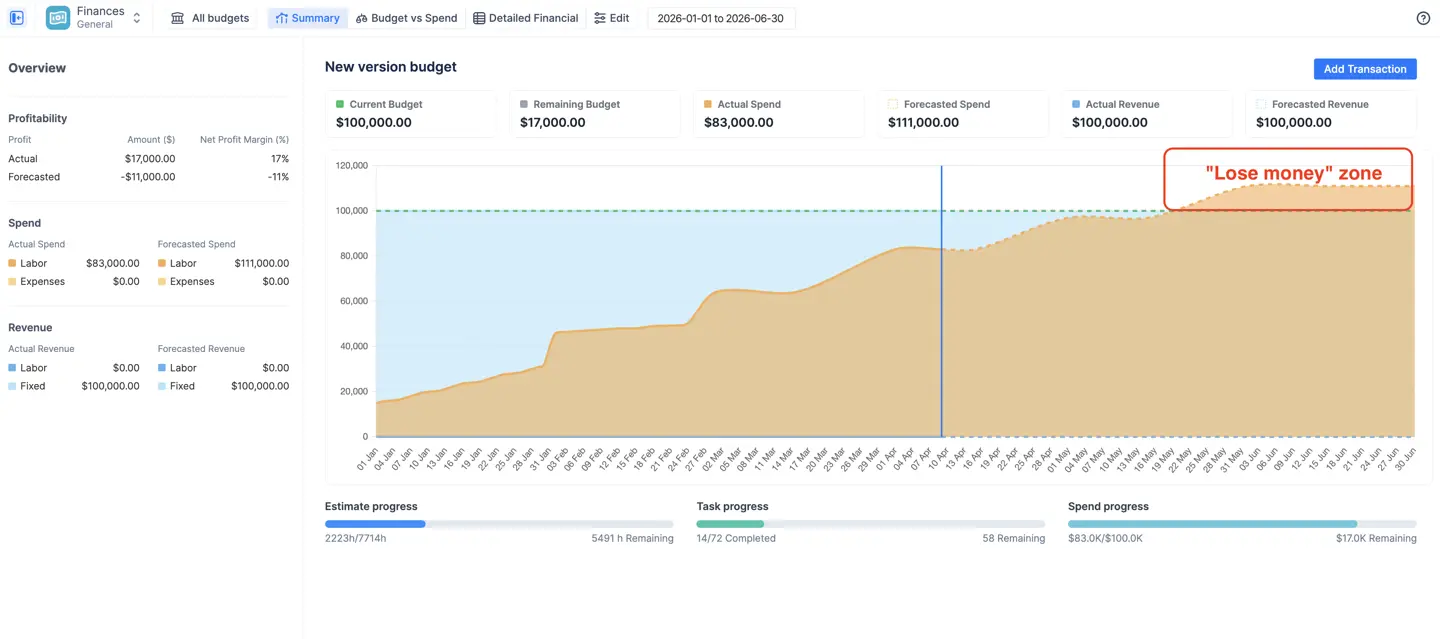
Previsión integrada, sin necesidad de un segundo producto. El gasto y los ingresos previstos se calculan a partir de lo que ya está programado: trabajo planificado, transacciones recurrentes y tarifas mensuales proyectadas durante el periodo presupuestario. El gráfico de tendencia acumulada muestra la previsión cruzando la línea presupuestaria semanas antes de que lo haga la línea real, que es el momento en el que el proyecto de 90.000 dólares de la historia anterior debería haberse detectado.
Tres informes financieros en tiempo real.
- Panel de resumen: presupuesto actual y restante, gasto e ingresos reales y previstos, beneficio y margen, el gráfico de consumo acumulado y barras de progreso que comparan el dinero gastado frente a la estimación consumida y las tareas resueltas, que es como te das cuenta de que el 60 por ciento del presupuesto cubrió el 35 por ciento del trabajo.
- Presupuesto frente a Gasto: asignaciones frente a la realidad, agrupadas por categoría, proyecto, épica o responsable, mediante gráficos circulares para proporciones o barras para cantidades, con una línea roja donde una asignación se ha excedido.
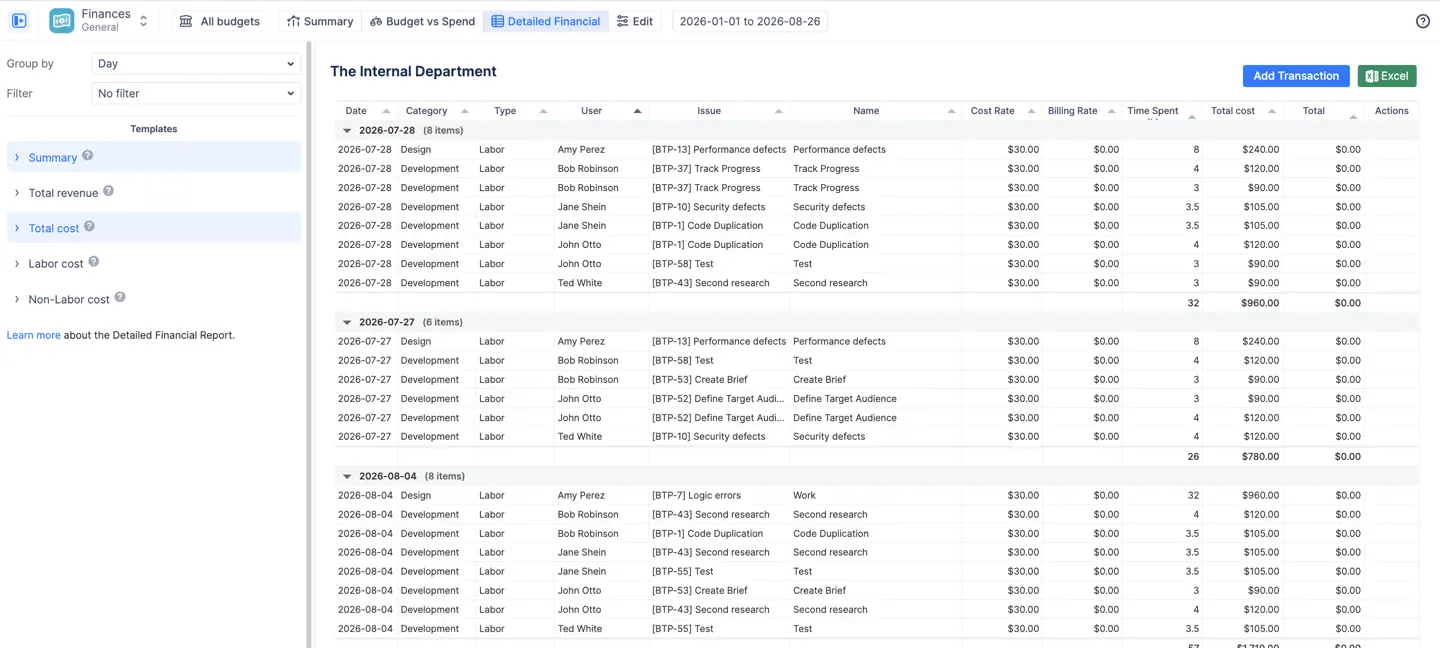
- Informe financiero detallado: el libro mayor, cada hora registrada y cada transacción como una línea con la tarifa aplicada, filtrable por rango de fechas y exportable a Excel para el contable que nunca iniciará sesión en Jira y que no debería tener que hacerlo.
Aprobaciones que bloquean la entrada, no la semana. Los gerentes, líderes de equipo y administradores aprueban los registros de trabajo uno por uno o de forma masiva; los registros aprobados se bloquean, la aplicación registra quién aprobó qué y los administradores pueden limitar la antigüedad de los registros para cerrar los libros contables. Nadie tiene que retirar toda una semana porque alguien envió sus horas un miércoles.
Quién ve el dinero. Tres roles por presupuesto: Propietario, Administrador y Solo lectura. El rol de Solo lectura ve todos los informes pero nunca las tarifas, que es como un gestor de proyectos obtiene los márgenes sin ver los salarios. Los presupuestos también respetan los permisos de proyecto existentes en Jira, por lo que las finanzas nunca muestran a nadie incidencias que no debería ver.
Lo que Harvest no puede hacer sin Forecast
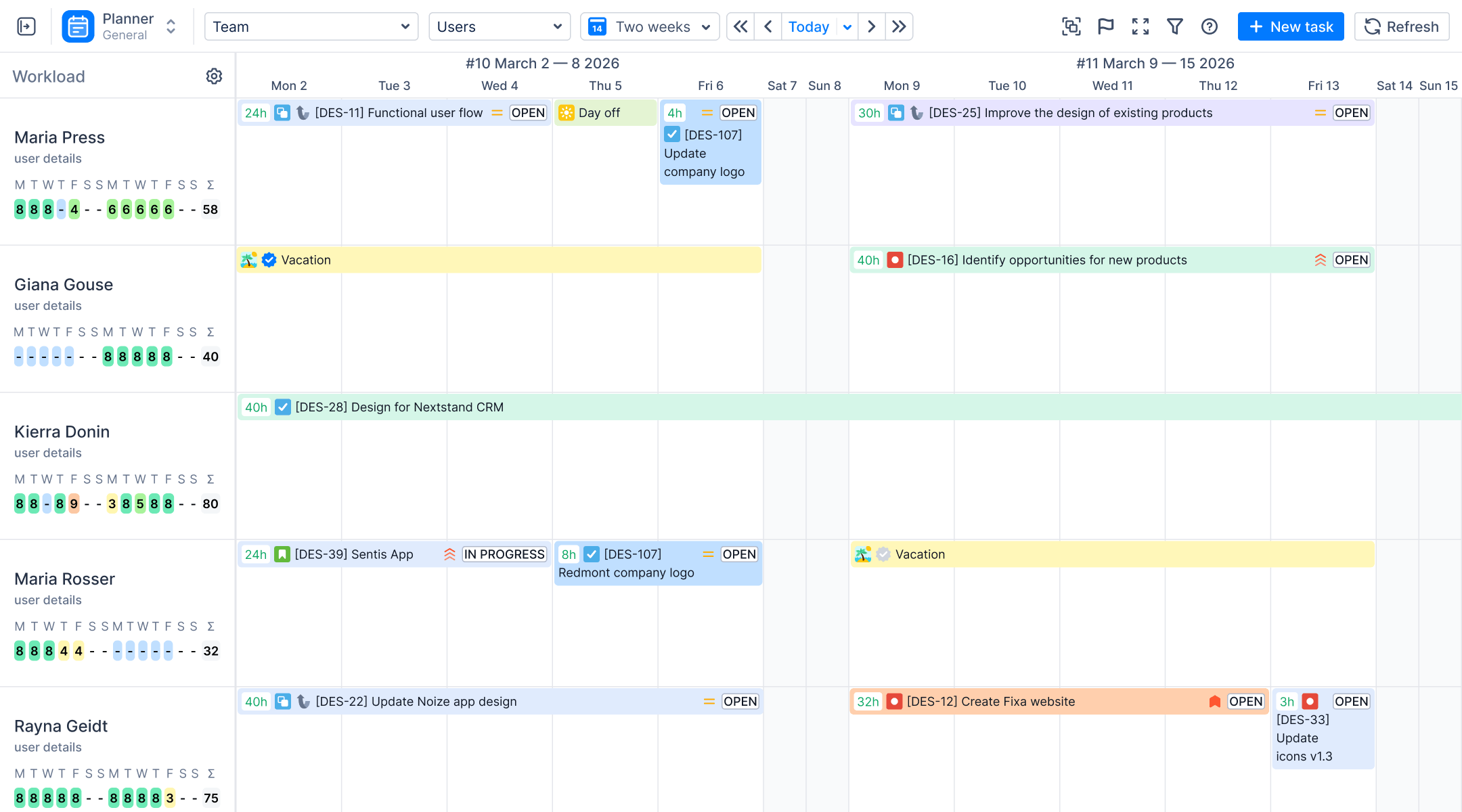
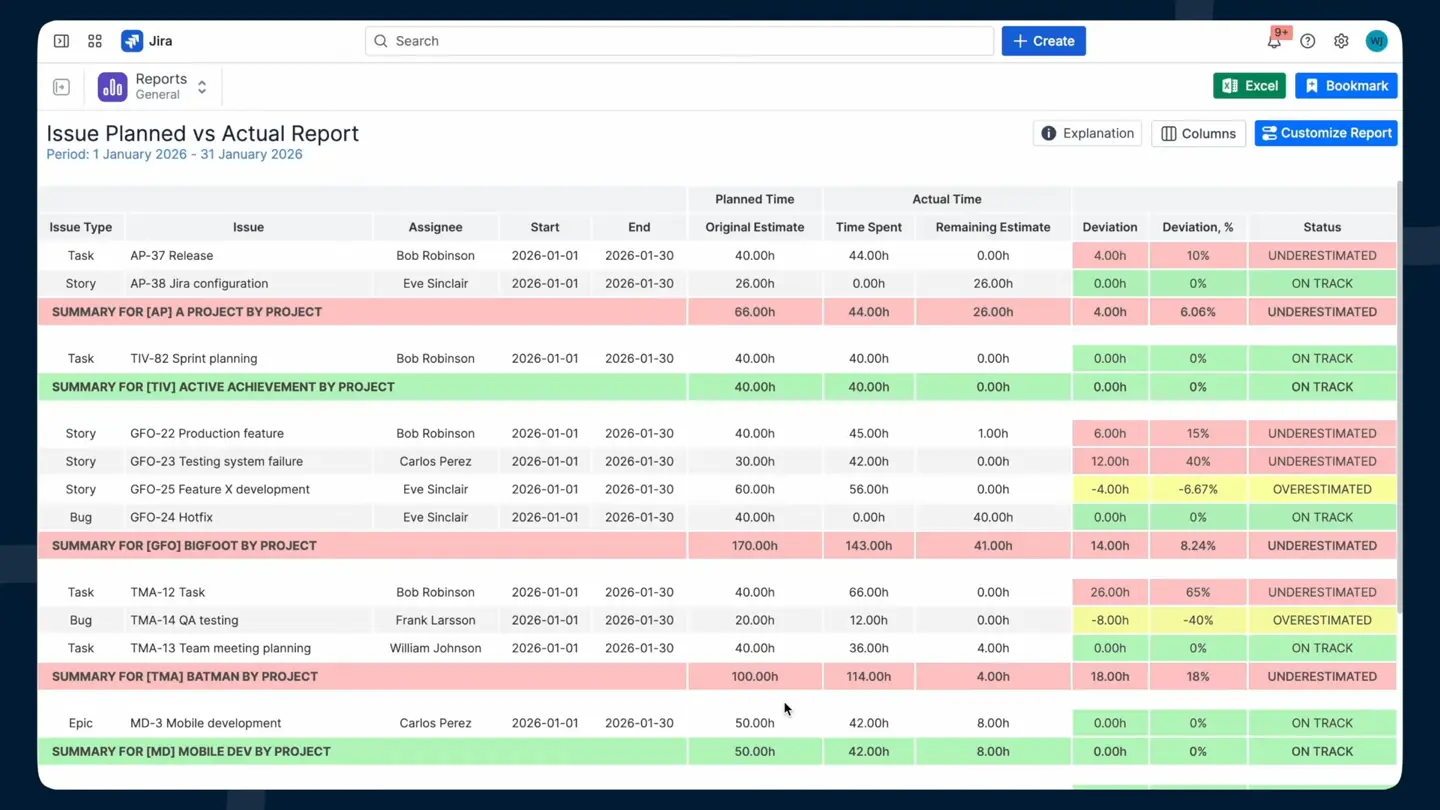
La misma aplicación planifica el trabajo, con vistas nativas de Jira para gestionar tareas y cronogramas de proyectos. Debido a que ActivityTimeline es ante todo un planificador de recursos, la estimación de Jira y las horas registradas ya aparecen una al lado de la otra. El informe de Planificado frente a Real compara la estimación original con el tiempo registrado por proyecto y equipo, con un umbral de desviación que usted establece, de modo que el proyecto de 90.000 $ aparece como excedido en la sexta semana, no cuando llega el correo electrónico del presupuesto. La vista de carga de trabajo y la previsión de utilización de recursos muestran el tiempo del equipo en el trabajo programado y las estimaciones restantes, para que pueda ver qué miembros del equipo están sobrecargados la próxima semana antes de que comience el sprint y asignar tareas de forma más realista. En la edición Advanced, la hoja de horas de alineación muestra las horas planificadas frente a las registradas por persona, como un delta o un porcentaje de coincidencia, lo que también ayuda al gestionar tareas y tratar de gestionar proyectos sin cambiar a otra herramienta. La vista general del equipo de Harvest también puede mostrar una columna de delta entre lo programado y lo real, pero solo una vez que haya comprado y conectado Forecast; aquí es la misma pantalla.
Lo que no hace
No hay facturación. Si la prioridad es el seguimiento del tiempo y la facturación en un mismo sistema, algunos equipos pueden preferir una alternativa externa a Harvest diseñada en torno a flujos de trabajo de facturación, especialmente cuando necesitan funciones de facturación para cobrar a los clientes con precisión. Finances realiza un seguimiento de los costes e ingresos internos y le entrega un libro mayor listo para facturar; la factura en sí, el botón de Stripe, la deducción de anticipos y la sincronización con QuickBooks son cosas que hace Harvest y nosotros no, y si la facturación es el centro de su flujo de trabajo, esa es una razón real para quedarse o para combinar ActivityTimeline con una herramienta de contabilidad. Los gastos son transacciones introducidas por un administrador de presupuesto, no recibos que un empleado fotografía con un teléfono y envía para su reembolso, por lo que esto no es un seguimiento de gastos para equipos que necesitan registrar gastos en campo o facturar a clientes desde un único flujo de trabajo. Finances es solo para la nube por ahora, y si utiliza Data Center y lo necesita, díganoslo, porque así es como decidimos qué construir a continuación. Y la edición Advanced es más de lo que necesitan la mayoría de los equipos de cinco personas. La edición Standard ya incluye hojas de horas, categorías, atributos, aprobaciones e informes de planificación, y eso cubre lo que la mayoría de los clientes realmente utilizan; nuestro propio director de proyectos sénior lo expresó así sobre los informes de hojas de horas: del 80 al 90 por ciento de los clientes utilizan el informe sencillo y nunca necesitan más, y quienes lo hacen pueden hacer clic en dos o tres botones más.
Migrar desde Harvest
Las horas de Harvest están en Harvest, por lo que, a diferencia de un cambio desde un rastreador nativo de Jira, hay un historial que trasladar. Harvest exporta informes de tiempo detallados a CSV con la clave de incidencia de Jira en el campo de notas dondequiera que la gente haya usado el complemento; a partir de ahí, se pueden crear registros de trabajo en Jira a través de la API REST o una herramienta de importación, y ActivityTimeline los lee en el momento en que existen. La migración es más fácil cuando las notas de Harvest incluyen sistemáticamente las claves de incidencia, ya que eso facilita la recreación de las entradas de tiempo antiguas y el seguimiento de las horas frente a las incidencias correctas. Las tarifas son la parte más sencilla: la tarifa de coste y la tarifa de facturación de una persona son dos campos en ActivityTimeline, y las tarifas de todo un equipo se pueden importar desde un grupo de Jira en lugar de escribirlas una por una. Lo que no se traslada es la estructura de clientes y tareas de Harvest, porque los proyectos e incidencias de Jira asumen ese papel, y el historial de facturación, que permanece en Harvest o en su sistema contable.
Perfil de cliente ideal y precios
ActivityTimeline se adapta a gestores de proyectos y recursos que necesitan conectar la planificación de capacidad con los informes financieros; agencias, consultoras y equipos de servicios profesionales que facturan por horas; y equipos que ya utilizan ActivityTimeline para la planificación y quieren ver el aspecto financiero en el mismo lugar. Una suscripción cubre la planificación, las hojas de horas, los informes y las finanzas. La edición Advanced cuesta 1.245 $ al mes para 500 usuarios (2,49 $ por usuario), 2.195 $ para 1.000 (2,19 $ por usuario) y 2.895 $ para 2.000 (1,45 $ por usuario), facturados en la misma factura de Atlassian que Jira, con una prueba de 30 días y sin necesidad de tarjeta de crédito. Entre herramientas comparables, los planes de pago suelen ser donde se abren los flujos de trabajo avanzados, y algunas opciones de seguimiento automático como Rize cuestan más por puesto que Harvest, con su nivel Team a 29,99 $ al mes, lo que refuerza el valor de ActivityTimeline para los equipos centrados en Jira. Puede probar cualquiera de las ediciones y cambiar entre ellas durante o después de la prueba, y la facturación anual ahorra más si ya sabe que la mantendrá después del periodo de prueba gratuito de 30 días, así que comience con Advanced si quiere ver Finances y baje a Standard si el seguimiento del dinero resulta no ser su problema.
Las horas solo son útiles cuando alguien puede ponerles un precio, en el mismo lugar donde se planifica el trabajo. Ese es todo el argumento de esta sección.
#2 Tempo Timesheets con Financial Manager
Ideal para: grandes empresas que dejan Harvest, que quieren tener todo dentro de Jira y que se sienten cómodas comprando el ecosistema de un proveedor por partes.
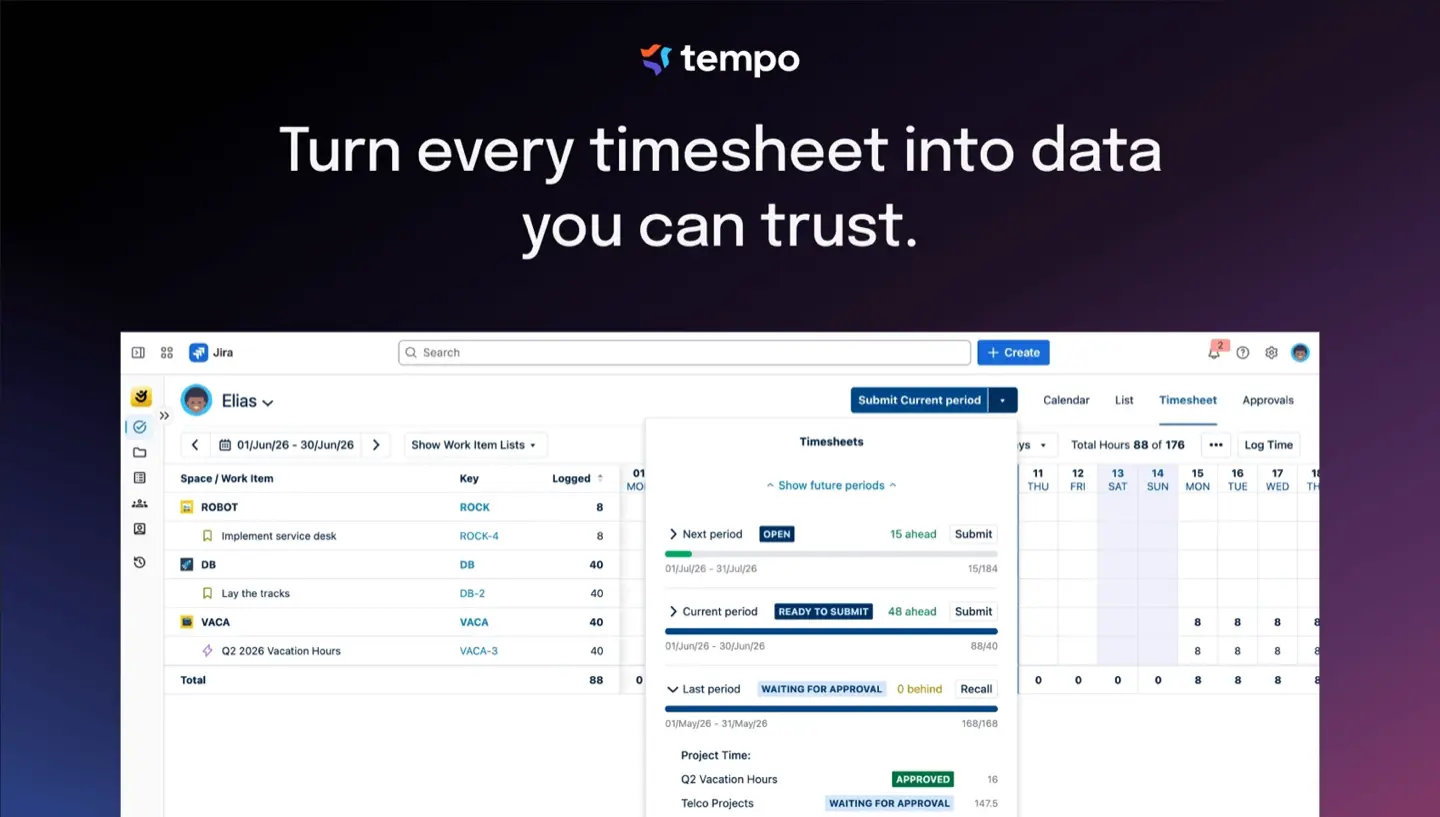
Esto es lo más parecido a un Harvest nativo de Jira. Tempo Timesheets le ofrece registros de trabajo nativos de Jira, lo que se adapta a las empresas que necesitan planificación de capacidad y programación de empleados en Jira, aprobaciones maduras a nivel de hoja de horas o de proyecto, cuentas y clientes de Tempo en los registros de trabajo, informes detallados, y versiones Cloud y Data Center. Financial Manager (anteriormente Cost Tracker) convierte esos registros de trabajo en costes, ingresos y un presupuesto por proyecto, con tipos de cuenta CAPEX y OPEX. Si tiene 500 usuarios o más y una política de un solo proveedor, nadie tendrá problemas por elegir Tempo.
El punto débil es que el camino de las horas al dinero requiere dos o tres licencias. Los costes y los ingresos residen en Financial Manager, una aplicación de pago independiente y solo para la nube. La planificación y la previsión residen en Capacity Planner, una tercera compra. Con 500 usuarios, Timesheets cuesta 1.728 $ al mes y Financial Manager otros 909,50 $, por lo que el par cuesta aproximadamente el doble que ActivityTimeline Advanced para una capacidad equivalente, y Tempo aumentó los precios de lista entre un 10 y un 25 por ciento en todas sus marcas en septiembre de 2025. Los presupuestos en Financial Manager son un total manual que se rastrea a posteriori, que es el modelo de Harvest con mejores tuberías. Todas las aplicaciones incluyen una prueba gratuita de 30 días. Elija esta opción si tiene más de 500 usuarios, el presupuesto no es la limitación y un ecosistema conocido por partes es mejor que evaluar a un proveedor más pequeño.
#3 Everhour con la integración de Jira
Ideal para: equipos que dejan Harvest por la experiencia de Jira pero quieren seguir facturando desde el rastreador.
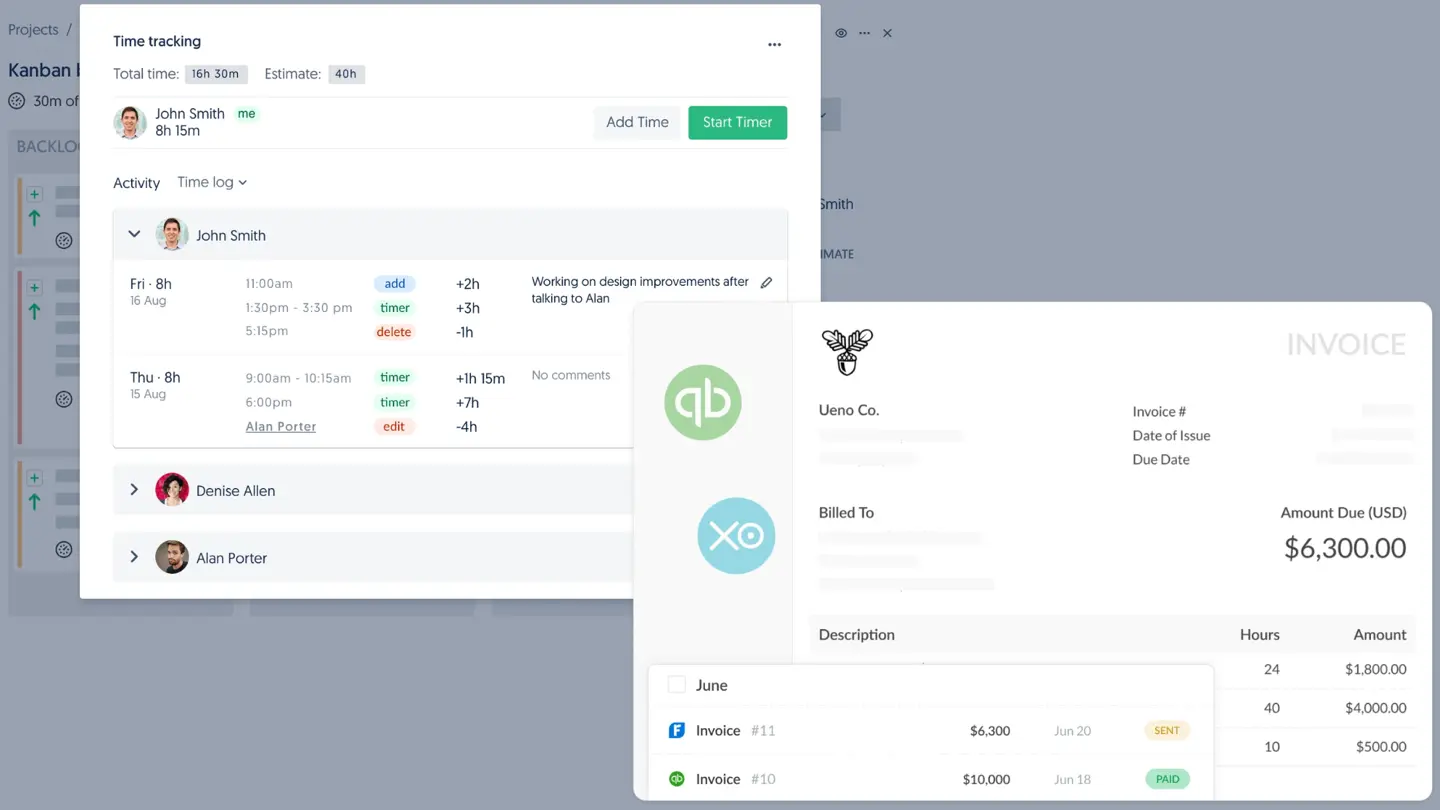
Everhour es la opción con un enfoque similar a Harvest y también se adapta a equipos que ya utilizan herramientas de gestión de proyectos como Asana, ClickUp o Trello junto con Jira. Su temporizador y sus controles de presupuesto se integran directamente en la vista de incidencias de Jira en lugar de en un panel lateral; los nombres de los proyectos y las incidencias se sincronizan automáticamente, y los presupuestos, las tarifas facturables, las alertas de umbral y la facturación vienen incluidos en el plan Team, por 8,50 $ por usuario al mes con facturación anual y un mínimo de cinco usuarios. Everhour es gratuito para hasta cinco usuarios y ofrece una prueba gratuita de 14 días. Proporciona un seguimiento del tiempo integrado mediante conexiones directas con Asana, ClickUp y Jira, lo que lo hace más adecuado para equipos que trabajan con varias herramientas o gestionan múltiples clientes. Cuando la sincronización del registro de trabajo está activada, las entradas realizadas en Everhour se envían al registro de trabajo nativo de Jira, una función que va más allá de lo que ofrece el complemento de Harvest.
Su punto débil es que sigue siendo un sistema independiente. La documentación de Everhour indica que la sincronización es unidireccional: el tiempo registrado directamente en Jira no se captura y el historial no se transfiere, por lo que todo lo que se registre de forma nativa en Jira nunca llegará a la factura. Requiere dos inicios de sesión, presenta retrasos en la sincronización, una segunda interfaz de administración, no permite planificar según las estimaciones de Jira y tiene un precio por usuario que se suma al de Jira, situándose casi al mismo nivel que Harvest Teams. Además, sus facturas no permiten que los clientes paguen directamente desde ellas. Elígelo si la factura es tu objetivo principal y lo que echabas de menos era el temporizador dentro de la incidencia.
#4 Toggl Track con la integración de Jira
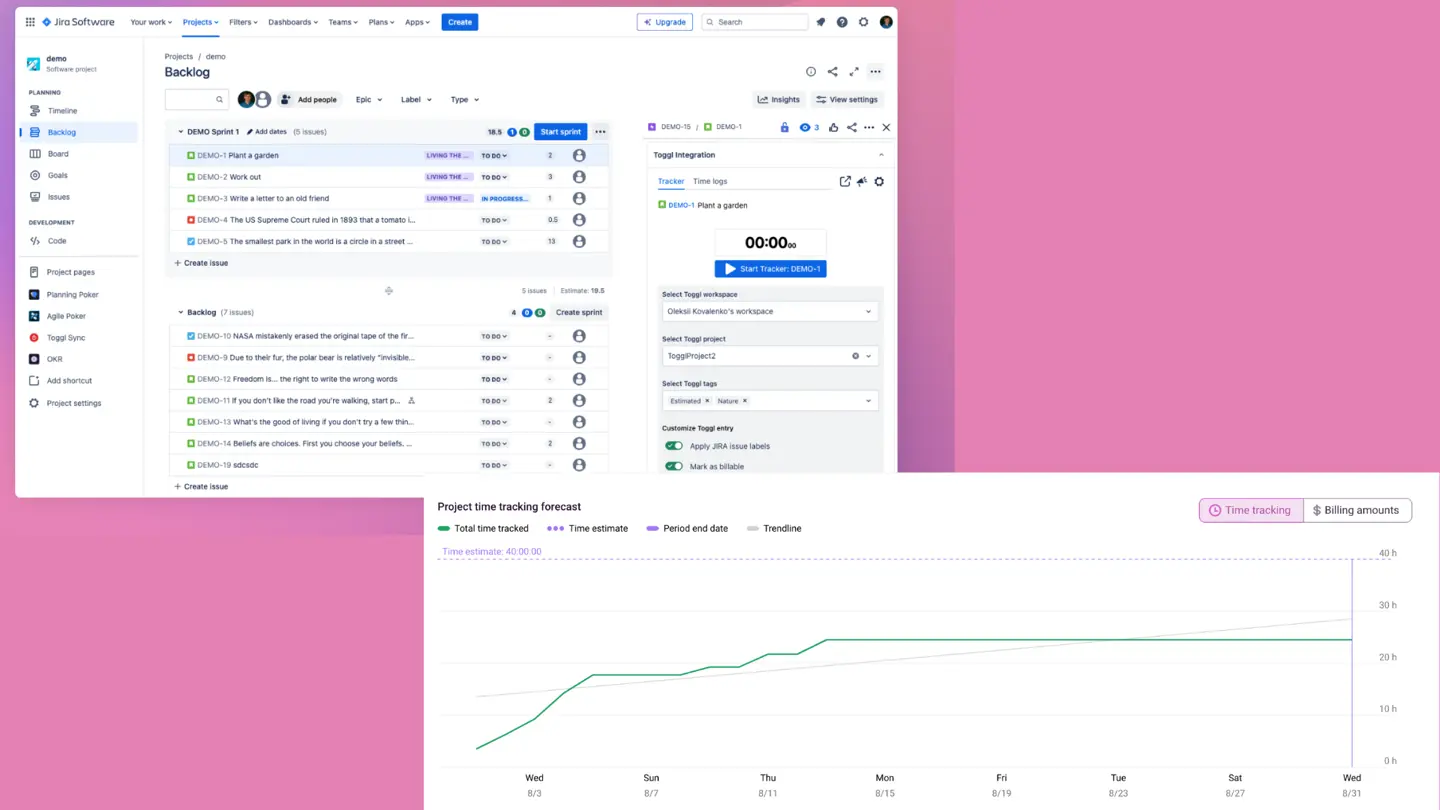
Ideal para: equipos que prefieren seguir con un rastreador externo pero buscan un temporizador más intuitivo y una estructura de precios más sencilla que el modelo Flex de Harvest.
Su temporizador es el mejor de su categoría, la extensión del navegador añade un botón de inicio dentro de Jira y las tarifas facturables están disponibles en el plan Starter por 9 $ por usuario al mes con facturación anual (12 $ mensual). Toggl Track también se integra con más de 100 herramientas adicionales, incluidas Asana y Jira. Los presupuestos de proyectos, las tarifas fijas, los costes laborales y el informe de rentabilidad forman parte del plan Premium, que cuesta 16 $ por usuario al mes con facturación anual o 24 $ mensual, al igual que la propia integración con Jira. Toggl Track ofrece una prueba gratuita de 30 días. No incluye componentes basados en el uso, lo cual, tras los cambios de Harvest en 2026, algunos equipos considerarán una ventaja.
El obstáculo es el mismo de siempre: los registros de trabajo permanecen en Toggl, Jira sigue vacío, la sincronización y la administración se duplican, y no hay funciones de facturación ni integración nativa con Stripe, por lo que es menos completo que Harvest en su punto fuerte. Elígelo si Jira es solo una de tus herramientas y buscas cambiar por la experiencia de usuario y una facturación predecible, no para cerrar la brecha entre sistemas.
#5 Clockify con la integración de Jira
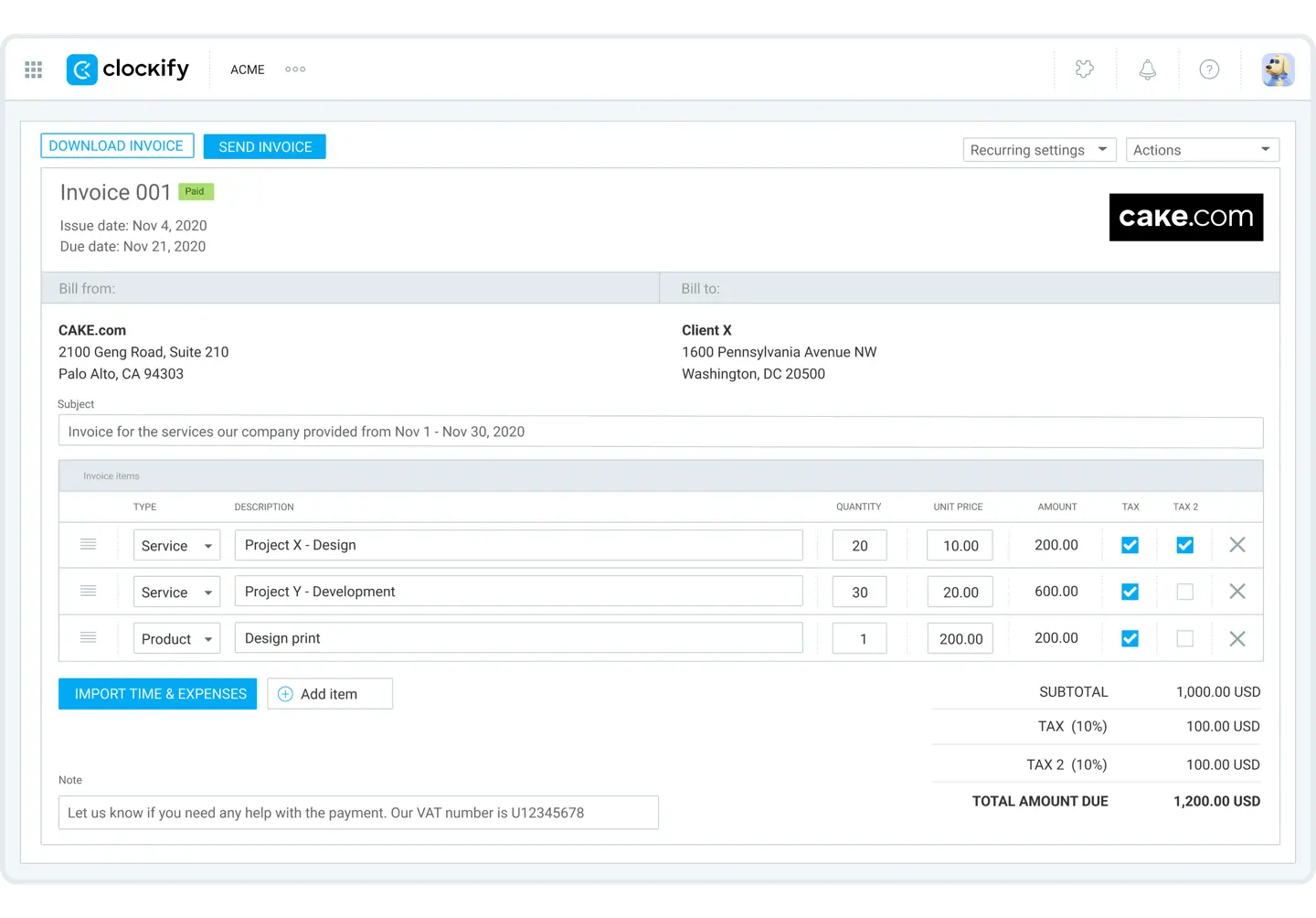
Ideal para: la opción más económica: equipos pequeños que desean un seguimiento al estilo Harvest con tarifas y facturación, pero que no pueden justificar un gasto de 9 a 14 $ por usuario.
El plan gratuito cubre el seguimiento básico para hasta cinco usuarios, con una prueba Pro de 7 días disponible. Los niveles de pago añaden las herramientas empresariales. El plan Basic comienza en 3,99 $ por usuario al mes (facturación anual) e incluye tarifas horarias y facturables. El plan Standard (5,49 $) añade aprobaciones, hojas de horas bloqueadas y facturación, mientras que el plan Pro (7,99 $) incluye presupuestos de proyectos, gastos y un calendario de programación. Para un equipo de diez personas, todo el conjunto sigue costando menos que Harvest para cuatro.
Sin embargo, el problema estructural persiste. Los datos están fuera de Jira y solo las entradas detenidas dentro del complemento de Jira llegan al registro de trabajo de Jira; los campos personalizados no se sincronizan, Clockify no lee las estimaciones de Jira y todas las funciones financieras son de pago, por lo que la herramienta gratuita se convierte en un gasto por usuario junto a Jira justo cuando el equipo crece. Elígelo si el precio es el motivo por el que dejas Harvest y el problema de las dos bases de datos no es una prioridad.
Conclusión
Harvest no es un mal producto. Resuelve muy bien el ciclo de "registrar tiempo, gastos y facturar", y lo hace de forma sencilla y fiable, por lo que para una agencia donde Jira es una herramienta secundaria, es una solución completa. La mayoría de los equipos que lo superan no lo hacen por un fallo en el temporizador. El problema es que Jira se convirtió en el lugar donde se planifica y estima el trabajo, mientras que Harvest siguió siendo el lugar donde se mide el tiempo, y ambos mundos nunca llegaron a encontrarse.
Si la facturación es el centro de tu flujo de trabajo y quieres el temporizador dentro de la incidencia, elige Everhour. Si buscas la experiencia de un rastreador con precios fijos, elige Toggl Track; si lo quieres casi gratis, Clockify. Si eres una gran empresa con presupuesto y una política de proveedor único, elige Tempo, adquirido por partes. Y si lo que buscas es gestionar horas, planificación y finanzas en una sola aplicación de Jira por una fracción del coste de Harvest Enterprise más Forecast, la opción es ActivityTimeline Advanced Edition, con las advertencias mencionadas: sin facturación, con finanzas solo en la nube por ahora, y más de lo que un equipo de cinco personas necesita (en cuyo caso, empieza por el plan Standard).
¿Quieres verlo en la práctica?
Si tu revisión de sprint y tu informe de Harvest siguen contando historias diferentes, prueba ActivityTimeline con una prueba gratuita de 30 días en el Atlassian Marketplace y comprueba si el módulo de Finanzas se ajusta a tus necesidades antes de realizar cualquier pago. El seguimiento de lo planificado frente a lo real, el control de facturación y la previsión de utilización utilizan los mismos registros de trabajo de Jira, por lo que no hay nada que sincronizar.