
Your current resource planning "system" – whether it’s spreadsheets, or you are still struggling with how to do resource management in Jira using only basic tools – is costing you more than you think.
The Hidden Costs of Bad Planning
Project Managers are the backbone of your team and they are drowning in manual tasks. Spending 5 to 9 hours just copy-pasting data into Excel for one single report.
But manual work kills focus. And no matter how skilled your team is, mistakes will happen. “Did I paste that into the wrong column?” is a feeling that happens to the best of us. That's just the truth of the situation. Research shows that 90% of spreadsheets contain errors and those mistakes cost the U.S. economy $3 trillion a year. Those "small" mistakes snowball into delays that can bloat project costs by up to 30%.
Beyond that, burnout drains your budget. You are losing $4,000 to $21,000 per employee in productivity alone, long before they decide to quit.
Yet, many companies cling to the idea that “If it ain’t broke, don’t fix it”. Here’s the truth: it is broken. That "free" or "existing" tool is secretly costing you a fortune in lost productivity, critical errors, project delays, and talented people. Ignoring ActivityTimeline onboarding is the biggest cost you’ll face this year. Just try ActivityTimeline free for 30 days and see the results.
10 Ways ActivityTimeline Delivers Positive ROI in 90 Days
1. Reclaim Your Managers’ Time with ActivityTimeline Onboarding (ROI: Automated Reporting)
Stop chaining your managers to spreadsheets. Make a quick ActivityTimeline start to automate reporting, saving 5-9 hours per manager. Imagine the time freed up for strategy and decision-making. This isn’t just empty talk. IMCD Group reduced invoice sign-offs fivefold, saving over 5 hours of admin work every month.
2. Prevent Burnout & Turnover (ROI: Workload Visibility)
Overworked employees = burnout.
ActivityTimeline permits every teammate with a visual engagement gauge to see who is over (red), or under (yellow) allocated, or perfectly balanced (green) with their workload. This feature is the best and first line of defence against team burnout. Managers can finally start balancing workloads effectively before a crisis hits.
The ActivityTimeline implementation solved a critical visibility problem for Loto-Québec. Without a capacity planning tool, the organization struggled to balance workloads, often leading to misallocation and stress.
They were able to clearly visualize team capacity by putting the tool into practice. Vanessa Da Silva Ambrósio (Team Leader of IT Alignment and Strategic Planning) says that teams are now using the app to “demonstrate work overload, justify hiring or even avoid firing people, by showing the team's workload”. Thanks to this data-driven transparency they are able to reprioritize projects and prevent talent turnover.
3. Increase Billable Hours (ROI: Accurate Time Tracking)
Every unlogged billable hour is lost revenue.
ActivityTimeline simplifies time tracking, ensuring all billable hours are logged correctly. This accurate, consistent tracking has an immediate and direct impact on cash flow by stopping revenue leakage. Just as strict new labor regulations hit Denmark, FractureCode struggled with unstructured, inconsistent tracking in Jira. They needed to fix it really fast. Through ActivityTimeline onboarding, FractureCode gained full visibility into time spent by team and customer, which is the critical first step to ensuring every billable hour is accurately captured and invoiced.
4. Eliminate Project Delays (ROI: Conflict Resolution)
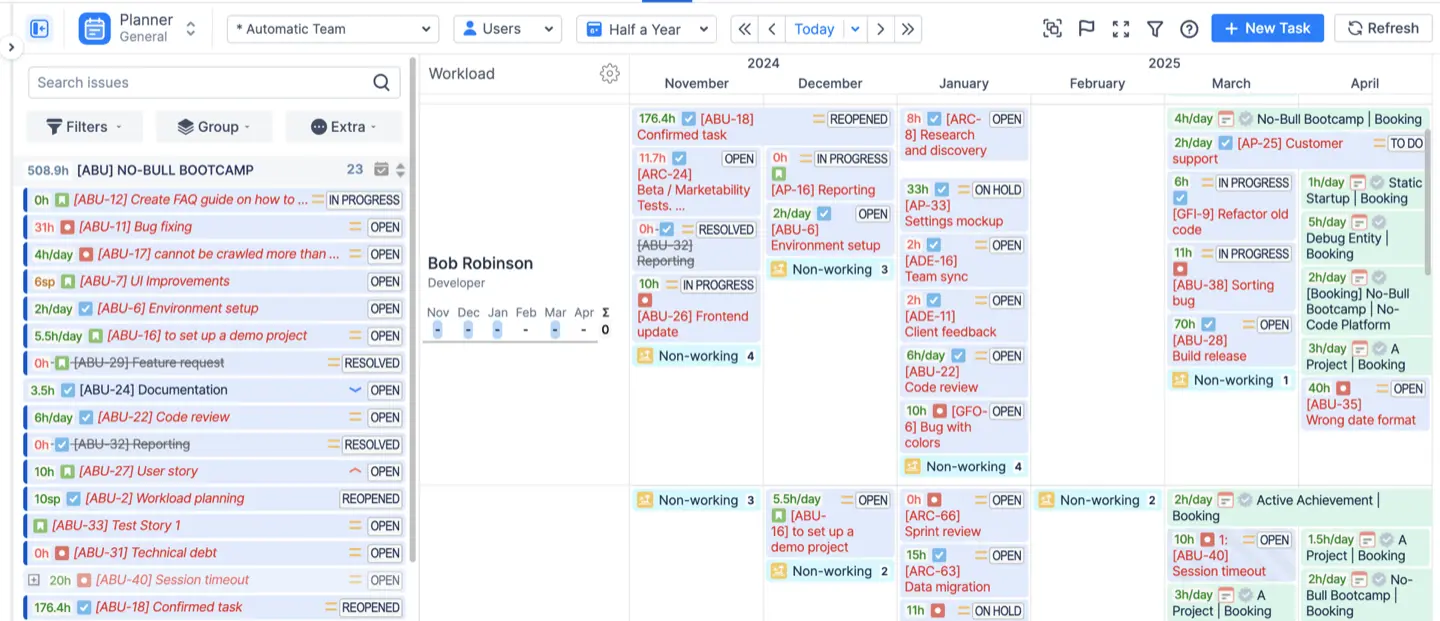
Have you ever had a project fail because two project managers accidentally scheduled the same expert for the same week? It happens more than teams admit and every conflict is discovered way too late, which costs you thousands in delays and rework. ActivityTimeline eliminates this mess by giving you a cross-project view of everyone’s workload. Conflicts become visually impossible to miss. Before a schedule clash can damage a timeline, the Planner shows it instantly so you can resolve it with one click.
5. Stop Scheduling Conflicts (ROI: Integrated Leave Management)
Everything looks perfectly scheduled… right up until someone casually mentions they’ll be out next week. And suddenly, the whole plan shifts.
With ActivityTimeline there’s no need to even think about scheduling conflicts. ActivityTimeline solves this headache by fusing leave management directly into your scheduling workflow. If someone is unavailable, the system will not let you schedule them.
Medtronic, for example, needed a solution to manage absences. ActivityTimeline delivered a feature to automatically sync “out of office” status from their system. That way their plan is always based on reality, not assumption.
6. Optimize Your Bench (ROI: Resource Utilization)
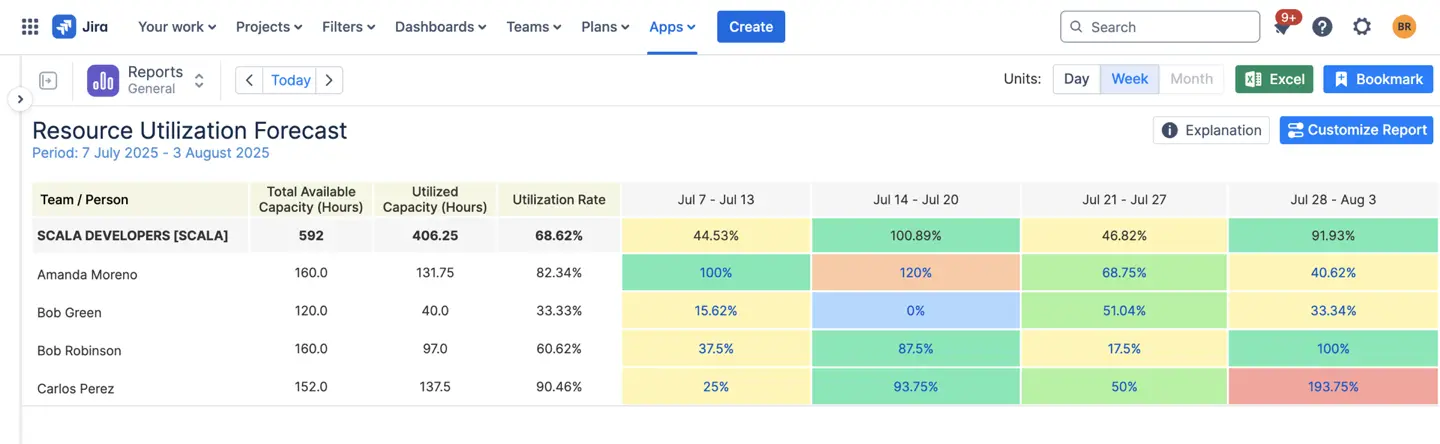
Do you have employees “on the bench” or under-utilized simply because no one knows they’re available? That is pure wasted budget. They still cost money and don’t contribute value, simply because no one realizes they’re free.
Who is available for new work? Who is underloaded? You can see that instantly in the Resource Utilization Forecast and Availability Reports. Managers get a clear view of who is capable of taking on new responsibilities, as well as who needs help.
7. Staff Projects Faster (ROI: Skills Management)
It often takes a week of frustrating emails like “Who knows Python and is free next week?”
But we have a solution. ActivityTimeline fixes this with searchable Skills & Tags. Need someone with special experience? Type it in and you will instantly get a filtered list of qualified people who are actually available.
ELVA faced a critical issue: their previous planning tools showed only “day-old data”. They needed a solution to visualize plans for weeks ahead, not just today. After implementing ActivityTimeline, they gained the ability to “extend tasks over several weeks”. This shift gave them true visibility, allowing them to move from reacting to outdated info to planning their future.
8. Pass Audits with Ease (ROI: Timesheet Approvals)
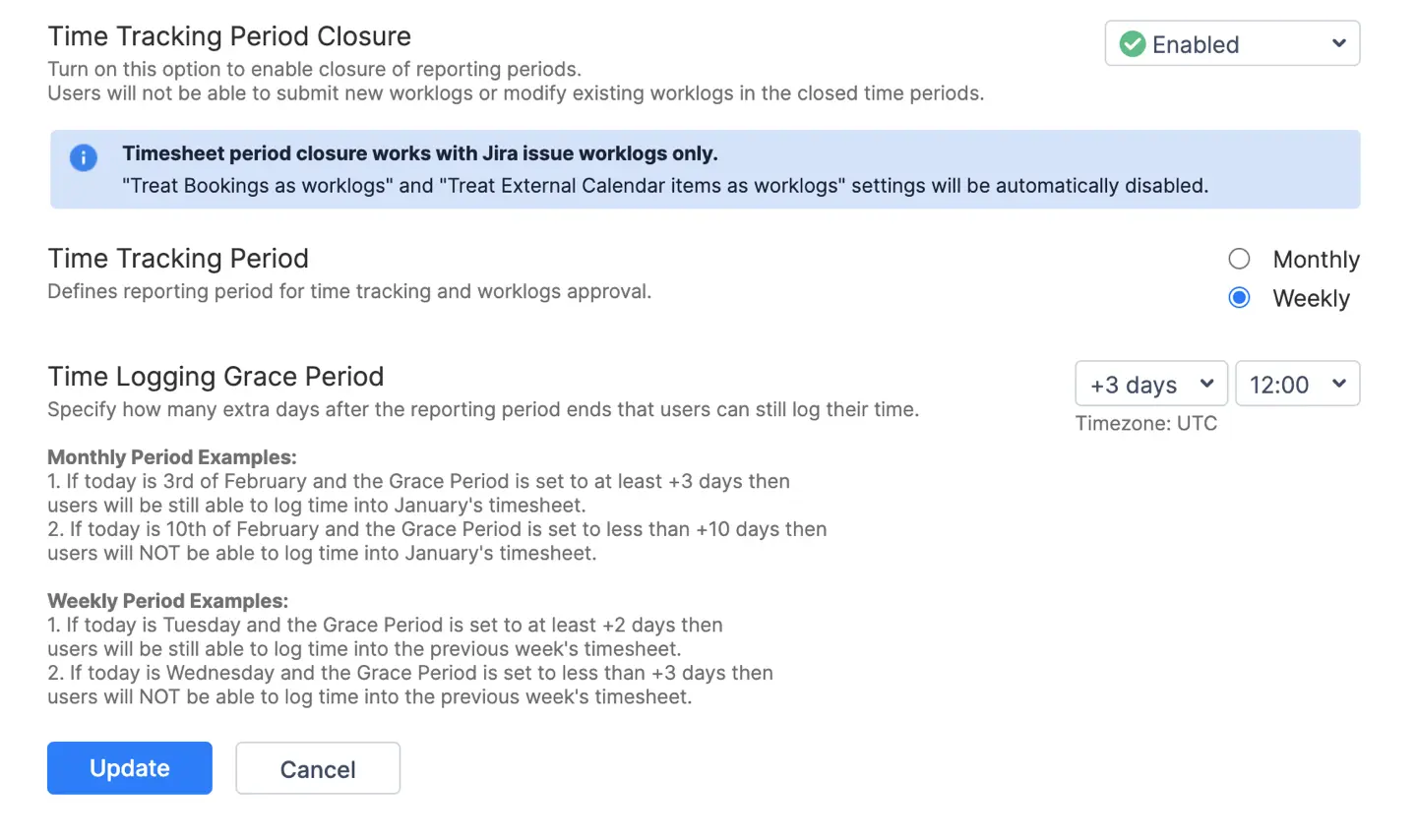
No more guessing if hours are logged correctly. ActivityTimeline allows you to set customizable approval periods for timesheets. That ensures that all hours are logged accurately and consistently. And that is actually essential for both internal budgeting and meeting compliance requirements.
IMCD Group struggled without a standardized way to track timesheets. ActivityTimeline streamlined this process so effectively that managers reduced the time spent signing off invoices from 5 min to just 1 min. That’s over 5 hours saved per manager each month.
9. Improve Future Bids (ROI: Planned vs. Actual Data)
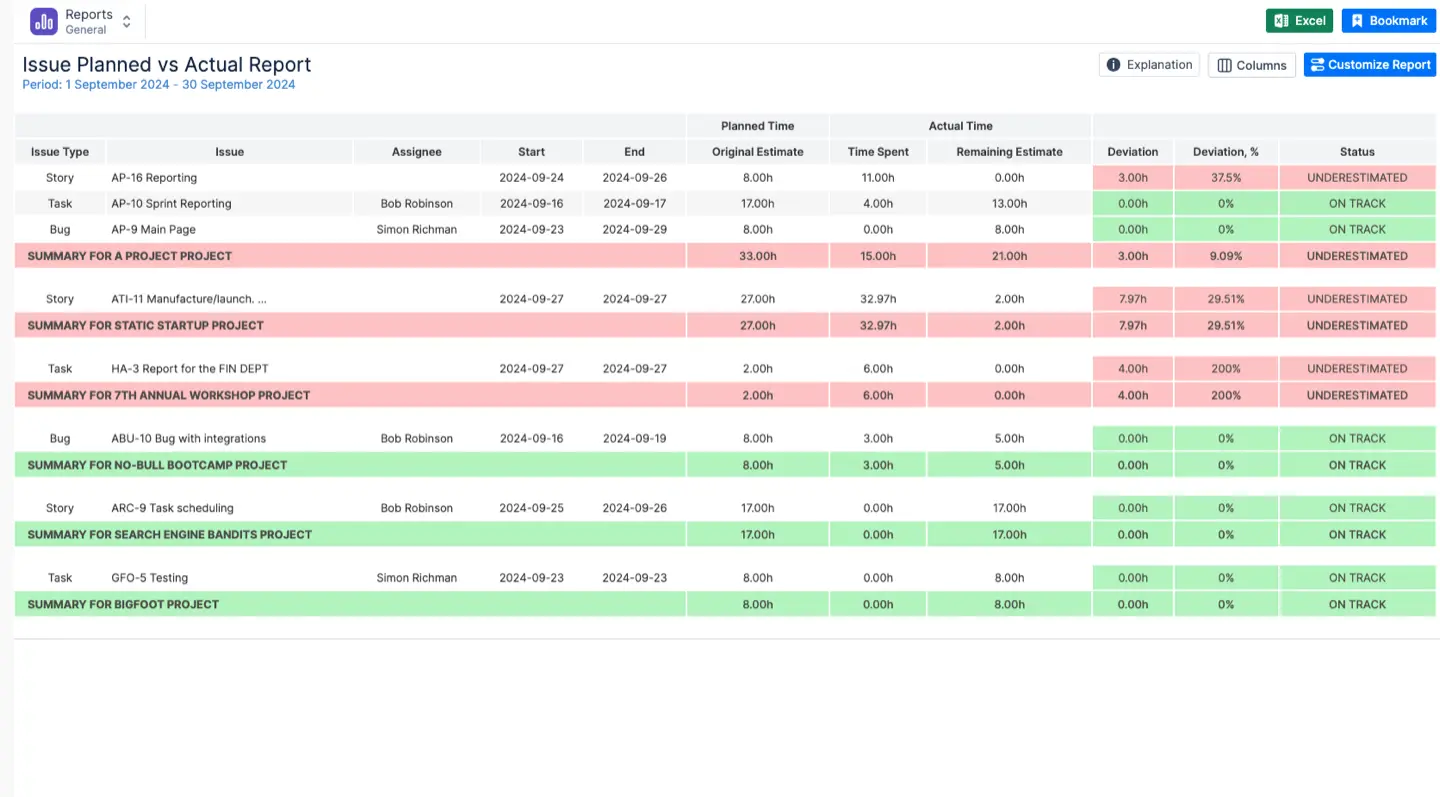
If you are still basing your project estimates on a “gut feel”, you’re probably loosing money. The “Planned vs. Actual” report is your crystal ball for project budgets. It directly compares the time you expected a task to take with the hours it actually consumed. ActivityTimeline captures this time automatically across all projects, giving you real data on what tasks really cost in time and effort. Your next estimates become grounded and accurate, not guesswork. And you can instantly spot when a project is losing money or when difficult tasks keep being underestimated.
10. Get a Single Source of Truth (ROI: Integrations)
Are you sick of switching between a dozen Jira boards?
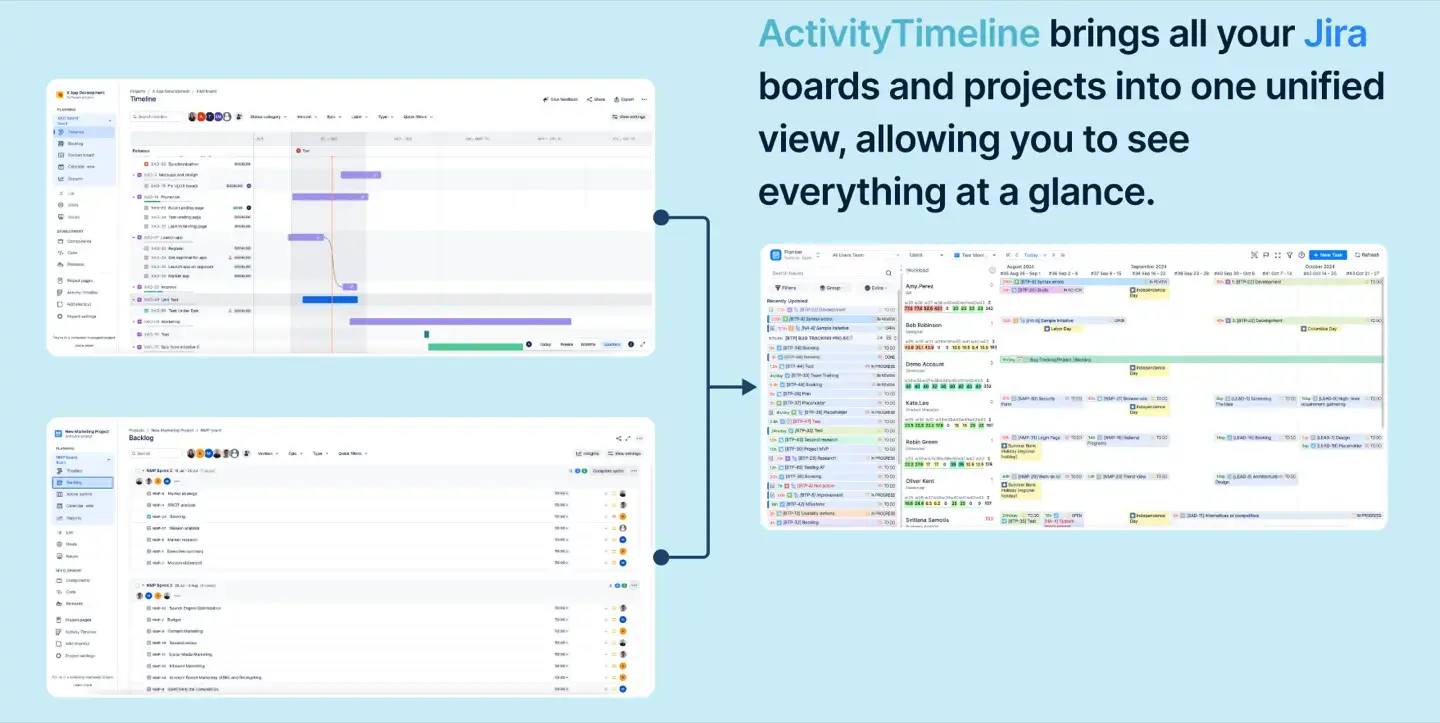
ActivityTimeline offers a single, all-inclusive, cross-project summary of all tasks, projects and resources. It integrates natively with Tempo, Advanced Roadmaps and external calendars (Microsoft Outlook, Google, Apple) turning data chaos into clarity. This makes it possible to intelligently manage shared resources.
Calculate Your ROI
Still think those "hidden costs" are just abstract problems? Let's make them painfully real.
First, let's calculate the cost of "free" manual reporting.
Manual work always pretends to be harmless, until you open a calculator.
The average hourly rate for a Project Manager in the US is around $50/hour. Let’s use the low end of the 5-9 hours/week wasted on manual reports that we mentioned earlier. You lose $13,000 annually per manager ($50 x 5 x 52)
Use this formula to calculate it for your team:
(Cost of 1 PM’s hour) x (Hours wasted on manual reports/week) x (52 weeks) =?
Next, the cost of turnover.
Industry standards show a turnover rate of about 13%. For a team of 15 people, that means losing 2 developers earning in average $104k each year. Replacing them is expensive, at least 50% of their salary.
For 2 developers, that’s a $104,000 check you just wrote for turnover ($104k x 50% x 2).
Calculate your cost:
(Cost of replacing 1 developer) x (Number of turnovers/year) =?
Finally, the cost of delays.
Every project looks perfectly planned… until you start noticing that some things just don’t add up. A task that should’ve been done yesterday isn’t even started, someone was double-booked for two sprints in a row. Mistakes in resource planning can bloat project costs by 30%. Apply that to $200,000 project budget and you will get $60,000 in pure waste ($200,000 x 30%).
Calculate your potential overrun:
(Project Budget) x (30% Cost Bloat) =?
Time to add up the real cost of that “free” manual process:
- $13,000 (Wasted PM time)
- $104,000 (Replacing just 2 devs)
- $60,000 (One bad project delay)
Total Waste: $177,000/year
Now, look at the price of ActivityTimeline.
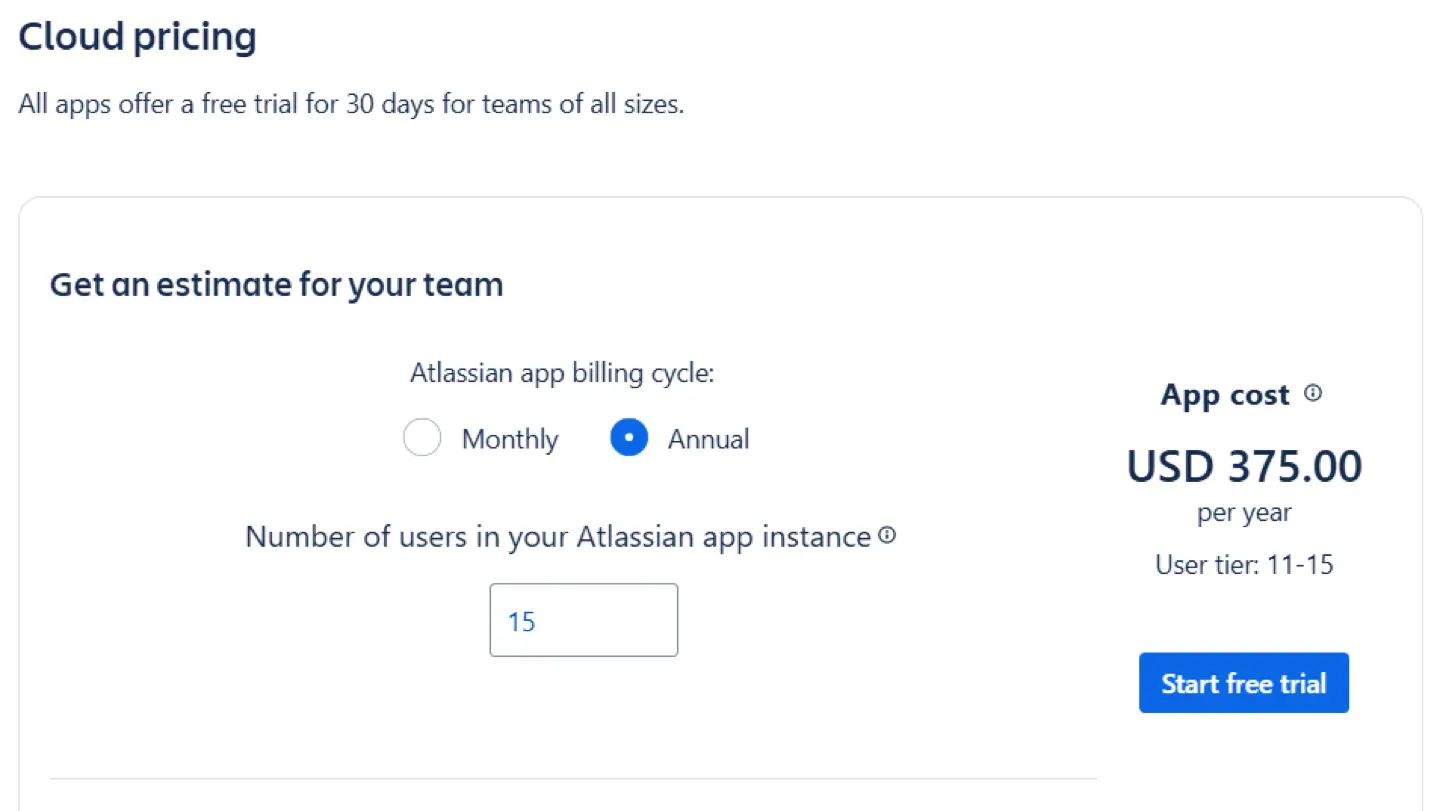
ActivityTimeline Cloud offers tiered pricing based on the number of users in your Jira instance, meaning the cost per user actually drops as your team grows.
Let’s apply that to our example team of 15 people. The entire team's annual investment is just $375. So you are currently losing over $100,000 a year on burnout and mistakes, while the solution costs less than buying your team one single round of coffee.
"But we are a big company," you say. "It will be expensive." Wrong.
Pricing is driven by user count, not just the version of ActivityTimeline you are using. Whether you choose Cloud or Data Center, the cost per user drops drastically as your team scales.
Conclusion
Stop wasting time and money on outdated methods. ActivityTimeline onboarding eliminates manual waste and prevents costly delays. It’s an investment with an immediate return.
{{rich-cta-5}}